How to use pdf24 fill out PDF in 4 steps
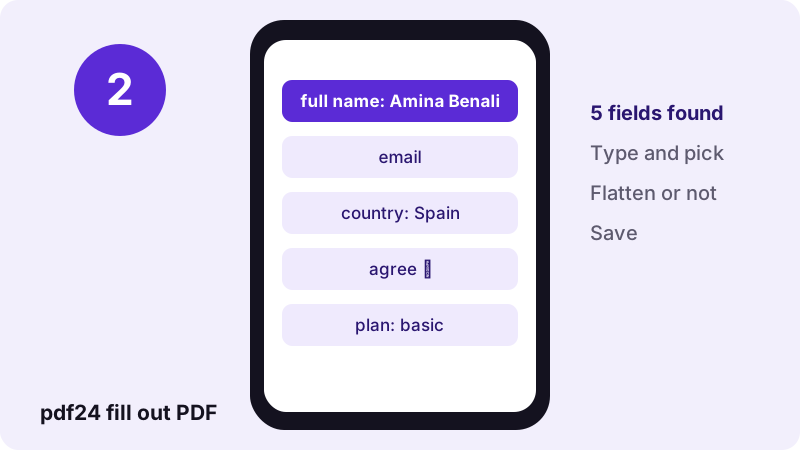
- Open the PDF form. Choose the form or drop it on the box; the page reads its fields and says how many it found.
- Fill in the fields. Type into text boxes, tick checkboxes and pick from drop-down lists and option groups.
- Choose editable or flattened. Leave Flatten off to keep the answers editable, or tick it to make them a fixed part of the page.
- Save the form. Press the button and download the -filled.pdf file.
Which form fields can pdf24 fill out PDF complete?
pdf24 fill out PDF handles the five AcroForm field types that hold answers: single-line and multi-line text, checkboxes, drop-down lists, list boxes and radio-button groups. Read-only fields are shown but locked. Push buttons and signature fields hold no typed answers, so they are left out of the list.
| Field in the PDF | Shown as | Saved as |
|---|---|---|
| Text, single line | Text input | Field value, editable |
| Text, multi-line | Text area, 3 rows | Field value, editable |
| Checkbox | Checkbox | Checked or unchecked |
| Drop-down or list box | Selection list with its options | Selected option |
| Radio-button group | Selection list with the group's options | Selected option |
| Read-only field | Disabled input | Unchanged |
| Button, signature field | Not listed | Unchanged |
pdf24 fill out PDF on our 5-field test form
To test pdf24 fill out PDF we used a form with 5 fields: full_name, email, a country drop-down, an agree checkbox and a plan option group. We typed a name, picked Spain and saved. The job took 0.1 seconds; reading the file back showed full_name = Amina Benali and country = Spain. The saved file was 9.2 KB, smaller than the 12 KB original, because it was written with compressed object streams.
pdf24 fill out PDF on a phone
The list layout suits small screens better than zooming into a form page: each field is a normal input, so the phone shows the right keyboard and its own picker for drop-down lists. Field labels come from the field names, for example form1[0].FirstName[0] is shown as FirstName.
pdf24 fill out PDF on a computer
On a computer, Tab moves from field to field in the list, so long forms can be completed from the keyboard. The browser's autofill may suggest your name or address for text fields, which speeds up repeat forms.
pdf24 fill out PDF tip for unclear field names
Some forms use names like Text12 that say nothing. Open the form in the browser's own PDF viewer in a second tab, click into a field there to see where it sits on the page, and match it with the name in our list.
Should pdf24 fill out PDF flatten the form?
Flattening in pdf24 fill out PDF turns the answers into ordinary page content and removes the fields. Choose it when you submit a final form that nobody should change, such as an application or a signed declaration. Leave it off when someone else still has to add answers or correct yours later.
| Point | Flatten off | Flatten on |
|---|---|---|
| Fields in the saved file | 5 | 0 |
| Answers editable later | Yes | No |
| Looks the same in every viewer | Usually | Always |
| File size | 9.2 KB | 9.2 KB |
| Best for | Drafts, forms passed on | Final submissions, archives |
pdf24 fill out PDF before signing
Fill the form first, flatten it if it is final, then add your signature with Sign PDF. Signing last means the signature sits on top of the finished answers, the order a reader expects.
Why does pdf24 fill out PDF find no fields?
The form filler finds no fields when the PDF only looks like a form: a scan or a document with printed lines but no real fields. It also stops at XFA forms made with Adobe LiveCycle, which only Adobe Reader can fill. Each case shows a message that names the cause and the alternative.
“The XML Forms Architecture was not standardized as an ISO standard, and has been deprecated in PDF 2.0.”
| Situation | What you see | What to do |
|---|---|---|
| Printed lines, no fields | “This PDF has no fillable fields” | Type on it with Write on PDF |
| You want a reusable form | Same message | Add fields with Make PDF fillable |
| XFA (LiveCycle) form | “This is an XFA form” | Fill it in Adobe Reader, or type over it with Edit PDF |
| Password-protected | “This PDF is password-protected” | Unlock PDF, then fill |
pdf24 fill out PDF and non-Latin answers
The standard PDF fonts used by most forms cover only Western European letters. When an answer contains other characters, such as Polish ł, Greek, Cyrillic or Arabic letters, the tool embeds a full Unicode font in the file and redraws the field appearances with it, so the answer displays correctly in every viewer. The file grows by the size of that font.
pdf24 fill out PDF and right-to-left text
Arabic and Hebrew answers are stored as the characters you typed. How they are shaped in the field depends on the PDF viewer; if a receiver sees separated letters, flatten the form or type the answer with Edit PDF, which places shaped text as an image.
Is pdf24 fill out PDF safe for tax and medical forms?
pdf24 fill out PDF never uploads your form: the browser reads it, you type, and the completed copy is written by JavaScript on your device. Our result line read 0 bytes uploaded. Tax numbers, health details and bank data therefore stay on your phone or computer, and nothing remains on a server.
The page loads its own code and the PDF engine, plus a font only when an answer needs one. The File API on MDN explains how a page reads a local file without sending it. Protect the completed form with Lock PDF before e-mailing it.
pdf24 fill out PDF: frequently asked questions
Is pdf24 fill out PDF free?
Yes. Filling forms on pdf24tools is free, with no account, no watermark and no limit on forms. The browser does all the work on your own device, so there is no server cost. Fill as many forms as you need, one after another in the same tab.
Does pdf24 fill out PDF upload my form?
No. The PDF is read and written by your browser; the result line in our test showed 0 bytes uploaded. Only the page, the PDF engine and, for some answers, a font are downloaded. Your answers never reach a server and are gone from the page when you close the tab.
Can pdf24 fill out PDF fill a form without fields?
No, it fills real form fields only. If the PDF has printed lines but no fields, the tool says so. Type on it with Write on PDF instead, or turn its blank lines into real fields with Make PDF fillable and then fill it here.
Why does pdf24 fill out PDF say XFA form?
XFA forms, made with Adobe LiveCycle Designer, describe their fields in XML that only Adobe Reader understands. The format was deprecated in PDF 2.0. Open such a form in Adobe Reader, or print it, or type over its pages with Edit PDF if Reader is not available.
What does flatten mean in pdf24 fill out PDF?
Flatten turns your answers into ordinary page content and removes the form fields. The form then looks identical everywhere and nobody can change the answers in a form viewer. In our test, the flattened copy had 0 fields left instead of 5.
Can I fill out a PDF on iPhone with pdf24 fill out PDF?
Yes. Open the page in Safari or Chrome, choose the form from Files and fill in the list of fields with the iPhone keyboard and pickers. Saving writes the -filled.pdf file to Files, ready to attach to an e-mail or upload to a website.
Can I edit my answers later with pdf24 fill out PDF?
Yes, if you did not flatten. Open the saved -filled.pdf file again: the fields are listed with your previous answers, ready to change. After flattening, the answers are part of the page, so start from the blank form if you need changes.
Does pdf24 fill out PDF support drop-down lists?
Yes. Drop-down lists and list boxes are shown with all their options, and radio-button groups appear as a list of the group's choices. The selected option is written into the field. Leaving the dash option selected clears the field.
Why are some fields greyed out in pdf24 fill out PDF?
Those fields are marked read-only by the form's author, often for totals, office-use boxes or pre-printed data. The tool shows them so you see the full form, but it does not change them. Ask the sender for an editable version if you must fill one.
Can pdf24 fill out PDF type answers in Greek or Arabic?
Yes. When an answer contains characters outside Western European letters, the tool embeds a full Unicode font and redraws the fields, so the text shows in every viewer. Right-to-left shaping depends on the viewer; flatten the form for the most reliable look.
Does pdf24 fill out PDF add a signature?
No. Signature fields are not listed, because they hold certificates or images, not typed text. Fill in the form first, then open the saved copy in Sign PDF to draw, type or upload your signature and place it on the signature line.
Who makes the pdf24 fill out PDF tool?
The pdf24tools team makes it. pdf24tools is an independent website and is not affiliated with PDF24 or Geek Software GmbH. Our form filler was built separately and runs in your browser; this page describes it only from our own tests with our own files on 2026-11-02.
pdf24 fill out PDF: sources
- XFA — Wikipedia
- Form (document) — Wikipedia
- File API — MDN Web Docs