How to use pdf24 redact PDF in 5 steps
- Choose the PDF. Tap Choose PDF files or drop the file on the box. The pages appear in the editor; nothing is uploaded.
- Find words to black out. Type a name or number in the search box and press Mark all. Every match on every page gets a black box, and the count is shown.
- Draw boxes by hand. Use Draw a box to cover signatures, photos, stamps or text in scanned pages, which have no searchable text.
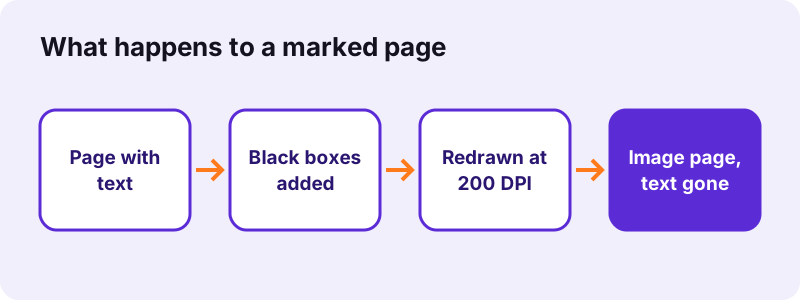
- Press the button. Each page with a box is redrawn at 200 DPI with the boxes burnt in. Pages without boxes are copied unchanged.
- Download and check. Save the -redacted.pdf file, open it and try to select or search the hidden words: nothing should be found.
What does pdf24 redact PDF do to the hidden text?
pdf24 redact PDF deletes the hidden text instead of covering it. Every page that has a black box is rendered to an image at 200 DPI, the boxes are painted into that image, and the image replaces the page. Text, links and comments on that page are gone; the other pages are copied as they were.
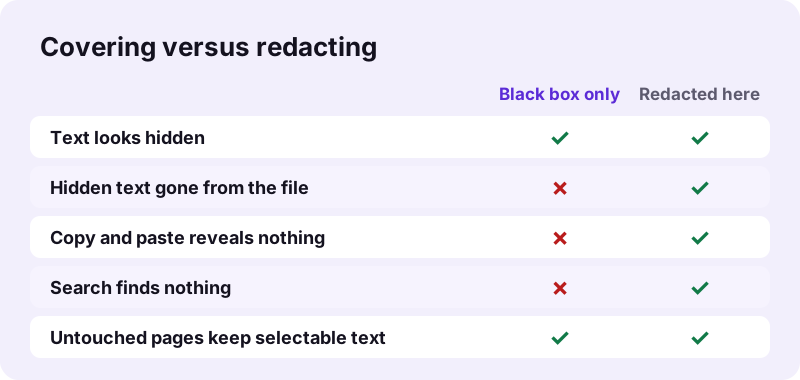
That is the difference between redacting and drawing a rectangle. A rectangle drawn in an editor sits on top of the text, and anyone can select the text below it, copy it, or remove the rectangle. Burning the box into a redrawn page leaves nothing below to find.
“Redaction or sanitization is the process of removing sensitive information from a document so that it may be distributed to a broader audience.”
pdf24 redact PDF with find and mark
The search box finds every occurrence of a word or phrase, ignoring capital letters, and marks each one with a box sized to the text. In our test, Atlas Trading on a 2-page invoice gave 1 match; searching only Atlas also gave 1 match. Check the count before you press the button.
pdf24 redact PDF for scanned pages
A scan is already a picture, so the search box finds nothing on it. Draw the boxes by hand over each name or number. The redrawing step still applies, so a box burnt into a scanned page cannot be lifted off either.
pdf24 redact PDF on a phone or tablet
On iPhone, iPad and Android the editor works with a finger: switch to Draw a box and drag across the area. Zoom the browser for small print. The search-and-mark route is easier on a small screen than drawing many boxes.
pdf24 redact PDF: tip for numbers with spaces
Search finds text inside one line as written in the file. An IBAN or phone number may be stored with spaces or split across lines, so search for a distinctive part, such as the last 6 digits, and draw a box over anything the search did not mark.
Is pdf24 redact PDF really permanent?
pdf24 redact PDF makes the removal permanent on every marked page, because the original text objects are not copied into the new file at all. In our test the redacted page went from 298 characters of text to 0, the name Atlas was found nowhere in the output, and the page held one 1,654 × 2,339-pixel image.
The old file's information does not travel along either: in our output the creator and producer read pdf24tools, and the original title and author fields were gone. To remove those fields from a file you do not redact, use Remove PDF metadata.
“the redacted material still exists in the document underneath the visible appearance and is subject to searching”
pdf24 redact PDF test results
We redacted a 2-page invoice in Chrome on Windows on 2026-11-02 and checked the output with PyMuPDF. The tool marked the company name, redrew only page 1, kept page 2 untouched with its 68 characters of text, and finished in 0.35 seconds. The file grew because page 1 became an image.
| Check | Before | After |
|---|---|---|
| File size | 2,440 bytes | 96,704 bytes |
| Page 1 selectable text | 298 characters | 0 characters |
| Page 2 selectable text | 68 characters | 68 characters (untouched) |
| Matches for Atlas Trading | 1 | 0 anywhere in the file |
| Page 1 content | Text and lines | 1 JPEG, 1,654 × 2,339 px (200 DPI) |
| Time | — | 0.35 s |
A second run with the single word Atlas gave the same result in 0.30 seconds and a 98,133-byte file. If the bigger size matters, run the result through Compress PDF afterwards; the redaction stays in place.
What should you redact with pdf24 redact PDF?
pdf24 redact PDF suits any detail a reader must not see while the rest of the document stays useful: names of private people, ID and passport numbers, bank and card numbers, home addresses, phone numbers and email addresses, signatures, medical details, salary figures and client names in court or tender documents.
- Personal data before you publish a document or answer a records request.
- Account numbers on a bank statement sent as proof of address.
- Client names in a portfolio, report or case study.
- Signatures and stamps on a contract shared as an example.
- Headers, footers and margins where a name repeats on every page.
Search each sensitive item separately, then scroll through every page once more: initials, nicknames and numbers in tables are easy to miss.
pdf24 redact PDF for GDPR requests
When you answer a data subject request, third-party names often have to be removed before the document goes out. Because the work stays on your device, the unredacted original is never handed to another processor.
Is pdf24 redact PDF private?
pdf24 redact PDF works entirely in your browser: pdf.js draws the pages, the search runs over the text on your device, and pdf-lib writes the new file in memory. The result line reported 0 bytes uploaded, so the very information you want to hide is never sent to a server.
That is the reason to redact locally. A server-based redaction service necessarily receives the full, unredacted document first, which is the version you were trying to protect.
Keep the unredacted original in a safe place and send only the -redacted.pdf copy. Redaction cannot be undone in the new file.
pdf24 redact PDF limits and fixes
pdf24 redact PDF has a few honest limits. Marked pages become images, so their remaining text can no longer be selected; the search finds only text inside the file, not words in pictures; and a phrase split across two lines may need a hand-drawn box. The table lists each limit with a workaround.
| Limit | Workaround |
|---|---|
| Marked pages lose selectable text | Run OCR PDF on the result if you need searchable text again |
| Search finds 0 matches on a scan | Draw boxes by hand |
| Phrase split over two lines | Search each half, or draw a box |
| Result is larger | Compress PDF afterwards |
| Password-protected file | Unlock PDF first |
Text recognition with OCR PDF reads only what is visible, so the black boxes stay black. A locked file goes through Unlock PDF first.
pdf24 redact PDF: frequently asked questions
Is pdf24 redact PDF free?
Yes. pdf24 redact PDF costs nothing, needs no account and adds no watermark. There is no page or daily limit, because the search, the black boxes and the redrawing of pages all run in your own browser instead of on a paid server. You can redact as many documents as you need.
Can someone remove the black boxes made by pdf24 redact PDF?
No. pdf24 redact PDF does not leave the boxes as separate shapes on top of the text. Each marked page is redrawn as an image with the boxes painted in, and the original text of that page is not copied into the new file. There is nothing underneath to reveal, which our check confirmed: 0 characters of text on the redacted page.
Does pdf24 redact PDF upload my document?
No. The file is read with the browser File API, the pages are drawn by pdf.js and the new PDF is written by pdf-lib, all on your device. The result line shows 0 bytes uploaded. That matters for redaction in particular, because the unredacted original is exactly what should not reach a server.
Why can I not select text on some pages after pdf24 redact PDF?
Pages that received at least one black box are redrawn as 200 DPI images, so all their text, not only the hidden part, stops being selectable. Pages without boxes keep their text, as page 2 of our test did. If you need searchable text again, run OCR PDF on the redacted file.
Can pdf24 redact PDF find every occurrence of a name?
Yes, within the text layer. Type the name and press Mark all: every match on every page gets a box, capital letters ignored, and the number of matches is shown. Words inside pictures, scans or logos are not text, so they need hand-drawn boxes. Always scroll through the pages before you press the button.
Does pdf24 redact PDF work on scanned documents?
Yes, pdf24 redact PDF handles scans by drawing boxes. A scanned page has no text layer, so the search finds nothing, but you can drag a box over any area with Draw a box. The page is then redrawn with the box burnt in, exactly like a text page, so the covered part of the scan is gone for good.
Does pdf24 redact PDF remove metadata as well?
Partly. The new file is built from scratch, so the old title, author and creation details are not carried over; in our output the creator and producer read pdf24tools. Bookmarks and attachments of the original are not copied either. For a full metadata clean-up of other files, use Remove PDF metadata.
Can I use pdf24 redact PDF on an iPhone?
Yes. Open the page in Safari or Chrome, choose the PDF from Files, and use the search box or Draw a box with your finger. Press the button and the redacted file is saved to Downloads. Searching is quicker than drawing on a small screen, so start with the names and numbers you know.
Is pdf24tools the official pdf24 redact PDF tool?
No. pdf24tools is an independent website and is not affiliated with PDF24 or Geek Software GmbH. Our redaction page is our own build on the open-source pdf.js and pdf-lib libraries, running entirely in your browser. The name only describes what people search for when they need to black out text in a PDF.
Why is the file bigger after pdf24 redact PDF?
A text page stores letters and outlines, which takes little space; a redacted page stores a full image instead. Our 2,440-byte invoice became 96,704 bytes with one redrawn page. Only marked pages grow, so a long document with a few redactions stays close to its size. Compress PDF can shrink the result.
Can pdf24 redact PDF undo a redaction?
Not in the saved file, and that is the point: the hidden content is not in it any more. Before you press the button, you can still remove a box in the editor with its × button. Keep the original document if you may need the full version later, and share only the redacted copy.
Is a black highlight in Word or a PDF editor enough instead of pdf24 redact PDF?
No. A black highlight or rectangle only changes how text looks; the words stay in the file and can be copied, searched or revealed by removing the shape. Published court filings and reports have leaked this way. Real redaction removes the content, which is what redrawing the marked pages does.