pdf24 how to redact a PDF: what are the steps?
To redact a PDF, open Redact PDF and choose the file. Type a word, name or number in the search box and press Mark all, or draw boxes by hand over what must go. Press the Redact button and download the copy: affected pages are redrawn with black boxes burnt in.
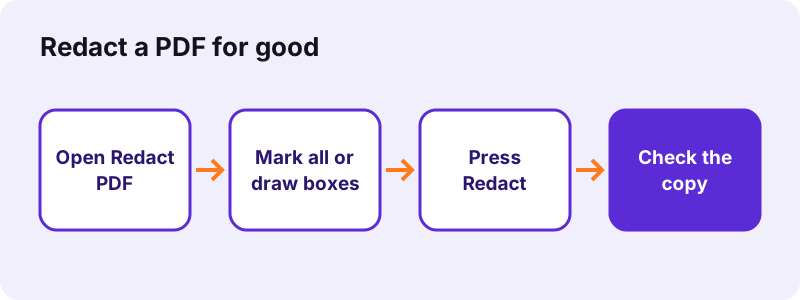
- Open Redact PDF and choose the document.
- Type the text in Find words to black out and press Mark all; the hint shows how many matches were marked.
- Use Draw a box for signatures, photos, stamps or text in a scan.
- Check every page in the preview and remove a wrong box with its cross.
- Press the button under the pages and save the -redacted.pdf file.
pdf24 how to redact a PDF: what Mark all finds
Mark all searches the text layer of every page, ignoring upper and lower case, and puts a box over each match. Searching for "Atlas Trading SARL" on our invoice found exactly 1 match; searching for "ipsum" in a 6-page text found 240. Scans have no text layer, so for them you draw the boxes yourself.
pdf24 how to redact a PDF when the page is a scan
On a scanned page, drag a box over each item. The box is burnt into the picture just like on a text page. If you want to search a scan first, run OCR PDF, then use Mark all on the OCR copy.
pdf24 how to redact a PDF without losing print quality
Each affected page is rendered at 200 dpi and saved as a JPEG at quality 0.9, which keeps print sharp. Pages without any box are copied unchanged and keep their selectable text.
pdf24 how to redact a PDF: tip on spelling variants
Search for every form of a name or number: with and without spaces, the short name, the e-mail address and the account number in parts. One missed spelling is enough to leak what you meant to hide.
pdf24 how to redact a PDF: why is a black box not enough?
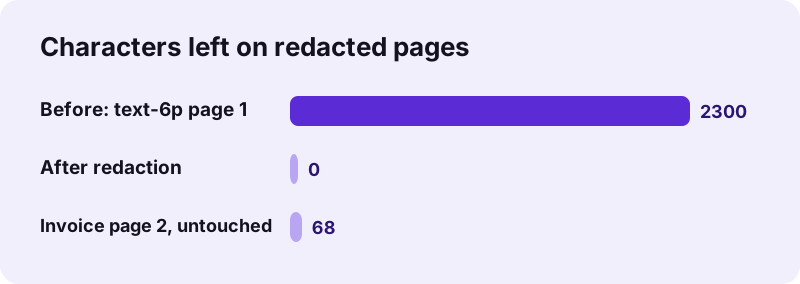
A black rectangle drawn with an editor only covers the text on screen; the words stay inside the file and can be selected, copied or found by search. Real redaction removes them. Our redact test rebuilt every affected page as a picture, so pypdf extracted 0 characters from those pages afterwards.
“Redaction or sanitization is the process of removing sensitive information from a document so that it may be distributed to a broader audience.”
That is the difference to white-out in Edit PDF: in our test the client name could still be extracted from under a white box. White-out is for cosmetic fixes; redaction is for secrets.
Many leaks in published reports came from exactly this mistake: black rectangles over text that could still be copied and pasted. Following pdf24 how to redact a PDF with burnt-in boxes avoids it, because there is no text left under the box to copy.
pdf24 how to redact a PDF: what did our tests measure?
We ran two redaction tests. Marking 240 matches on a 6-page text PDF of 5.1 KB gave a 2.61 MB file in 1.1 seconds with 0 extractable characters. Redacting one client name on page 1 of a 2-page invoice gave 93 KB in 0.2 seconds; page 2 kept its 68 characters.
| Test | Matches | Output | Time | Text left on redacted pages |
|---|---|---|---|---|
| text-6p.pdf, 6 pages, "ipsum" | 240 | 2.61 MB | 1.1 s | 0 characters |
| invoice-v1.pdf, 2 pages, client name | 1 | 93 KB | 0.2 s | 0 characters (page 2 keeps 68) |
The size grows because redacted pages become pictures. If the file must be small, run Compress PDF on the redacted copy; never compress or edit the original instead of redacting.
pdf24 how to redact a PDF: what else leaves the file?
Besides the marked words, redaction removes everything hidden under the boxes on affected pages: text, links, form fields and comments, because those pages are redrawn without annotations. The file's metadata, such as author and title, is not copied either; in our test Producer and Creator only said pdf24tools.
- Removed on redacted pages: the text layer, links, comments and form fields.
- Removed from the whole file: the old title, author, subject and keywords.
- Kept: untouched pages with their text, the page order and the page size.
- Not checked: attachments and text inside images on untouched pages; open them and redact them too.
For the remaining metadata of other files, see Remove PDF metadata.
pdf24 how to redact a PDF for court, HR and public requests
Court filings, HR files and freedom-of-information replies often must show that a document exists while hiding names, ID numbers or health data. Redaction lets you publish the rest. Keep the unredacted original in a safe place, and write down what you removed and why, so the decision can be reviewed later.
| Document | Typical items to redact |
|---|---|
| Court exhibit | Names of minors, ID numbers, addresses |
| HR file | Salary, health notes, other employees |
| Public records reply | Personal data of third parties |
| Bank statement for a landlord | Account numbers, unrelated transactions |
After the pdf24 how to redact a PDF steps, search the redacted copy for each removed word once more; it should return no results.
pdf24 how to redact a PDF: is it safe in a browser?
Redacting in the browser here is safe because the document never leaves your device: the page opens it with the File API, redraws the pages on your computer or phone and saves the copy locally. Our request log showed no POST request, and the result line reported 0 bytes uploaded.
That is the point of redacting locally: the unredacted version, which is the most sensitive one, is never sent to a server. See the File API on MDN for how browsers read local files.
pdf24 how to redact a PDF on iPhone, Android and computers
Redact PDF runs in Safari, Chrome, Edge and Firefox on phones, tablets and computers. On a phone, Mark all is the easiest way, because drawing small boxes with a finger is fiddly. Zoom in before drawing, and check each page in the preview before you press the button.
- iPhone / iPad: choose the file in Files; the copy is saved to Downloads.
- Android: pick from Files or Downloads; the copy is saved to Downloads.
- Computer: drag the file onto the box; a mouse makes precise boxes easy.
Whatever the device, the last step of pdf24 how to redact a PDF is the same: open the redacted copy, press the search shortcut of your PDF viewer and look for each word you removed. No hits means the redaction worked; a hit means a spelling or page was missed.
pdf24 how to redact a PDF: frequently asked questions
Is pdf24 how to redact a PDF free?
Yes. Redacting on pdf24tools costs nothing: no account, no watermark and no limit on files or boxes. The work runs inside your browser on your own device, so there is no server cost to pass on. You can redact as many documents as you need, one after another.
Can redacted text be recovered after pdf24 how to redact a PDF?
Not from the redacted pages. They are redrawn as pictures with the boxes burnt in, so the text layer under the boxes no longer exists; our check found 0 characters on those pages. Anything you did not mark, including other spellings of a name, stays readable, so search carefully.
Does pdf24 how to redact a PDF keep the rest of the text selectable?
Yes, on pages without boxes. Untouched pages are copied unchanged and keep their text, as page 2 of our invoice did with its 68 characters. Pages that contain a box become pictures, so all text on them, not only the marked words, can no longer be selected.
Can pdf24 how to redact a PDF find every occurrence of a word?
Yes, in the text layer. Type the word and press Mark all; matching ignores upper and lower case and shows how many matches were marked, such as 240 in our 6-page test. Words inside pictures or scans are not found, so draw boxes over those by hand.
Why is my file bigger after pdf24 how to redact a PDF?
Redacted pages are stored as 200 dpi pictures instead of compact text, so the size grows: our 5.1 KB text file became 2.61 MB after all 6 pages were redacted. Run Compress PDF on the redacted copy if a portal has a size limit; that does not bring the text back.
Is my document uploaded during pdf24 how to redact a PDF?
No. The PDF is opened by your browser and every page is redrawn on your device. Our request log for both tests showed no POST request, and the result line states 0 bytes uploaded, which is what you want for court papers, HR files and medical records.
Can pdf24 how to redact a PDF black out images and signatures?
Yes. Choose Draw a box and drag it over a photo, logo, signature or stamp. The box is burnt into the page picture, so the hidden part of the image is gone from the file. Use the same method for handwriting and for scanned pages without a text layer.
Can I use white instead of black in pdf24 how to redact a PDF?
Redaction boxes are always black, which signals clearly that something was removed. If you only want a clean look, white-out in Edit PDF hides text visually, but it leaves the words in the file. For anything confidential, use the black redaction boxes.
Does pdf24 how to redact a PDF work on password-protected files?
Not while they are locked. Remove the password first with Unlock PDF, using the password you know, then redact the unlocked copy. Afterwards you can protect the redacted file again with Lock PDF before sending it, if the recipient expects a password.
How long does pdf24 how to redact a PDF take?
Only pages with boxes are redrawn, so time depends on how many pages are affected. Our 2-page invoice with 1 box took 0.2 seconds and the 6-page file with 240 boxes took 1.1 seconds on a Windows laptop. Long scans take longer, and phones are slower than laptops.
Does pdf24 how to redact a PDF remove the author name?
Yes. The redacted copy does not carry over the old document information such as title, author, subject and keywords; in our test Producer and Creator only showed pdf24tools. Check attachments and comments on untouched pages yourself, because those pages are copied as they are.
Is pdf24 how to redact a PDF an official tool?
No. pdf24tools is an independent website and is not affiliated with PDF24 or Geek Software GmbH. Redact PDF here is our own code that runs in your browser. The measurements in this guide were made by us on 2 November 2026 with our own test files.
Can I undo a box in pdf24 how to redact a PDF?
Before saving, yes: tap the small cross on a box to remove it, or drag it to the right place. After saving, the redacted copy cannot be undone, but your original file stays unchanged on your device, so you can start again from it if you marked too much.
More pdf24 how to redact a PDF tools and guides
pdf24 how to redact a PDF: sources
- Redaction — Wikipedia
- File API — MDN Web Docs
- PDF (Portable Document Format) Family — Library of Congress