How to use pdf24 tools rearrange PDF pages in 4 steps
- Choose the PDF. Tap Choose a PDF or drop it on the box. Each page appears as a thumbnail with its original page number below.
- Move the pages. Tap ← to move a page one place towards the start, → to move it one place towards the end. The grid redraws after every move.
- Press Save new order. The pages are copied into a new PDF in exactly the order shown in the grid.
- Download the file. Save the file ending in -organized.pdf and open it to check. The original is not changed.
What does pdf24 tools rearrange PDF pages do?
pdf24 tools rearrange PDF pages saves a copy of your PDF with the pages in a new order. You move pages with arrows under their thumbnails, and the copy follows the grid exactly. Pages are copied, never redrawn, so text stays selectable, scans keep their sharpness and every page keeps its size and rotation.
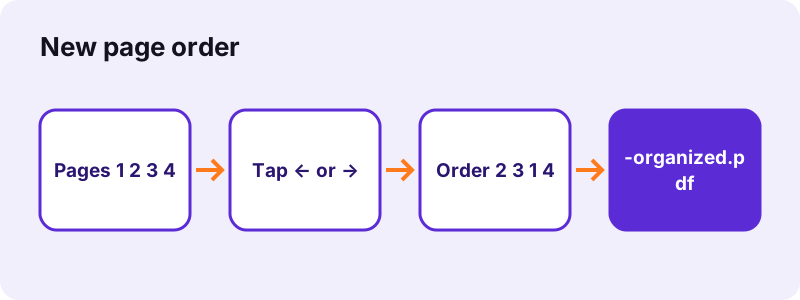
Our 6-page test file of 5,238 bytes became a reordered file of 4,239 bytes in 0.2 seconds after moving page 1 two places to the right. The number under each thumbnail is always the original page number, so you can see at a glance which page came from where.
Moving pages with pdf24 tools rearrange PDF pages
Each tap moves a page by one place. To move page 7 to the front of a 7-page file, tap its ← arrow six times; the grid updates after every tap, so you can watch the page travel. The first page has no place to go towards the start, and the last none towards the end.
pdf24 tools rearrange PDF pages for scanned stacks
Feeding a stack upside down or in two batches into a scanner often mixes up a few pages. Spot them in the thumbnails, move them into place and save; the scans themselves are not touched.
pdf24 tools rearrange PDF pages in long files
The grid shows the first 200 pages. For bigger reorders, such as reversing a whole file, type the complete order into Extract PDF pages instead, for example 6, 5, 4, 3, 2, 1.
pdf24 tools rearrange PDF pages: check before you send
Open the saved file and page through it once. The thumbnails are small; a quick look at full size catches two similar pages in the wrong order, such as two near-identical form pages or the front and back of a scanned ID card. If something is off, go back to the tab: the grid still shows your last order, so one more tap and a new save fix it.
Can pdf24 tools rearrange PDF pages reverse a whole file?
Reversing pages or building a completely new order is quickest with a typed list rather than arrows. Open Extract PDF pages, type every page in the new order, such as 10, 9, 8, 7, 6, 5, 4, 3, 2, 1, and download one file. That tool keeps the typed order and can repeat a page.
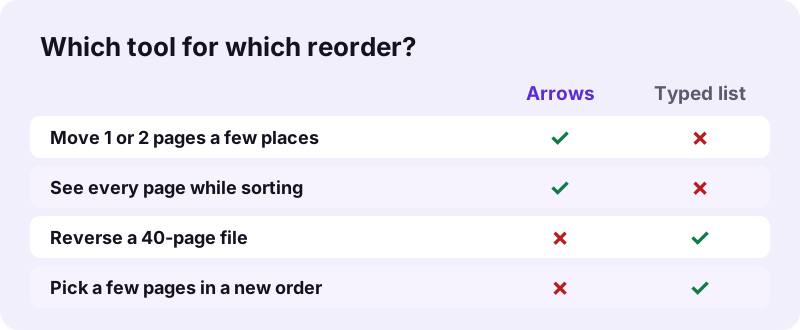
| Job | Fastest way | Effort |
|---|---|---|
| Swap two neighbouring pages | Arrows here | 1 tap |
| Move the last page of 10 to the front | Arrows here | 9 taps |
| Reverse a 30-page file | Extract PDF pages: 30-1 typed out | 1 line |
| Interleave odd and even scans | Extract PDF pages: 1, 6, 2, 7, 3, 8 … | 1 line |
A run typed backwards, such as 30-1, is read as 1-30, so a reverse order must be written out page by page. For a duplex scan where all fronts came first and all backs second, the interleaved list puts each back after its front.
Can pdf24 tools rearrange PDF pages mix several files?
pdf24 tools rearrange PDF pages works inside one PDF per run. To mix pages from several files, first join them with Merge PDF in a rough order, then open the merged file here and move single pages into place. The two steps take well under a minute, and neither of them uploads anything.
- Merge the files with Merge PDF; sort whole files with ↑ and ↓ there.
- Open merged.pdf in this tool.
- Move single pages with ← and →.
- Press Save new order and download.
“Drag thumbnails to reorder them.”
On a Mac, Preview sorts pages by dragging, as Apple describes. This tool uses arrows instead, which work the same with a mouse, a touch screen or a keyboard, on any system.
Is pdf24 tools rearrange PDF pages private?
pdf24 tools rearrange PDF pages is private because the PDF stays on your device the whole time. The browser opens it, draws the thumbnails, and writes the reordered copy in the same tab. No server receives the document, there is no account, and the file is gone from memory when you close the tab.
The result line confirms 0 bytes uploaded after each save. That makes the tool fine for exam papers, HR files and contracts. Once the page is loaded, it also works without a network connection.
What does pdf24 tools rearrange PDF pages keep?
pdf24 tools rearrange PDF pages changes only the sequence of pages. Each page keeps its text, fonts, pictures, size, orientation, links and comments, because it is copied as a whole object. Document-wide items are not carried over: the bookmark outline and the document title are left out, and a digital signature no longer validates in the new file.
- Kept: page content, page size, rotation, annotations on the page.
- Not kept: bookmarks; add new ones with Bookmark PDF.
- Not kept: page numbers printed on the pages still show the old numbers; renumber with Add page numbers on a clean file.
- Pages that are sideways: turn them with Rotate PDF pages.
pdf24 tools rearrange PDF pages: frequently asked questions
Is pdf24 tools rearrange PDF pages free?
Yes. Reordering pages is free, with no account, no watermark and no limit on how often you use it. The work runs on your own phone or computer, so there is no server to pay for. The original file stays as it was, so you can try another order at any time.
Can I drag pages in pdf24 tools rearrange PDF pages?
The tool uses arrow buttons instead of dragging: ← moves a page one place towards the start, → one place towards the end. Arrows work the same with a mouse, on a touch screen and with the keyboard, and they never drop a page in the wrong spot by accident.
Does pdf24 tools rearrange PDF pages upload my file?
No. The PDF is read by your browser and the new order is written in the same tab with JavaScript. No byte is sent to a server, as the result line confirms with 0 bytes uploaded. The tool keeps working if you switch off the network after the page has loaded.
How do I reverse page order with pdf24 tools rearrange PDF pages?
For a full reverse, typing is faster than tapping. Open Extract PDF pages and type the pages from last to first, such as 8, 7, 6, 5, 4, 3, 2, 1. That tool keeps the typed order and saves one file. For small moves, the arrows here are quicker.
Does pdf24 tools rearrange PDF pages reduce quality?
No. Pages are copied as complete objects, with their original fonts, images and vector graphics; nothing is turned into a picture or re-compressed. Scans stay as sharp as before and typed text remains selectable and searchable in the reordered file.
Can pdf24 tools rearrange PDF pages work on a phone?
Yes, in Safari on iPhone and iPad and in Chrome or Samsung Internet on Android, without installing an app. The arrows under each thumbnail are large enough to tap. The reordered file is saved to your downloads, from where you can share it like any other document.
How many pages can pdf24 tools rearrange PDF pages show?
The grid shows the first 200 pages of a file. Very long documents still open, and the pages beyond 200 keep their place at the end. For a long document that needs a big reorder, type the full order into Extract PDF pages, which addresses any page by number.
Why do page numbers look wrong after pdf24 tools rearrange PDF pages?
Numbers printed on the pages are part of the page content, so a page that was page 2 still shows 2 after moving. The tool does not edit page content. If the printed numbers matter, start from a version without numbers and add them after reordering with Add page numbers.
Can pdf24 tools rearrange PDF pages open a locked PDF?
Not while a password is needed to open it. The tool stops with a message. Remove the password first with Unlock PDF, using the password you know, reorder the unlocked copy, and protect it again with Lock PDF if the file must stay locked.
Does pdf24 tools rearrange PDF pages keep bookmarks?
No. The reordered copy is built page by page, and the bookmark outline of the original is not carried over, since its targets would now point to other places. Links and comments on the pages stay. Add fresh bookmarks to the new order with Bookmark PDF if the file needs them.
Is this the official pdf24 tools rearrange PDF pages?
No. pdf24tools is an independent website and is not affiliated with PDF24 or Geek Software GmbH. This tool is our own code and runs in your browser. We use the name only because it is what people search for; your PDF is processed on your device and never on our servers.
pdf24 tools rearrange PDF pages: sources
- Combine PDFs in Preview on Mac — Apple Support
- File API — MDN Web Docs
- PDF — Wikipedia