How to use pdf24 tools change PDF page size in 4 steps
- Choose the PDF. Tap Choose a PDF or drop the file on the box. Pages of any size are accepted, also mixed sizes.
- Pick size and orientation. Choose A4, US Letter, A3, A5 or US Legal. Orientation Same as each page keeps landscape pages landscape; Portrait or Landscape forces one.
- Pick the scaling. Fit and centre keeps proportions and adds white bands where needed; Stretch fills the page and distorts slightly.
- Press Change page size and download. The resized file is named after the size, such as report-letter.pdf. Print it at 100 %.
What does pdf24 tools change PDF page size do?
pdf24 tools change PDF page size creates a new PDF in which every page has the paper size you choose, and places the old page on it. With Fit and centre the page is scaled to fit while keeping its proportions; with Stretch it fills the new page completely. Text stays vector content and prints sharp.
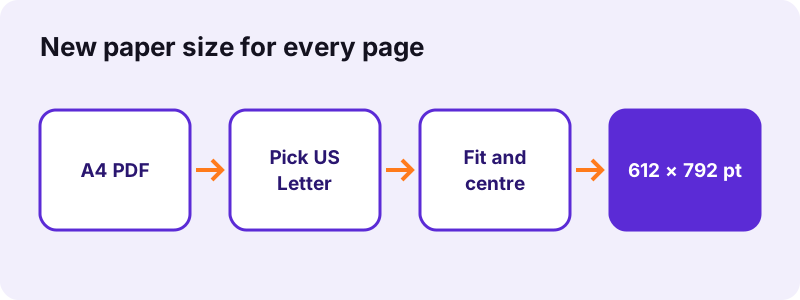
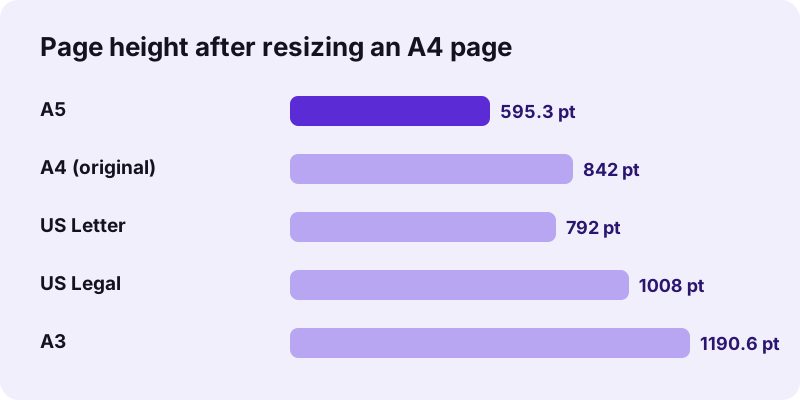
In our tests, 6 A4 pages became US Letter pages of 612 × 792 points, A5 pages of 419.5 × 595.3 points, and a 4-page A4 scan became A3 pages of 841.9 × 1190.6 points. Each run took 0.1 to 0.2 seconds. The scan stayed 8.07 MB, since its pictures were placed, not re-encoded.
| Size | Millimetres | Inches | Points |
|---|---|---|---|
| A5 | 148 × 210 | 5.8 × 8.3 | 419.5 × 595.3 |
| A4 | 210 × 297 | 8.3 × 11.7 | 595.3 × 841.9 |
| A3 | 297 × 420 | 11.7 × 16.5 | 841.9 × 1190.6 |
| US Letter | 215.9 × 279.4 | 8.5 × 11 | 612 × 792 |
| US Legal | 215.9 × 355.6 | 8.5 × 14 | 612 × 1008 |
pdf24 tools change PDF page size from A4 to Letter
A4 is narrower and taller than Letter. Fitted onto Letter, an A4 page is scaled to 94 % and gets white bands of about 9 mm on the left and right. Content near the edges stays complete, which is what most offices in the United States and Canada need before printing a European document.
pdf24 tools change PDF page size from Letter to A4
The other way round, a Letter page fits A4 at 97 % with bands of about 13 mm at the top and bottom. That is the usual fix for American forms that a printer in Europe would otherwise crop or shrink unevenly.
pdf24 tools change PDF page size to A5 or A3
From A4, A5 means 71 % and A3 means 141 %, because each ISO size is half or double the next one. 10-point text becomes about 7 points on A5, still readable, and about 14 points on A3.
pdf24 tools change PDF page size: scans on bigger paper
Enlarging a scan to A3 makes it bigger, not sharper: the picture keeps its pixels, so a 150 dpi scan prints at about 106 dpi on A3. Rescan at a higher resolution if the large print must look crisp.
Fit or Stretch in pdf24 tools change PDF page size?
Fit and centre is the right choice for almost every document, because it keeps the proportions of text, logos and photos and only adds white bands. Stretch fills the new page edge to edge but scales width and height differently, by about 9 % between A4 and Letter, which makes circles slightly oval and text slightly wider or narrower.
- Fit and centre: proportions kept, white bands where the shapes differ, nothing cut off.
- Stretch: no white bands, slight distortion, nothing cut off.
- Same shape (A4 to A3 or A5): both options give the same result, because ISO sizes share one aspect ratio.
“Letter (officially ANSI A) is a paper size standard defined in ANSI/ASME Y14.1.”
How does pdf24 tools change PDF page size handle orientation?
Orientation has three settings. Same as each page keeps portrait pages portrait and landscape pages landscape, so a report with a few wide tables keeps them wide. Portrait or Landscape forces every page into one orientation; a landscape page placed on a portrait sheet is then shrunk to fit the width, with large white bands above and below.
| Your file | Orientation to choose |
|---|---|
| Portrait report with some wide tables | Same as each page |
| Slides that must print as handouts | Landscape |
| Mixed scans for a binder | Portrait |
To turn pages rather than resize them, use Rotate PDF pages first; then resize with Same as each page.
Is pdf24 tools change PDF page size private?
pdf24 tools change PDF page size is private because the PDF never leaves your device. Your browser reads the file, draws every page onto its new size in the open tab and saves the result from memory. No server receives the document, there is no account, and the file disappears from memory when you close the tab.
The result line confirms 0 bytes uploaded after each run. Resizing does not change the words on a page, but it does change its size, so a document with a certificate signature will no longer validate; sign it again after resizing if needed.
pdf24 tools change PDF page size or a related tool?
Changing the paper size is one of several tools that look alike. Use it when every page should get a standard size. To cut away margins, cropping changes the visible area instead. To fit several pages on one sheet, pages per sheet arranges them. And to make the file smaller in megabytes, compression is the right tool, not resizing.
| You want | Tool |
|---|---|
| Every page in A4 or Letter | Change PDF page size |
| Remove white margins | Crop PDF |
| 4 pages on one sheet | Pages per sheet |
| A5 booklet from A4 pages | PDF booklet |
| Smaller file in MB | Compress PDF |
pdf24 tools change PDF page size: frequently asked questions
Is pdf24 tools change PDF page size free?
Yes. Resizing pages is free, with no account, no watermark and no page limit beyond your device's memory. The work runs on your own phone or computer, so there is nothing to pay for. You can try several sizes on the same file, since the original is never changed.
Does pdf24 tools change PDF page size make the file smaller?
No. A new paper size changes the dimensions of the pages, not the weight of their content. Our scan was 8.07 MB before and after resizing to A3, and a 5 KB text file grew to 9 KB because each page is wrapped once. To reduce megabytes, use Compress PDF instead.
Can pdf24 tools change PDF page size convert A4 to Letter?
Yes. Choose US Letter and Fit and centre. Each A4 page is scaled to about 94 % and centred on a 612 × 792-point Letter page, with narrow white bands at the sides. Nothing is cut off, and the file prints correctly on American printers.
Will text get blurry with pdf24 tools change PDF page size?
No. Pages are placed as vector content, so typed text and lines stay sharp at any size and remain selectable and searchable. Only pictures, such as scans and photos, keep their fixed number of pixels; enlarging them a lot, for example to A3, can make them look softer in print.
Does pdf24 tools change PDF page size upload my file?
No. The PDF is read and resized by your browser in the same tab, and the new file comes from your device's memory. Nothing is sent to a server, as the result line confirms with 0 bytes uploaded. The tool even works offline once the page has loaded.
Can pdf24 tools change PDF page size resize only some pages?
The tool resizes every page of the file. To change only some, extract them with Extract PDF pages, resize that file, and combine everything again in the right order with Merge PDF. All three steps run on your device and take a few seconds each.
Does pdf24 tools change PDF page size allow a custom size?
Not at the moment. The tool offers the five common office sizes: A4, US Letter, A3, A5 and US Legal. For other formats, the PDF booklet tool can make a sheet exactly twice the page width, and Crop PDF can cut pages down to the area you draw.
Why does pdf24 tools change PDF page size add white bands?
The new paper has a different shape from the old page, and Fit and centre keeps proportions, so the leftover space stays white. A4 on Letter leaves bands at the sides, Letter on A4 at top and bottom. Choose Stretch if the bands must go and slight distortion is acceptable.
Does pdf24 tools change PDF page size keep links?
Each old page is drawn onto a new page, so its look is kept but clickable items such as links, comments and form fields are not carried into the new file. If the document relies on working links or fillable fields, keep the original for screen use and use the resized copy for printing.
Does pdf24 tools change PDF page size work on a phone?
Yes, in Safari on iPhone and iPad and in Chrome or Samsung Internet on Android, without an app. Pick the file, choose the size and scaling, press the button, and the resized PDF is saved to your downloads. It prints at the chosen size from the phone's print dialog.
Is this the official pdf24 tools change PDF page size tool?
No. pdf24tools is an independent website and is not affiliated with PDF24 or Geek Software GmbH. This tool is our own code that runs in your browser. We use the name only because people search for it; your files are processed on your device and never on our servers.
pdf24 tools change PDF page size: sources
- ISO 216 paper sizes — Wikipedia
- Letter (paper size) — Wikipedia
- PDF — Wikipedia