How do you pdf24 merge PDF iPhone files in Safari?
To merge PDFs on an iPhone, open Merge PDF in Safari, tap Choose PDF files, select two or more PDFs in the Files app, put them in order with the arrows and tap Merge PDF. The joined file, merged.pdf, is saved to Downloads in Files and can be shared from there.
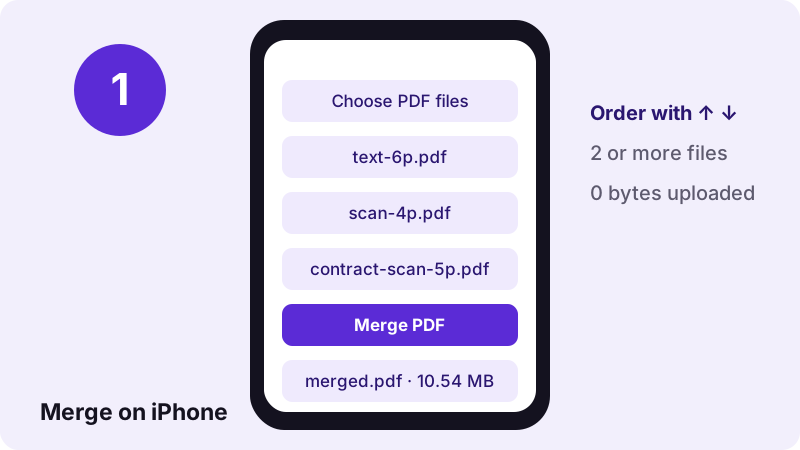
- Open Merge PDF in Safari (Chrome and Edge on iPhone work the same way).
- Tap Choose PDF files, then Browse to reach the Files app.
- Tap Select, mark all the PDFs you want, and tap Open.
- Use the ↑ and ↓ buttons to set the order; the top file becomes the first pages.
- Tap Merge PDF, then tap the download link to save merged.pdf.
pdf24 merge PDF iPhone: adding files from different folders
Files from iCloud Drive, On My iPhone and Downloads can be combined in one run. Pick the first batch, then tap Add more files and pick the rest from another folder. Each new file is added at the bottom of the list, so reorder before merging.
pdf24 merge PDF iPhone: where the merged file is saved
Safari asks whether to download merged.pdf. After you confirm, it lands in the Downloads folder of the Files app. Long-press the file there to rename it, move it to iCloud Drive or share it to Mail, Messages or WhatsApp.
pdf24 merge PDF iPhone with photos and PDFs together
Merge PDF accepts PDFs only. To mix photos from the camera roll with PDFs, use Assemble PDF, which takes PDFs and pictures in the same list, or turn the photos into a PDF first with JPG to PDF.
pdf24 merge PDF iPhone: tip for long lists
Rename files with a number in front, such as 01-cover.pdf and 02-contract.pdf, before you pick them. Files sorts them by name, so they arrive in the right order and you need fewer taps on the arrows.
Do you need an app for pdf24 merge PDF iPhone?
No app is needed to merge PDF files on an iPhone with this method. The merge tool is a web page that runs in Safari, so nothing is installed and no storage is used apart from the finished file. It also works on iPad, Android phones and computers in the same way.
Because the work runs inside the browser, the speed depends on your phone. Our tests used a laptop browser and a 390-pixel iPhone-sized window; we did not time a physical iPhone, so allow a few extra seconds for very large scans.
“Files is a file management app developed by Apple Inc. for devices that run iOS 11 and later or iPadOS.”
What did our pdf24 merge PDF iPhone test measure?
Our merge test joined three PDFs: a 6-page typed file, a 4-page scan of 8.07 MB and a 5-page contract scan of 2.46 MB. The result was one 15-page merged.pdf of 10.54 MB, made in 0.2 seconds, with every page kept at A4 size and the typed text still selectable.
| Files merged | Pages | Size in | Size out | Time |
|---|---|---|---|---|
| Text + 2 scans | 15 | 10.54 MB | 10.54 MB | 0.2 s |
| Two invoices | 4 | 4.8 KB | 2.6 KB | 0.1 s |
| Text + locked PDF | — | — | refused: password | 0.3 s |
The merged file is about as big as the inputs added together, because pages are copied, not re-compressed. If the result is too large to send, run Compress PDF on merged.pdf afterwards; in our compression test this same 15-page file fell to 1.85 MB. That two-step pdf24 merge PDF iPhone routine, merge first and compress second, gives the smallest file with the fewest taps.
pdf24 merge PDF iPhone: what stays and what changes
Merging keeps the pages exactly as they are: text, pictures, page size and orientation are copied unchanged. What does not carry over is file-level information such as bookmarks, the original titles and certificate signatures, because the result is a new document built from the copied pages.
- Kept: page content, selectable text, page sizes (A4 and Letter can be mixed), rotation.
- Not kept: bookmark lists of the source files and their document titles.
- Broken: certificate-based digital signatures, since any change invalidates them.
- Refused: PDFs that need a password to open; unlock them first.
Is pdf24 merge PDF iPhone safe for private documents?
Merging private documents on an iPhone here is safe because the files never leave the phone. Safari reads them with the File API and joins them in JavaScript on the device; the result line confirms 0 bytes uploaded, and our request log showed no POST request. No account is needed and nothing is stored.
This suits bank statements, rental applications or medical papers that you would rather not send to a server. Close the tab when you are done and the files are cleared from memory. Read how browsers open local files in the MDN File API guide.
pdf24 merge PDF iPhone or on a computer: which is better?
Merging on an iPhone or on a computer gives the same file, because the same code runs in every browser. A computer is faster for large scans and long lists thanks to drag and drop, while the phone wins when the PDFs are already in Files, Mail or Messages and you need one document right away.
| Situation | Best place | Why |
|---|---|---|
| PDFs arrived by mail on the phone | iPhone | No need to move files first |
| More than 20 large scans | Computer | More memory, faster |
| Need to reorder single pages | Either | Rearrange PDF pages after merging |
| Sending from the phone | iPhone | Share merged.pdf straight from Files |
If you start on the phone and the tab reloads during a big merge, that is a memory limit, not an error in the files. Split the job into two smaller merges, or finish the pdf24 merge PDF iPhone task on a laptop with the same steps; nothing has to be installed on either device.
Why is pdf24 merge PDF iPhone not working for me?
Merging on an iPhone usually fails for one of four reasons: only one file was chosen, one PDF is password-protected, a file is damaged, or the phone ran short of memory with very large scans. The page shows a message for the first three, and each has a quick fix.
| Problem | What you see | Fix |
|---|---|---|
| One file only | Merge button stays grey | Choose at least 2 PDFs |
| Locked PDF | "This PDF is password-protected" | Unlock PDF first |
| Damaged file | Error opening the file | Repair PDF, then merge |
| Huge scans | Tab reloads | Compress the scans first |
pdf24 merge PDF iphone: frequently asked questions
Is pdf24 merge PDF iPhone free?
Yes. You can use the pdf24 merge PDF iPhone method on pdf24tools without paying, signing up or seeing a watermark. There is no limit on the number of merges per day. The joining happens on your phone, so there is no server cost that would need a subscription.
How many files can pdf24 merge PDF iPhone combine?
There is no fixed file limit; you need at least two. The practical limit is your phone's memory, because all pages are held in the browser while the new file is built. Dozens of normal PDFs are fine; for very large scans, compress them first or merge in two rounds.
Can I change the order in pdf24 merge PDF iPhone?
Yes. Each file in the list has ↑ and ↓ buttons; the file at the top supplies the first pages of merged.pdf. To reorder single pages after merging, open the result in Rearrange PDF pages and move the pages there. On a phone, keep Safari in front until the download link appears.
Does pdf24 merge PDF iPhone upload my files?
No. Safari opens the PDFs on the phone and the pdf24 merge PDF iPhone steps run in JavaScript on the device. The result line shows 0 bytes uploaded and our request log confirmed that no file data was sent, which makes the method suitable for private papers such as contracts and statements.
Where does pdf24 merge PDF iPhone save the file?
Safari saves merged.pdf to the Downloads folder in the Files app after you tap the download link. From there you can rename it, move it to iCloud Drive or share it to Mail and messaging apps with the Share button. Rename the result in Files if you want a clearer name than merged.pdf.
Does pdf24 merge PDF iPhone reduce quality?
No. Pages are copied as they are, without re-compression, so text stays sharp and selectable and pictures keep their resolution. That is why the merged file is about the sum of the inputs; our three files of 10.54 MB gave a 10.54 MB result. This works the same on iPad.
Can pdf24 merge PDF iPhone merge photos too?
Merge PDF accepts PDF files only. For photos, use Assemble PDF, which takes pictures and PDFs in one list, or convert the photos with JPG to PDF first and then merge the resulting PDF with your other documents. Check the page count of the result before sending it.
Does pdf24 merge PDF iPhone work on iPad?
Yes. The steps are the same on iPad in Safari, and the larger screen makes reordering easier. The page also accepts files dropped onto its drop area, so dragging from the Files app in Split View is an option. On a phone, keep Safari in front until the download link appears.
Why does pdf24 merge PDF iPhone say my PDF is password-protected?
One of the files needs a password to open, and protected files cannot be copied page by page. Remove the protection with Unlock PDF using the password you know, then add the unlocked copy to the merge list and run the merge again. Delete the unlocked copy from Files once the merge is done.
Does pdf24 merge PDF iPhone work in Chrome on iPhone?
Yes. Chrome, Edge and Firefox on iPhone all use Apple's WebKit engine, so the tool behaves the same as in Safari. The download is saved through the browser's own download list and then appears in the Files app. This works the same on iPad.
Is pdf24 merge PDF iPhone an official tool?
No. pdf24tools is an independent website and is not affiliated with PDF24 or Geek Software GmbH. Our merge tool is separate browser code, and the results in this guide come from our own tests with our own files on 2 November 2026. Our privacy page explains what the site stores, which is no file data.
Will pdf24 merge PDF iPhone keep my bookmarks?
No. The pages are copied into a new document, and the bookmark lists of the source files are not carried over. The page content itself is unchanged. If you need bookmarks, add them to merged.pdf afterwards with Bookmark PDF. One bookmark per source document is usually enough.
Can pdf24 merge PDF iPhone merge a signed contract?
It can copy the pages, and a drawn or typed signature image stays visible. A certificate-based digital signature, however, becomes invalid, because the merged file is a different document. Send the signed original separately when the signature must stay verifiable. A visible signature drawn with Sign PDF can be added again to merged.pdf.
More pdf24 merge PDF iphone tools and guides
pdf24 merge PDF iphone: sources
- Files (Apple) — Wikipedia
- File API — MDN Web Docs
- PDF — Wikipedia