Is there a pdf24 android app to install?
pdf24tools has no Android app in the Play Store, and none is needed. Every tool is a web page that runs in Chrome or another Android browser. You choose a file from the phone or take a photo, the work runs on the device, and the result goes to the Downloads folder. Nothing is installed or updated.
To open the tools quickly, use Chrome's menu and choose Add to Home screen: you get an icon that opens the page like an app. That shortcut is only a bookmark, so pdf24 android use never asks for storage or contact permissions.
pdf24 android: scanning paper with the camera
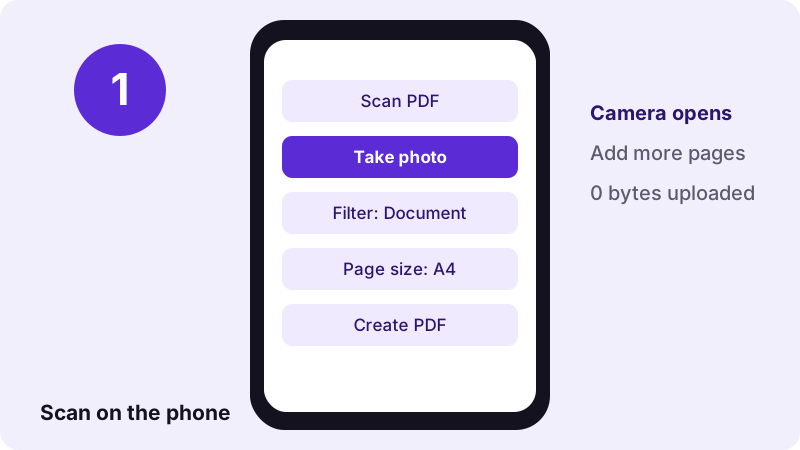
- Open Scan PDF in Chrome.
- Tap the camera button and photograph the page; repeat for each page.
- Pick a filter: Document, Colour, Grey or Black & white.
- Pick the page size: A4, Letter or Fit to photo.
- Tap the button to create the PDF and download it.
The same steps run in pdf24 android browsers on any phone with a camera, from budget models to tablets. On a computer, the camera button is replaced by the normal file picker, so you can also turn existing photos into a scan-style PDF.
pdf24 android: which scan filter to pick
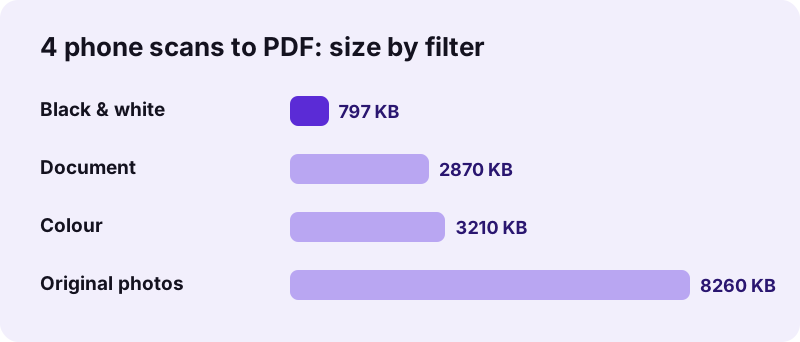
Document pushes the paper to white and the ink to black in greyscale, which reads well and stays compact. Black & white uses an adaptive threshold that survives shadows, and gave the smallest file in our test: 797 KB for 4 pages. Colour keeps stamps and highlighter marks but is the largest at 3.13 MB.
pdf24 android: light and angle tips
Shoot from straight above in daylight or under a ceiling lamp, with the page filling most of the frame. A dark table behind white paper helps the filter find the edges. Avoid the flash on glossy paper, because the bright spot can wash out a whole line of text.
pdf24 android: tip for multi-page forms
Photograph every page first, then check their order in the list before you create the PDF; the arrows next to each picture move it up or down. Re-taking one blurred page is quicker than scanning the whole form again.
What results does pdf24 android scanning give?
Scanning four page photos of 8.07 MB on the Android tool gave a 2.80 MB PDF with the Document filter in 1.9 seconds, 3.13 MB in Colour and 797 KB in Black & white. All three runs reported 0 bytes uploaded. For forms under a size limit, compress the scan afterwards or choose Black & white.
| Filter | PDF size | Time |
|---|---|---|
| Document | 2.80 MB | 1.9 s |
| Colour | 3.13 MB | 0.8 s |
| Black & white | 797 KB | 6.8 s |
Which filter suits pdf24 android scanning depends on the receiver. Universities and job portals that cap uploads at 1 or 2 MB are happy with Black & white, while a bank that wants to see a coloured stamp needs Colour. For a scan that must also be searchable, run OCR PDF on the result; OCR read 2,575 words from our 5-page contract scan.
Which pdf24 android tasks work best on a phone?
Phone tasks that work best are the light ones: scanning, merging, splitting, signing, compressing a few pages and turning photos into a PDF. Heavy jobs such as OCR on a 50-page scan also run on Android, but take longer because the phone's processor does all the work instead of a server.
| Task | Tool | Measured on test files |
|---|---|---|
| Shrink a PDF | Compress PDF | 2.46 MB scan → 493 KB |
| Join files | Merge PDF | 3 files, 15 pages, 0.2 s |
| Photos to PDF | JPG to PDF | 3 photos, 0.3 s |
| Sign a form | Sign PDF | 12 KB → 29 KB, 0.2 s |
| Searchable text | OCR PDF | 5 pages, 2,575 words |
Times in the table come from a laptop; a mid-range phone is slower on big scans, but small tasks still finish in seconds. Keep the screen on during long pdf24 android jobs, because Android may pause a background tab.
Is pdf24 android use safe for ID cards and bank papers?
Using the tools on an Android phone is safe for ID cards and bank papers because the file never leaves the phone. Chrome opens it with the File API and processes it in the page; our request logs showed 0 POST requests. No account exists, so no copy sits on a server.
“Browsers can also display content stored locally on the user's device.”
With pdf24 android use there are no app permissions to grant: the page only sees the files you pick yourself. See the File API on MDN for how that access works.
pdf24 android: where downloaded PDFs are saved
Downloaded PDFs land in the Downloads folder of the phone's internal storage, which the Files app shows under Downloads. Chrome also lists them under its menu, Downloads. The original file stays untouched; results carry endings such as -compressed.pdf or -signed.pdf, so they are easy to tell apart.
- Share the result straight from the download notification to email or a messenger.
- Several output files, such as split pages, arrive together as one ZIP file.
- Tap and hold a file in the Files app to rename it before sending.
Sharing is where most pdf24 android users lose track of files. The downloaded PDF stays in Downloads until you delete it, so remove copies of passports or bank statements once they are sent. The tool itself keeps nothing: when you close the tab, the page forgets the file.
Why might pdf24 android tools not work in my browser?
Android browser problems usually come from an outdated browser, low memory or a protected file. Update Chrome from the Play Store, close other tabs, and remove the password with Unlock PDF before compressing or merging. A password-protected PDF stops with a clear message rather than giving a broken file.
- If the camera button is missing, allow camera access for the site in Chrome's site settings.
- If a big scan stops halfway, split it with Split PDF and process the parts.
- If a file will not open at all, try Repair PDF.
For more pdf24 android tasks, every tool below works on the phone the same way, with the same 0 bytes uploaded.
pdf24 android: frequently asked questions
Is pdf24 android free?
Yes. The tools cost nothing on Android: there is no app purchase, no subscription, no account and no watermark. Because the work runs on your phone instead of a server, there is no per-file cost to pass on, and you can process as many files as you like.
Do I need the Play Store for pdf24 android?
No. There is nothing to install from the Play Store or anywhere else. Open the tool page in Chrome, Samsung Internet or Firefox and use it straight away. If you want an icon, pick Add to Home screen in the browser menu; it is only a bookmark that opens the page, and it needs no permissions.
Can pdf24 android scan documents with the camera?
Yes. Scan PDF shows a camera button on phones. Photograph each page, pick a filter such as Document or Black & white, choose A4, Letter or Fit, and create one PDF. Four test pages became a 2.80 MB file with the Document filter. Black & white gave the smallest file, 797 KB.
Is my file uploaded when I use pdf24 android?
No. With pdf24 android tools the browser opens the file locally and the processing runs in the page on your phone. Our request logs for every test showed no POST request, and each result line states 0 bytes uploaded. Nothing is stored on a server, so there is nothing to delete later.
Can pdf24 android compress a PDF for WhatsApp or email?
Yes. Use Compress PDF with Recommended or an exact size in KB. A 5-page, 2.46 MB scan dropped to 493 KB with Recommended and to 82 KB with a 100 KB target in our tests, so pdf24 android compression fits most chat and email limits. Share the result from the download notification.
Does pdf24 android work on Samsung phones?
Yes. The tools work in Samsung Internet as well as in Chrome and Firefox on Galaxy phones and tablets. Downloads go to the Download folder, which the My Files app shows under Downloads. Very old browser versions may lack features, so keep the browser updated. Results are identical in every browser.
Can pdf24 android sign a PDF with my finger?
Yes. Sign PDF lets you draw the signature with your finger, type it in a handwriting-style font or upload a photo of it. Place it on the page, resize it, and download. It is a visible image signature, not a certificate-based digital signature. Most everyday forms ask for exactly that.
Why is pdf24 android slow on big files?
All processing happens on the phone, so pdf24 android speed depends on its processor and memory. Merging and splitting are fast because pages are copied, not redrawn. Compressing or OCR on long scans redraws every page, which can take a minute or more on a mid-range phone.
Can pdf24 android merge photos into one PDF?
Yes. JPG to PDF and Images to PDF accept many pictures at once, including JPG, PNG, WebP and HEIC. Order them with the arrows, pick the page size and margin, and download one PDF. Three 12-megapixel photos became a 3-page PDF in 0.3 seconds in our test.
Does pdf24 android work without internet?
The page and the libraries a tool loads on first use need a connection once. After that, pdf24 android processing runs on the phone and sends nothing. OCR also downloads its language data the first time; if the connection drops before loading finishes, reload the page later and try again.
Is pdf24 android an official app?
No. pdf24tools is an independent website and is not affiliated with PDF24 or Geek Software GmbH, and it publishes no Android app. Our tools are separate code that runs in your phone's browser. The figures in this guide are our own measurements from 2 November 2026.
Can pdf24 android open password-protected PDFs?
A file that needs a password to open stops with a message asking for it. Use Unlock PDF with the password you know to make an open copy first. Files that only block printing or copying can be unlocked without any password, then edited or merged.
Does pdf24 android work on tablets and Chromebooks?
Yes. Android tablets and Chromebooks run the same browser pages, and a bigger screen makes placing signatures or text boxes easier. On a Chromebook, results go to the Downloads folder in the Files app, just as on a phone, and a keyboard makes typing text onto a form faster.
More pdf24 android tools and guides
pdf24 android: sources
- Android (operating system) — Wikipedia
- Web browser — Wikipedia
- File API — MDN Web Docs