Why is pdf24 ocr not working on my scan?
OCR not working on a scan usually means the engine cannot see clear letters: the page is too small or blurry, rotated, in another language than the one selected, or handwritten. Less often, the engine itself never finished loading because a network filter blocked its download, or the file is password-protected.
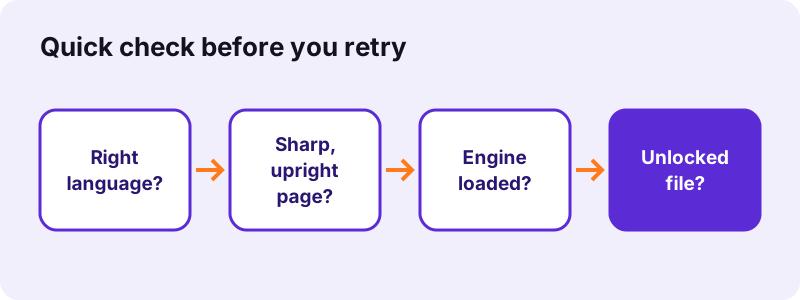
| Symptom | Most likely cause | Fix |
|---|---|---|
| No text was recognised | Too few pixels, rotated page or wrong language | Rescan at 300 dpi, rotate, set the language |
| Text full of errors | Low resolution or accents in another language | Higher resolution, matching language |
| Stuck at Loading the OCR engine | Engine download blocked or offline | Allow cdn.jsdelivr.net, reconnect |
| Password message | Open password set | Unlock PDF with the password |
| Random letters on a photo | Picture contains no text | Use OCR only on documents |
Work through the table from the top. On our test scans, the first two rows explain most cases of pdf24 ocr not working, and both are fixed in under a minute: switch the language, or replace a tiny or blurred image with a sharper one.
pdf24 ocr not working: check the language first
The OCR page preselects the language of the site you opened, so English on this site. A French, German or Turkish document recognised as English loses its accents and many words. Pick the document's language from the 11 in the list before pressing the button.
pdf24 ocr not working on rotated pages
Pages scanned sideways or upside down give little or no text. Turn them upright with Rotate PDF pages, download the rotated copy and run OCR on that file. Check every page, because a single rotated page in a long scan is easy to miss.
pdf24 ocr not working with handwriting
The engine is trained on printed text. Neat block capitals sometimes work; joined-up handwriting usually returns wrong words or nothing. That is a limit of the recognition model, not a setting you can change, so type short handwritten notes instead.
pdf24 ocr not working: tip for phone photos
Hold the phone straight above the page, fill the frame with the paper and use daylight. Shadows across the text and a tilted angle confuse the engine more than a slightly lower resolution does. Our Scan PDF tool can clean the photo first with its Document filter.
Does resolution explain pdf24 ocr not working?
Resolution is the most common reason for OCR not working well. Our invoice scan at 1654 × 2339 pixels gave about 55 correct words. Reduced to a third, it still found 53 words, but with errors such as 2550 for 25.50. At a fifth of the size, only 3 words came back, all unusable.
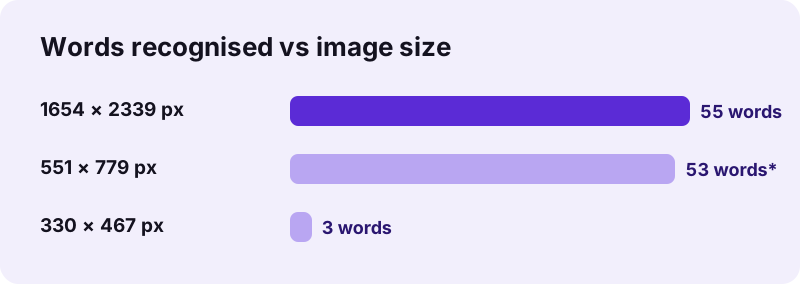
| Image size | File | Words | Time | Quality |
|---|---|---|---|---|
| 1654 × 2339 px | 72 KB | about 55 | 4.0 s | Correct |
| 551 × 779 px | 33 KB | about 53 | 2.8 s | Allas Trading, 2550, 309 |
| 330 × 467 px | 15 KB | about 3 | 1.8 s | Unusable |
“Image resolution is the level of detail of an image.”
PDF pages are rendered at about 300 dpi before recognition, but that cannot recover detail a low-quality scan never had. Rescan at 300 dpi, or photograph the page closer.
What if pdf24 ocr not working means it is stuck loading?
When OCR is stuck on Loading the OCR engine and language data, the browser could not download the engine files. The engine and language packs come from cdn.jsdelivr.net on first use. School and office firewalls, strict ad blockers or a dropped connection stop that download; your document itself is never part of it.
- Check the percentage: if it stays at 0 % for a minute, the download is blocked.
- Allow
cdn.jsdelivr.netin your blocker, or try another network. - Reload the page after reconnecting; a half-loaded engine does not resume.
- The first run on a device is the slowest; later runs reuse the cached files.
In our tests the first OCR run, engine download included, took 75.1 seconds for 5 pages and 82.2 seconds for 4 heavy pages. If yours shows no progress at all, pdf24 ocr not working is a network problem, not a file problem.
Why does pdf24 ocr not working show text that makes no sense?
Nonsense text appears when the OCR engine tries to read letters in a picture that has none, such as a photo, a logo or a pattern. Our test photo without any text still returned about 494 words of noise in 48.1 seconds. The word count alone therefore does not prove that recognition worked.
Always open the result and read a few lines against the original. In the searchable PDF, select a sentence and paste it into a text editor; in the .txt output, compare names and numbers. If a mixed document has photo pages, remove them with Remove PDF pages before running OCR.
A quick way to judge a pdf24 ocr not working report is to try the text output on one page. If the .txt shows real words from your page, recognition works and only the source pages need cleaning; if it shows random letters, the page has no readable text for the engine.
pdf24 ocr not working on locked or damaged PDFs
A locked PDF stops OCR with a message that the file is password-protected. Remove the open password with Unlock PDF, using the password you know, then run OCR on the unlocked copy. A damaged file that no reader opens can often be rebuilt first with Repair PDF, which fixed our broken test file in 0.8 seconds.
- Unlock PDF: removes print and copy limits without a password; removes an open password when you type it.
- Repair PDF: rebuilds a broken file index so the pages can be read again.
- Then return to OCR PDF with the fixed copy.
Once the copy opens without a password, pdf24 ocr not working on that file is usually solved; the remaining causes are the image ones covered above.
Is pdf24 ocr not working because the file is too big?
Large scans make OCR slow rather than broken, because every page is redrawn at about 300 dpi and recognised on your own device. Our 4-page, 8.07 MB scan needed 82.2 seconds. A 100-page scan on a phone can take many minutes and may stop if the browser runs short of memory or the tab sleeps.
Split long scans into parts of 10 to 20 pages with Split PDF, recognise each part, and join the results with Merge PDF. Keep the screen on and the tab in front while it works. When pdf24 ocr not working turns out to be a memory limit, a laptop finishes the same file much faster than a phone.
Privacy is not affected by any of these fixes: the file is read with the File API and processed locally, and our request logs showed 0 bytes uploaded.
pdf24 OCR not working: frequently asked questions
Why does pdf24 ocr not working say no text was recognised?
The engine found no letters it could read. Check that the language matches the document, that the page is upright and that the scan is sharp. In our test, a page reduced to 330 × 467 pixels gave only 3 words, while the full-size scan gave about 55 correct ones.
Is pdf24 ocr not working because of my browser?
Rarely. OCR needs a current browser with WebAssembly and web workers, which Chrome, Edge, Firefox and Safari all support. Very old versions, or extensions that block workers or scripts from cdn.jsdelivr.net, stop the engine from starting. Update the browser or try a private window without extensions.
Can pdf24 ocr not working be caused by a firewall?
Yes. The engine and language data download from cdn.jsdelivr.net the first time. Company, school or public Wi-Fi filters sometimes block that address, and the progress then stays at 0 %. Try another network or ask the administrator to allow it; your document is never sent anywhere.
Why is pdf24 ocr not working on handwriting?
The recognition model is trained on printed letters, so cursive handwriting usually produces wrong words or nothing. Neat capital letters sometimes work. There is no setting that improves handwriting recognition, so for short handwritten notes typing them is faster than correcting the output.
Does pdf24 ocr not working mean my file was uploaded and failed?
No. Nothing is uploaded at any point: the browser opens your file locally and runs recognition in the page. Our request logs showed no POST request. Only the engine and the language data are downloaded, and those contain nothing from your document.
Why does pdf24 ocr not working give wrong accents?
Accents go wrong when the selected language differs from the document's language. The English model does not expect letters such as é, ü or ç, so it replaces or drops them. Choose French, German, Spanish, Portuguese, Italian, Turkish or Vietnamese to match the text and run it again.
How long should OCR take before I think pdf24 ocr not working?
Expect roughly 15 to 20 seconds per scanned page on a laptop, plus the first engine download. Our 5-page scan took 75.1 seconds and our 4-page heavy scan 82.2 seconds. If the page counter does not move for several minutes, reload the page and try a shorter file.
Can pdf24 ocr not working be fixed by rotating pages?
Often, yes. Sideways and upside-down pages give little or no text. Rotate them upright with Rotate PDF pages, save the new copy and run OCR on it. Mixed scans where only one page is rotated are common, so check every page in the preview first.
Why is pdf24 ocr not working on a photo of a sign?
OCR is built for documents: dark text on a light, flat background. Photos of signs, screens or packaging have perspective, glare and decorative fonts, which give poor results. A photo with no text at all even produced about 494 words of noise in our test.
Is pdf24 ocr not working on Arabic text?
Arabic is one of the 11 languages, so it works when Arabic is selected and the print is clear. Small, low-contrast or decorative Arabic fonts reduce accuracy, as they do in every language. Use a sharp scan at about 300 dpi and check the recognised text against the original.
Is pdf24 ocr not working the same on other OCR sites?
We cannot speak for other services. pdf24tools is independent and not affiliated with PDF24 or Geek Software GmbH; this guide covers our own OCR, which runs the open-source Tesseract engine in your browser. The fixes here are based on our measurements from 2 November 2026.
Does pdf24 ocr not working happen with password-protected files?
Yes. A file that needs a password to open stops with a message asking you to remove it. Use Unlock PDF with the password you know, then run OCR on the unlocked copy. Files with only print or copy limits unlock without a password.
What can I do if pdf24 ocr not working persists after every fix?
Try the text output instead of PDF to see what the engine actually reads, test a single clean page, and use a laptop rather than a phone. If a clean, upright, 300-dpi page in the right language still fails, write to us through the contact page with a description of the file.
More pdf24 OCR not working tools and guides
pdf24 OCR not working: sources
- Optical character recognition — Wikipedia
- Image resolution — Wikipedia
- Tesseract (software) — Wikipedia
- File API — MDN Web Docs