How to use pdf24 change PDF document information in 4 steps
- Choose the PDF. Tap Choose PDF file or drop the PDF on the box. It is read from your disk, not uploaded.
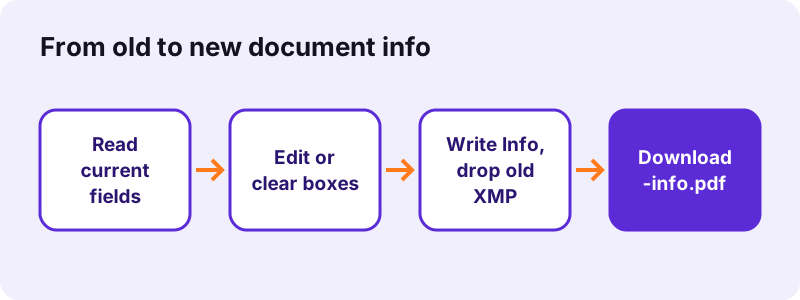
- Read the current values. The panel lists the document info found in the file and copies each value into its edit box.
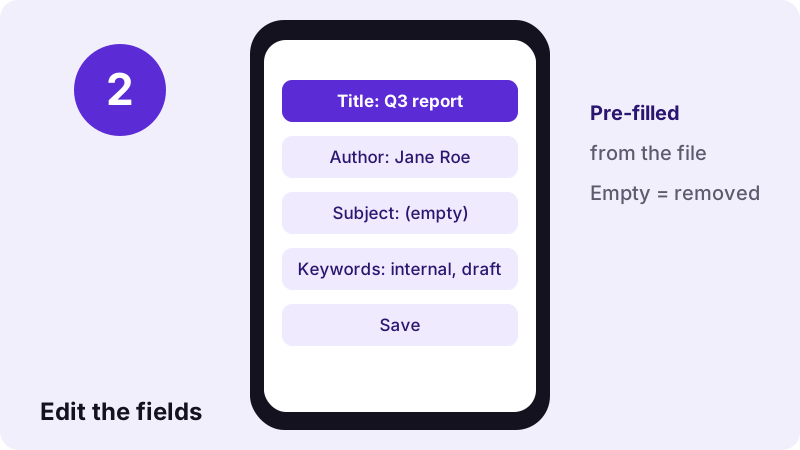
- Edit or clear the boxes. Type a new title, author, subject, keywords (comma separated), creator or producer. Leave a box empty to remove that field.
- Press the button and download. The new values are written, the change date is set to now, and the -info.pdf file downloads.
What does pdf24 change PDF document information edit?
pdf24 change PDF document information edits the Info dictionary: title, author, subject, keywords, creator (the program that made the original) and producer (the one that wrote the PDF). Every box starts with the value already in the file. A typed value replaces it, an empty box removes the field, and the modification date is updated.
| Field | Before | What we typed | After |
|---|---|---|---|
| Title | Secret project plan | Q3 report | Q3 report |
| Author | Jane Roe | (kept) | Jane Roe |
| Subject | Budget 2027 | (cleared) | (none) |
| Keywords | internal, draft | (kept) | internal, draft |
| Creator / Producer | SampleWriter 1.0 / SampleProducer 2.0 | (kept) | unchanged |
| Modification date | (none) | — | set to the time of saving |
“It includes elements such as title, abstract, author, and keywords.”
pdf24 change PDF document information and XMP
Most PDFs store their info twice: in the Info dictionary and in an XMP packet, an XML copy that many readers prefer. If only one copy were changed, a reader could keep showing the old title. The tool therefore removes the old XMP packet, so the values you typed are the only ones left in the file.
pdf24 change PDF document information on iPhone and Android
The edit boxes work with the phone keyboard in Safari, Chrome, Edge and Firefox. Since only a few small objects are rewritten, saving is almost instant: 0.11 to 0.16 seconds for our two test files on a laptop.
pdf24 change PDF document information on Windows and Mac
File Explorer on Windows can show title and author columns, and macOS Finder shows them under Get Info. After the change those places read the new values, which makes large folders of reports or invoices easier to sort and search.
pdf24 change PDF document information: keyword tip
Separate keywords with commas or semicolons. The box is saved exactly as you type it, so internal, draft stays internal, draft, which is how our test file came out when pypdf read it back.
Why use pdf24 change PDF document information?
Correct document information makes a PDF look finished and easy to find. The title field is what many viewers show in the window or tab instead of a cryptic file name, the author field names the right person or company, and keywords help desktop search and document systems file the document where people expect it.
- Replace a draft title such as "Secret project plan" with the public one.
- Put the company name as author instead of a staff login.
- Add keywords for a document management system.
- Clear the subject or creator fields you do not want to share.
To show the title in the reader's window instead of the file name, set Show the document title in Viewer preferences after writing it here.
pdf24 change PDF document information for websites
When a PDF is published online, its title field can be shown by browsers and search tools. A clear title such as Price list 2027 reads far better than untitled, the value our ReportLab-made test files carried.
Can pdf24 change PDF document information remove fields?
Yes. Any field you leave empty is deleted from the document information instead of being saved as an empty string. In our test the subject Budget 2027 was cleared and the output had no subject entry at all. To remove every field and the XMP packet in one click, Remove PDF metadata is faster.
| You want to… | Best tool |
|---|---|
| Fix or set title, author, keywords | Change PDF info (this page) |
| Delete all document info and XMP | Remove PDF metadata |
| Hide names written on the pages | Redact PDF |
| Set how the PDF opens | Viewer preferences |
The creation date is left as it was; only the modification date is updated to the moment you save.
Is pdf24 change PDF document information safe?
pdf24 change PDF document information works only in your browser: the File API reads the PDF, pdf-lib changes the fields in memory and the new copy downloads directly. Both of our test runs reported "0 bytes uploaded", and nothing is stored after the tab closes, so internal titles and names stay private.
The pages themselves are copied unchanged. Our 6-page test file had 13,806 characters of text before and after, and the page count stayed the same in both runs.
Password-protected PDFs must be unlocked first with Unlock PDF. Add the password back with Lock PDF once the info is right.
pdf24 change PDF document information: measured results
Two test files were edited in Chrome on 2 November 2026. Both saves took well under a second, both outputs were slightly smaller than the input because unused objects were dropped, and the text and page count were identical before and after.
| Test file | Change | Before | After | Time |
|---|---|---|---|---|
| pg-meta.pdf (3 pages) | New title, subject cleared | 2,147 bytes | 1,704 bytes | 0.16 s |
| text-6p.pdf (6 pages, no info) | Title, author, 3 keywords added | 5,238 bytes | 4,304 bytes | 0.11 s |
For text-6p.pdf we typed Annual report 2026, Finance team and the keywords report, 2026, finance; pypdf read back exactly those values, with the keywords kept as typed, commas included.
pdf24 change PDF document information not working? Fixes
When a reader still shows old values after saving, it is normally showing the old file, a cached preview or its own file-name label. The table below covers the usual symptoms and how to solve each one without running the tool again.
| Symptom | Cause | Fix |
|---|---|---|
| Old title in the reader | Original file opened | Open the -info.pdf download |
| Window shows file name, not title | Reader shows names by default | Set Show the document title in Viewer preferences |
| Explorer shows old author | Thumbnail and property cache | Refresh the folder |
| Error on loading | Password-protected file | Unlock PDF first |
pdf24 change PDF document information: frequently asked questions
Is pdf24 change PDF document information free?
Yes. pdf24 change PDF document information on pdf24tools costs nothing, needs no account and adds no watermark. There is no limit on files, because the editing runs in your own browser instead of on a server. Change the info of one PDF or of a hundred, one after another.
Which fields can pdf24 change PDF document information edit?
Six fields: title, author, subject, keywords, creator and producer. Each box is filled with the value found in the file, so you only touch what you want to change. The modification date is set automatically to the time you save, and the creation date stays as it was.
Does pdf24 change PDF document information alter the pages?
No. Text, images, fonts, links, bookmarks and form fields are copied as they are. In our tests the 6-page file kept all 13,806 characters of text and the 3-page file kept its 3 pages. Only the document info and the modification date change in the saved copy.
How do I delete a field with pdf24 change PDF document information?
Empty its box before you press the button. An empty box removes the field from the file instead of saving a blank value, which is what our test did with the subject Budget 2027. To clear every field and the XMP packet at once, Remove PDF metadata does it in one step.
Does pdf24 change PDF document information keep the commas in keywords?
Yes. The keywords box is written into the PDF exactly as you type it, commas and semicolons included, so report, 2026, finance is saved as report, 2026, finance. Search tools still find each word, and readers that show the Keywords field display your own punctuation.
Is my file uploaded by pdf24 change PDF document information?
No. The browser reads the file with the File API and the edit runs in memory on your device. The result line shows 0 bytes uploaded, no copy is stored, and closing the tab clears everything. That keeps draft titles and staff names private while you are correcting them.
Does pdf24 change PDF document information work on a phone?
Yes. pdf24 change PDF document information works in Safari on iPhone and iPad and in Chrome, Edge or Firefox on Android, with the normal phone keyboard. Saving takes a fraction of a second, so long PDFs are just as quick as short ones. Share the downloaded copy instead of the original afterwards.
Why does my reader still show the file name after pdf24 change PDF document information?
Many readers show the file name in the title bar unless the PDF asks them to show the title. Open the new file in Viewer preferences, tick Show the document title instead of the file name, and save. Desktop readers such as Acrobat then display the title you wrote.
Does pdf24 change PDF document information keep a digital signature valid?
No. Any change to a signed PDF, including its document info, makes the signature check fail. Change the title, author and keywords before the document is signed. If a signed file must stay valid, leave it as it is and ask for an unsigned copy to edit.
Is pdf24tools the official pdf24 change PDF document information tool?
No. pdf24tools is an independent website and is not affiliated with PDF24 or Geek Software GmbH. Our info editor is our own build on the open-source pdf-lib library and runs entirely in your browser. The page name only describes what people search for when they want to fix PDF properties.
What happens to XMP in pdf24 change PDF document information?
The old XMP packet is removed. XMP is an XML copy of the document info that many readers prefer over the classic fields, so leaving it would let them keep showing the old title or author. After saving, the values you typed in the six boxes are the only document info in the file.
Can pdf24 change PDF document information edit the creation date?
No. The creation date is kept as it was, and the modification date is set to the moment you save. The tool edits only the six text fields. If you want every date and field gone, use Remove PDF metadata, which deletes the whole Info dictionary including both dates.
pdf24 change PDF document information: sources
- Metadata — Wikipedia
- Extensible Metadata Platform — Wikipedia
- PDF — Wikipedia