How to use pdf24 generate password in 4 steps
- Choose the length. Type a length from 4 to 128 characters. 16 to 20 is a good choice for accounts you store in a password manager.
- Choose how many. Make 1 to 100 passwords at once, for example one per new account or per employee.
- Pick the characters. Capital letters, small letters, digits and symbols are all ticked by default. Tick Leave out look-alikes to drop 0 O 1 l I.
- Generate and copy. Press Generate passwords. Use the Copy button next to a password, or download all of them as passwords.txt.
How strong is a password from pdf24 generate password?
A password from pdf24 generate password is as strong as its length and character pool allow, because every character is picked at random with equal chance. With the default 20 characters from a pool of 86, the tool reports about 129 bits of entropy, far beyond what brute-force guessing can reach.
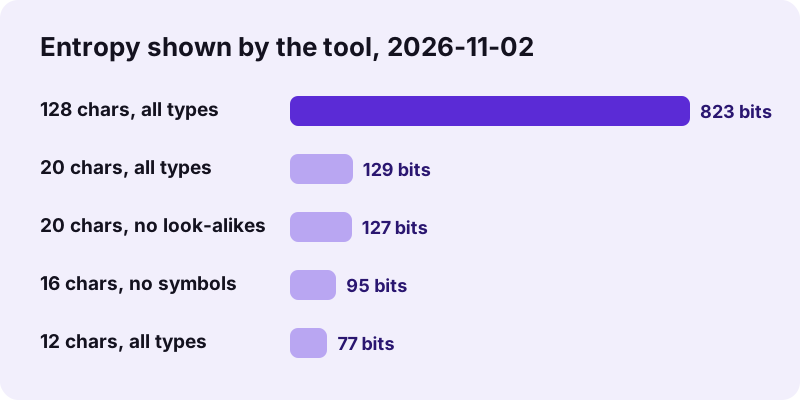
| Length | Characters | Pool | Entropy | passwords.txt for 5 |
|---|---|---|---|---|
| 12 | all four types | 86 | 77 bits | 70 bytes |
| 16 | no symbols | 62 | 95 bits | 90 bytes |
| 20 (default) | all four types | 86 | 129 bits | 110 bytes |
| 20 | no look-alikes | 81 | 127 bits | 110 bytes |
| 128 (maximum) | all four types | 86 | 823 bits | 650 bytes |
In pdf24 generate password each extra character multiplies the number of possible passwords by the pool size, so length counts more than symbols: 16 characters without symbols (95 bits) beat 12 characters with symbols (77 bits).
pdf24 generate password: what the entropy number means
Entropy in bits is length × log2(pool). 129 bits means about 2^129 possible passwords; even an attacker testing a trillion guesses per second would need far longer than the age of the universe to try a meaningful share of them. The figure assumes the password is truly random, which is the whole point of a generator.
The character pool of pdf24 generate password
- Capital letters: 26 (A–Z).
- Small letters: 26 (a–z).
- Digits: 10 (0–9).
- Symbols: 24, namely ! # $ % & * + - = ? @ ^ _ ~ . , : ; ( ) [ ] { }
- Leave out look-alikes removes 0, O, 1, l and I: the pool drops from 86 to 81.
pdf24 generate password and site rules
When all four types are ticked, every password contains at least one character of each type, so it passes the usual must contain a digit and a symbol rules. If a site refuses some symbols, untick Symbols and add 2 to 4 characters of length to keep the same strength.
pdf24 generate password: tip for typing by hand
For a Wi-Fi key or a PIN-pad login you type yourself, tick Leave out look-alikes. It costs only about 2 bits on 20 characters (129 to 127) and avoids mixing up 0 and O or 1, l and I.
Is pdf24 generate password safe to use online?
Yes. The password generator runs entirely in your browser: passwords are made with crypto.getRandomValues, the operating system's cryptographic random source, and are never sent, logged or stored. The result line confirms nothing is sent anywhere, and in our network check generating passwords caused no request carrying them.
pdf24 generate password draws random numbers with rejection sampling, so every character in the pool has exactly the same chance; a simple modulo would make some characters slightly more likely. The code that does this is visible in the page's script for anyone who wants to check it.
Once you close or reload the tab, the passwords are gone for good. Save them in your password manager or keep the downloaded passwords.txt somewhere safe, and delete that file when you no longer need it.
pdf24 generate password offline
For the highest caution, load the page, switch off Wi-Fi or turn on flight mode, then generate. pdf24 generate password works the same offline because nothing needs a server; the passwords you get are no different from the ones made online.
How long should a pdf24 generate password result be?
A password should be long enough that guessing is hopeless: 16 to 20 random characters suit almost every account, 12 is a sensible minimum, and 24 or more suits master keys and encryption. Length matters more than special characters, and every account needs its own password, ideally kept in a password manager.
“Verifiers SHOULD permit subscriber-chosen memorized secrets at least 64 characters in length.”
The NIST guideline also asks services to accept at least 8 characters and to stop forcing periodic changes without a reason. pdf24 generate password goes up to 128 characters; if a site cuts long passwords, test the login once right after you set it.
| Use | Length | Types |
|---|---|---|
| Website account in a password manager | 20 | all |
| Site that refuses symbols | 20 | letters + digits |
| Wi-Fi key (WPA2/WPA3: 8–63 characters) | 20 | all, no look-alikes |
| PDF or ZIP encryption password | 24+ | all |
| Temporary password for a new user | 12–16 | no look-alikes |
pdf24 generate password for protecting PDFs
A password from pdf24 generate password is a good fit for protecting documents. Make one here, then use it in lock PDF to encrypt a file with AES-256, or in secure PDF to limit printing and copying. Send the password through a different channel than the file, for example the PDF by email and the password by phone.
To open a PDF you protected yourself and no longer want locked, unlock PDF removes the password when you know it.
pdf24 generate password: frequently asked questions
Is pdf24 generate password free?
Yes. The generator costs nothing, needs no account and has no limit: make up to 100 passwords per click and click as often as you like. Your browser does all the work, so there is no server involved and nothing to pay for, and no email address or sign-up is ever requested.
Does pdf24 generate password send my passwords anywhere?
No. Passwords are generated with your browser's crypto.getRandomValues and shown only on your screen. They are not sent, logged or saved; the result line says nothing is sent anywhere, and our network check confirmed it. After you close the tab they no longer exist anywhere except where you saved them.
How random is pdf24 generate password?
It uses crypto.getRandomValues, the cryptographically secure random generator built into every modern browser and fed by the operating system. Characters are chosen with rejection sampling, so each one in the pool has exactly the same probability. That is the same source browsers use for encryption keys.
What length does pdf24 generate password recommend?
The default is 20 characters, about 129 bits with all character types, which is strong for any account. Use at least 12 for anything you type often and 24 or more for master passwords or encryption keys. The tool accepts any length from 4 to 128 characters.
Can pdf24 generate password make passwords without symbols?
Yes. Untick Symbols and the pool is 62 letters and digits. To keep the same strength, add length: 16 characters without symbols give about 95 bits, more than 12 characters with symbols (77 bits). This helps for sites or devices that reject special characters.
Can pdf24 generate password create many passwords at once?
Yes, 1 to 100 per click. Each one appears with its own Copy button, and the Download button saves all of them as passwords.txt, one per line. That is handy when you set up accounts for a class, a team or a batch of devices.
What does Leave out look-alikes do in pdf24 generate password?
It removes the five characters that are easy to confuse when reading or typing: zero 0, capital O, one 1, small l and capital I. The pool drops from 86 to 81, which on 20 characters lowers the entropy only from 129 to 127 bits.
Does every password from pdf24 generate password contain each character type?
Yes, as long as the length is at least the number of ticked types. A password missing one of the ticked types is thrown away and redrawn, so passwords always pass the usual rules that ask for a capital letter, a digit and a symbol.
Can pdf24 generate password make a passphrase of words?
No, it makes random character passwords only. Passphrases of several random words are easier to remember but need a word list; for a memorable password, use 4 to 6 random words from a dice-based list. For anything stored in a password manager, a random character password is the simpler choice.
Does pdf24 generate password work on a phone?
Yes, in any current browser on Android and iPhone. Tap Copy next to a password and paste it into the app or site where you are signing up. On iPhone, the iCloud Keychain prompt can then save it. The tool also works offline once the page has loaded.
Can I use pdf24 generate password for a PDF password?
Yes, that is a good use. Generate a password, then lock the PDF with it in our lock PDF tool, which uses AES-256 encryption. Keep the password in a password manager: without it, a properly encrypted PDF cannot be opened, not even by us.
Is pdf24 generate password made by PDF24?
No. pdf24tools is an independent website and is not affiliated with PDF24 or Geek Software GmbH. We wrote this generator ourselves; it runs in your browser, and the entropy figures on this page are the values the tool printed in our test on 2026-11-02.
pdf24 generate password: sources
- Crypto: getRandomValues() method — MDN Web Docs
- NIST SP 800-63B Digital Identity Guidelines — NIST
- Password strength — Wikipedia