How to use pdf24 create card in 5 steps
- Choose a photo. Pick one picture for the front: JPG, PNG, WebP, HEIC from an iPhone, GIF, BMP, TIFF or SVG.
- Write the texts. Front text is printed under the photo (default Happy birthday!), Message inside goes on the inside page, From adds a signature line.
- Pick the paper. A4 for most of the world, US Letter for the US and Canada. The folded card is a quarter of the sheet.
- Make the PDF. Press Make card PDF and download greeting-card.pdf.
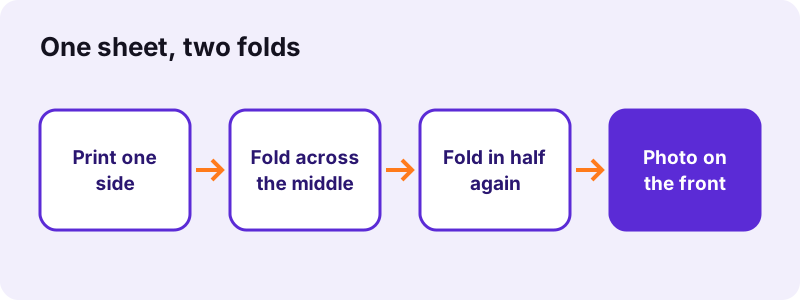
- Print and fold. Print at 100 % (actual size) on one side, fold the sheet in half across the middle, then in half again so the photo is on the front.
How does a card from pdf24 create card fold?
A card from pdf24 create card is a quarter-fold card: the PDF is one page, printed on one side, and the sheet is folded twice. The bottom right quarter becomes the front with your photo and title; the top left quarter, printed upside down on purpose, becomes the inside page with your message.
| Quarter of the sheet | After folding | Content |
|---|---|---|
| Bottom right | Front cover | photo + front text (up to 3 lines) |
| Top left (upside down) | Inside right page | message + From line |
| Top right | Inside left page | blank, for a handwritten note |
| Bottom left | Back cover | blank |
Upside-down text on the top half is how pdf24 create card is meant to look: after the first fold across the middle, the top half turns over and reads the right way up. Light dashed lines across the middle and down the centre show where to fold.
pdf24 create card folding, step by step
- Lay the printed sheet face up, photo at the bottom right.
- Fold the top half backwards along the horizontal dashed line, so the printing stays outside.
- Fold the strip in half along the vertical line, so the photo lands on the front.
- Press the folds with a ruler or a fingernail for a crisp edge.
pdf24 create card: the finished size
Folded twice, an A4 sheet (210 × 297 mm) gives a card of 105 × 148.5 mm, the A6 size of a postcard, and a US Letter sheet (8.5 × 11 in) gives 4.25 × 5.5 in. Both fit a C6 or A2 envelope respectively.
pdf24 create card on thicker paper
Normal 80 g/m² office paper works but feels thin. Paper of 120 to 160 g/m² folds well and still goes through most home inkjet and laser printers; very stiff card above 200 g/m² cracks along a double fold.
pdf24 create card print tip
In the print dialog choose Actual size or 100 %, not Fit to page, and one-sided printing. Fit to page shrinks the sheet slightly and moves the folds off the dashed lines.
Which photo works best with pdf24 create card?
The best photo for pdf24 create card is a portrait-format picture, taller than wide, because the front of the card is a tall A6 panel. The picture is scaled to fit inside the panel above the title without cropping, so a landscape photo works too but leaves more white space above and below.
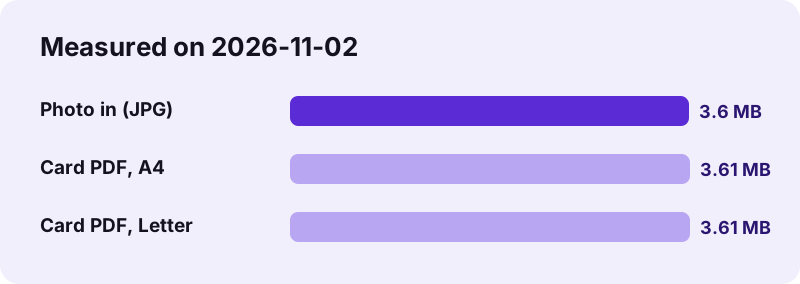
pdf24 create card embeds the photo at its original quality, so the card prints as sharp as the picture itself. That also means the PDF is about as big as the photo: our 3.60 MB JPG gave a 3.61 MB card on A4 and on Letter. For sending the PDF by email that is fine; if a messenger refuses it, shrink it with compress PDF.
- Resolution: a front panel of about 9 × 10 cm needs roughly 1,100 × 1,200 pixels for 300 dpi; any phone photo has more.
- HEIC photos from an iPhone are converted in the browser, no app needed.
- Transparent PNG or SVG logos print on white paper.
Is pdf24 create card private?
Yes. The card tool reads your photo with the browser and draws the card PDF on your own device; the result line shows 0 bytes uploaded. Family photos, names and personal messages are never sent to a server and nothing is kept after you close the tab, so there is no account or gallery to delete.
pdf24 create card also works offline once the page has loaded: switch off Wi-Fi, choose the photo and make the PDF. The text on the card is real text in an embedded Unicode font, so names with accents, umlauts or non-Latin letters print correctly.
pdf24 create card for every occasion
The defaults of pdf24 create card are a birthday card, Happy birthday! on the front and a short wish inside, but every text can be changed. The front text wraps onto up to 3 lines at 20 points; the inside message wraps automatically and holds up to 22 lines at 15 points, enough for a long personal note.
“A greeting card or greetings card is a piece of card stock, usually with an illustration or photo on its front cover”
| Occasion | Front text | Message idea |
|---|---|---|
| Birthday | Happy birthday! | a memory you share + a wish |
| Thank you | Thank you | what the person did and why it mattered |
| Wedding | Congratulations | a wish for the couple |
| New baby | Welcome, little one | a welcome for the family |
| Holidays | Season's greetings | news of the year |
| Invitation | You're invited | date, time and place |
What pdf24 create card does not do
pdf24 create card makes one card design: one photo, one title, one message. It has no fonts or colours to choose, no stickers and no second photo for the back. If you need more, make a photo collage first and use the collage JPG as the card picture, or add text to the finished file with edit PDF.
It also does not print double-sided or set your printer: the quarter-fold layout exists precisely so that a single-sided print works on any printer.
pdf24 create card: frequently asked questions
Is pdf24 create card free?
Yes. Making cards costs nothing, there is no account and no watermark on the card, so the front shows only your photo and text. Make as many as you like, for example one per guest. The PDF is drawn by your browser, so there is no server cost and no daily limit.
Does pdf24 create card upload my photo?
No. The photo is read and placed on the card inside your browser tab; the result line shows 0 bytes uploaded. Nothing is stored after you close the page. This matters for pictures of children or family events that you would rather not hand to an online service.
Why is the message upside down in pdf24 create card?
Because of the fold. The message sits on the top half of the sheet, and the first fold turns that half over, so text printed upside down ends up the right way round inside the card. Fold along the dashed lines and it reads correctly.
What paper sizes does pdf24 create card support?
A4 (210 × 297 mm) and US Letter (8.5 × 11 in). The folded card is a quarter of the sheet: 105 × 148.5 mm on A4 and 4.25 × 5.5 in on Letter. Choose the size your printer has loaded, otherwise the folds will not match the dashed lines.
Can pdf24 create card print double-sided?
It does not need to. The quarter-fold layout puts the front, the inside and the back on one side of one sheet, so a single-sided print and two folds give a full card. Choose one-sided printing and 100 % scale in the print dialog.
How long can the message be in pdf24 create card?
Up to 22 lines at 15 points on the inside page, which is about 80 to 120 words depending on line length. Longer text is cut after line 22. The From name is added two lines below the message, starting with a dash. The front text holds up to 3 lines.
Can I use an iPhone photo with pdf24 create card?
Yes. HEIC photos from an iPhone are decoded in the browser, as are JPG, PNG, WebP, GIF, BMP, TIFF and SVG. On the phone itself, choose the picture straight from Photos; the card PDF can then be printed with AirPrint or sent by message.
Why is my pdf24 create card PDF so large?
Because the photo is embedded at full quality: a 3.60 MB picture gave a 3.61 MB card in our test. That keeps the print sharp. To email or message the PDF, compress it, or use a smaller copy of the photo when you make the card.
Can pdf24 create card add a second photo?
No, the card holds one picture, on the front. A workaround: combine several photos with the photo collage tool, save the collage as JPG and choose that JPG as the card photo. The inside left page is left blank on purpose for a handwritten note.
Does pdf24 create card change the fonts or colours?
No. Texts use one clean sans-serif font, Noto Sans, in dark ink, the front text in bold. That keeps the card readable on any printer. For decorative lettering, write the front text into the photo with an image editor first and leave the front text field empty.
Does pdf24 create card work on a phone?
Yes, in Chrome, Safari, Edge and Firefox on Android and iPhone. Pick the photo from the gallery, type the texts, and the PDF downloads in a moment. Print it from the phone over Wi-Fi, or send it to a computer next to the printer.
Is pdf24 create card made by PDF24?
No. pdf24tools is an independent website and is not affiliated with PDF24 or Geek Software GmbH. We built this card maker ourselves; it runs in your browser, and the sizes and timings on this page come from our own test on 2026-11-02.
pdf24 create card: sources
- Greeting card — Wikipedia
- ISO 216 (A series paper sizes) — Wikipedia
- Letter (paper size) — Wikipedia