How to use pdf24 create invoice in 4 steps
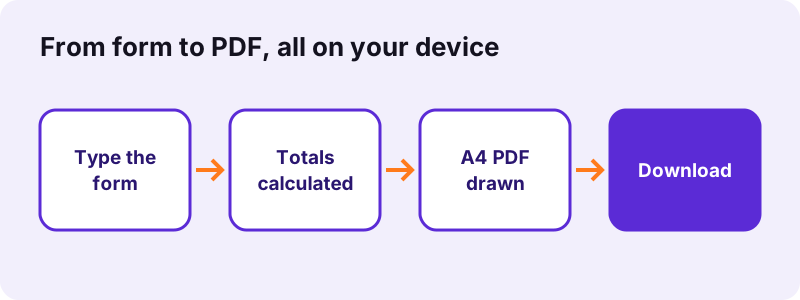
- Enter your details and the customer. Type your name or company, address and VAT number under From, and the customer under Bill to. Each line of the box becomes one line on the invoice.
- Check number, dates and currency. The form suggests a number such as INV-202611-001, today's date, a due date 14 days later and EUR. Change any of them, for example to USD or GBP.
- Add the item lines and the tax rate. Write one item per line as description; quantity; unit price, for example Website design; 10; 50. Set the tax rate in percent, or 0 for none.
- Create and download the PDF. Press the button. The totals are worked out on your device and the file invoice-<number>.pdf is offered for download.
What does pdf24 create invoice put on the PDF?
The pdf24 create invoice tool prints a one-column A4 invoice: the word Invoice, the invoice number, date and due date at the top right, your details under FROM, the customer under BILL TO, a table of items, then subtotal, tax and total, followed by your notes. Every value comes from the form you fill in.
| Form field | Default | Printed as |
|---|---|---|
| From | empty | FROM block, first line in bold |
| Bill to | empty | BILL TO block, first line in bold |
| Invoice number | INV-YYYYMM-001 | Invoice no. (top right) |
| Invoice date | today | Date |
| Due date | today + 14 days | Due |
| Currency | EUR | after each total, e.g. 887.86 EUR |
| Items | empty | Description, Qty, Unit price, Amount |
| Tax rate (%) | 20 | Tax 20% line; hidden when 0 |
| Notes | empty | small grey lines under the totals |
The text that pdf24 create invoice writes into the PDF is real text, not a picture. In our 3-item test a PDF reader extracted 382 characters from page 1, so the customer can search the invoice, copy the IBAN or the invoice number, and accounting software can read it.
pdf24 create invoice: how the totals are calculated
Each line amount is quantity × unit price, rounded to 2 decimals. The subtotal is the sum of the line amounts, the tax is subtotal × rate ÷ 100, rounded to 2 decimals, and the total is subtotal + tax. Our test lines 10 × 50, 12 × 9.99 and 1 × 120 gave a subtotal of 739.88, tax at 20 % of 147.98 and a total of 887.86 EUR.
The form uses one tax rate for the whole invoice. If you sell goods at two VAT rates, make two invoices or put the second rate in the notes and check the figures yourself; the tool will not split tax by line.
pdf24 create invoice with decimal commas
You can type prices the way your country writes them. 1.234,50 and 89,90 are read as 1,234.50 and 89.90, and 1,234.50 also works. In our test the lines 2 × 1.234,50 and 1 × 89,90 gave a subtotal of 2,558.90 and a total of 3,070.68 with 20 % tax. The PDF prints the numbers in the page language format, which on this English page is 1,234.50.
pdf24 create invoice for long item lists
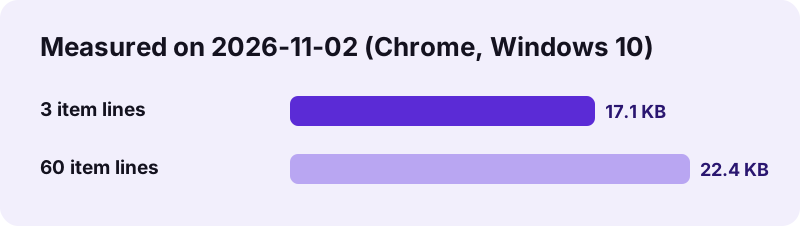
pdf24 create invoice has no fixed limit on item lines. When the table reaches the bottom margin a new A4 page starts and the column header is printed again. Our 60-line test produced 2 pages and 22,986 bytes, still small enough for any email attachment.
pdf24 create invoice: tip for the unit column
The form invoice has no separate unit field. Put the unit in the description, for example Consulting (hours); 12; 100, so the customer sees what the quantity means.
Is pdf24 create invoice safe for client data?
The pdf24 create invoice form never sends your data anywhere: the page draws the PDF with JavaScript in your browser and the result line reports 0 bytes uploaded. Names, addresses, bank details and prices stay in the tab. When you close or reload it, the form is empty again, because nothing is stored.
We checked pdf24 create invoice with the browser's network log while making an invoice: apart from the page itself, the only outside requests were for the web fonts of the site. No request contained the form text or the PDF. You can repeat the test in the Network tab of the developer tools, or switch off Wi-Fi after the page has loaded and make the invoice offline.
Because nothing is saved, keep a copy of each PDF you send. The tool has no history, no customer list and no invoice numbering memory.
pdf24 create invoice and your numbering sequence
Most tax rules ask for unique, sequential invoice numbers. The suggested number INV-202611-001 is built from the year and month only, so change the last part for every invoice you issue in a month, for example INV-202611-002, and keep your own list.
Which invoices can pdf24 create invoice make, and which not?
The pdf24 create invoice tool is made for simple service and sales invoices from freelancers, small shops and associations: one seller, one customer, item lines and one tax rate. It is not an accounting system and does not produce structured e-invoices such as XRechnung, ZUGFeRD or Factur-X, which need validated XML.
| Feature | Supported? | Note |
|---|---|---|
| Any currency text | Yes | EUR, USD, GBP, MAD, CHF… |
| One tax rate per invoice | Yes | 0 hides the tax line |
| Different tax rates per line | No | make separate invoices |
| Discount line | No | add a line with a negative price, e.g. Discount; 1; -50 |
| Logo | No | text only |
| Paper size | A4 only | prints on Letter with margins |
| XML e-invoice | No | PDF only |
| Saved customers / history | No | nothing is stored |
In pdf24 create invoice a negative unit price works because the amount is simply quantity × price, so a discount or a deposit already paid can be shown as its own line. Check the printed total before you send it.
pdf24 create invoice versus a live preview
If you prefer to see the invoice while you type, use the invoice maker with live preview: same fields, same PDF, plus a table that updates with every key. To read an XML e-invoice you received, use XML invoice to PDF.
What must an invoice from pdf24 create invoice contain?
A valid invoice usually needs the seller's and buyer's names and addresses, a unique number, the issue date, a description of goods or services with quantities and prices, the tax rate and amount, and the total due. The exact list depends on the country; in the EU it is set by the VAT rules.
“…a commercial document that includes an itemized list of goods or services furnished by a seller to a buyer relating to a sale transaction…”
- Your VAT or tax number: put it as the last line of From, for example VAT DE000000000.
- Delivery date or service period, if it differs from the invoice date: write it in the description or in Notes.
- Payment terms and bank details: Notes is the place, for example Bank transfer within 14 days, IBAN …
- A small-business or reverse-charge statement where your law asks for it: also in Notes.
pdf24 create invoice does not check legal content. Ask your accountant or your tax office which mentions your invoices need, then use the form fields to print them.
pdf24 create invoice on phone, tablet and computer
pdf24 create invoice is a normal web page, so it runs in Chrome, Edge, Firefox and Safari on Windows, macOS, Linux, Android and iPhone. On a phone the item box is easier to fill if you type each line and tap return; the semicolons are on the symbol keyboard. The PDF opens in the phone's built-in viewer and can be shared straight to email or a messenger.
To turn several invoices into one file for your records, use merge PDF; to protect a copy with a password, use protect PDF.
pdf24 create invoice: frequently asked questions
Is pdf24 create invoice free to use?
Yes. The invoice form costs nothing, needs no account and puts no watermark or advert on the PDF. You can make as many invoices as you like. The work is done by your own browser, so there is no server cost per invoice and no daily limit, and you do not have to give an email address.
Does pdf24 create invoice upload or store my data?
No. The form text and the PDF stay in your browser tab; the result line shows 0 bytes uploaded and our network test saw only the site's font files being loaded. Nothing is stored either, so a reload empties the form. Keep the downloaded PDF, because there is no copy anywhere else.
Can pdf24 create invoice add VAT or sales tax?
Yes, one rate for the whole invoice. Type the rate in percent, for example 20, 19 or 7.5, and the tool prints a Tax line with the amount and adds it to the total. Set the rate to 0 to hide the tax line, for example for a small-business invoice without VAT.
Which currencies does pdf24 create invoice support?
Any. The currency box is plain text printed after each total, so EUR, USD, GBP, CHF, MAD, INR or a symbol all work. The tool does not convert between currencies; it only prints the code you type next to the amounts it calculated from your prices.
Can I add my logo with pdf24 create invoice?
No, the form invoice is text only: the title, your details, the customer, the item table and notes. If you need a logo, print the PDF onto letterhead paper, or add the image afterwards with an PDF editor that places pictures on a page.
How do I write item lines in pdf24 create invoice?
One item per line, with the three parts separated by semicolons: description; quantity; unit price. Example: Hosting (12 months); 12; 9.99. A tab also works as separator, so you can paste three columns from a spreadsheet. A line with only a description gets quantity 1 and price 0.
Can pdf24 create invoice make a credit note or a discount?
Partly. A negative unit price, such as Discount; 1; -50, is subtracted from the subtotal, so discounts and deposits work. The title always reads Invoice, though, so for a real credit note change the wording in the notes or use your accounting software, which also keeps the link to the original invoice.
Is an invoice from pdf24 create invoice legally valid?
It can be, if it contains everything your law requires: names and addresses, a unique number, dates, items, tax rate and amount, and total. The tool prints what you type but does not check the content. In countries that require structured e-invoices between businesses, a PDF alone may not be enough.
Does pdf24 create invoice produce an e-invoice like XRechnung or ZUGFeRD?
No. It produces a normal PDF for people to read. Structured e-invoices need XML that passes official validation, which a browser tool cannot guarantee, so we do not offer one. If you receive such an XML file and want to read it, our XML invoice to PDF tool makes a readable copy.
Can I save a template in pdf24 create invoice?
No, the page does not store anything, not even in the browser's storage. A quick workaround: keep a text file with your From block, notes and usual item lines, and paste them into the form. The fields keep their text while the tab stays open, so you can make several invoices in a row.
What paper size does pdf24 create invoice use?
A4, 595 × 842 points (210 × 297 mm). In the US and Canada the PDF still prints on Letter paper: choose Fit to page in the print dialog, and the 50-point margins keep all text on the sheet. There is no Letter option in the form itself.
Is pdf24 create invoice made by PDF24?
No. pdf24tools is an independent website and is not affiliated with PDF24 or Geek Software GmbH. We wrote this invoice tool ourselves; it runs completely in your browser, and the figures on this page come from our own tests on 2026-11-02.
More pdf24 create invoice tools and guides
pdf24 create invoice: sources
- Invoice — Wikipedia
- Invoicing rules (VAT) — European Commission
- ISO 216 paper sizes — Wikipedia