How to use pdf24 create photo collage in 5 steps
- Add the photos. Choose or drop at least 2 pictures: JPG, PNG, WebP, HEIC, GIF, BMP, TIFF or SVG. Put them in order with the arrows in the file list.
- Pick the layout. All photos (automatic grid) uses up to 16; or fix 2, 3, 4, 6 or 9 photos on the page.
- Pick shape, gap and background. Portrait A4, landscape A4 or square; no, thin, medium or wide gaps; white, black, cream, blush pink or sky blue.
- Choose PDF or JPG. PDF for printing on A4, JPG for messengers, social media or a photo frame.
- Make and download. Press Make collage and save collage.pdf or collage.jpg.
What kind of collage does pdf24 create photo collage make?
The pdf24 create photo collage tool makes a tidy grid collage: every photo gets a cell of the same size, with an even gap and a plain background around it. Each picture is cropped from the centre to fill its cell, so there are no empty bands, and an unfinished last row is centred on the page.
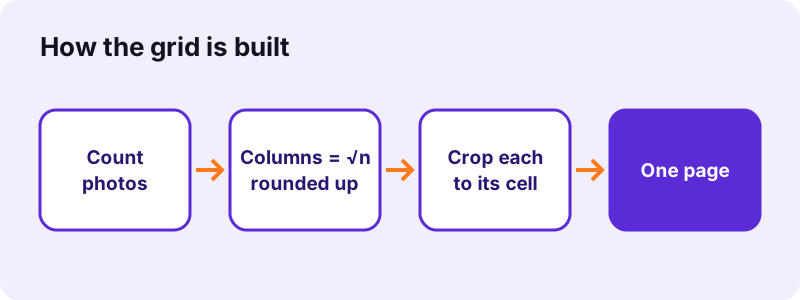
| Photos on the page | Columns × rows |
|---|---|
| 2 | 2 × 1 |
| 3 | 2 × 2, last row centred |
| 4 | 2 × 2 |
| 6 | 3 × 2 |
| 9 | 3 × 3 |
| All (e.g. 12) | 4 × 3 |
| All, maximum | 16 = 4 × 4 |
On a landscape page, rows and columns swap when that fits the shape better, so 6 photos become 3 across and 2 down either way, while 3 photos stand 2 across with the third centred below.
pdf24 create photo collage: cropping explained
Cells are rarely the same shape as the photos, so pdf24 create photo collage scales each picture until it covers the cell and the overflow is trimmed equally from both sides. Faces near the edge of a photo can be cut. Crop such photos first, or choose a layout whose cells are closer to the photo shape: tall cells for portrait photos, wide cells for landscape ones.
pdf24 create photo collage with too few or too many photos
With a fixed layout, extra photos are left out and the result says so: in our test 6 photos on the 4-photo layout gave the note 2 photos did not fit the chosen layout and were left out. With fewer photos than cells, the photos repeat to fill the grid, for example 3 photos on the 9-photo layout appear three times each.
pdf24 create photo collage and multi-page TIFF
A TIFF file with several pages counts as several photos, one per page. That makes it easy to put a scanned set of prints on one sheet.
pdf24 create photo collage: gap tip
Medium is the default gap, about 2.4 % of the page width. Pick None for a seamless mosaic, Wide when you want to cut the prints apart with scissors afterwards.
PDF or JPG: which file should pdf24 create photo collage save?
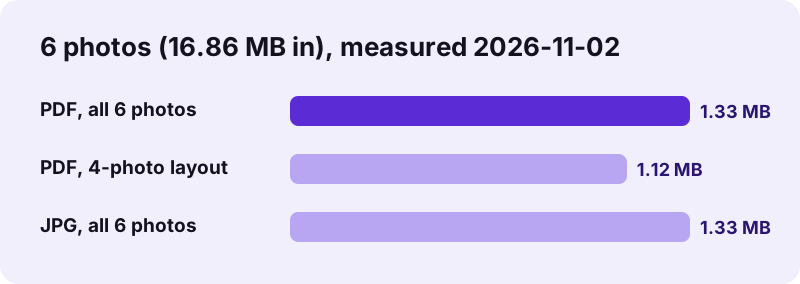
Choose PDF when you print the collage, because the PDF page is exactly A4 or square and prints at the right size; choose JPG for WhatsApp, Instagram, a digital frame or a website. In our test both versions of a 6-photo collage were 1.33 MB, since the PDF simply wraps the same JPEG picture.
| Shape | Pixels (JPG and inside the PDF) | PDF page |
|---|---|---|
| Portrait | 1,754 × 2,480 | A4, 210 × 297 mm |
| Landscape | 2,480 × 1,754 | A4, 297 × 210 mm |
| Square | 2,160 × 2,160 | 210 × 210 mm |
1,754 × 2,480 pixels on A4 is about 212 dpi, sharp for a home print or a photo-shop print of the same size. The picture is saved as JPEG at quality 0.9, which keeps photos clean while 16.86 MB of phone photos shrank to 1.33 MB.
Is pdf24 create photo collage private?
Yes. The photo collage is drawn on a canvas inside your browser and saved from there; the result line reports 0 bytes uploaded. Holiday photos, children's pictures and screenshots stay on your phone or computer, nothing is stored after you close the tab, and there is no account or gallery that keeps copies.
pdf24 create photo collage keeps working without internet once the page is open, which you can test by switching to flight mode before pressing Make collage. Only the finished file you download exists afterwards.
pdf24 create photo collage ideas and settings
Five background colours in pdf24 create photo collage set the mood: white for a clean print, black for a gallery look, cream for warm vintage photos, blush pink for weddings and baby photos, sky blue for summer and travel. The colour shows in the gaps and around the outside edge.
“…the process and the result of making a composite photograph by cutting, gluing, rearranging and overlapping two or more photographs into a new image.”
- Family calendar page: 9 photos, square, thin gap, white.
- Party invitation: 4 photos, portrait, medium gap, blush pink, then add text with edit PDF.
- Card front: make a collage as JPG and use it in create card.
- Photo book page: 6 photos, landscape, wide gap, cream.
- Contact sheet of scans: All photos, none, black.
What pdf24 create photo collage cannot do
pdf24 create photo collage makes a grid only: no free placement, no rotation, no overlapping, no text or stickers, and one page per collage. For a multi-page photo document with one picture per page, use JPG to PDF or images to PDF instead; to print many PDF pages on one sheet, use pages per sheet.
pdf24 create photo collage: frequently asked questions
Is pdf24 create photo collage free?
Yes. Making collages costs nothing, needs no account and adds no watermark, so your photos stay the only thing on the page. Make as many collages as you like: the work is done by your browser, so there is no server cost, no daily limit and no quality reduction for free users.
How many photos can pdf24 create photo collage use?
From 2 up to 16 on one page with All photos (automatic grid). Fixed layouts hold 2, 3, 4, 6 or 9 photos. If you add more photos than the layout holds, the extra ones are left out and the result tells you how many; for more than 16, make two collages.
Does pdf24 create photo collage upload my photos?
No. The photos are decoded and drawn on a canvas inside your browser tab, and the collage is saved from there; the result line shows 0 bytes uploaded. Nothing is stored after you close the page. Private pictures never reach a server, which also makes the tool fast with large phone photos.
Why are my photos cropped in pdf24 create photo collage?
Every photo is scaled to fill its cell completely and trimmed equally on both sides, so the grid has no empty bands. When a photo's shape differs a lot from the cell, more is cut. Pick a layout with cells closer to your photo shape, or crop the photo yourself before adding it.
Can pdf24 create photo collage save as JPG?
Yes. Choose JPG image under Save as and you get collage.jpg, 1,754 × 2,480 pixels for a portrait page, 2,480 × 1,754 for landscape or 2,160 × 2,160 for square. In our test a 6-photo JPG was 1.33 MB, small enough for messengers and social media.
What resolution does pdf24 create photo collage print at?
About 212 dpi on A4: the portrait page is 1,754 × 2,480 pixels on 210 × 297 mm. That is sharp at normal viewing distance for home prints and photo-shop prints of A4 size. Printing much larger than A4 will look soft, so keep the collage at A4 or smaller.
Can I change the order in pdf24 create photo collage?
Yes. Photos fill the grid from left to right and top to bottom in the order of the file list, and the arrow buttons next to each file move it up or down. Put the most important photo first, so it sits at the top left where people look first.
Can pdf24 create photo collage add text?
No, the collage contains photos and the background colour only. Save it as PDF and add a title with the edit PDF tool, or save it as JPG and use it as the front picture of a greeting card with create card, which adds a title and a message.
Does pdf24 create photo collage work with iPhone photos?
Yes. HEIC photos are converted in the browser, along with JPG, PNG, WebP, GIF, BMP, TIFF and SVG. On an iPhone, choose the photos straight from your library in Safari; the finished collage can be saved to Photos as a JPG or to Files as a PDF.
Why does a photo appear twice in pdf24 create photo collage?
Because the layout has more cells than you added photos. With a fixed layout such as 9, the tool repeats your photos to fill all cells. Choose All photos (automatic grid) instead, which uses exactly as many cells as you have photos, up to 16.
Can pdf24 create photo collage make a square collage for Instagram?
Yes. Choose Square as the shape and JPG as output; the image is 2,160 × 2,160 pixels, which Instagram scales down to its square format without cropping. Thin or no gaps look best on a phone screen, where every pixel of the post counts.
Is pdf24 create photo collage made by PDF24?
No. pdf24tools is an independent website and is not affiliated with PDF24 or Geek Software GmbH. We built this collage maker ourselves; it runs in your browser, and the sizes and times on this page come from our own test with six photos on 2026-11-02.
pdf24 create photo collage: sources
- Photomontage — Wikipedia
- Canvas API — MDN Web Docs
- JPEG — Wikipedia