How to use pdf24 images to PDF in 4 steps
- Choose all the pictures. Tap Choose images and select every file at once, or press Add more files to add others later. Formats can be mixed.
- Arrange the order. Use the ↑ and ↓ arrows in the file list; the PDF pages follow that order.
- Pick page size, margin and quality. A4 or US Letter for documents, Same as image for photo albums, Small file for email.
- Convert and download. Press Convert to PDF and save images.pdf. Scroll through it to check every page.
Which formats does pdf24 images to PDF combine?
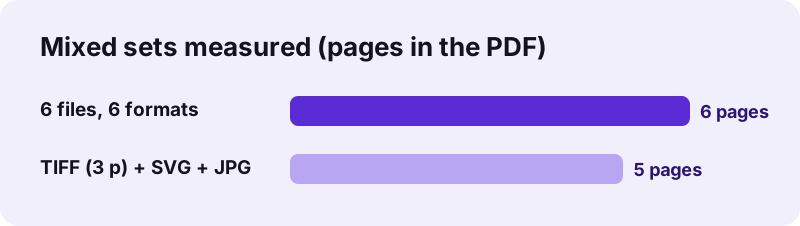
pdf24 images to PDF accepts nine kinds of picture in one run: JPG and JPEG, PNG, WebP, HEIC and HEIF, TIFF, SVG, GIF and BMP. Our test put a JPG photo, a PNG chart, a WebP, an iPhone HEIC, a GIF and a BMP into one 6-page PDF of 3.73 MB in 2.0 seconds.
| Format | Stored in the PDF as | Pages per file |
|---|---|---|
| JPG / JPEG | the original JPEG, unchanged | 1 |
| PNG | lossless PNG data, transparency kept | 1 |
| WebP, GIF, BMP | JPEG 88 %, up to 3,000 px | 1 (GIF: first frame) |
| HEIC / HEIF | JPEG 88 %, up to 4,000 px | 1 per image in the file |
| TIFF | lossless PNG, up to 4,000 px | 1 per TIFF page |
| SVG | lossless PNG, drawn at 2,000 px | 1 |
“PDF was standardized as ISO 32000 in 2008.”
pdf24 images to PDF with multi-page TIFF files
A multi-page TIFF expands into all its pages at the position of the file in the list. Our second test put a 3-page TIFF scan, an SVG logo and a JPG scan together and got a 5-page US Letter PDF of 2.09 MB: three scan pages, then the logo, then the photo. Every file is decoded with the method its format needs, so pdf24 images to PDF can take a fax TIFF and a vector logo in the same run without any preparation on your side.
pdf24 images to PDF with portrait and landscape pictures
With orientation on Automatic, each page follows its own picture: a landscape chart gets a landscape page, the next portrait photo a portrait page. Viewers rotate nothing; you scroll through pages of two shapes. Force Portrait if every page must have the same shape for printing. Phone JPGs that rely on an orientation tag are turned upright too, in Original quality as well as High (smaller), and Original still copies the JPEG file itself unchanged.
pdf24 images to PDF for a photo album
For an album without white borders choose Same as image and Margin None. Every page then has its photo's exact size, one pixel per point. Albums for printing look better on A4 with a Large margin of 40 pt, about 14 mm, which leaves room for binding.
pdf24 images to PDF: tip for GIF and animated pictures
Animated GIF and WebP files contribute one frame, the one the browser shows first, because a PDF page is static. Our 3-frame test GIF gave a single page. Save the frames you need as separate pictures if each should get its own page.
How large is the PDF from pdf24 images to PDF?
The size of a pdf24 images to PDF file is roughly the sum of the pictures in Original quality, since JPG and PNG are copied unchanged and other formats become JPEG or PNG. Our six mixed files of 4.38 MB gave a 3.73 MB PDF; the Small file option shrinks phone photos by about 99 %.
The PDF was smaller than the inputs here because the large BMP became a compact JPEG. The opposite also happens: WebP and HEIC pictures grow when re-encoded as JPEG, because those formats compress photos better than JPEG does.
| Option | Effect | Best for |
|---|---|---|
| Original | JPG and PNG unchanged; others converted once | Printing, archiving |
| High (smaller) | Long side 3,000 px, JPEG | Large photo sets that must stay sharp |
| Small file | Long side 1,600 px, JPEG | Email, upload portals, phones |
Need a fixed limit such as 100 KB? The image to PDF under 100 KB page rebuilds the PDF with smaller pictures until it fits.
pdf24 images to PDF and readable text
Pictures of documents stay pictures: the text on them can be read and printed but not searched. Run OCR on the finished PDF to add a searchable text layer to every page.
Is pdf24 images to PDF private?
pdf24 images to PDF is private because every picture stays on your device: the browser reads the files with the File API, the decoders for HEIC and TIFF run in JavaScript on the page, and the PDF is built locally with pdf-lib. The result line confirms 0 bytes uploaded, and nothing is kept afterwards.
- No account, no watermark, no file limit.
- Works offline after the page has loaded.
- Only photos? JPG to PDF is the same tool with photo-focused advice.
- Several PDFs to join? Use merge PDF.
pdf24 images to PDF on phones and computers
The page runs in Chrome, Edge, Firefox and Safari on Windows, macOS, Linux, Android and iOS.
Mixed sets usually come from several places: a few photos from the gallery, a screenshot, a picture saved from a website, a scan from the Files app. On a phone you can press Add more files repeatedly to collect them from different folders before converting. On a computer, select files from several formats in one dialog.
Typical uses are visa and job applications that want every document in one PDF, insurance claims with photos and receipts, school assignments photographed page by page, and portfolios that combine drawings with photographs. A single PDF keeps the order fixed, prints in one go, and is accepted by almost every upload form, while a loose set of pictures in different formats often is not.
pdf24 images to PDF: frequently asked questions
Is pdf24 images to PDF free?
Yes. pdf24 images to PDF on this site costs nothing, has no account, adds no watermark and sets no daily limit. All the work runs in your browser, so there are no server costs to recover. You can combine as many pictures as your device's memory can hold in one PDF.
Is pdf24 images to PDF the official PDF24 tool?
No. pdf24tools is an independent website and is not affiliated with PDF24 or Geek Software GmbH. We use the search phrase in our titles because many people type it, but this converter, its code and the measurements here are our own. Your pictures stay on your device.
Can pdf24 images to PDF mix JPG, PNG and HEIC in one file?
Yes. Formats can be mixed freely in one run. JPG and PNG go into the PDF unchanged, HEIC photos are decoded and saved as JPEG, and TIFF and SVG are stored as lossless PNG. Our test combined six formats into one 6-page PDF in 2.0 seconds.
How do I change the page order in pdf24 images to PDF?
Use the ↑ and ↓ arrows next to each file in the list before you press Convert to PDF. The pages follow the list from top to bottom. A multi-page TIFF keeps its internal page order and appears at the position of the TIFF file in the list.
Does pdf24 images to PDF upload my pictures?
No. The pictures are read with the browser File API and processed on your device. The PDF is assembled locally, the result line reports 0 bytes uploaded, and nothing is stored on a server. After the page has loaded you can switch on airplane mode and it still works.
Does pdf24 images to PDF reduce quality?
Not for JPG and PNG in Original mode, which are copied into the PDF unchanged. WebP, GIF, BMP and HEIC must be re-encoded as JPEG at 88 % quality, because a PDF cannot store those formats; the difference is not visible. High and Small file reduce size and quality on purpose.
What page size does pdf24 images to PDF use?
A4 by default, with each page's orientation following its picture. US Letter is the other paper size, and Same as image makes each page exactly as large as its picture. Margins are None, Small at 20 pt or Large at 40 pt, and pictures are never cropped.
Can pdf24 images to PDF handle many pictures at once?
Yes, limited only by your device's memory. Large photo sets in Original quality make large PDFs, around 3–4 MB per modern phone photo, so choose Small file for long sets that will be emailed. Phones are slower than computers because they do all the decoding themselves.
What happens to transparent pictures in pdf24 images to PDF?
PNG transparency is kept in Original mode and shows the white page behind it. Transparent WebP, GIF and SVG pictures, and PNGs in High or Small mode, are placed on white before they are saved, because they become JPEG or flattened PNG. On a white page the result looks the same.
Does pdf24 images to PDF work on iPhone?
Yes. In Safari tap Choose images, then pick from Photos or Files. iOS may pass photos as JPEG copies instead of HEIC; both work. The finished PDF is saved through the download prompt into the Files app, from where you can share it by mail or messages.
Can I add text pages to a PDF from pdf24 images to PDF?
Not in this tool, which only places pictures. Convert the pictures first, then use the merge tool to join the result with PDFs you already have, such as a cover letter exported from a word processor. The page order can be set during the merge.
More pdf24 images to PDF tools and guides
pdf24 images to PDF: sources
- PDF — Wikipedia
- PDF (Portable Document Format) Family — Library of Congress
- Image file type and format guide — MDN Web Docs