How do you pdf24 JPG to PDF without margin?
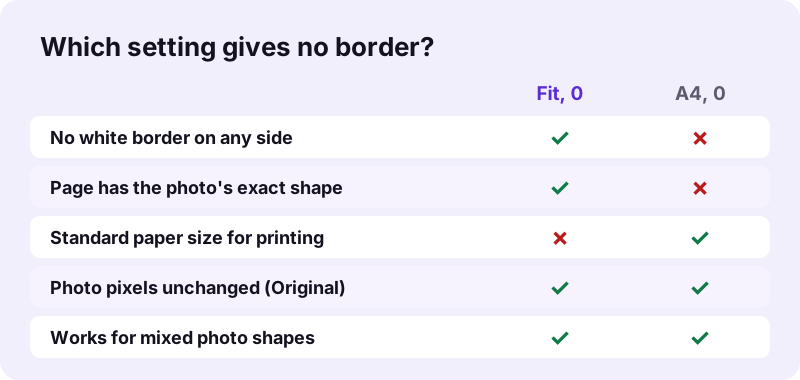
To convert JPG to PDF without any margin, open JPG to PDF, choose the photos, set Page size to Fit to image and Margin to 0, keep quality on Original and convert. Each page then has exactly the width and height of its photo, so the picture fills the page from edge to edge.
- Open JPG to PDF.
- Click Choose images and select one or more JPG files.
- Set Page size to Fit to image.
- Set Margin to 0.
- Keep Original quality, convert and download the PDF.
pdf24 JPG to PDF without margin: what Fit to image does
Fit to image sets the page size to the photo's size in pixels, read as points. Our 3024 × 4032 photos produced pages of exactly 3024 × 4032 points. The picture is drawn at scale 1 and nothing is added around it, so no white strip can appear on any side.
pdf24 JPG to PDF without margin for several photos
With several photos, each page takes the size of its own photo. A portrait shot and a landscape shot in the same PDF give one tall page and one wide page. That is fine for viewing on screen and for portals; for printing on one paper size, see the printing section below.
pdf24 JPG to PDF without margin: Fit plus a frame
Margin also works with Fit to image, but in the opposite direction: margin 20 makes the page 40 points wider and taller than the photo and centres the picture in a white frame. Keep margin 0 if you want no border.
pdf24 JPG to PDF without margin: quick check
Open the PDF and set the viewer's background to dark grey, or look at it on a dark page: any white strip at the edge shows up at once. With Fit to image and margin 0, the photo edge touches the page edge on all four sides.
Why does pdf24 JPG to PDF without margin still show white bands on A4?
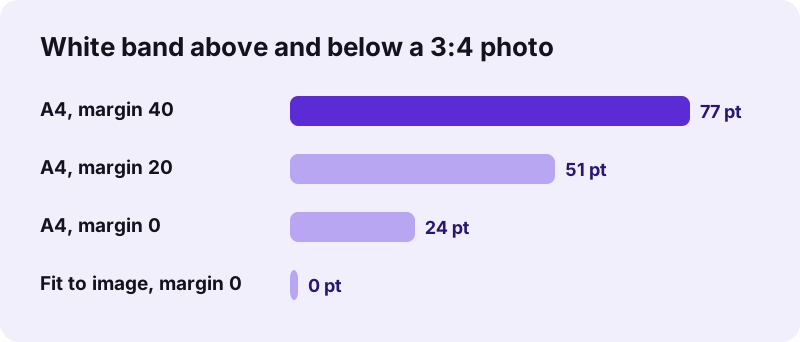
White bands appear on A4 because a phone photo and an A4 sheet have different shapes. A typical photo is 3:4, while A4 is about 1:1.41. The converter scales the photo to fit inside the page without cropping, so the leftover space at the top and bottom stays white, even at margin 0.
| Setting | Photo size on page | Band left/right | Band top/bottom |
|---|---|---|---|
| A4, margin 40 | 515 × 687 pt | 40 pt (14 mm) | 77 pt (27 mm) |
| A4, margin 20 | 555 × 740 pt | 20 pt (7 mm) | 51 pt (18 mm) |
| A4, margin 0 | 595 × 793 pt | 0 | 24 pt (8.6 mm) |
| Fit to image, margin 0 | 3024 × 4032 pt | 0 | 0 |
“In typography, a margin is the area between the main content of a page and the page edges.”
The same rule explains Letter pages: US Letter is 612 × 792 points, a ratio of about 1:1.29, so a 3:4 photo leaves smaller bands there than on A4 but still not zero. Only a page with the photo's own shape has no band, which is exactly what Fit to image produces.
Does pdf24 JPG to PDF without margin reduce photo quality?
Converting JPG to PDF without margin does not reduce quality when the quality option is Original. The JPEG data is embedded byte for byte: our three photos of 10.80 MB gave a 10.80 MB PDF in 0.2 seconds. Only the High and Smaller options re-encode the picture to save space.
| Settings | PDF size | Page size | Time |
|---|---|---|---|
| A4, margin 20, Original | 10.80 MB | 595 × 842 pt | 0.3 s |
| A4, margin 0, Original | 10.80 MB | 595 × 842 pt | 0.2 s |
| Fit to image, margin 0, Original | 10.80 MB | 3024 × 4032 pt | 0.2 s |
| A4, margin 20, Smaller | 113 KB | 595 × 842 pt | 0.9 s |
Removing the border does not crop the photo either: every pixel of the original stays visible. If you need a smaller file without a border, combine Fit to image with Smaller quality. A border-free page and a full-quality photo are therefore not a trade-off: you can pdf24 JPG to PDF without margin and keep every pixel at once, as long as page size is Fit to image and quality stays Original.
pdf24 JPG to PDF without margin for printing
For printing, a borderless PDF and a borderless print are two different things. Fit to image gives a page with no white edge, but its size follows the photo, so the print dialog scales it to your paper. Whether the paper itself has a white edge depends on the printer's borderless setting.
- Choose Fit to page or Scale to fit in the print dialog for Fit-to-image PDFs.
- Turn on borderless printing if your printer and paper support it.
- For A4 paper prints, crop the photo to about 1:1.41 first, then use A4 at margin 0: the photo then fills the page.
- Use Crop PDF afterwards to trim white bands from an A4 PDF you already made.
The A4 and Letter shapes are defined in the ISO 216 and North American paper standards; see international standard paper sizes for the exact ratios.
Is pdf24 JPG to PDF without margin private?
The JPG to PDF conversion is private because your photos stay on your device. The browser opens them with the File API and builds the PDF in JavaScript; the result line reports 0 bytes uploaded and our request log contained no POST request. No account is required and nothing is kept after you close the tab.
Note that Original quality embeds the JPEG file unchanged, including any camera details stored inside it. Choose High if you prefer the picture redrawn without those details. Background on local file access: MDN File API.
pdf24 JPG to PDF without margin on iPhone and Android
Phones handle borderless conversion in the browser without any app. Tap Choose images, pick photos from the library, set Page size to Fit to image and Margin to 0, and convert. iPhone HEIC photos work the same way through Images to PDF, which decodes HEIC directly in the browser.
| Phone | Photos from | PDF saved to |
|---|---|---|
| iPhone | Photo Library or Files | Files → Downloads |
| Android | Gallery or Files | Downloads |
Screenshots are a common case: a phone screenshot is very tall and narrow, so on A4 it leaves wide white bands left and right. With Fit to image the PDF page matches the screenshot exactly, which is the cleanest way to pdf24 JPG to PDF without margin for screen captures.
pdf24 JPG to PDF without margin: frequently asked questions
Is pdf24 JPG to PDF without margin free?
Yes. You can pdf24 JPG to PDF without margin on pdf24tools at no cost, with no sign-up and no watermark. There is no limit on photos per day. The PDF is built in your own browser on your device, so there is no server cost and no paid version with extra page sizes.
Why is there still a border in pdf24 JPG to PDF without margin?
You probably kept page size A4 or Letter. Those pages have a different shape than most photos, so white bands stay where the photo does not reach, even at margin 0. Switch Page size to Fit to image; then each page is exactly as large as its photo.
Does pdf24 JPG to PDF without margin crop my photo?
No. The photo is never cropped; it is scaled to fit inside A4 or Letter, or placed at full size with Fit to image. To fill an A4 page completely, crop the photo to the A4 shape in a photo app first, then convert with margin 0.
What page size does pdf24 JPG to PDF without margin create?
With Fit to image, each page takes the photo's pixel size as points. Our 3024 × 4032 photos gave 3024 × 4032-point pages, about 107 × 142 cm if printed at that size. Viewers and printers simply scale such pages to the screen or paper.
Can pdf24 JPG to PDF without margin keep full quality?
Yes, with quality set to Original. JPG files are then embedded unchanged, so the PDF holds exactly the same pixels; three photos of 10.80 MB gave a 10.80 MB PDF. Choose Smaller only if the file must be light, which gave 113 KB in our test.
Does pdf24 JPG to PDF without margin upload my photos?
No. The photos are read and placed into the PDF on your device. The result line says 0 bytes uploaded and our request log confirmed no file data was sent. That makes the tool fine for personal photos, ID pictures and documents photographed with a phone.
Can pdf24 JPG to PDF without margin combine several photos?
Yes. Choose several JPGs at once and sort them with the arrow buttons. Each photo gets its own page with Fit to image, sized to that photo, so portrait and landscape pictures can sit in one PDF without white borders. Thumbnails next to each name help you check the order.
How does pdf24 JPG to PDF without margin handle landscape photos?
With Fit to image, a landscape photo simply gets a wide page. On A4 or Letter with orientation Auto, a landscape photo gets a landscape sheet; our mixed test turned two of nine pages to 842 × 595 points. Bands then appear on the short sides instead.
Can I print pdf24 JPG to PDF without margin borderless?
The PDF has no border, but the paper print depends on your printer. Choose scale to fit in the print dialog and switch on borderless printing if the printer supports it. Without that, most printers leave a small unprintable edge of a few millimetres.
Does pdf24 JPG to PDF without margin work with PNG and HEIC?
JPG to PDF accepts all the same picture types as Images to PDF, including PNG, WebP, HEIC and TIFF. The page-size and margin options behave the same for every format, so Fit to image with margin 0 removes the border for screenshots and iPhone photos too.
Is pdf24 JPG to PDF without margin an official tool?
No. pdf24tools is an independent website and is not affiliated with PDF24 or Geek Software GmbH. Our JPG to PDF converter is our own browser code, and the measurements in this guide come from our own tests on 2 November 2026. Our code, prices and privacy rules are separate from theirs.
Can I remove margins from a PDF made earlier with pdf24 JPG to PDF without margin?
If you already have an A4 PDF with white bands, open it in Crop PDF and use the automatic mode: it trims each page to its printed content plus the padding you choose, set it to 0. Or simply convert the original photos again with Fit to image.
Does pdf24 JPG to PDF without margin change the photo colours?
No. At Original quality the JPEG data is copied unchanged, so colours are identical to the source file. Transparent areas in PNG files are shown on white, because each page gets a white background before the picture is drawn. High and Smaller re-encode the photo as JPEG, which keeps colours but can soften fine detail.
More pdf24 JPG to PDF without margin tools and guides
pdf24 JPG to PDF without margin: sources
- Margin (typography) — Wikipedia
- International standard paper sizes — Wikipedia
- File API — MDN Web Docs