How to use pdf24 tools SVG to PDF in 4 steps
- Choose the SVG. Tap Choose images or drop one or more .svg files on the box.
- Set the order. With several graphics, use the ↑ and ↓ arrows to decide which page comes first.
- Pick the page size. A4 or US Letter puts the graphic on paper with a margin; Same as image with no margin makes the page exactly the graphic's shape.
- Convert and download. Press Convert to PDF, save the file and zoom in to check edges and text.
How does pdf24 tools SVG to PDF convert a vector file?
pdf24 tools SVG to PDF lets the browser render the SVG, scaled so its long side is 2,000 pixels, and stores that rendering as a lossless PNG on the PDF page. The result is a high-resolution picture of the graphic, not editable vector paths, which is the honest trade-off of doing the conversion without a server.
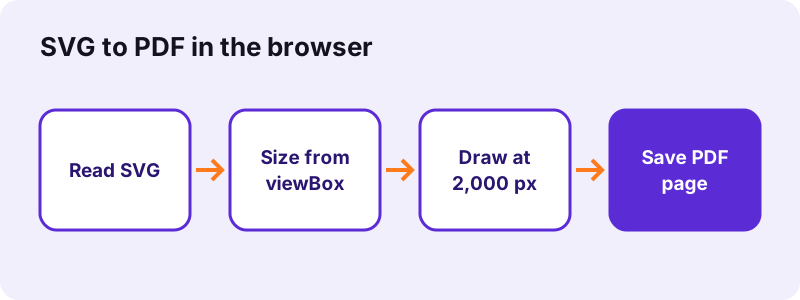
The size comes from the SVG itself: the width and height attributes if present, otherwise the viewBox. Our test logo had only a viewBox of 400 × 200, so it was drawn at 2000 × 1000 pixels. Graphics without any size information are treated as 1000 × 1000 units before scaling.
“SVG images can thus be scaled in size without loss of quality, and SVG files can be searched, indexed, scripted, and compressed.”
pdf24 tools SVG to PDF and print sharpness
2,000 pixels across an A4 width of 210 mm gives about 240 dpi, more than enough for office printing and screens. A logo printed at 5 cm wide gets far more than that. For large-format posters or professional prepress that need true vector paths, export a PDF from the drawing program itself instead.
pdf24 tools SVG to PDF with text inside the graphic
Text in the SVG is drawn with the fonts installed on your device. A logo that names a font you do not have falls back to a default font, so check the preview. In the PDF the text becomes part of the picture: it looks right but cannot be selected or searched. Convert text to outlines in your editor before exporting if the exact font matters.
pdf24 tools SVG to PDF and linked images
Browsers draw an SVG used as an image in a sandbox: scripts do not run and files linked from the SVG, such as external pictures or web fonts, are not loaded. Graphics that embed everything inside the file convert fully; graphics that point to other files may come out with gaps.
pdf24 tools SVG to PDF: tip for a borderless page
Set Page size to Same as image and Margin to None. The PDF page then measures 2000 × 1000 pt for a 2:1 logo, with no white frame, ideal for sending a logo proof. With A4, orientation Automatic chose landscape for our wide logo.
Why is the PDF from pdf24 tools SVG to PDF bigger than the SVG?
pdf24 tools SVG to PDF output is bigger because an SVG is a short text description of shapes, while the PDF stores the drawn pixels. Our 269-byte logo became 2,000 × 1,000 pixels of image data, 45.8 KB as a PDF. Simple flat graphics stay small; detailed illustrations with gradients produce larger files.
| Quality option | How the page is stored | Our 269 B logo |
|---|---|---|
| Original | PNG, lossless, 2,000 px long side | 45.8 KB, 0.6 s |
| High (smaller) | JPEG 88 %, 2,000 px | not measured |
| Small file | JPEG 88 %, 1,600 px | not measured |
Keep Original for logos and line art, because JPEG adds soft halos around sharp edges. The smaller modes make sense only for photo-like SVGs with many colours. For a file that must stay under a portal limit, convert first and then use the compress tool, which lets you type the exact size you need.
pdf24 tools SVG to PDF and transparent backgrounds
The converter paints a white background behind the graphic before drawing it, so transparent parts of the SVG appear white in the PDF. On a printed page that is invisible. If you need a transparent picture instead, SVG to PNG keeps the transparency.
Is pdf24 tools SVG to PDF private?
pdf24 tools SVG to PDF is private: the SVG is read with the File API and drawn by your own browser, and the PDF is assembled on your device. The result line shows 0 bytes uploaded. Unreleased logos, client artwork and internal diagrams never reach a server, and the tool works offline after loading.
- No account, no watermark, no file limit.
- Several SVG files become a multi-page PDF in one run.
- Mix SVG with photos and scans on the images to PDF page.
- Need a picture file instead? See SVG to JPG.
pdf24 tools SVG to PDF on Windows, Mac and phones
The page works in Chrome, Edge, Firefox and Safari on any operating system.
SVG files come from Inkscape, Illustrator, Figma, icon libraries and chart tools. On a desktop, drop them on the box; on a phone, pick them from the Files app. Because each browser renders SVG with its own engine, tiny differences in text spacing between Chrome and Safari are possible; check the preview in the browser you use.
The SVG format is an open standard of the World Wide Web Consortium, published since 1999, and every current browser displays it. That is what makes an in-browser converter possible at all: the page asks the browser to draw the file exactly as it would on a website, then saves that drawing into the PDF. Animations and hover effects in an SVG are not carried over; the PDF shows the graphic's first, static state.
pdf24 tools SVG to PDF: frequently asked questions
Is pdf24 tools SVG to PDF free?
Yes. pdf24 tools SVG to PDF on this site is free, with no account, no watermark and no daily limit. The SVG is drawn by your own browser and the PDF is assembled on your device, so there is no server cost involved. You can convert as many graphics as you need.
Is pdf24 tools SVG to PDF the PDF24 tool?
No. pdf24tools is an independent site and is not affiliated with PDF24 or Geek Software GmbH. We use the search phrase in our titles because people type it, but this converter, its code and the measurements on this page are our own. Your files stay on your device.
Does pdf24 tools SVG to PDF keep vector quality?
No, and we say so openly. The SVG is drawn at 2,000 pixels on its long side and stored as a lossless PNG, so the PDF contains a sharp picture rather than vector paths. That is plenty for screens and office printing; for posters or prepress, export the PDF from the design program.
Can I select text in a PDF from pdf24 tools SVG to PDF?
No. Text inside the SVG is drawn into the picture, so it looks correct but cannot be selected, searched or copied. If you need searchable text, run the OCR tool on the finished PDF, or export the PDF directly from the program that created the SVG.
Why does my font look different after pdf24 tools SVG to PDF?
The browser draws SVG text with fonts installed on your device and does not download web fonts linked from the file. If the font is missing, a default font is used. Convert the text to outlines in your vector editor before exporting, and the shapes will be exact.
Does pdf24 tools SVG to PDF upload my artwork?
No. The SVG is read with the browser File API and rendered locally. The PDF is built on your device with the pdf-lib library, the result line reports 0 bytes uploaded, and nothing is stored anywhere. You can disconnect from the internet after the page loads and it keeps working.
Can pdf24 tools SVG to PDF put several SVGs in one PDF?
Yes. Select all the SVG files or add them with Add more files. Each graphic becomes one page in the order shown, and the arrows in the file list change that order. Icon sets and diagram series can be collected into a single multi-page PDF this way.
Why are parts of my SVG missing after pdf24 tools SVG to PDF?
Browsers do not load files that an SVG links to when it is drawn as an image, such as external pictures, and they do not run scripts. Embed linked pictures inside the SVG, or flatten the artwork in your editor, then convert again. Fully self-contained SVGs convert completely.
What page size does pdf24 tools SVG to PDF use?
A4 by default, with orientation chosen automatically: our wide 2:1 logo got a landscape page. US Letter is the other paper size. Same as image makes the page as large as the rendered graphic, 2000 × 1000 pt for that logo, and with Margin None there is no white border.
Does pdf24 tools SVG to PDF keep transparency?
No. A white background is painted behind the graphic before it is drawn, so transparent areas appear white in the PDF. On a printed page this makes no difference. Use the SVG to PNG converter on this site if you need a picture with a transparent background.
Does pdf24 tools SVG to PDF work on an iPhone?
Yes. Open the page in Safari, tap Choose images and pick the SVG from the Files app. Safari draws the SVG with its own engine, so text spacing can differ very slightly from Chrome. The PDF downloads to Files, where you can share it or open it in any PDF viewer.
More pdf24 tools SVG to PDF tools and guides
pdf24 tools SVG to PDF: sources
- SVG — Wikipedia
- Scalable Vector Graphics (SVG) 2 — W3C
- File API — MDN Web Docs