How to use pdf24 SVG to PNG in 4 steps
- Choose the SVG files. Tap Choose images or drop one or more .svg files on the box.
- Check the list. Each SVG in the list becomes one PNG; remove any file you do not need.
- Press Convert images. The browser draws every SVG at 2,000 px on its long side and saves it as PNG.
- Download. One graphic downloads as .png; several come as one ZIP with a PNG for each SVG.
What does pdf24 SVG to PNG produce?
pdf24 SVG to PNG produces a raster picture of the SVG, 2,000 pixels on its long side, in lossless PNG with an alpha channel. Transparent areas of the graphic stay transparent: in our output the corner pixel had alpha 0. The 400 × 200 logo we tested became exactly 2000 × 1000 pixels.
The size comes from the SVG's width and height attributes, or from the viewBox when those are missing. Graphics with neither are treated as 1000 × 1000 units. The vector is drawn fresh at the target size, so a tiny 24-pixel icon becomes a crisp 2,000-pixel PNG, not a blurry enlargement.
“Raster images are characterized by their dimensions (width and height in pixels) and color depth (the number of bits per pixel).”
pdf24 SVG to PNG for logos on any background
A transparent PNG logo sits cleanly on a coloured slide, a dark theme or a photo, without the white box a JPG would bring. That makes PNG the usual format for presentation decks, office letterheads, video overlays and email signatures where SVG is not supported.
pdf24 SVG to PNG for app icons and stores
App stores, browser extension galleries and favicon generators often want PNG at a fixed size. Convert once at 2,000 pixels, then scale down in an image editor to 512, 192 or 48 pixels as each platform requires; scaling down from a large sharp picture gives clean results.
pdf24 SVG to PNG with fonts and linked files
Text in the SVG uses fonts installed on your device, and the browser does not fetch external pictures, web fonts or style sheets when it draws an SVG as an image. Convert text to outlines and embed linked pictures before exporting from your design program for an exact result.
pdf24 SVG to PNG: tip for a white background
Some forms and print services expect a picture without transparency. Use SVG to JPG, which paints white behind the graphic, or place the PNG on a white layer in any editor. Keep the transparent file from pdf24 SVG to PNG as your master copy, since adding a background later is easy, while removing a white background from a JPG takes careful masking work around every edge.
Is a PNG from pdf24 SVG to PNG as sharp as the SVG?
A PNG from pdf24 SVG to PNG is perfectly sharp at its own size of 2,000 pixels on the long side, because PNG stores every pixel without loss. Unlike the SVG it cannot grow further without blurring. For screens, slides and office printing up to about 17 cm at 300 dpi, that resolution is more than enough.
| Property | SVG | PNG (this tool) | JPG |
|---|---|---|---|
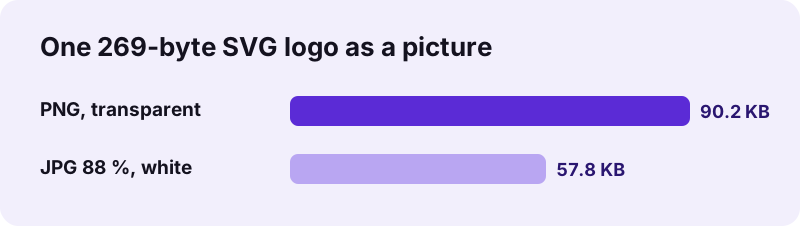
| Our test file | 269 B | 90.2 KB | 57.8 KB |
| Scales without loss | Yes | No, fixed at 2,000 px | No |
| Transparency | Yes | Yes | No, white |
| Accepted by most apps | No | Yes | Yes |
| Edges | Perfect | Perfect at 2,000 px | Slight halos possible |
The PNG converter has no quality setting: PNG is lossless, so there is nothing to tune. File size depends on the graphic; flat logos stay small, detailed illustrations with gradients and shadows grow.
pdf24 SVG to PNG and very large print jobs
The output size is fixed at 2,000 pixels. Posters, banners and vehicle graphics need more; for those, export a large PNG or a PDF from the design program, or send the SVG itself to a print shop that accepts vector files.
Is pdf24 SVG to PNG private?
pdf24 SVG to PNG is private because your graphics never leave the device. The SVG is read with the File API, drawn by your own browser and encoded as PNG with its canvas encoder. The result line shows 0 bytes uploaded, so unpublished logos and client artwork are safe, and the converter works offline after loading.
- No account, no watermark, no file limit.
- Several SVGs come back as one ZIP file.
- Graphics on PDF pages: SVG to PDF.
- The PNG carries no metadata about the source file.
pdf24 SVG to PNG on phones and computers
The page works in Chrome, Edge, Firefox and Safari on Windows, macOS, Linux, Android and iOS.
On a computer, drag SVG files from your design tool's export folder onto the box. On a phone, pick them from the Files app; SVG files rarely appear in the photo gallery, because phones treat them as documents rather than pictures. Each browser renders SVG with its own engine, so tiny differences in text spacing are possible between Safari and Chrome.
SVG is an open W3C standard and every browser displays it, which is what makes conversion in the browser reliable: the page asks the browser to draw the graphic exactly as a website would, then saves the drawing. Many places outside the browser still refuse SVG, partly because the format can contain scripts. Word processors, chat apps, marketplaces and social networks expect PNG or JPG, and PNG is the one that keeps transparency.
pdf24 SVG to PNG speed and batches
Our 269-byte logo converted in 0.1 s on a laptop. Complex illustrations with many paths, filters or blur effects take longer to draw, more so on a phone. A batch of icons comes back as one ZIP named after the first file, holding a PNG with the same base name for every SVG. Unzip it with the tool built into your system.
pdf24 SVG to PNG: frequently asked questions
Is pdf24 SVG to PNG free?
Yes. pdf24 SVG to PNG on this site costs nothing, needs no account and adds no watermark. The browser draws and encodes every graphic, so there is no server cost and no daily limit. Any current browser on a phone, tablet or computer can run it.
Is pdf24 SVG to PNG made by PDF24?
No. pdf24tools is an independent website and is not affiliated with PDF24 or Geek Software GmbH. We use the search phrase in our titles because people type it, but this converter, its code and the measurements on this page are our own. Your files are processed only on your device.
Does pdf24 SVG to PNG keep the transparent background?
Yes. Transparent and semi-transparent areas of the SVG stay transparent in the PNG, which is saved with an alpha channel. Our test logo's corner pixel had alpha 0, fully transparent. Nothing is filled with white, unlike a conversion to JPG.
What size is the PNG from pdf24 SVG to PNG?
Always 2,000 pixels on the long side, with the SVG's proportions. A 2:1 logo becomes 2000 × 1000 pixels, a square icon 2000 × 2000. The size is taken from the SVG's width and height or its viewBox. Scale the PNG down in an editor if you need smaller versions.
Does pdf24 SVG to PNG upload my graphics?
No. The SVG is read with the browser File API and drawn locally. The PNG is encoded by the browser, the result line reports 0 bytes uploaded, and nothing is stored on any server. After loading the page you can disconnect and the converter still works.
Why do the fonts change in pdf24 SVG to PNG?
The browser draws SVG text with fonts installed on your device and does not download web fonts that the SVG links to. When the font is missing, a default font replaces it. Convert the text to outlines in your design program before exporting to keep the exact letter shapes.
Can pdf24 SVG to PNG convert a whole icon set?
Yes. Select all the SVG files at once. One file downloads directly as a PNG; two or more come as one ZIP file with a PNG for each SVG, named after the originals. The only limit is the memory of your device.
Why is the PNG bigger than the SVG after pdf24 SVG to PNG?
An SVG is a short text description of shapes, while a PNG stores millions of pixels. Our 269-byte logo became 2 million pixels in 2000 × 1000 format, 90.2 KB as PNG. Flat graphics stay small; detailed illustrations with gradients make larger files.
Can pdf24 SVG to PNG make favicons?
It makes the large starting picture. Convert the SVG to a 2,000-pixel PNG here, then scale it down to 32, 48, 192 or 512 pixels in an image editor or a favicon generator. Starting from a big sharp picture gives cleaner small icons than enlarging a small one.
Does pdf24 SVG to PNG work on an iPhone?
Yes. Open the page in Safari, tap Choose images and pick the SVG from the Files app. Safari draws SVG with its own engine, so text spacing can differ very slightly from other browsers. The PNG downloads into Files, from where you can save it to Photos.
Are parts of my drawing missing after pdf24 SVG to PNG?
Browsers draw an SVG used as an image without loading linked pictures, fonts or style sheets, and without running scripts. Embed the linked parts inside the SVG or flatten the artwork in your editor, then convert again. Fully self-contained SVGs convert completely.
More pdf24 SVG to PNG tools and guides
pdf24 SVG to PNG: sources
- SVG — Wikipedia
- Scalable Vector Graphics (SVG) 2 — W3C
- Portable Network Graphics (PNG) Specification — W3C