How to use pdf24 SVG to JPG in 4 steps
- Choose the SVG files. Tap Choose images or drop the .svg files on the box. Several graphics can be converted at once.
- Pick the JPEG quality. High (88 %) suits most uses; Best (95 %) gives the cleanest edges for logos.
- Press Convert images. The browser draws each SVG at 2,000 px on its long side and saves it as JPEG.
- Download. One graphic downloads as .jpg; several come as one ZIP with a JPG for each SVG.
How does pdf24 SVG to JPG turn a vector into a picture?
pdf24 SVG to JPG asks the browser to render the SVG, scaled so its long side is exactly 2,000 pixels, paints the result on a white background and saves it as a JPEG at the quality you choose. Our 400 × 200 logo became a 2000 × 1000 picture of 57.8 KB at the default 88 %.
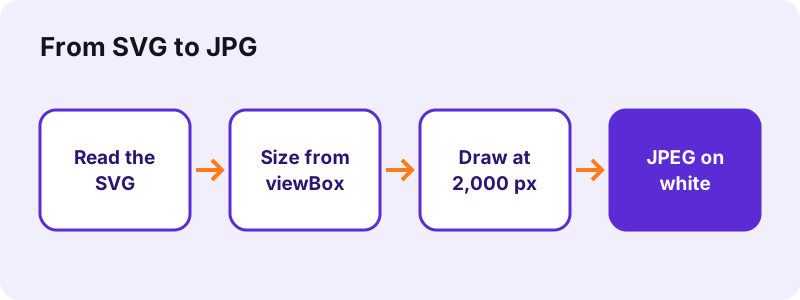
The size comes from the SVG: its width and height attributes, or the viewBox when those are missing, as in our test file. A graphic with neither is treated as 1000 × 1000 units. Small icons are scaled up and very large drawings scaled down, so every JPG has 2,000 pixels on its long side, sharp because the vector is drawn fresh at that size.
“SVG images are defined in a vector graphics format and stored in XML text files.”
pdf24 SVG to JPG and the white background
JPEG has no transparency. The converter paints white behind the graphic before drawing, so a transparent logo gets a clean white background, never a black one. In our output the corner pixel was pure white, 255, 255, 255. If you need the background transparent, use SVG to PNG, which keeps it.
pdf24 SVG to JPG with text in the graphic
SVG text is drawn with the fonts installed on your device. A file that names a font you do not have falls back to a default font, so compare the JPG with the design. Converting text to outlines in the design program before export makes the result identical on every device.
pdf24 SVG to JPG with linked images and fonts
When a browser draws an SVG as an image, it does not load anything the file links to: external pictures, web fonts and style sheets stay out, and scripts do not run. Self-contained SVGs convert completely; if parts are missing, embed them in the file or flatten the artwork first.
pdf24 SVG to JPG: tip for crisp logo edges
JPEG can leave faint halos around hard edges and flat colour. For logos choose Best (95 %), which keeps edges cleanest, or convert to PNG, which has no halos at all. For illustrations with gradients, High (88 %) is usually indistinguishable.
Which quality should I choose in pdf24 SVG to JPG?
pdf24 SVG to JPG offers four JPEG levels: Best at 95 %, High at 88 % (the default), Medium at 75 % and Small file at 60 %. The pixel size stays at 2,000 pixels on the long side for all four; the level only decides how much compression is applied, and therefore the file size and edge quality.
| Level | JPEG quality | Good for |
|---|---|---|
| Best | 95 % | Logos, line art, print |
| High (default) | 88 % | Web pages, documents |
| Medium | 75 % | Social media previews |
| Small file | 60 % | Strict upload limits |
A 2000 × 1000 JPG is large enough for a full-width web banner, a slide or a printed page about 17 cm wide at 300 dpi. Because the size is fixed by the converter, very large print jobs that need 5,000 pixels or more should be exported from the design program itself.
pdf24 SVG to JPG compared with PNG output
From the same 269-byte logo, the JPG at 88 % measured 57.8 KB and the PNG 90.2 KB. The JPG came out smaller for this logo, but PNG keeps flat edges and text perfectly sharp, with no halos. When size matters, convert to both and keep the better file.
Is pdf24 SVG to JPG private?
pdf24 SVG to JPG is private because the graphics never leave your device. The SVG is read with the File API, drawn by your own browser and encoded with its canvas encoder. The result line shows 0 bytes uploaded, so unreleased logos, client artwork and internal diagrams stay with you, and the page works offline.
- No account, no watermark, no limit on files.
- Several SVGs download as one ZIP file.
- Graphics on printable pages: SVG to PDF.
- The JPG gets no EXIF data, so nothing reveals how it was made.
pdf24 SVG to JPG on phones and computers
The converter works in Chrome, Edge, Firefox and Safari on every major operating system.
SVG files come from Figma, Illustrator, Inkscape, icon libraries, chart tools and logo makers. On a computer, drop them on the box; on a phone, pick them from the Files app. Each browser renders SVG with its own engine, so tiny differences in text spacing between browsers are possible; check the preview in the one you use.
Why convert at all? SVG is the best format for a logo on your own website, because it stays sharp at every size and weighs only a few hundred bytes. Many other places refuse it: marketplaces, profile pictures, email signatures, document templates, chat apps and some content management systems block SVG uploads, partly because an SVG can contain scripts. A JPG has no such risk, so it is accepted almost everywhere.
Our conversion with pdf24 SVG to JPG took 0.1 s on a laptop, for a file of 269 bytes. Complex drawings with thousands of paths and filters take longer to render, especially on a phone, but stay within seconds for typical logos and icons.
pdf24 SVG to JPG: frequently asked questions
Is pdf24 SVG to JPG free?
Yes. pdf24 SVG to JPG on this site costs nothing, needs no account and adds no watermark. Your browser draws and encodes the graphics, so there is no server cost to pass on and no limit on the number of files. A current browser on any device is all you need.
Is pdf24 SVG to JPG made by PDF24?
No. pdf24tools is an independent website and is not affiliated with PDF24 or Geek Software GmbH. We use the search phrase in our titles because people type it, but this converter, its code and the measurements on this page are our own. Your graphics are processed only on your device.
What size is the JPG from pdf24 SVG to JPG?
Always 2,000 pixels on the long side, with the proportions of the SVG. A 2:1 logo becomes 2000 × 1000 pixels, a square icon 2000 × 2000. The size comes from the SVG's width and height or its viewBox. There is no setting for other sizes yet.
Why does pdf24 SVG to JPG add a white background?
JPEG cannot store transparency, so something has to fill the transparent areas. The converter paints white before drawing the graphic, which looks clean on white pages and avoids the black backgrounds some converters produce. Use SVG to PNG if you need a transparent result instead.
Does pdf24 SVG to JPG upload my files?
No. The SVG is read with the browser File API and rendered on your device. The JPEG is made with the browser's canvas encoder, the result line reports 0 bytes uploaded, and nothing is stored. You can go offline after the page has loaded and it keeps working.
Why do the fonts look different after pdf24 SVG to JPG?
The browser draws SVG text with fonts installed on your device and does not download web fonts linked from the file. A missing font is replaced by a default one. Convert text to outlines in your design program before exporting, and the letters will be exact on every device.
Why are parts missing after pdf24 SVG to JPG?
Browsers draw an SVG used as an image without loading linked files such as external pictures, fonts or style sheets, and without running scripts. Embed those parts inside the SVG or flatten the artwork in your editor, then convert again. Self-contained files convert completely.
Can pdf24 SVG to JPG convert many SVG files at once?
Yes. Select all the SVG files together. One graphic downloads as a single JPG, two or more as a ZIP file with one JPG per SVG, named like the originals. Icon sets can be converted in one step this way, limited only by your device's memory.
Is a JPG from pdf24 SVG to JPG sharp enough to print?
For most uses, yes. 2,000 pixels print about 17 cm wide at 300 dpi, or a full A4 width at about 240 dpi. Posters and large-format prints need more pixels; export those from the design program, or use the SVG directly if the print shop accepts vector files.
Does pdf24 SVG to JPG work on an iPhone?
Yes. Open the page in Safari, tap Choose images and pick the SVG from the Files app. Safari renders SVG with its own engine, so text spacing may differ very slightly from Chrome. The JPG downloads into Files, from where you can save it to Photos or share it.
When should I use PNG instead of pdf24 SVG to JPG?
Use PNG for logos and icons that need a transparent background, and for graphics with hard edges and text, which PNG keeps perfectly sharp. Use JPG when the place you upload to only accepts JPG, or when the graphic is photo-like with many colours and gradients.
More pdf24 SVG to JPG tools and guides
pdf24 SVG to JPG: sources
- SVG — Wikipedia
- Scalable Vector Graphics (SVG) 2 — W3C
- HTMLCanvasElement: toBlob() method — MDN Web Docs