How to use pdf24 WebP to PDF in 4 steps
- Choose the WebP files. Tap Choose images or drop the .webp files on the box. Each picture becomes one page.
- Set the order. Use the ↑ and ↓ arrows in the file list to move a picture up or down.
- Pick size and quality. A4 with a small margin suits printing. Small file makes the PDF lighter for email.
- Convert and download. Press Convert to PDF, save the file and open it to check the pages.
What does pdf24 WebP to PDF change in the picture?
pdf24 WebP to PDF has to re-encode every WebP picture, because the PDF format cannot store WebP data. The browser decodes the WebP, draws it on a white canvas and saves it as a JPEG at 88 % quality, which the PDF can hold. Size in pixels stays the same up to 3,000 pixels on the long side.
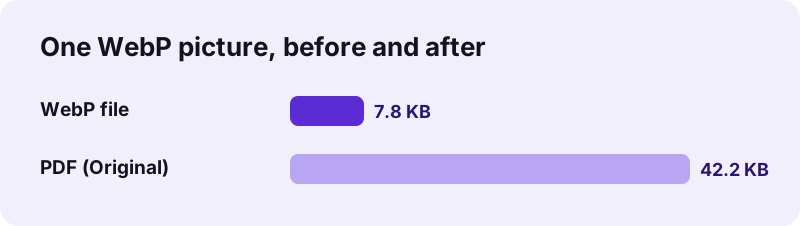
That extra step explains the size jump in our test: WebP compresses photos far better than JPEG, so the same 1000 × 1400 picture needs 42.2 KB as JPEG against 7.8 KB as WebP. The PDF is still small enough for any email or form, and every viewer can show it.
“WebP has seen widespread adoption across the Internet in order to reduce image size, with all major browsers currently supporting the format.”
pdf24 WebP to PDF for pictures saved from websites
Many websites serve their images as WebP, so Save image as often gives a .webp file even when the picture looked like a normal photo. Product photos, recipes, tickets, infographics and screenshots of web pages all arrive this way. Office programs and older viewers may not open them, while a PDF opens anywhere.
pdf24 WebP to PDF with transparent pictures
WebP can store transparency. Because the picture becomes a JPEG inside the PDF, transparent areas are filled with white first. Logos and stickers on a white page therefore look as expected; if you need to keep the transparency, convert to PNG first with WebP to PNG.
pdf24 WebP to PDF with animated WebP
An animated WebP, like a GIF, holds many frames. A PDF page is static, so only the frame the browser shows first is drawn. If you need several frames as separate pages, capture them as single pictures first.
pdf24 WebP to PDF: tip for very large pictures
Pictures wider or taller than 3,000 pixels are scaled down to 3,000 on the long side in Original and High modes, and to 1,600 in Small file. At 3,000 pixels an A4 page still gets about 250 dpi, so prints stay sharp.
Which settings work best in pdf24 WebP to PDF?
WebP to PDF works best with A4 or US Letter, automatic orientation and Original quality for printing, or Small file when the PDF goes by email. Original writes JPEG at 88 % quality; Small file writes JPEG at 60 % and 1,600 pixels, which is enough for reading on any phone screen.
| Option | Choices | Effect on WebP input |
|---|---|---|
| Page size | A4, US Letter, Same as image | Paper size or the picture's own size in points |
| Orientation | Automatic, Portrait, Landscape | Automatic follows the picture's shape |
| Margin | None, Small (20 pt), Large (40 pt) | White space around the picture |
| Image quality | Original, High, Small file | JPEG 88 % up to 3,000 px; JPEG 60 % at 1,600 px for Small |
Original and High behave the same for WebP input, since both have to re-encode. That is the main difference between pdf24 WebP to PDF and the JPG version of the tool, where Original copies the photo into the PDF untouched. For a fixed size limit, use WebP to PDF under 100 KB, which keeps shrinking until the PDF fits.
pdf24 WebP to PDF and text in the picture
A WebP holds pixels, so words in an infographic or a saved ticket become part of the page image. You can read and print them, but not select or search them. Run OCR on the PDF to add searchable text.
Is pdf24 WebP to PDF safe to use?
pdf24 WebP to PDF is safe because your pictures never leave the device: the browser reads them with the File API, decodes and draws them locally, and the PDF is built in JavaScript. The result line shows 0 bytes uploaded, there is no account or watermark, and nothing is stored after you close the tab.
- Works offline once the page has loaded.
- Several WebP files become one multi-page PDF.
- Mixed sets with JPG, PNG or HEIC work on images to PDF.
- Need a JPG picture instead of a PDF? Use WebP to JPG.
pdf24 WebP to PDF on phones and computers
The page runs in Chrome, Edge, Firefox and Safari on desktop and mobile.
Chrome on Android and desktop browsers save web images as WebP most often. On a phone, the saved pictures sit in Downloads or the gallery; tap Choose images and pick them there. Safari on iPhone and Mac decodes WebP as well, so the conversion works the same way on Apple devices. In our test pdf24 WebP to PDF needed 0.1 s for one picture on a laptop; a phone takes a little longer, because every picture is decoded and re-encoded on the device itself.
Google announced WebP in 2010 as a smaller replacement for JPEG and PNG on the web. It supports lossy and lossless compression, transparency and animation in one format. Its weakness is outside the browser: some print services, government portals and older office software still accept only PDF, JPG or PNG. That gap is exactly where turning a WebP into a PDF helps.
pdf24 WEBP to PDF: frequently asked questions
Is pdf24 WebP to PDF free?
Yes. pdf24 WebP to PDF on this site costs nothing, needs no account and adds no watermark. All decoding and PDF building run in your browser, so there is no server cost to pass on and no daily limit. You can convert as many WebP pictures as your device's memory holds.
Is pdf24 WebP to PDF made by PDF24?
No. pdf24tools is an independent website and is not affiliated with PDF24 or Geek Software GmbH. We use the common search phrase in our titles, but the converter, its code and every measurement on this page are our own. Your WebP pictures are processed only on your device.
Why is the PDF bigger than the WebP after pdf24 WebP to PDF?
A PDF cannot store WebP data, so each picture is re-encoded as JPEG, and JPEG needs more bytes than WebP for the same photo. Our 7.8 KB WebP became a 42.2 KB PDF. Choose Small file, or a size page such as under 100 KB, if the PDF must be lighter.
Does pdf24 WebP to PDF lose quality?
Very little. The picture is saved as JPEG at 88 % quality with the same pixel size, up to 3,000 pixels on the long side, which looks the same as the WebP on screen and in print. Small file uses 60 % and 1,600 pixels, which is still sharp on a phone.
Does pdf24 WebP to PDF upload my pictures?
No. The WebP files are read with the browser File API and processed on your device. The PDF is assembled locally with pdf-lib, the result line reports 0 bytes uploaded, and nothing is stored. The tool keeps working if you switch off the network after the page has loaded.
Can pdf24 WebP to PDF combine several WebP files?
Yes. Select all the WebP files at once or press Add more files. Each picture becomes one page in the order of the list, and the arrows move a page up or down. The result is a single PDF named images.pdf when more than one picture is used.
Does pdf24 WebP to PDF keep transparency?
No. Because the picture becomes a JPEG inside the PDF, transparent areas are filled with white before encoding. On a white page this is invisible. If you need to keep a transparent background, convert the WebP to PNG first, then turn the PNG into a PDF in Original quality.
What happens to an animated WebP in pdf24 WebP to PDF?
Only one frame is used, the one the browser shows first, because a PDF page cannot animate. The rest of the animation is ignored. To keep several moments, save them as single pictures with a screenshot or an image editor, and convert those pictures together into a multi-page PDF.
Can I open WebP files without pdf24 WebP to PDF?
Yes, every current browser opens WebP: drag the file into a browser window to view it. The problem is sending or uploading it, since some portals, print shops and office programs refuse WebP. Converting to PDF or JPG gives you a file that those services accept.
Does pdf24 WebP to PDF work on an iPhone?
Yes. Safari on iPhone and iPad decodes WebP, so open the page, tap Choose images and pick the pictures from Photos or Files. The PDF downloads through the Safari prompt into the Files app, from where you can share it by mail or messages.
Which page size should I choose in pdf24 WebP to PDF?
Choose A4 or US Letter when the PDF will be printed or uploaded to a form; both match real paper. Choose Same as image with Margin None for a screen-only PDF where every page has the picture's exact shape and no white border around it.
More pdf24 WEBP to PDF tools and guides
pdf24 WEBP to PDF: sources
- WebP — Wikipedia
- An image format for the Web (WebP) — Google for Developers
- Image file type and format guide — MDN Web Docs