How to use pdf24 tools WebP to PNG in 4 steps
- Choose the WebP files. Tap Choose images or drop the .webp files on the box.
- Check the list. Each WebP in the list becomes one PNG; remove any file you do not need.
- Press Convert images. The browser decodes each WebP and saves it as PNG on your device.
- Download. One picture downloads as .png; several come as one ZIP with a PNG for each.
What does pdf24 tools WebP to PNG keep from the original?
pdf24 tools WebP to PNG keeps the exact pixel size, the colours as decoded by the browser and the alpha channel, so transparent and semi-transparent areas stay transparent. The PNG is written losslessly; it adds no new compression artefacts, and a lossless WebP converts into a PNG with identical pixels.
What cannot be kept is information that is not pixels: animation frames beyond the first one and any metadata. A lossy WebP stays as detailed as it was; converting does not restore detail removed when the WebP was made, it only stops further loss.
“It supports image compression (both lossy and lossless), as well as animation and alpha compositing.”
pdf24 tools WebP to PNG for logos and stickers
Logos, emoji-style stickers and icons on websites are often transparent WebP files. Converting them to JPG would fill the background with white; PNG keeps the shape cut out, so you can place the graphic on a coloured slide, a dark website theme or a photo without a box around it.
pdf24 tools WebP to PNG for editing
Image editors, office suites and design tools of every age read PNG, while some older ones still reject WebP. A PNG also survives repeated saving: each save of a JPG compresses again, but a PNG saved ten times looks exactly like the first save.
pdf24 tools WebP to PNG with animated WebP
An animated WebP is drawn once, so the PNG holds the first frame the browser shows. PNG files on this site are always still pictures; keep the WebP if you need the animation.
pdf24 tools WebP to PNG: tip for file size
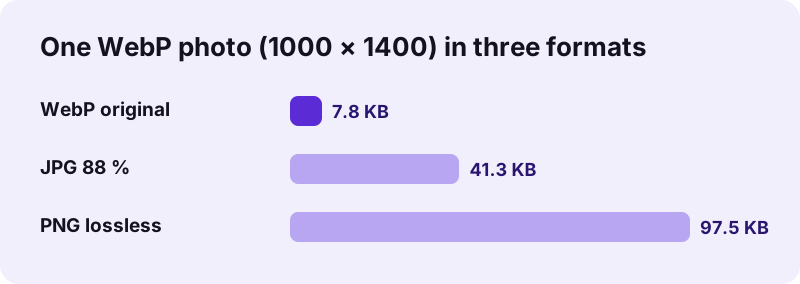
Photos as PNG are heavy: our WebP photo grew from 7.8 KB to 97.5 KB, more than twelve times. For photos you only want to share, WebP to JPG gives 41.3 KB for the same picture.
Why is a PNG from pdf24 tools WebP to PNG so much larger?
pdf24 tools WebP to PNG output is larger because PNG stores pixels without loss, while most WebP pictures on websites use lossy compression tuned for photos. For flat graphics such as logos and icons the difference is small; for photos it is large, 97.5 KB of PNG against 7.8 KB of WebP in our measurement.
| Property | WebP | JPG | PNG |
|---|---|---|---|
| Compression | Lossy or lossless | Lossy | Lossless |
| Transparency | Yes | No | Yes |
| Animation | Yes | No | No (in this tool) |
| Our 1000 × 1400 photo | 7.8 KB | 41.3 KB at 88 % | 97.5 KB |
| Opens in older software | Not always | Yes | Yes |
The PNG converter has no quality setting because lossless output has nothing to tune. Choose PNG for graphics and editing, JPG for photos that only need to be shared.
Is pdf24 tools WebP to PNG private?
pdf24 tools WebP to PNG is private because no picture leaves your device. The browser reads the files with the File API, decodes them with its built-in WebP support and writes the PNG with its canvas encoder. The result line confirms 0 bytes uploaded, nothing is stored, and the page works offline once loaded.
- No account, no watermark, no limit on files.
- Several pictures download as one ZIP file.
- Pictures for a document: WebP to PDF.
- The other direction: PNG to WebP makes files smaller.
pdf24 tools WebP to PNG: where WebP files come from
Most WebP files on a computer or phone were never chosen by their owner; they arrived from the web.
Large websites, online shops and image search results serve pictures as WebP to load faster, so right-click › Save image as stores a .webp file. Sticker packs in messaging apps are often WebP with a transparent background. Screenshot tools and browser extensions sometimes save WebP too. In all these cases the picture is fine on the web, but a slide program, a label printer, an embroidery or cutting machine, or a print-on-demand shop may ask for PNG.
For stickers and logos the conversion is the cleanest possible path: transparent edges stay soft, and the graphic can be resized or placed on any colour afterwards. For photos saved from a website, think about the purpose first. If the photo only needs to open on another device, JPG is lighter; if it will be edited, cut out or combined with other layers, PNG avoids the extra compression a JPG would add each time you save it.
pdf24 tools WebP to PNG on phones and computers
The page works in Chrome, Edge, Firefox and Safari on every major system.
On Android and desktop Chrome, pictures saved from websites are often WebP; pick them from Downloads. On iPhone and Mac, Safari decodes WebP too, so the conversion works the same way. Our test picture took 0.1 s on a laptop; phones are a little slower, and large batches of big pictures need memory, so convert them in groups if a phone struggles.
PNG has been an open standard since 1997 and is published both by the W3C and as ISO/IEC 15948. That long history is the reason it works in practically every program, from old office suites to new design tools, and why it is a safe long-term format for graphics you want to keep. WebP is newer and smaller, and ideal on websites, but PNG remains the format to hand to a designer, a printer or a colleague with older software.
File names stay recognisable: logo.webp becomes logo.png, and a batch keeps each original name inside the ZIP, so you can match every PNG with its source at a glance.
pdf24 tools WEBP to PNG: frequently asked questions
Is pdf24 tools WebP to PNG free?
Yes. pdf24 tools WebP to PNG on this site costs nothing, with no account, no watermark and no file limit. The conversion runs in your browser using its own WebP decoder and PNG encoder, so there is no server cost to recover. Any current browser is enough.
Is pdf24 tools WebP to PNG a PDF24 product?
No. pdf24tools is an independent website and is not affiliated with PDF24 or Geek Software GmbH. We use the search phrase in our titles because people type it, but the converter, its code and the measured numbers on this page are our own. Your pictures stay on your device.
Does pdf24 tools WebP to PNG keep transparency?
Yes. The alpha channel of the WebP is written into the PNG, so fully and partly transparent areas stay transparent. Nothing is filled with white, unlike a conversion to JPG. Logos, icons and stickers can then be placed on any background without a visible box.
Is pdf24 tools WebP to PNG lossless?
The PNG step is lossless: every decoded pixel is stored exactly. A lossless WebP therefore converts to identical pixels. A lossy WebP keeps the detail it already has; converting cannot restore what the original compression removed, but no further loss is added.
Why is my file bigger after pdf24 tools WebP to PNG?
PNG is lossless and WebP is usually lossy, so photos need many more bytes as PNG. Our 1000 × 1400 photo went from 7.8 KB to 97.5 KB. For logos and flat graphics the growth is much smaller. Use the JPG converter if you only need a photo that opens everywhere.
Does pdf24 tools WebP to PNG upload my files?
No. The pictures are read with the browser File API and converted locally. The result line reports 0 bytes uploaded and nothing is kept on any server. After loading the page you can switch on airplane mode and the converter still works, which shows that it runs entirely on your device.
Can pdf24 tools WebP to PNG convert several files at once?
Yes. Select all the WebP pictures together. One picture downloads directly as a PNG; two or more come as one ZIP file with a PNG for each, named after the original files. Your device's memory is the only limit on how many you convert.
Does pdf24 tools WebP to PNG keep animations?
No. The PNG files made here are still pictures, so only the first frame the browser draws from an animated WebP is saved. Keep the original WebP for the animation, or use a dedicated animation tool if you need a moving format such as GIF.
Does pdf24 tools WebP to PNG change the resolution?
No. The PNG has exactly the same width and height as the WebP; our test picture stayed 1000 × 1400 pixels. Nothing is scaled, cropped or sharpened. If you need a different size, resize the PNG afterwards in any image editor.
Does pdf24 tools WebP to PNG work on an iPhone?
Yes. Safari on iPhone and iPad decodes WebP, so open the page, tap Choose images and pick the files from Photos or Files. The PNG downloads into the Files app through the Safari prompt, where you can save it to Photos or share it.
When should I choose JPG instead of pdf24 tools WebP to PNG?
Choose JPG for photos that only need to be viewed, sent or uploaded: the file is far smaller and opens everywhere. Choose PNG for anything with transparency, sharp edges or text, and for pictures you will keep editing, since PNG never adds compression artefacts.
More pdf24 tools WEBP to PNG tools and guides
pdf24 tools WEBP to PNG: sources
- WebP — Wikipedia
- Portable Network Graphics (PNG) Specification — W3C
- An image format for the Web (WebP) — Google for Developers