How to use pdf24 PNG to WebP in 4 steps
- Choose the PNG files. Tap Choose images or drop the .png files on the box.
- Pick the quality. High (88 %) for most pictures, Best (95 %) for screenshots with small text, Medium (75 %) for photos.
- Press Convert images. Each PNG is encoded as WebP on your device, with its transparency kept.
- Download. One picture downloads as .webp; several come as one ZIP with a WebP for each PNG.
How much does pdf24 PNG to WebP save?
pdf24 PNG to WebP saved 32 % on our 1200 × 800 chart, 38 % on a 1654 × 2339 invoice scan and 79 % on a 12-megapixel photo stored as PNG, all at the default High (88 %). Only a tiny transparent logo grew, from 5.8 KB to 6.6 KB, because it was already highly optimised.
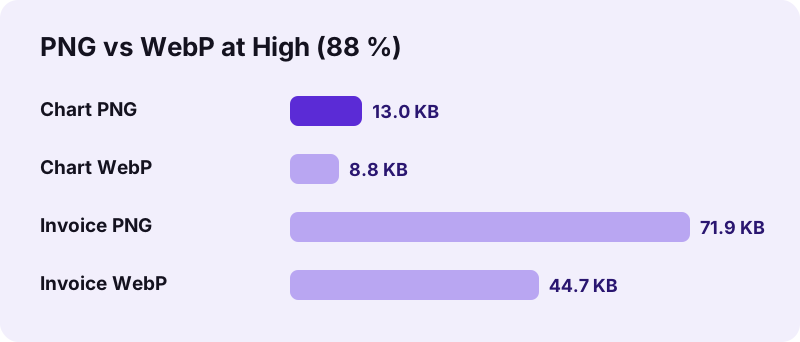
| Input PNG | PNG size | WebP size | Change | Time |
|---|---|---|---|---|
| Bar chart, 1200 × 800 | 13.0 KB | 8.8 KB | −32 % | 0.2 s |
| Invoice scan, 1654 × 2339 | 71.9 KB | 44.7 KB | −38 % | 0.9 s |
| Photo, 3024 × 4032 | 15.03 MB | 3.23 MB | −79 % | 6.5 s |
| Transparent logo, 800 × 800 | 5.8 KB | 6.6 KB | +13 % | 0.2 s |
“It supports image compression (both lossy and lossless), as well as animation and alpha compositing.”
pdf24 PNG to WebP and transparency
WebP keeps an alpha channel, and the converter writes it unchanged: our transparent logo's corner pixel stayed at alpha 0 in the WebP. Logos, icons and cut-out product photos therefore keep their shape on any background, which a JPG could not do.
pdf24 PNG to WebP is lossy
The converter uses the browser's WebP encoder with the quality you choose, which is lossy compression, even though the PNG was lossless. At 88 % the difference is hard to see; around fine text and hard edges it can show slight softening. Choose Best (95 %) for screenshots with small text.
pdf24 PNG to WebP for website images
Every current browser shows WebP, so the files can replace PNGs on a website directly. Lighter images mean faster pages on mobile networks. Keep the PNG originals as masters and regenerate the WebP versions from them when needed.
The biggest wins come from photos that were saved as PNG by an editing app or a screenshot tool. Our 15.03 MB photo PNG became 3.23 MB, a fifth of its size, with no visible change at normal viewing size.
pdf24 PNG to WebP: tip for tiny icons
Very small, already optimised PNGs, such as our 5.8 KB logo, may grow as WebP. Check the size after converting and keep whichever file is smaller; for icons of a few kilobytes the difference rarely matters for page speed.
Which browsers can run pdf24 PNG to WebP?
pdf24 PNG to WebP needs a browser that can create WebP files, which Chrome, Edge and Firefox can do on Windows, macOS, Linux and Android. If the browser returns another format instead of WebP, the tool stops with a message to try Chrome, Edge or Firefox, rather than saving a file with the wrong content.
The converter checks every result: if the encoded file is not image/webp, it reports the problem instead of guessing. All current browsers can display WebP, including Safari, but creating it through the canvas encoder depends on the browser engine.
Encoding time grows with the number of pixels. Our chart took 0.2 s, the invoice scan 0.9 s and the 12-megapixel photo 6.5 s on a laptop. Phones need longer for big pictures, so keep the tab open in the foreground during large batches.
pdf24 PNG to WebP quality levels
| Level | WebP quality | Good for |
|---|---|---|
| Best | 95 % | Screenshots, small text, logos |
| High (default) | 88 % | Charts, scans, most graphics |
| Medium | 75 % | Photos saved as PNG |
| Small file | 60 % | Previews, thumbnails |
Is pdf24 PNG to WebP private?
pdf24 PNG to WebP is private because the pictures never leave your device. The browser reads them with the File API and encodes the WebP with its own canvas encoder. The result line confirms 0 bytes uploaded, nothing is stored on a server, and the converter keeps working offline after the page has loaded.
- No account, no watermark, no file limit.
- Several PNGs come back as one ZIP.
- Photos in JPG format: JPG to WebP.
- Need PNG back for an app that refuses WebP? WebP to PNG.
pdf24 PNG to WebP on phones and computers
The page works in Chrome, Edge and Firefox on desktop and Android devices.
On a computer, drop the PNG files from your export folder on the box; on Android, pick screenshots and graphics from the gallery or Files. The ZIP holds one WebP per PNG with the same base name, so logo.png becomes logo.webp and image links are easy to update. The WebP contains no metadata from the PNG.
PNG remains the best master format for graphics: lossless, universal and safe for repeated editing. WebP is the delivery format: smaller files for the web, with transparency still available. A practical workflow keeps the PNG in the design folder and publishes the WebP. For print, documents and older software, hand out the PNG; for websites, apps and online shops, the WebP is usually the lighter choice.
pdf24 PNG to WebP: test before you replace images
Before replacing images on a live website, convert one page's worth of pictures with pdf24 PNG to WebP, upload them next to the old ones and compare the page weight in the browser's network panel. The saving you see there is the one your visitors get on every visit, and it is easy to undo if a picture looks worse than expected, because the PNG originals stay untouched in your folder.
pdf24 PNG to WEBP: frequently asked questions
Is pdf24 PNG to WebP free?
Yes. pdf24 PNG to WebP on this site costs nothing, needs no account and adds no watermark. The encoding runs in your browser, so there is no server cost and no daily limit. You can convert as many pictures as your device's memory allows, and as often as you like.
Is pdf24 PNG to WebP made by PDF24?
No. pdf24tools is an independent website and is not affiliated with PDF24 or Geek Software GmbH. We use the search phrase in our titles because people type it, but this converter, its code and the measurements on this page are our own. Your pictures are processed only on your device.
Does pdf24 PNG to WebP keep transparency?
Yes. The alpha channel of the PNG is written into the WebP, so transparent and semi-transparent areas stay transparent. In our test the transparent corner of a logo kept alpha 0. Nothing is filled with white, which is the main advantage over converting the PNG to JPG.
Is pdf24 PNG to WebP lossless?
No. The browser's WebP encoder is used with a quality setting, which produces lossy WebP files. At the default 88 % the difference is hard to see; for screenshots with small text, choose Best (95 %). Keep the original PNG if you need a lossless master for editing.
Why did pdf24 PNG to WebP make my file bigger?
Very small PNGs that were already optimised can grow slightly as WebP, as our 5.8 KB logo did when it became 6.6 KB. Larger pictures shrink: a chart by 32 %, a scan by 38 % and a photo by 79 %. Keep whichever file is smaller for tiny icons.
Why does pdf24 PNG to WebP say my browser cannot save WebP?
Some browsers display WebP but cannot create it through the canvas encoder. The converter checks each result, and if it is not real WebP it stops with this message rather than saving a wrong file. Use Chrome, Edge or Firefox, on a computer or an Android phone.
Does pdf24 PNG to WebP upload my pictures?
No. The PNG files are read with the browser File API and converted on your device. The result line reports 0 bytes uploaded and nothing is stored anywhere. You can switch off the network after the page has loaded and the converter still works the same way.
Does pdf24 PNG to WebP change the picture size?
No. Width and height stay exactly as in the PNG; our invoice scan stayed 1654 × 2339 pixels. Only the compression changes, according to the quality level. Resize very large pictures in an editor first if they are much bigger than they will be displayed.
Can pdf24 PNG to WebP convert many files at once?
Yes. Select all the PNG files at once. One picture downloads directly as a WebP; two or more come as one ZIP with a WebP for each PNG, named like the originals. Large photo PNGs take several seconds each, so give big batches some time.
Which quality should I use in pdf24 PNG to WebP?
High (88 %) suits charts, scans and most graphics. Best (95 %) keeps small text and sharp edges cleanest. Medium (75 %) is good for photos that were saved as PNG, and Small file (60 %) for previews and thumbnails where size matters more than detail.
Can every website visitor see files from pdf24 PNG to WebP?
Yes, in practice. All current versions of Chrome, Edge, Firefox and Safari display WebP on desktop and mobile. Only very old browsers and some offline programs cannot, which is why it is worth keeping the PNG originals for print and for sharing with older software.
More pdf24 PNG to WEBP tools and guides
pdf24 PNG to WEBP: sources
- WebP — Wikipedia
- An image format for the Web (WebP) — Google for Developers
- Portable Network Graphics (PNG) Specification — W3C