How to use pdf24 JPG to WebP in 4 steps
- Choose the JPG files. Tap Choose images or drop the .jpg or .jpeg photos on the box.
- Pick the quality. Medium (75 %) gives the biggest saving for web use; High (88 %) keeps more detail.
- Press Convert images. Each photo is encoded as WebP on your device; large photos take a few seconds each.
- Download. One photo downloads as .webp; several come as one ZIP with a WebP for each JPG.
How much smaller does pdf24 JPG to WebP make a photo?
pdf24 JPG to WebP saved 10 % at High (88 %), 51 % at Medium (75 %) and 66 % at Small file (60 %) on our 3.60 MB phone photo, which stayed 3024 × 4032 pixels. A 2.01 MB A4 scan shrank to 982 KB at the default 88 %, a saving of 52 %.
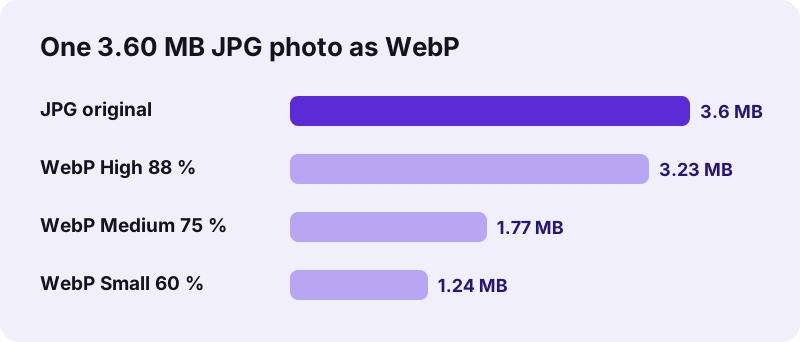
| Input | Quality | WebP size | Saving | Time |
|---|---|---|---|---|
| Photo, 3.60 MB | High 88 % | 3.23 MB | 10 % | 5.6 s |
| Photo, 3.60 MB | Medium 75 % | 1.77 MB | 51 % | 5.2 s |
| Photo, 3.60 MB | Small file 60 % | 1.24 MB | 66 % | 5.3 s |
| A4 scan, 2.01 MB | High 88 % | 982 KB | 52 % | 2.9 s |
“Google announced the WebP format in September 2010; the company released the first stable version of its supporting library in April 2018.”
pdf24 JPG to WebP quality levels
The saving depends on how strongly the JPG was compressed already. Phone cameras save photos at high JPEG quality, so re-encoding at 88 % gains little, while 75 % halves the file with no difference you would notice on a web page. Scans with large plain areas compress well at any level. A good routine with pdf24 JPG to WebP is to convert one typical photo at 88 % and at 75 %, compare both at full size, and then run the whole batch at the level you prefer.
pdf24 JPG to WebP for online shops
Product photos are the heaviest part of most shop pages. Converting them at Medium (75 %) cut our photo to under half its size, which means faster category pages on mobile connections. Upload the WebP files to your shop system if it accepts them; most current platforms do. Keep the JPG originals in a separate folder, because marketplaces and print services may still ask for them, and you can always create a fresh WebP version from the original later.
pdf24 JPG to WebP for blogs and websites
Every current browser shows WebP, so a WebP can replace a JPG in an image tag directly. Resize huge photos as well: a 3024-pixel photo shown 800 pixels wide still downloads all its pixels. Converting keeps the pixel size, so scale the photo in an editor first if it is far larger than its display size.
pdf24 JPG to WebP: tip for repeated conversions
Always convert from the original JPG. Turning a WebP back into JPG and then into WebP again stacks two lossy steps. Keep the camera JPGs as masters, and generate the web versions from them whenever you need a new size or quality.
Which browsers can run pdf24 JPG to WebP?
pdf24 JPG to WebP needs a browser that can encode WebP, which Chrome, Edge and Firefox can do on Windows, macOS, Linux and Android. If a browser hands back another format instead of WebP, the tool stops with a message to try Chrome, Edge or Firefox rather than saving a wrong file.
The check is built into the converter: after encoding it verifies that the result really is image/webp. Decoding WebP works in all current browsers, including Safari, but encoding through the browser canvas depends on the engine, which is why the tool tests the output instead of assuming it.
WebP encoding is heavier work than JPEG encoding. Our 12-megapixel photo needed 5.2 to 5.6 s on a laptop; smaller pictures finish far faster, and the scan of 8.7 megapixels took 2.9 s. Phones take longer for large batches. Keep the tab in the foreground while a large batch runs; some phones slow down background tabs to save battery.
pdf24 JPG to WebP and metadata
The WebP is written from the pixels only, so EXIF data from the JPG, including GPS position and camera model, is not copied. For photos published on a website that is usually what you want.
Is pdf24 JPG to WebP private?
pdf24 JPG to WebP is private because the photos stay on your device. The browser reads them with the File API, decodes the JPG and encodes the WebP with its own canvas encoder. The result line shows 0 bytes uploaded, nothing is stored on any server, and the converter works offline once loaded.
- No account, no watermark, no file limit.
- Several photos come back as one ZIP.
- Graphics with transparency: PNG to WebP.
- Need JPG again later? WebP to JPG.
pdf24 JPG to WebP on phones and computers
The page works best in Chrome, Edge and Firefox on any desktop or Android device.
On a computer, drop a folder's worth of photos on the box; the ZIP that comes back holds one WebP per JPG with the same base name, so photo1.jpg becomes photo1.webp and links are easy to update. On Android, pick the photos from the gallery or Files in Chrome.
WebP supports lossy and lossless compression, transparency and animation in one format, and has become a standard image format of the web since its launch. Its main use is speed: lighter pictures mean faster pages, less mobile data and lower hosting traffic. For pictures that must be printed, emailed to people with older software, or uploaded to portals with strict rules, JPG remains the safer choice, so keep both.
pdf24 JPG to WEBP: frequently asked questions
Is pdf24 JPG to WebP free?
Yes. pdf24 JPG to WebP on this site costs nothing, needs no account and adds no watermark. The browser does the encoding, so there is no server cost and no daily limit. You can convert as many photos as your device's memory and time allow, and repeat as often as you like.
Is pdf24 JPG to WebP made by PDF24?
No. pdf24tools is an independent website and is not affiliated with PDF24 or Geek Software GmbH. We use the search phrase in our titles because people type it, but this converter, its code and the measurements on this page are our own. Your photos are processed only on your device.
How much space does pdf24 JPG to WebP save?
It depends on the quality level and the photo. On our 3.60 MB phone photo the WebP was 10 % smaller at 88 %, 51 % smaller at 75 % and 66 % smaller at 60 %. An A4 scan shrank by 52 % at 88 %. The pixel size never changes.
Why does pdf24 JPG to WebP say my browser cannot save WebP?
Some browsers can display WebP but cannot create it through the canvas encoder. The converter checks the result, and if it is not real WebP it stops with this message instead of saving a wrong file. Open the page in Chrome, Edge or Firefox and convert again.
Does pdf24 JPG to WebP upload my photos?
No. The photos are read with the browser File API and encoded on your device. The result line reports 0 bytes uploaded and nothing is stored. After loading the page you can switch off the network and the converter still works, which shows that it runs entirely in your browser.
Does pdf24 JPG to WebP reduce quality?
WebP at these settings is lossy, like JPEG, so some detail is given up; at 75 % or more it is not visible on a web page. Each lossy step adds up, so always convert from the original camera JPG rather than from a file that was already compressed several times.
Why is pdf24 JPG to WebP slow with big photos?
WebP encoding is more demanding than JPEG encoding. Our 12-megapixel photo needed 5.2 to 5.6 seconds on a laptop, the 8.7-megapixel scan 2.9 seconds. Smaller pictures are much quicker. Phones need longer for big batches, so convert large sets on a computer if you can.
Can pdf24 JPG to WebP convert a whole folder?
Yes. Select all the JPG files at once. One photo downloads directly as a WebP; two or more come as one ZIP with a WebP for each JPG, named like the originals. On a computer you can drag a whole selection of files from a folder onto the box.
Do all browsers show files from pdf24 JPG to WebP?
Yes. Every current version of Chrome, Edge, Firefox and Safari displays WebP on desktop and mobile, so the files work on modern websites. Some older software, print services and upload portals still refuse WebP; for those, keep the JPG versions as well.
Does pdf24 JPG to WebP keep EXIF data?
No. The WebP is created from the pixels only, so GPS position, date taken and camera model are not copied from the JPG. That is useful for photos published online. Keep the original JPGs if you need the metadata for your archive.
Does pdf24 JPG to WebP change the image size?
No. Width and height stay exactly as in the JPG; our photo stayed 3024 × 4032 pixels. Only the compression changes. For web pages, resize very large photos in an image editor first, because a photo with more pixels than its display size wastes bandwidth even as WebP.
More pdf24 JPG to WEBP tools and guides
pdf24 JPG to WEBP: sources
- WebP — Wikipedia
- An image format for the Web (WebP) — Google for Developers
- HTMLCanvasElement: toBlob() method — MDN Web Docs