How to use pdf24 WebP to JPG in 4 steps
- Choose the WebP files. Tap Choose images or drop the .webp files on the box. Several pictures can be converted at once.
- Pick the JPEG quality. High (88 %) suits most uses, Best (95 %) printing, Small file (60 %) email and portals.
- Press Convert images. Each picture is decoded and saved as JPEG on your device in a fraction of a second.
- Download. One picture downloads as .jpg; several come as one ZIP file with a JPG for each picture.
What does pdf24 WebP to JPG change in the picture?
pdf24 WebP to JPG lets the browser decode the WebP, paints it on a white background and saves it as a new JPEG at the quality you choose. The width and height stay exactly the same, 1000 × 1400 pixels in our test, and the colours look the same; only the compression method changes.
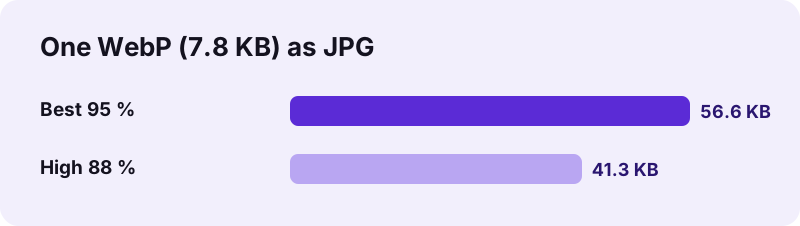
Expect the JPG to be larger. WebP was designed to compress photos better than JPEG, so the same picture needs more bytes in the older format: our 7.8 KB WebP became 41.3 KB at 88 % and 56.6 KB at 95 %. The file is still small enough for any form or message.
“The degree of compression can be adjusted, allowing a selectable trade off between storage size and image quality.”
pdf24 WebP to JPG quality levels
| Choice | JPEG quality | When to use it |
|---|---|---|
| Best | 95 % | Printing, further editing |
| High (default) | 88 % | Most uploads and sharing |
| Medium | 75 % | Chat apps, social media |
| Small file | 60 % | Strict size limits |
The WebP you saved from a website has usually been compressed already. Converting at Best does not bring back lost detail; it only avoids adding new loss. High is a sensible default for pictures from the web.
Small file at 60 % is worth trying when a form sets a size limit in kilobytes, because it lowers the bytes without touching the pixel size the form may also check.
pdf24 WebP to JPG with transparent pictures
WebP can hold transparency, JPEG cannot. The converter therefore fills transparent areas with white before saving, so logos and stickers keep a clean white background instead of black. If you need the transparency, use WebP to PNG, which keeps it.
pdf24 WebP to JPG with animated WebP
Animated WebP files hold several frames, like a GIF. A JPG is a single still picture, so the converter saves the frame the browser draws first. The animation is not carried over.
pdf24 WebP to JPG: tip for files named .jpg that are really WebP
Some sites deliver WebP data even when the address ends in .jpg, and some save dialogs keep the wrong ending. If an app refuses a picture that looks like a JPG, rename it to .webp and convert it here; the result is a real JPEG file.
Why convert WebP pictures with pdf24 WebP to JPG?
WebP to JPG solves a compatibility problem. Browsers display WebP everywhere, but many upload forms, government portals, print services, office programs and older phones still accept only JPG or PNG. A JPG made with pdf24 WebP to JPG is understood by practically every program, camera app and website.
- Profile and application photos for portals that list JPG only.
- Product pictures to paste into a document or spreadsheet.
- Images to send to a print shop or photo kiosk.
- Pictures for an older phone, TV or digital photo frame.
If your goal is a document rather than a picture, WebP to PDF puts the pictures on printable PDF pages instead.
pdf24 WebP to JPG or keep the WebP file?
Before converting, check whether you need the conversion at all. Many modern apps, including current versions of Windows Photos, macOS Preview, Google Photos and most chat apps, open WebP without help. The trouble usually appears at the edges: a visa or exam portal with a strict list of allowed file types, a photo printing kiosk, a smart TV, a car's media system or an e-mail client used by an older relative. In those cases a JPG removes the question entirely, and the picture looks the same to the person who receives it.
Is pdf24 WebP to JPG private?
pdf24 WebP to JPG is private because your pictures stay on your device. The browser reads them with the File API, decodes them with its built-in WebP support and encodes the JPEG with its canvas encoder. The result line shows 0 bytes uploaded, and nothing is stored after the tab is closed.
| Question | Answer |
|---|---|
| Price | 0, no sign-up |
| Bytes uploaded | 0 |
| Watermark | None |
| Resolution | Unchanged |
| EXIF in the result | None |
| Several files | Downloaded as one ZIP |
pdf24 WebP to JPG on phones and computers
The converter works in Chrome, Edge, Firefox and Safari on every operating system.
On Android, web pictures saved from Chrome land in Downloads or the gallery; tap Choose images and pick them there. On an iPhone, saved pictures appear in Photos or Files. On Windows and Mac, drag the files from the Downloads folder onto the box. Conversion is fast because WebP decoding is built into every current browser: our picture took 0.1 s.
Google introduced WebP in 2010 to make web pages lighter, and today most large websites serve their images in it. That is why Save image as so often gives a .webp file, even on a site where you expected a photo in JPG. The conversion back to JPG is not a repair of a damaged file; it simply rewrites the same picture in the format that older software knows how to open.
Batches are handled in one go. Select all the WebP files, convert, and the download is a single ZIP named after the first picture, holding one JPG for each WebP with the same base name. Unzip it with the tool built into Windows, macOS, Android or iOS.
pdf24 WEBP to JPG: frequently asked questions
Is pdf24 WebP to JPG free?
Yes. pdf24 WebP to JPG on this site costs nothing, with no account, no watermark and no limit on the number of pictures. The conversion runs in your browser, so there is no server cost to recover. Any current browser on a phone, tablet or computer is enough.
Is pdf24 WebP to JPG made by PDF24?
No. pdf24tools is an independent website and is not affiliated with PDF24 or Geek Software GmbH. We use the search phrase in our titles because people type it, but the converter, its code and the measured numbers on this page are our own. Your pictures stay on your device.
Why is the JPG bigger than the WebP after pdf24 WebP to JPG?
WebP compresses photos more efficiently than JPEG, so the same picture needs more bytes as a JPG. Our 7.8 KB WebP became 41.3 KB at 88 % quality and 56.6 KB at 95 %. Choose Medium or Small file if the JPG must be smaller; the resolution stays the same either way.
Does pdf24 WebP to JPG lose quality?
Very little at the default 88 % quality, and nothing you will normally see. The picture keeps its exact pixel size. JPEG is lossy, so each save compresses a little, which is why Best at 95 % exists for pictures that will be printed or edited further.
Does pdf24 WebP to JPG upload my pictures?
No. The WebP files are read with the browser File API and converted on your device by the browser's own image decoder and encoder. The result line reports 0 bytes uploaded, nothing is stored, and the converter keeps working without a network once the page has loaded.
Can pdf24 WebP to JPG convert many pictures at once?
Yes. Select all the WebP files at once. One picture downloads as a single JPG; two or more come as one ZIP file containing a JPG for each picture, named like the originals. The only limit is your device's memory.
What happens to transparency in pdf24 WebP to JPG?
Transparent areas become white, because JPEG has no transparency. The converter paints a white background first, so logos and icons do not end up with a black box behind them. Use the WebP to PNG converter on this site if you need to keep the transparent background.
Does pdf24 WebP to JPG keep animations?
No. A JPG is a single still picture, so only one frame of an animated WebP is saved, the one the browser draws first. If you need the animation, keep the WebP file, or convert it with a video or GIF tool instead of an image converter.
Does pdf24 WebP to JPG work on an iPhone?
Yes. Safari on iPhone and iPad decodes WebP, so open the page, tap Choose images and pick the pictures from Photos or Files. The JPG downloads through the Safari prompt into the Files app, from where you can save it to Photos or share it.
Does pdf24 WebP to JPG remove metadata?
Yes. The JPEG is written from the pixels only, so no EXIF data is included; we checked our output with an image library. Pictures saved from websites rarely carry useful metadata anyway, and a clean file reveals nothing about where it came from.
Can pdf24 WebP to JPG change the picture size?
No, the width and height stay exactly as in the WebP. To reduce the pixel size, put the pictures into a PDF with the Small file option, or resize them in an image editor. For lighter files at the same size, pick Medium or Small file quality.
More pdf24 WEBP to JPG tools and guides
pdf24 WEBP to JPG: sources
- JPEG — Wikipedia
- An image format for the Web (WebP) — Google for Developers
- HTMLCanvasElement: toBlob() method — MDN Web Docs