How do you pdf24 combine images into one PDF step by step?
To combine images into one PDF, open Images to PDF, select all the pictures at once, sort them with the arrow buttons, choose page size, margin and quality, then press the convert button. You get one file called images.pdf with one picture per page, in the order of the list.
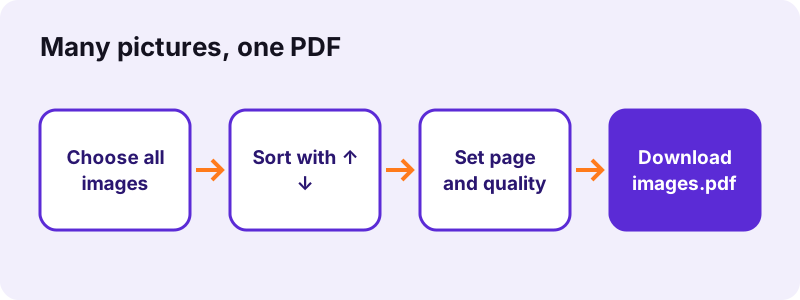
- Open Images to PDF (or JPG to PDF for photos only).
- Click Choose images and select every picture; Ctrl-click or Cmd-click picks several.
- Use ↑ and ↓ to set the order; the top picture becomes page 1.
- Pick page size (A4, Letter or Fit to image), margin and quality.
- Convert and download images.pdf.
pdf24 combine images into one PDF: page size choices
A4 and Letter put each picture on a standard sheet, scaled to fit inside the margin, which is best for printing and for portals that expect paper sizes. Fit to image makes every page exactly the size of its picture, so there is no white border at all; our 3024 × 4032 photos gave pages of the same dimensions.
pdf24 combine images into one PDF: orientation and margins
With orientation on Auto, wide pictures get landscape pages and tall ones portrait pages; in our mixed test two of nine pages turned landscape (842 × 595 points). Margins of 0, 20 or 40 points set the white frame around each picture on A4 or Letter pages.
pdf24 combine images into one PDF from a multi-page TIFF
A TIFF file can hold several scanned pages. Each one becomes its own PDF page: our 3-page TIFF added three pages, which is why seven input files produced a 9-page PDF. Animated GIFs, by contrast, contribute only their first frame.
pdf24 combine images into one PDF: naming tip
The file picker hands over pictures in the folder's sort order. Rename them 01, 02, 03 before choosing, or sort the folder by date taken, and the list arrives in the right order without tapping the arrows.
Which image formats can pdf24 combine images into one PDF accept?
The images tool accepts nine picture formats in one list: JPG/JPEG, PNG, WebP, GIF, BMP, SVG, TIFF and the iPhone formats HEIC and HEIF. Formats can be mixed freely. Each picture is decoded in the browser and placed on its own page, so a PDF can hold a phone photo, a screenshot and a scan side by side.
| Format | Placed as | Note |
|---|---|---|
| JPG / JPEG | original bytes at Original quality | no re-compression |
| PNG | original bytes at Original quality | transparency becomes white |
| HEIC / HEIF | converted to JPEG (quality 0.88) | iPhone photos |
| TIFF | decoded, one page per image | 3-page TIFF → 3 pages |
| WebP, GIF, BMP | re-encoded as JPEG | GIF: first frame |
| SVG | drawn at 2,000 px long side | sharp vector source |
What happened when we tested pdf24 combine images into one PDF?
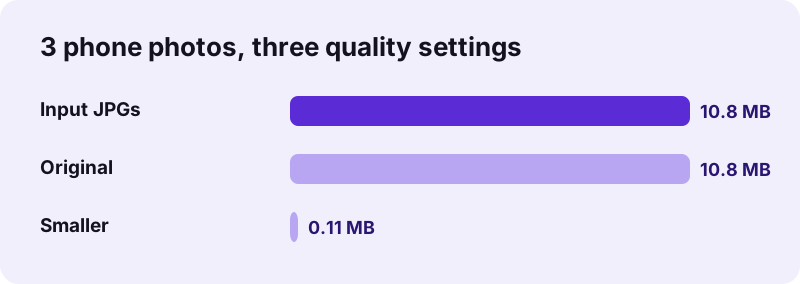
Our image tests produced three clear results. Seven mixed files of 4.41 MB became a 9-page, 3.79 MB PDF in 4.1 seconds. Three phone photos of 10.80 MB stayed 10.80 MB at Original quality, because the JPEG data is embedded unchanged, and dropped to 113 KB at Smaller.
| Input | Settings | Output | Time |
|---|---|---|---|
| 7 files: JPG, WebP, HEIC, TIFF (3 p.), PNG, BMP, SVG | A4, auto, Original | 9 pages, 3.79 MB | 4.1 s |
| 3 photos 3024 × 4032, 10.80 MB | A4, margin 20, Original | 3 pages, 10.80 MB | 0.3 s |
| Same 3 photos | Fit to image, margin 0 | 3 pages, 10.80 MB | 0.2 s |
| Same 3 photos | A4, Smaller | 3 pages, 113 KB | 0.9 s |
| 4 scans, 8.07 MB | A4, Original | 4 pages, 8.07 MB | 0.1 s |
The time depends mostly on formats the browser cannot embed directly. JPG and PNG are copied as they are, which is why four 2 MB scans needed only 0.1 seconds, while HEIC, TIFF and WebP pictures are decoded and redrawn first, so the mixed run took 4.1 seconds. When you pdf24 combine images into one PDF from iPhone photos, expect that decoding step to be the slower part.
pdf24 combine images into one PDF without losing quality
Image quality is kept fully at the Original setting: JPG and PNG files are embedded byte for byte, so the PDF shows exactly the pixels of the source. High re-encodes at JPEG quality 0.88 with a 3,000-pixel limit, and Smaller uses 1,600 pixels at quality 0.6 for the lightest file.
- Original: best for printing photos and for documents you will crop or zoom.
- High: nearly identical on screen, smaller for very large camera files.
- Smaller: for email and upload portals; text in photographed documents stays readable at 1,600 px.
- Size target pages: image to PDF under 200 KB keeps shrinking until it fits.
“Portable Network Graphics is a raster-graphics file format that supports lossless data compression.”
Is pdf24 combine images into one PDF safe for ID photos?
Putting ID photos into one PDF here is safe because the pictures never leave your device. The browser reads them with the File API, draws them into the PDF in JavaScript and offers the file for download; the result line reports 0 bytes uploaded, and our request log showed no POST request.
That suits passport scans, driving licences, residence permits and medical photos that application portals often ask for as a single PDF. One detail matters for photos: at Original quality the JPEG data is embedded unchanged, including any camera or location details stored inside it. High and Smaller redraw the picture, which leaves those details behind. Details on local file access: File API on MDN.
pdf24 combine images into one PDF on iPhone and Android
Phones can combine pictures into one PDF in the browser, with no app. Tap Choose images, then Photo Library on iPhone or Gallery on Android, select the pictures and convert. iPhone HEIC photos are handled directly, so there is no need to change the camera format first.
| Phone | Pick pictures from | PDF saved to |
|---|---|---|
| iPhone | Photo Library or Files | Files → Downloads |
| Android | Gallery, Photos or Files | Downloads |
Large photo sets need memory, so on an older phone combine about 20 pictures per run and join the PDFs afterwards with Merge PDF. That way you can still pdf24 combine images into one PDF for 100 receipts or more.
Why does pdf24 combine images into one PDF give a big file?
A large PDF from images usually means the pictures were embedded at Original quality, which keeps every byte of the camera files. Three 12-megapixel photos stay about 10.8 MB that way. Choose Smaller, or compress the PDF afterwards, and the same three photos fit in 113 KB.
- Switch quality to Smaller for email.
- Run Compress PDF with an exact size if a portal sets a limit.
- Crop screenshots before adding them, so empty areas do not take space.
pdf24 combine images into one PDF: frequently asked questions
Is pdf24 combine images into one PDF free?
Yes. You can pdf24 combine images into one PDF on pdf24tools without paying, registering or getting a watermark. There is no limit on pictures per day. The conversion runs on your own device in the browser, so no server cost has to be covered by a paid plan or by storing your files.
How many pictures can pdf24 combine images into one PDF take?
There is no fixed limit. The practical limit is the memory of your device, because all pictures are decoded in the browser. A laptop handles dozens of phone photos easily; on an older phone, combine about 20 per run and merge the resulting PDFs afterwards.
Can pdf24 combine images into one PDF mix JPG, PNG and HEIC?
Yes. Formats can be mixed freely in one list: JPG, PNG, WebP, GIF, BMP, SVG, TIFF, HEIC and HEIF. Our test combined six formats from seven files into a single 9-page PDF in 4.1 seconds, each picture on its own page. No conversion beforehand is needed.
Does pdf24 combine images into one PDF reduce photo quality?
Not at the Original setting, which embeds JPG and PNG files unchanged; three photos of 10.80 MB gave a 10.80 MB PDF. High and Smaller re-encode the pictures as JPEG to save space, and Smaller cut the same photos to 113 KB.
How do I remove white borders in pdf24 combine images into one PDF?
Choose page size Fit to image and margin 0. Each page then has exactly the size of its picture, with no border. With A4 or Letter, a white band remains whenever the picture's shape differs from the paper, even at margin 0, because the picture is scaled to fit.
Does pdf24 combine images into one PDF upload my photos?
No. The pictures are read and placed into the PDF on your device. The result line shows 0 bytes uploaded and our request log confirmed that no file data was sent, which makes the tool suitable for ID documents and private photos. Closing the tab clears the pictures from memory.
Can pdf24 combine images into one PDF change the order?
Yes. Each picture in the list has ↑ and ↓ buttons; the top one becomes page 1. You can also add more pictures later with Add more files; new ones join the end of the list, so move them into place before converting. A thumbnail next to each name shows which picture is which.
Does pdf24 combine images into one PDF make the text searchable?
No. Photos and scans become picture pages, so the words in them cannot be searched or copied yet. Run OCR PDF on the finished file; it recognised 2,575 words on our 5-page scanned contract and made them searchable. OCR runs on your device as well.
What page size does pdf24 combine images into one PDF use?
A4 by default, with portrait or landscape chosen automatically for each picture. You can switch to US Letter or Fit to image. Fit to image gives pages the exact pixel size of each picture, which suits screenshots and designs viewed on screen. Margins apply only to A4 and Letter pages.
Can pdf24 combine images into one PDF handle iPhone HEIC photos?
Yes. HEIC and HEIF photos are decoded in the browser and placed as JPEG at quality 0.88, so you can use iPhone photos directly without changing the camera settings. Our HEIC test picture was converted along with five other formats in one run.
Is pdf24 combine images into one PDF an official tool?
No. pdf24tools is an independent website and is not affiliated with PDF24 or Geek Software GmbH. Our image tool is our own browser code, and every number in this guide comes from our own tests on 2 November 2026. Our tools, prices and privacy rules are our own.
Can pdf24 combine images into one PDF keep transparent PNG backgrounds?
Transparent areas are shown as white in the PDF, because each page gets a white background before the picture is drawn. Logos and screenshots therefore look as they would on white paper. Use a solid background in the source if you need another colour.
How do I get a small file from pdf24 combine images into one PDF?
Choose quality Smaller, which limits pictures to 1,600 pixels at JPEG quality 0.6, or use a size page such as image to PDF under 200 KB. Both shrink the pictures until the PDF is light enough for email and upload portals. Check the result size on the download line before you upload it.
More pdf24 combine images into one PDF tools and guides
pdf24 combine images into one PDF: sources
- PNG — Wikipedia
- International standard paper sizes (ISO 216) — Wikipedia
- File API — MDN Web Docs