Is there a pdf24 download for pdf24tools?
No, pdf24tools has no program to download and install. Every tool runs inside your web browser, so you open a page such as JPG to PDF and use it at once. The only download is your result file, for example images.pdf, which goes to your normal download folder.
That is also a safety rule: if a site offers you a pdf24 download claiming to be our desktop app, it is not from pdf24tools. We publish no installer, no portable version and no offline package.
pdf24 download not needed on Windows
Open Edge, Chrome or Firefox and go to the tool. Drag files onto the box or use the file dialog. Results land in your Downloads folder, the same place as any other browser download. No administrator rights are needed.
Skipping the pdf24 download also means no update reminders and nothing left behind when you stop using the tools. The browser keeps a cache of the scripts, which it clears on its own or when you clear site data.
pdf24 download not needed on Mac and Linux
Safari, Chrome and Firefox on macOS and any Linux distribution run the same code as on Windows. There are no packages, dependencies or system requirements beyond a current browser.
pdf24 download not needed on Android and iPhone
Phone browsers run the tools too. Pick the file from Files or Downloads; the result is saved to the phone's download folder, which on iPhone is Downloads in the Files app.
pdf24 download tip: a home-screen shortcut
Use your browser's Add to Home Screen option on the tool you use most. It creates a shortcut icon that opens the page; it is a bookmark, not an installed or offline app.
How do you use the tools without a pdf24 download?
Using the tools without any download takes four steps: open the tool page, choose the file, set the options and press the button. The file is processed on your device and the result downloads. Turning three 12-megapixel photos into a 3-page PDF took 0.3 seconds in our test.
- Open a tool, for example JPG to PDF.
- Tap Choose files or drop them on the box.
- Set page size, margin or quality.
- Press the button and click the download link.
| Tool | Input | Result downloaded | Time |
|---|---|---|---|
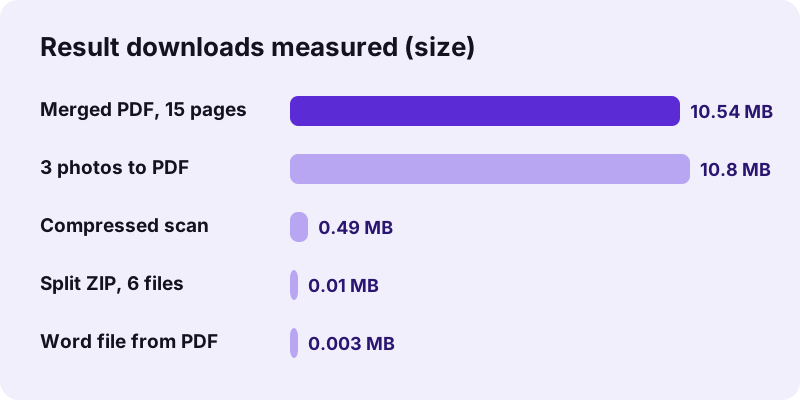
| JPG to PDF | 3 photos, 10.80 MB | images.pdf, 3 pages | 0.3 s |
| Merge PDF | 3 PDFs, 10.54 MB | merged.pdf, 15 pages | 0.2 s |
| Compress PDF | 5-page scan, 2.46 MB | 493 KB | 6.6 s |
| Split PDF | 6-page PDF | ZIP with 6 files | 0.2 s |
| PDF to Word | 6-page PDF | 2.9 KB .docx | 0.8 s |
The same steps work for every tool, so once you have made one PDF this way you know how to merge, split, compress or convert without any pdf24 download. Only the options under the file list change from tool to tool, and each option has a short hint.
Why is a pdf24 download not necessary for privacy?
People often look for a download because they do not want to upload files to a website. Browser-only tools solve that without installing anything: the file is read with the File API and processed on your device. Our request logs showed 0 POST requests in every test run, so nothing was uploaded.
“Browsers can also display content stored locally on the user's device.”
In other words, the privacy benefit of a pdf24 download, keeping files local, is already there in the browser. You can check it yourself in the Network tab of the developer tools while a tool runs.
For work computers this matters twice: a pdf24 download would need approval from IT, while a web page needs none, and your files stay on the managed device the whole time. Some companies still restrict web tools, so check your policy first.
What does a pdf24 download from pdf24tools contain?
You download two kinds of things: the page itself with its scripts, which your browser loads automatically, and your result files. OCR PDF also downloads its recognition engine and language data from a public CDN on first use. Your own documents are never sent in the other direction.
- Results: one file, or one ZIP when a tool makes several, such as a split.
- Libraries: loaded the first time a tool needs them, then cached by the browser.
- OCR data: engine and language files, fetched on the first OCR run.
- Never: an installer, an extension or a background program.
The result file names show what happened, such as -compressed.pdf, -signed.pdf or -page-1.pdf, so a pdf24 download folder stays easy to sort.
Browsers ask before saving some files, especially on phones. If no pdf24 download of your result appears, look for a prompt at the top or bottom of the screen and allow downloads for the site.
When is a pdf24 download of desktop software still useful?
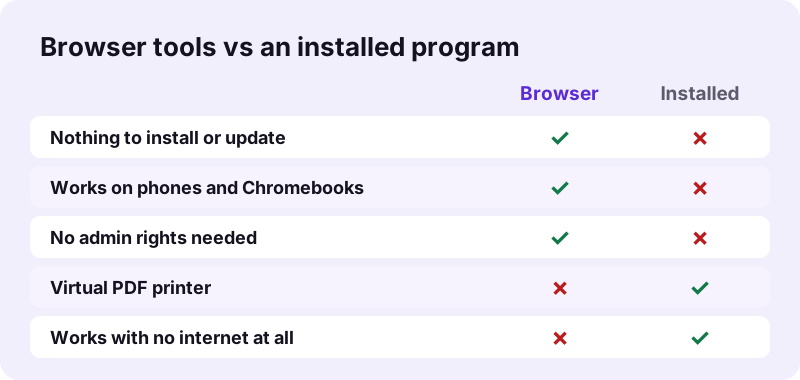
A desktop download is still useful for jobs a browser cannot do: printing any program's output to PDF through a virtual printer, sending faxes, working with no internet at all, signing with a certificate, or batch-processing thousands of files. For printing to PDF, Windows and macOS already include it in the print dialog.
| Need | Browser tools | Better option |
|---|---|---|
| Merge, split, compress, convert | Yes | — |
| OCR, redact, sign visibly | Yes | — |
| Print any program to PDF | No | System print dialog |
| Certificate digital signature | No | Software with your digital ID |
| No internet at all | No (pages must load) | Installed program |
To print a document to PDF without extra software, open the print dialog of any program and choose Microsoft Print to PDF on Windows or Save as PDF on a Mac. You can then merge, compress or sign that file in the browser tools.
For everything in the first two rows, skipping the pdf24 download saves you the install, the updates and the admin rights.
Does pdf24tools work without a pdf24 download offline?
Partly. A tool page and the libraries it needs must load from the internet once. After that, the processing runs entirely on your device, so a connection that drops during a run does not matter. OCR needs its language data downloaded first. There is no fully offline mode, because nothing is installed.
A simple test shows it: load JPG to PDF, switch off Wi-Fi, choose three photos and press the button. The PDF still appears, because the work never needed a server. If you travel often, open the tools you need before you lose the connection.
So the honest answer for travellers is that a pdf24 download is not required, but an internet connection is required once per tool. After the first load, the browser cache usually serves the scripts again quickly.
pdf24 download: frequently asked questions
Is pdf24 download free?
There is no pdf24 download to pay for or to get: pdf24tools has no installer. All tools are free to use in the browser, with no sign-up, no watermark and no file-count limit. The only files you download are your own results, such as a merged PDF or a converted Word file.
Is there a pdf24 download for Windows 10 or 11?
No installer exists, and none is needed. Open the tools in Edge, Chrome or Firefox on Windows 10 or 11 and they work at once. Results go to your Downloads folder. This also works on locked work laptops, because no administrator rights are required.
Is there a pdf24 download for Mac?
No pdf24 download is offered for macOS. On a Mac you use the tools in Safari, Chrome or Firefox with nothing to install, running the same code as on Windows. For quick viewing and simple annotation macOS includes the Preview app; for merging, exact-size compression or OCR, use the browser tools.
Is there a pdf24 download for Android?
No app is offered. Open the tools in Chrome, Edge, Firefox or Samsung Internet on Android, pick files from Files or Downloads and save the result to Downloads. If a store app uses our name, it is not from pdf24tools. Add a home-screen shortcut for quick access.
Is there a pdf24 download for Linux?
No package exists for Ubuntu or any other distribution. The tools run in Firefox or Chrome on Linux exactly as on Windows, because the processing happens in the browser. There are no dependencies to install and nothing to update except your browser.
Is a pdf24 download safer than a website?
Not necessarily. An installed program can read every file on your computer, while a web page can only read the files you pick. pdf24tools processes files locally with 0 bytes uploaded in our logs, so it gives the main privacy benefit of a program without installing anything.
Where do my files go after a pdf24 download of a result?
To your browser's download folder, like any other download. On Windows and Mac that is usually Downloads; on iPhone it is Downloads in the Files app; on Android the Downloads folder. Several results come as one ZIP, which you unpack on your device.
Is there a portable pdf24 download for USB sticks?
No. pdf24tools offers no portable version, offline installer or executable. Any file claiming to be one is not from us. The tools only exist as web pages; to use them on another computer, open the same address in that computer's browser.
Can I use the tools without a pdf24 download on Windows 7?
Only with a browser that still supports current web features. Windows 7 is no longer supported by most browser makers, so newer tools may fail to load. Try the most recent browser version still available for it, or use a phone or another computer instead.
Why does the site not offer a pdf24 download?
Because the browser already does everything the tools need. Processing runs in JavaScript and WebAssembly on your device, so an installer would add updates and permissions without adding much. The few jobs that need a program, such as a virtual printer, are outside what we offer.
Is a pdf24 download of desktop software related to this site?
No. pdf24tools is an independent website and is not affiliated with PDF24 or Geek Software GmbH. We offer no software download of any kind. This guide only describes our own browser tools and our own measurements from 2 November 2026.
Does a pdf24 download of a result keep the original file?
Yes. Each tool reads your file into memory, works on a copy and offers a new file to save. The original stays unchanged where it was. If you do not like the result, press Start over, change an option and run the tool again.
How big can a pdf24 download of a result be?
As big as your device can handle. We downloaded a 10.80 MB PDF of three photos and a 10.54 MB merged file without any limit from the site. On phones, very large results may take longer to build because the phone itself does the processing.
More pdf24 download tools and guides
pdf24 download: sources
- Web browser — Wikipedia
- File API — MDN Web Docs
- WebAssembly — Wikipedia