How to use pdf24 create PDF in 4 steps
- Type a title. The title becomes the large heading on page 1 and the file name, such as Meeting notes.pdf.
- Type or paste the text. Start a line with # for a heading, - for a bullet, 1. for a numbered list; wrap words in ** for bold, * for italic.
- Pick A4 or Letter. A4 is the default; Letter suits US paper.
- Press Create PDF and download. The PDF is built on your device in about a second.
What is pdf24 create PDF for?
pdf24 create PDF is for the moments when you need a PDF but have no document: a note for a landlord, a cover sheet, a list for a school form, a signed-off agenda, a short letter. You type straight into the page, and the browser lays the text out on A4 or Letter pages as a real PDF.
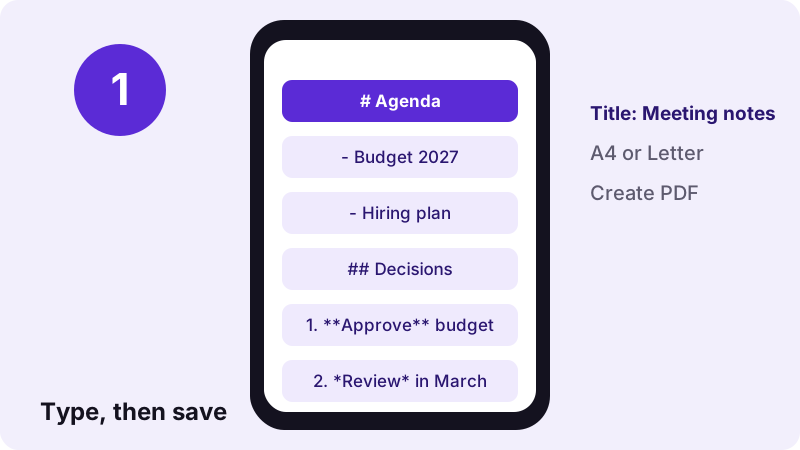
Nothing has to be installed and no file is needed. The text box is plain, but a few marks borrowed from Markdown give you structure: headings, lists, bold and italic, and even tables and code blocks if you know the syntax.
“A word processor (WP) is a device or computer program that provides for input, editing, formatting, and output of text, often with some additional features.”
Which formatting marks does pdf24 create PDF understand?
pdf24 create PDF reads the text as Markdown, so # to ###### make headings, - or * make bullets, 1. makes numbered items, **text** is bold and *text* is italic. A blank line starts a new paragraph. Tables with | pipes, code blocks between ``` fences and > quotes work too.
| You type | In the PDF |
|---|---|
| # Title of a section | Large bold heading (22 pt) |
| ## Subsection | Smaller heading (17 pt) |
| - item | • bullet |
| 1. item | Numbered item |
| **bold** and *italic* | Bold and italic |
| | a | b | plus |---|---| | Table with shaded header |
| ``` code ``` | Grey code block |
| > quote | Indented quote |
| --- | Horizontal rule |
pdf24 create PDF: the title field
The title you type above the text becomes a 22-point heading at the top of page 1 and the PDF's file name and document title. Leave it empty and the file is called document.pdf.
pdf24 create PDF and line breaks
Lines typed one after another without a blank line join into one paragraph, as in Markdown. Leave a blank line between paragraphs, or end a line with two spaces to force a line break inside a paragraph.
pdf24 create PDF for addresses and lists
For an address block, put each line as a - bullet, or end each line with two spaces so the lines stay separate without bullets.
pdf24 create PDF tip for long texts
Paste text from a notes app or an e-mail, then add # in front of the lines that should be headings. Headings are kept together with the first lines that follow them, so none ends alone at the bottom of a page.
How fast is pdf24 create PDF? Measured
pdf24 create PDF built our test note, a 13-character title plus 888 characters with two heading levels, bullets, a numbered list and bold and italic words, as a 2-page A4 PDF of 20,088 bytes in 1.0 second in Chrome on Windows 10. 822 characters were extractable as real text.
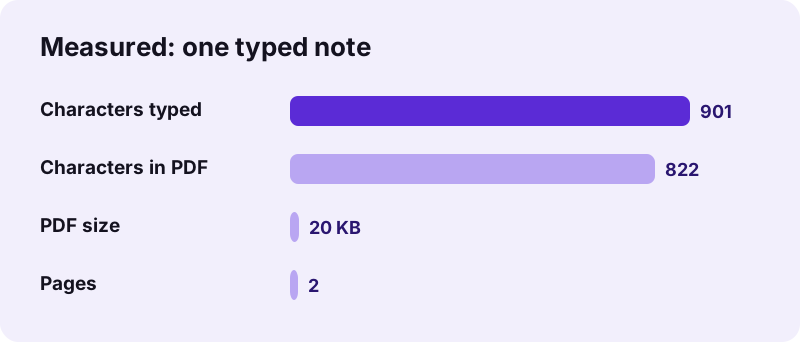
| Measure | Value |
|---|---|
| Typed | Title + 888 characters |
| Output | Meeting notes.pdf, 2 pages, 20,088 B |
| Time (tool) | 1.0 s |
| Characters extractable | 822 (marks like # and ** removed) |
| Fonts | Noto Sans Regular, Bold, Italic |
| Uploaded | 0 bytes |
Is pdf24 create PDF private?
pdf24 create PDF never sends your text anywhere: what you type stays in the page, the PDF is built by JavaScript in memory, and the result line confirms 0 bytes uploaded. That makes it safe for personal letters, complaints, medical notes and anything you would not paste into an online service.
Closing the tab clears the text, so copy it somewhere first if you want to edit it later. More on how the page handles data: browser File API (MDN).
What a PDF from pdf24 create PDF contains
A file made with pdf24 create PDF is a normal PDF with real, selectable text in embedded Noto Sans, A4 or Letter pages with 56-point margins, and the title as its document title. It has no watermark, no logo and no hidden tracking, and it opens in every PDF reader.
- Text: real and searchable, so Ctrl+F and copy work.
- Fonts: Noto Sans Regular, Bold and Italic, embedded as subsets.
- Scripts: Latin, Greek and Cyrillic as text; Arabic, Hebrew and Asian scripts as images.
- Links typed as [text](address): blue and underlined, not clickable.
pdf24 create PDF on iPhone, Android and any computer
pdf24 create PDF runs in Safari, Chrome, Edge and Firefox. On a phone, typing a short letter or a list and saving it as a PDF takes about a minute, and the file lands in Downloads, ready to attach to an e-mail or a form.
- iPhone/iPad: the PDF goes to Files → Downloads.
- Android: the PDF goes to the Download folder.
- Paste from Notes, Keep or an e-mail to save typing.
pdf24 create PDF versus Print to PDF
Any app with a print menu can print to PDF, but the layout then depends on the app. This page gives the same clean layout every time and adds headings and lists from simple marks.
After pdf24 create PDF: sign, merge or lock
A file made with pdf24 create PDF is a normal PDF, so every other tool on the site accepts it. Common next steps are signing it, adding it to other documents, or protecting it with a password before you send it. Each of these runs in the browser too, with 0 bytes uploaded.
- Sign PDF to add a signature to a letter.
- Merge PDF to attach it to other files.
- Lock PDF to add a password.
- TXT to PDF and Markdown to PDF when the text is already in a file.
- PDF converter for Word, Excel and slides.
pdf24 create PDF: frequently asked questions
Is pdf24 create PDF free?
Yes. It is free, with no sign-up, no watermark and no limit on documents, because your own device builds the PDF. pdf24tools is an independent website and is not affiliated with PDF24 or Geek Software GmbH; we use the name only because people search for it. The other tools on the site work the same way.
Does pdf24 create PDF save my text on a server?
No. The text exists only in the open page; the PDF is made by JavaScript on your device and the result line confirms 0 bytes uploaded. Nothing is stored, so closing or reloading the tab clears the text. Copy it to a notes app first if you may need it again.
How do I make a heading with pdf24 create PDF?
Start a line with # and a space for a large heading, ## for a smaller one, down to ###### for the smallest. The # signs are not printed. The title field above the text adds one more heading at the very top of the first page.
Can pdf24 create PDF make bullet and numbered lists?
Yes. Start each line with - or * and a space for bullets, or with 1., 2., 3. for numbers; indent a line by two or more spaces to nest it under the one above. Numbered lists continue from the first number you type, so a list can start at 5.
Can I add pictures with pdf24 create PDF?
No. The page creates text documents; image marks are printed as their description in square brackets. To make a PDF from photos, use JPG to PDF, or put text and pictures into a Word document and convert it with Word to PDF, which embeds pictures.
Can pdf24 create PDF make a table?
Yes. Type a header row such as | Item | Price |, then a separator row | --- | --- |, then one row per line. The PDF shows a grid with a shaded header row. Keep tables narrow, because the text width on A4 is about 483 points with 56-point margins.
What file name does pdf24 create PDF use?
The title you type becomes the file name, for example Meeting notes.pdf, and also the document title that PDF readers show. Without a title the file is called document.pdf. You can rename the file after downloading like any other file.
Does pdf24 create PDF work on a phone?
Yes. Open the page in Safari on iPhone or Chrome on Android, type or paste your text, and press the button. The PDF is saved to Downloads and can be attached to an e-mail straight away. A Bluetooth keyboard makes longer texts easier.
Is the text in a PDF from pdf24 create PDF selectable?
Yes. Every word is drawn as real text with an embedded Noto Sans subset, so the PDF can be searched, copied and read by screen readers; 822 characters were extractable from our 2-page test note. Arabic, Hebrew, Indic, Thai and CJK lines are placed as images.
Can pdf24 create PDF write in other languages?
Yes. Type in any language: Latin, Greek and Cyrillic text is drawn as real text, and Arabic, Hebrew, Hindi, Thai, Chinese, Japanese and Korean are shaped correctly by the browser and placed as images, with right-to-left lines aligned from the right.
What paper size does pdf24 create PDF use?
A4, 595 × 842 points, by default, or Letter, 612 × 792 points, if you choose it before pressing the button. Margins are 56 points on every side and body text is 11 points, the same layout used by the TXT and Markdown converters on this site.
pdf24 create PDF: sources
- Word processor — Wikipedia
- Markdown — Wikipedia
- File API — MDN Web Docs