How to use pdf24 Markdown to PDF in 4 steps
- Choose the Markdown file. Drop one or more .md, .markdown, .mdown or .mkd files on the box, or tap Choose files.
- Pick A4 or Letter. The page size applies to every file in the batch.
- Press Convert to PDF. The Markdown is parsed and laid out on your device.
- Download the PDF. Save it, or the ZIP for several files.
What does pdf24 Markdown to PDF render from a .md file?
pdf24 Markdown to PDF parses the file as GitHub-flavoured Markdown and renders headings # to ###### in six sizes, bold, italic and inline code, nested bullet and numbered lists, task lists, tables with a shaded header row, fenced code blocks on a grey background, block quotes and horizontal rules. Text stays real, selectable text.
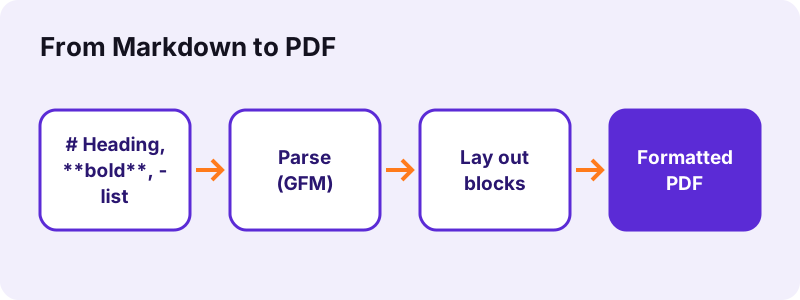
| Markdown | In the PDF |
|---|---|
| # to ###### | Bold headings, 22 pt down to 11 pt |
| **bold**, *italic* | Bold, italic |
| `code` | Slightly smaller inline code |
| - item / 1. item | Bullets, numbers, nesting |
| - [ ] / - [x] | [ ] and [x] task markers |
| | table | | Grid, header row shaded |
| ``` code ``` | Grey block, indentation kept |
| > quote | Indented grey text |
| --- | Thin rule |
“John Gruber created Markdown in 2004 as an easy-to-read markup language.”
Code blocks in pdf24 Markdown to PDF
Fenced and indented code blocks keep every line and every leading space, set slightly smaller on a light grey band. The font is Noto Sans, not a monospaced font, so characters in a block do not line up in exact columns.
pdf24 Markdown to PDF and nested lists
Nested items are indented 18 points per level; bullets alternate between • and – by depth. Numbered lists continue from the start number you wrote, such as 3. for a list that begins at three.
pdf24 Markdown to PDF with HTML inside Markdown
Raw HTML tags are removed and their text kept, so a <br> or a <div> wrapper does not show up as markup in the PDF.
pdf24 Markdown to PDF tip for README files
Badges and screenshots in a README are images; they appear as their alt text in square brackets, so give them meaningful alt text.
What does pdf24 Markdown to PDF not render?
pdf24 Markdown to PDF does not embed images: an image reference shows as its alt text in square brackets. Links keep their text in blue with an underline but are not clickable. Strikethrough text is shown without the line, and math, Mermaid diagrams and footnote syntax print as plain text. Fonts are always Noto Sans.
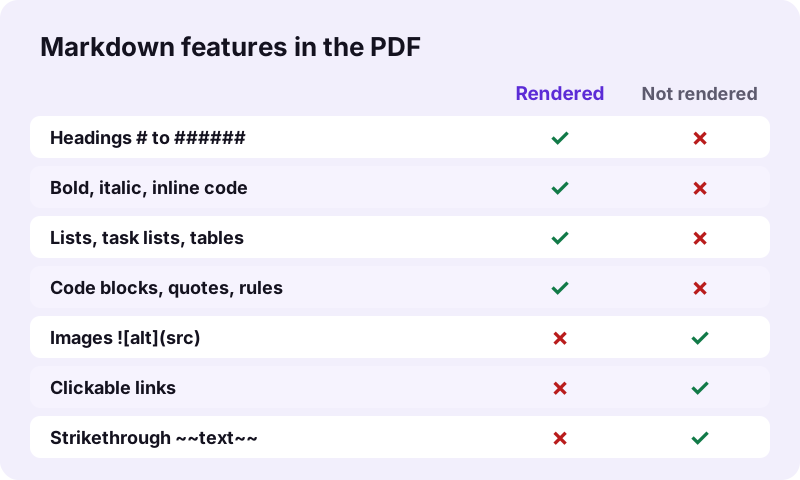
Need pictures in the PDF? Convert the Markdown to .docx in your editor (Pandoc, Typora, Obsidian export) and use Word to PDF, which embeds JPG and PNG pictures.
How fast is pdf24 Markdown to PDF? Measured
pdf24 Markdown to PDF converted our 400-byte test README, with H1 to H3, bold, italic, inline code, a nested list, a numbered list, a 3-row table, a code block, a quote and a link, into a 1-page A4 PDF of 18,383 bytes in 1.3 seconds. 278 characters were extractable.
| Measure | Value |
|---|---|
| Input | dc-readme.md, 400 B |
| Output | 1 page, 18,383 B, A4 |
| Time (tool) | 1.3 s |
| Characters extractable | 278 |
| Fonts | Noto Sans Regular, Bold, Italic |
| Link annotations | 0 (links not clickable) |
Is pdf24 Markdown to PDF private?
pdf24 Markdown to PDF keeps the file on your device: the browser reads the .md with the File API, the open-source marked parser runs in the page, and the result line confirms 0 bytes uploaded. Internal docs, meeting notes and unpublished READMEs never reach a server.
How it works: File API on MDN.
pdf24 Markdown to PDF for Obsidian, Notion, Joplin and GitHub files
Notes apps and code hosts all speak Markdown, with small dialect differences. The converter follows GitHub-flavoured Markdown, which most of them export, so the core syntax renders the same way everywhere. Dialect extras such as callouts, embeds or databases print as the text you typed, so check those parts after converting.
| Source | How to get the .md | Note |
|---|---|---|
| Obsidian | The vault folder already holds .md files | [[wiki links]] print as typed |
| Notion | Export → Markdown & CSV | Comes as a ZIP; unzip first |
| Joplin | Export → MD | Attachments are separate files |
| GitHub / GitLab | Raw → Save as, or clone | README.md converts directly |
| VS Code | Save the file | Any .md |
pdf24 Markdown to PDF versus Pandoc and editor exports
Desktop tools such as Pandoc, Typora, Obsidian or VS Code extensions can also turn Markdown into PDF, often through a full typesetting engine or a headless browser. They offer themes, images and clickable links, but need installing and configuring. The browser converter needs nothing and handles the common syntax.
| Need | Browser converter | Desktop export |
|---|---|---|
| No install, any device | Yes | No |
| Images embedded | No (alt text) | Usually yes |
| Clickable links | No | Usually yes |
| Custom themes and CSS | No | Yes |
| Batch of files | Yes, as a ZIP | Depends on the tool |
| 0 bytes uploaded | Yes | Yes |
A practical split: use the browser for quick shares of notes, meeting minutes and READMEs on any device, and a desktop export for a styled report with pictures.
pdf24 Markdown to PDF on phones and tablets
The page runs in Safari, Chrome, Edge and Firefox, so a Markdown note becomes a PDF on an iPhone, an iPad, an Android phone or a Chromebook. Save the .md file to the device, then pick it with Choose files.
- iPhone/iPad: Files app → the .md file.
- Android: Download folder or Drive.
- No file, only text? Paste it into Create PDF, which accepts the same # and ** syntax.
pdf24 Markdown to PDF problems and fixes
- Raw symbols like ** in the PDF: the file uses a dialect the parser does not know, or spaces are missing after #.
- Table shows as text: the separator row |---| is missing.
- Wrong characters: save the file as UTF-8.
- Images missing: expected, see the note above.
- Heading levels look the same: check that each heading has a space after the # signs, such as ## Setup.
pdf24 markdown to PDF: frequently asked questions
Is pdf24 Markdown to PDF free?
Yes. It is free, with no sign-up, no watermark and no limit, because your own device does the work. pdf24tools is an independent website and is not affiliated with PDF24 or Geek Software GmbH; we use the name only because it is what people search for. Every tool on the site runs locally.
Does pdf24 Markdown to PDF upload my file?
No. The .md file is read by your browser and parsed in memory by an open-source Markdown parser running inside the page. The result line shows the bytes read and 0 bytes uploaded. Only the converter code comes from our server.
Which Markdown flavour does pdf24 Markdown to PDF support?
GitHub-flavoured Markdown: CommonMark plus tables, task lists and fenced code blocks. That covers README files and the exports of most notes apps. Extensions such as math, footnotes, Mermaid diagrams or wiki links are not rendered and print as the text you typed.
Does pdf24 Markdown to PDF include images?
No. An image reference such as  is shown as [Diagram] in the text, because a single .md file does not contain the picture itself. To include pictures, export the Markdown to .docx in your editor and convert that file with Word to PDF.
Are links clickable after pdf24 Markdown to PDF?
No. Link text is drawn in blue with an underline so readers see that it was a link, but the PDF contains no link annotations; our test file with one link had 0. If readers need the address, write the full URL in the text, which stays selectable.
Does pdf24 Markdown to PDF keep code formatting?
Code blocks keep every line and every leading space and are drawn on a light grey band, slightly smaller than body text; inline code is set slightly smaller too. The font is Noto Sans rather than a monospaced font, so columns inside code do not align exactly.
Can pdf24 Markdown to PDF convert a whole folder of notes?
Yes. Select all the .md files at once; each becomes its own PDF with the same name, and the set downloads as one ZIP. To make one document, for example a notebook or a documentation set, run the PDFs through Merge PDF in the order you want.
Does pdf24 Markdown to PDF render tables?
Yes. GitHub-style tables with a header row and a |---| separator row become a grid, with the header row shaded light grey and bold or italic text kept inside cells. Our test table with 3 rows rendered on the first try. Column alignment colons are not applied.
Does pdf24 Markdown to PDF support non-Latin text?
Yes. Latin, Greek and Cyrillic text is drawn as real, selectable text with an embedded Noto Sans subset. Arabic, Hebrew, Indic, Thai and CJK lines are shaped by the browser and placed as images, so they look right but cannot be selected. Save the file as UTF-8 for best results.
What page size does pdf24 Markdown to PDF use?
A4 by default, with 56-point margins, or Letter if you choose it before converting. Body text is 11 points and headings range from 22 points for # down to 11 points for ######. Headings are kept together with the first lines that follow them.
Can I type Markdown directly instead of using pdf24 Markdown to PDF?
Yes. Create PDF on this site accepts typed or pasted text with the same syntax: # for headings, - for bullets, 1. for numbered lists, **bold** and *italic*. It uses the same layout engine, so the result looks the same as converting a .md file.
pdf24 markdown to PDF: sources
- Markdown — Wikipedia
- File API — MDN Web Docs
- Plain text — Wikipedia