How to use pdf24 ODG to PDF in 3 steps
- Choose the .odg. Drop one or more .odg or .otg files on the box, or tap Choose files.
- Press Convert to PDF. Each drawing page is drawn with vector shapes on your device.
- Download. Save the PDF, or the ZIP when you converted several drawings.
What is an .odg file and how does pdf24 ODG to PDF read it?
An .odg file is an OpenDocument drawing, the native format of LibreOffice Draw: a ZIP package whose content.xml lists each page and its shapes, frames and text. pdf24 ODG to PDF reads that XML in your browser and draws every page as vector graphics on a PDF page of the same size.
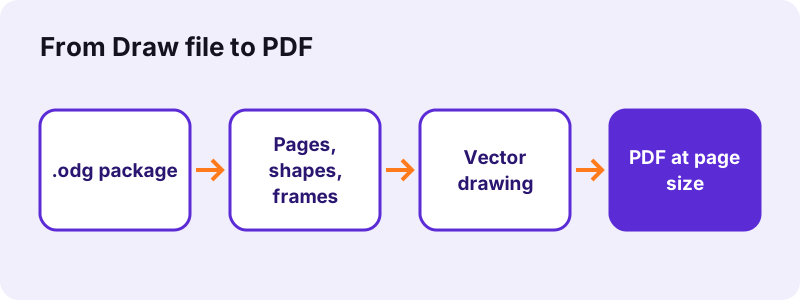
Draw is used for diagrams, floor plans, flyers, organisation charts and simple technical drawings. Because shapes are stored as geometry, not pixels, the converter can redraw rectangles, ellipses and lines as PDF vector paths that stay sharp at any zoom level and print crisply.
“LibreOffice Draw is a free and open source vector graphics editor.”
Page size in pdf24 ODG to PDF
Each PDF page takes the paper size of the drawing's page layout. Draw's default page is A4 portrait, so our test file gave a 595.3 × 841.9-point page; an A3 poster or a Letter flyer keeps its own size.
pdf24 ODG to PDF and colours
Solid fill and outline colours are kept. A shape with no style of its own gets Draw's default blue fill and darker blue outline, the same colours you see in Draw.
pdf24 ODG to PDF with labels in shapes
Text inside a shape is drawn centred in the shape at 18 pt unless the style sets a size. It stays real text, so a label in a floor plan or an org chart can be searched in the PDF.
pdf24 ODG to PDF tip for diagrams
Build diagrams from rectangles, ellipses and straight connectors where you can: those are drawn exactly, while freeform curves are simplified.
Which Draw objects does pdf24 ODG to PDF keep exactly?
pdf24 ODG to PDF draws rectangles, squares, ellipses, circles, straight lines, connectors, text frames and pictures exactly, with solid fills and outlines. Polygons, Bézier curves, freeform lines and custom shapes such as stars, arrows and flowchart symbols are simplified to their bounding rectangle. Gradients, hatching and rotation are not drawn.
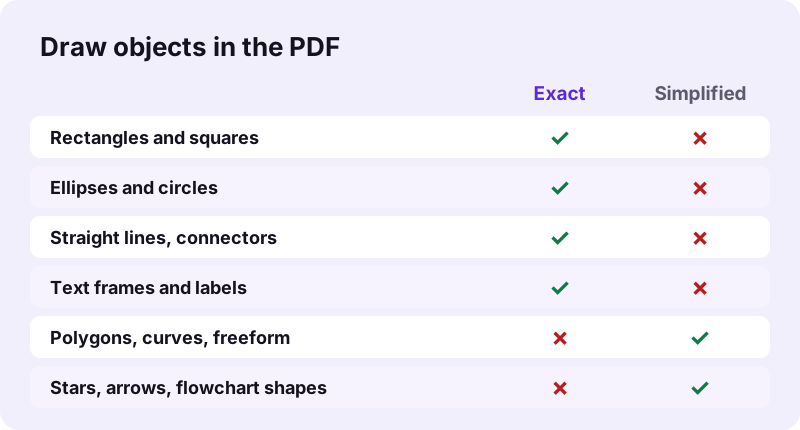
| Draw object | In the PDF |
|---|---|
| Rectangle, square | Vector, exact |
| Ellipse, circle | Vector, exact |
| Line, connector | Vector, straight |
| Text frame | Real text, Noto Sans |
| Picture (PNG, JPG) | Embedded |
| Polygon, curve, freeform | Bounding rectangle |
| Custom shapes (arrows, stars) | Bounding rectangle |
| Gradient, hatching, bitmap fill | Not drawn |
| Rotation | Not applied |
For a drawing full of curves, use Draw's own File → Export as PDF, which keeps every shape. The browser converter suits box-and-line diagrams, forms and simple layouts.
How fast is pdf24 ODG to PDF? Measured
pdf24 ODG to PDF converted our 2.0 KB test drawing, one A4 page with shapes and a text label, into a 1-page PDF of 8,961 bytes in 0.9 seconds in Chrome on Windows 10. The page measured 595.3 × 841.9 points, and the 23 characters of label text were extractable.
| Measure | Value |
|---|---|
| Input | dc-drawing.odg, 2.0 KB, 1 page |
| Output | 1 page, 8,961 B |
| Page size | 595.3 × 841.9 pt (A4) |
| Time (tool) | 0.9 s |
| Characters extractable | 23 |
| Uploaded | 0 bytes |
The PDF is larger than the 2.0 KB drawing mainly because it embeds a Noto Sans font subset, which makes labels print the same on every device; the .odg only names the fonts it expects.
Is pdf24 ODG to PDF private?
pdf24 ODG to PDF keeps the drawing on your device: the browser reads it with the File API, JavaScript draws it in memory, and the result line confirms 0 bytes uploaded. Floor plans of a home, internal org charts and unreleased product sketches never reach a server, and no account is needed.
How a page reads a local file: File API on MDN.
pdf24 ODG to PDF on phones, Chromebooks and computers without LibreOffice
An .odg file is hard to open on a phone, because few mobile apps read OpenDocument drawings. The converter runs in Safari, Chrome, Edge and Firefox, so turning the drawing into a PDF is often the easiest way to view it, share it or print it.
- iPhone/iPad: save the .odg to Files, then Choose files → Browse.
- Android: download it and pick it from Download.
- Chromebook, Windows, Mac: drag the file onto the box.
pdf24 ODG to PDF for multi-page drawings
Every page of the drawing becomes one PDF page, in order. Draw templates (.otg) are accepted as well.
pdf24 ODG to PDF for flyers, floor plans and org charts
Draw files cover very different jobs, and the converter suits some better than others. The table below rates common drawing types by how many of their objects are drawn exactly, so you can decide in advance whether to convert here or export from Draw itself.
| Drawing | Result | Advice |
|---|---|---|
| Org chart (boxes + connectors) | Very good | Convert here |
| Form or label sheet | Very good | Convert here |
| Floor plan with walls as rectangles | Good | Check doors drawn as arcs |
| Flyer with pictures and text | Good | Gradients become plain |
| Flowchart with diamond symbols | Simplified | Diamonds become rectangles |
| Illustration with curves | Poor | Export from Draw instead |
Fixing pdf24 ODG to PDF problems
When the PDF does not look like the drawing, the cause is almost always an object type the converter simplifies or skips. Each fix below is a small change in Draw, made in a copy of the file, followed by a new conversion that takes about a second.
- Square shapes where you drew stars or arrows: custom shapes are drawn as boxes; use Draw's export for those.
- Plain background: gradient or bitmap fills are not drawn; use a solid colour.
- Tilted objects appear straight: rotation is not applied.
- Flat XML drawing (.fodg): save it as a normal .odg first.
- Password-protected file: in Draw use Save As and untick Save with password.
pdf24 ODG to PDF next steps
pdf24 ODG to PDF: frequently asked questions
Is pdf24 ODG to PDF free?
Yes. It is free, with no sign-up, no watermark and no limit on drawings, because your own device does the work. pdf24tools is an independent site and is not affiliated with PDF24 or Geek Software GmbH; we use the name only because people search for it. All tools on the site run in the browser.
Do I need LibreOffice Draw for pdf24 ODG to PDF?
No. The page reads the OpenDocument drawing format itself, so the converter works on iPhones, Android phones, Chromebooks and computers without LibreOffice or OpenOffice. All you need is a current browser such as Chrome, Edge, Firefox or Safari, and nothing is installed on the device.
Does pdf24 ODG to PDF upload my drawing?
No. The .odg is read from your disk by the browser and drawn in memory by JavaScript. The result line shows the bytes read and 0 bytes uploaded. Only the converter code comes from our server, never your file, so private plans and sketches stay on your device.
Are shapes vector graphics after pdf24 ODG to PDF?
Yes. Rectangles, ellipses, circles and lines are drawn as PDF vector paths, so they stay sharp at any zoom and print cleanly at any size. Pictures inside the drawing are embedded as they are, and labels are drawn as real text with an embedded font.
Why do my arrows look like boxes after pdf24 ODG to PDF?
Arrows, stars, flowchart symbols, polygons and freeform curves are custom geometry that the converter simplifies to the shape's bounding rectangle, keeping its fill and its text. Rectangles, ellipses and lines are drawn exactly. For drawings that depend on curves, export from Draw.
What page size does pdf24 ODG to PDF use?
Each PDF page takes the paper size of the drawing's page layout, so A4 stays A4, A3 stays A3 and Letter stays Letter. Draw's default is A4 portrait, which our test confirmed with a 595.3 × 841.9-point page. Nothing is scaled or cropped.
Does pdf24 ODG to PDF keep text searchable?
Yes, for Latin, Greek and Cyrillic scripts: text frames and shape labels are drawn as real text in Noto Sans, so they can be searched and copied; our test page gave 23 extractable characters. Labels in Arabic, Hebrew or Asian scripts are placed as images.
Can pdf24 ODG to PDF convert several drawings at once?
Yes. Select or drop several .odg files together; each becomes its own PDF, and the set downloads as one ZIP. Every page of each drawing becomes one PDF page. Use Merge PDF afterwards to put all the drawings in one file, for example a set of floor plans.
Does pdf24 ODG to PDF keep gradients and rotation?
No. Gradient, hatching and bitmap fills are not drawn, and rotated objects are placed upright. Solid fills and outlines are kept. If a flyer depends on a gradient background, set a solid colour in Draw before converting, or use Draw's own Export as PDF.
Can pdf24 ODG to PDF open drawings from other programs?
It opens any valid OpenDocument drawing, whether it came from LibreOffice Draw, Apache OpenOffice Draw or another program that saves .odg. Visio, CorelDRAW and Illustrator files are different formats; open them in Draw if possible, save as .odg and convert that.
Is pdf24 ODG to PDF good for printing a floor plan?
Usually, yes. Walls and rooms drawn as rectangles and lines come out as sharp vectors at the exact paper size, ready to print at 100 %. Check doors or furniture drawn as arcs or freeform shapes, because those are simplified to rectangles in the PDF.
pdf24 ODG to PDF: sources
- LibreOffice Draw — Wikipedia
- Vector graphics — Wikipedia
- OpenDocument — Wikipedia