How to use pdf24 PDF to SVG in 4 steps
- Choose the PDF. Tap Choose a file or drop one PDF on the box. The browser reads it on your device.
- Pick the pages. Leave Pages empty for all pages, or type numbers such as 1-3, 7 to export only those.
- Press Convert to SVG. Each page is translated into SVG paths and text elements, page by page.
- Download. One page downloads as a .svg file; several pages come as a ZIP with one SVG per page.
What does pdf24 PDF to SVG keep from a PDF page?
pdf24 PDF to SVG keeps what a PDF draws as vectors: text, lines, curves and filled shapes. Text becomes real SVG text elements in the original font and position, shapes become paths, and the canvas matches the page, so a 595 × 842-point A4 page gives an SVG with the same viewBox.
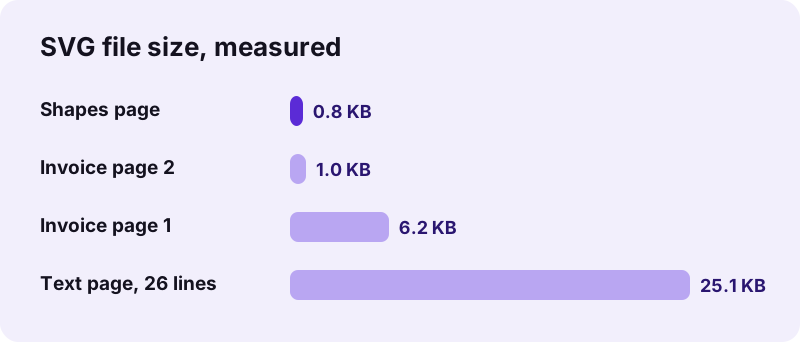
On our first invoice page the SVG held 25 text elements; on a 26-line text page it held 26, one per line, each letter placed at its exact position. A page of coloured rectangles came out as filled paths in only 787 bytes. Because nothing is turned into pixels, you can zoom in as far as you like and edges stay crisp.
“Scalable Vector Graphics (SVG) is an XML-based vector graphics format for defining two-dimensional graphics, having support for interactivity and animation.”
pdf24 PDF to SVG and text
Text stays text: you can select it in a browser, search it with Ctrl+F and edit it in Inkscape or Illustrator. Our test PDFs used the standard Helvetica font, which a PDF may reference without embedding, so the SVG names Helvetica and your viewer draws it with its own copy or a close substitute.
pdf24 PDF to SVG and fonts
When a PDF embeds its fonts, the converter is set to embed them in the SVG as well, so the letters keep their shapes on computers without that font. Check the result in two browsers if the typeface matters, for example for a logo or a printed sign.
pdf24 PDF to SVG and colours
Fills and strokes are written as RGB colours, such as the red rectangle on our shapes page. CMYK and spot colours from print PDFs are converted to screen colours, so send the original PDF to a print shop and use the SVG for screens and editing.
pdf24 PDF to SVG tip for logos
To get one logo out of a page, export just that page, open the SVG in Inkscape, ungroup, delete everything except the logo and use Resize page to drawing. The vector logo then scales to a business card or a banner without blur.
Can pdf24 PDF to SVG convert a scanned PDF?
Yes, but the SVG gets large. pdf24 PDF to SVG stores photos and scanned page images inside the file as lossless PNG data, so the saved SVG keeps showing the page. Our scanned A4 test page (2,480 × 3,508 pixels) became a 33.2 MB SVG in 5.2 seconds; PDF to PNG or JPG is far smaller.
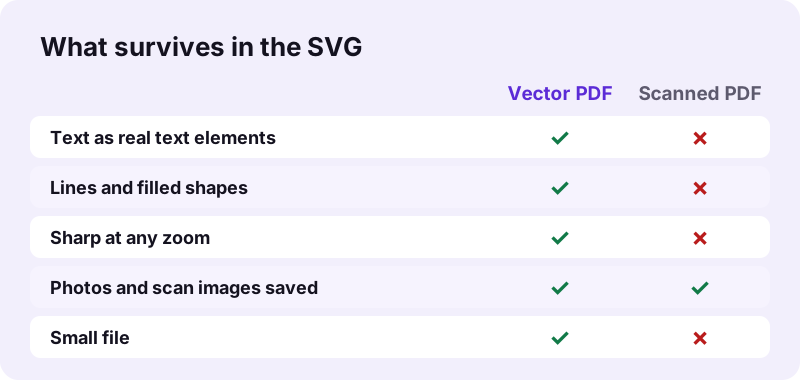
The same applies to photos placed on otherwise vector pages: the text and shapes stay vectors and the photo is embedded as a lossless picture, which makes picture-heavy pages large. When a small file matters more than vectors, these are the better choices:
- Scans and photo pages: PDF to PNG or PDF to JPG.
- Just the pictures inside a PDF: Extract images.
- Scanned text you want to edit: OCR PDF first, then PDF to Word.
SVG, PNG or TIFF: when is pdf24 PDF to SVG the right export?
pdf24 PDF to SVG is the right choice when the page is made of text and drawings and you want to scale or edit it: logos, floor plans, diagrams, charts, maps and icons. Raster formats such as PNG, JPG or TIFF are better for scans and photos, because they store pixels and every viewer shows them the same way.
| Format | Stores | Best for | Tool |
|---|---|---|---|
| SVG | Vector paths and text | Logos, diagrams, plans, web graphics | This page |
| PNG | Pixels, lossless | Screenshots, sharp text pages | PDF to PNG |
| JPG | Pixels, lossy | Scans, photos, small files | PDF to JPG |
| TIFF | Pixels, multi-page | Archives, fax, OCR input | PDF to TIFF |
The vector graphics article on Wikipedia explains the difference between shapes described by geometry and images stored as pixels.
pdf24 PDF to SVG for the web, Inkscape and Illustrator
pdf24 PDF to SVG files work in every current browser and in vector editors. Put them on a web page with an img tag, open them in Inkscape, Illustrator, Affinity Designer or Figma to edit, or use them in documentation where diagrams must stay sharp on high-resolution screens.
- Web: an
imgtag pointing to the .svg scales with the layout and stays crisp on retina screens. - Inkscape: File → Open; text stays editable as long as the font is installed.
- Illustrator and Affinity: open or place the SVG and ungroup to edit parts.
- Back to PDF: SVG to PDF rebuilds a PDF from edited SVG files.
Each file is named after the PDF and the page, such as invoice-page-1.svg, so pages stay in order after unzipping.
pdf24 PDF to SVG keeps your drawings on your device
With pdf24 PDF to SVG, plans, designs and contracts never leave your computer. The browser reads the PDF with the File API and writes the SVG files in JavaScript locally; our network log showed 0 upload requests for every test, and the result line confirms 0 bytes uploaded. No account is needed and no watermark is added.
You can check it in the Network tab of the browser developer tools while converting. The File API on MDN describes how pages read a file you choose without sending it anywhere.
pdf24 PDF to SVG speed and page selection
Vector pages convert almost instantly: both invoice pages took 0.4 seconds together and a full text page 0.5 seconds. Use the Pages box to export only what you need, for example 3 for a single drawing or 1-3, 7 for a set, which keeps the ZIP small and saves unzipping work.
| Test file | Pages | Output | Time |
|---|---|---|---|
| Invoice, 2 pages | All | ZIP 7.5 KB, 2 SVG | 0.4 s |
| Report, 6 pages | 1 | 25.1 KB SVG | 0.5 s |
| Shapes page | All (1) | 787 B SVG | 0.5 s |
| Scan, 4 pages | 1 | 33.2 MB SVG, scan embedded | 5.2 s |
pdf24 PDF to SVG: frequently asked questions
Is pdf24 PDF to SVG free?
Yes. It is free with no sign-up, no watermark and no daily limit. The conversion runs in your own browser, so there is no server cost per file. Export as many pages as you need; the SVG files are yours to use on websites, in print layouts or in your design projects.
Does pdf24 PDF to SVG keep text selectable?
Yes, for PDFs with a real text layer. Each line becomes an SVG text element with its font name, size and letter positions, so you can select, search and edit it. On our 26-line test page the SVG held 26 text elements. Scanned pages have no text, only a picture.
Why is my pdf24 PDF to SVG file blank?
A blank result usually means the page has no text and no shapes, or the viewer blocks pictures embedded in SVG files. Scans and photos are now written into the SVG itself as embedded pictures, so they no longer vanish after the download; open a scanned page that looks empty in a browser to check it. For small files from scanned and photo pages, use PDF to PNG or PDF to JPG.
Does pdf24 PDF to SVG make one file per page?
Yes. Every page becomes its own SVG, named after the PDF and the page number. A single page downloads directly as an .svg; several pages are packed into one ZIP. Use the Pages box to pick only the pages you need, for example 2-4.
Is pdf24 PDF to SVG made by PDF24?
No. pdf24tools is an independent site and is not affiliated with PDF24 or Geek Software GmbH. This converter is our own code that runs in your browser, uploads nothing and needs no account. We use the same plain page name only so that people searching for the tool can find it.
Can I edit a pdf24 PDF to SVG file in Inkscape?
Yes. Open the SVG in Inkscape, ungroup the content and you can move shapes, recolour fills and edit text. Text stays editable when the font named in the file is installed; otherwise Inkscape substitutes one. Save as Inkscape SVG or export to PDF when you are done.
How big are pdf24 PDF to SVG files?
Vector pages are small. In our tests a page of coloured shapes was 787 bytes, an invoice page 6.2 KB and a dense 26-line text page 25.1 KB. Size grows with the number of letters and shapes on the page, not with the zoom level, because SVG stores geometry rather than pixels.
Does pdf24 PDF to SVG upload my PDF?
No. The PDF is read and converted inside your browser and the SVG files are created on your device. Our network log showed 0 upload requests during every test, and the result line reports 0 bytes uploaded. Nothing is stored on a server, so drawings and plans stay private.
Can pdf24 PDF to SVG export a logo from a PDF?
Yes, if the logo is vector artwork in the PDF. Export the page, open it in a vector editor, delete everything around the logo and fit the page to the drawing. If the logo was placed as a bitmap, it will not survive the SVG export; use Extract images for that.
Does pdf24 PDF to SVG work on a phone?
Yes. It runs in Chrome, Safari, Firefox and Edge on Android, iPhone and iPad. The SVG or ZIP lands in Downloads or Files. Phone browsers display SVG files, but editing them is easier on a computer with Inkscape, Illustrator or another vector editor.
Can pdf24 PDF to SVG convert a password-protected PDF?
Only once the open password is removed. Use Unlock PDF with the password you know, then convert the unlocked copy. A PDF that only restricts copying or printing usually opens and converts directly. Removing a password you do not know is not possible here.
More pdf24 PDF to SVG tools and guides
pdf24 PDF to SVG: sources
- SVG — Wikipedia
- Vector graphics — Wikipedia
- File API — MDN Web Docs