How to use pdf24 PDF to WEBP in 4 steps
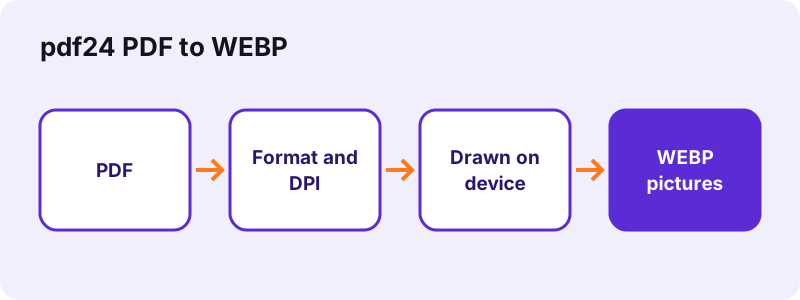
- Choose the PDF. Tap Choose a PDF and pick the document.
- Check the format. WEBP is preselected; pick 72, 150 or 300 DPI and, if you like, a page list.
- Press Convert to images. Pages are drawn one by one on your device.
- Download the pictures. One page downloads as a picture; several pages come as a ZIP file.
When is pdf24 PDF to WEBP the right choice?
Saving PDF pages as WEBP pictures suits chats, slides and websites that do not accept PDF files. WebP files are smaller than JPEG at similar quality, though some old apps cannot open them. Use 150 DPI for screens and 300 DPI when the pictures will be printed or zoomed.
- 72 DPI: previews
- 150 DPI: sharing
- 300 DPI: printing
pdf24 PDF to WEBP on a phone
Android and iPhone browsers run the same code; large files simply take a little longer on a phone.
pdf24 PDF to WEBP on a computer
Windows, macOS and Linux all work in Chrome, Edge, Firefox or Safari, with nothing to install.
pdf24 PDF to WEBP with many files
There is no file-count limit; the memory of your device is the only ceiling.
pdf24 PDF to WEBP: privacy in one line
Files are read by the browser and never uploaded, so nothing needs deleting afterwards.
Which resolution should pdf24 PDF to WEBP use?
Conversion to WEBP draws pages at 72, 150 or 300 DPI. One A4 page becomes 595 × 842 pixels at 72 DPI, 1,240 × 1,754 at 150 DPI and 2,480 × 3,508 at 300 DPI, so file size roughly quadruples each time the resolution doubles.
| Resolution | Pixels (A4) | Good for |
|---|---|---|
| 72 DPI | 595 × 842 | Previews |
| 150 DPI | 1,240 × 1,754 | Sharing |
| 300 DPI | 2,480 × 3,508 | Printing |
“JPEG is a commonly used method of lossy compression for digital images, particularly for those images produced by digital photography.”
pdf24 PDF to WEBP works in Chrome, Edge, Firefox and Safari on Windows, macOS, Linux, Android and iOS.
pdf24 PDF to WEBP: frequently asked questions
Is pdf24 PDF to WEBP free?
Yes. This converter costs nothing, needs no account and adds no watermark. It runs on your own device, so there is no upload queue, no file-count limit and no daily cap, and you can use it as often as you like, on any device with a current browser.
Does pdf24 PDF to WEBP upload my files?
No. The browser reads the files with the File API and converts them in JavaScript on your device. The result line confirms 0 bytes uploaded, and nothing is kept anywhere once you close the tab. That makes it safe for contracts, IDs and medical papers.
Does pdf24 PDF to WEBP work on a phone?
Yes. It works in current Chrome, Safari, Edge and Firefox on Android and iPhone. Large files take a little longer on a phone because all the work happens on the device itself rather than on a server. A file of a few megabytes usually converts in under ten seconds.
More pdf24 PDF to WEBP tools and guides
pdf24 PDF to WEBP: sources
- File API (MDN Web Docs) — MDN
- PDF format family (Library of Congress) — Library of Congress
- JPEG (Wikipedia) — Wikipedia