How to use pdf24 PDF to images in 4 steps
- Choose the PDF. Tap Choose a file or drop one PDF on the box. The pages are previewed; the file never leaves your device.
- Pick a format. JPG for photos and sharing, PNG for text and line art, WebP for the smallest files.
- Set resolution and pages. Keep 150 DPI or choose 72 or 300; leave Pages empty for all or type 1-3, 7.
- Convert and download. Press Convert to images. One page gives one image; several pages arrive in a ZIP.
Which format should you pick in pdf24 PDF to images?
The best format in pdf24 PDF to images depends on the page and where the picture goes. WebP made the smallest files in all our tests and suits websites and chat. JPG opens everywhere, including old software and printers. PNG is lossless, so small text, tables and lines stay perfectly sharp, but scans become large.
| Page (150 DPI) | WebP | JPG | PNG |
|---|---|---|---|
| Invoice page, text and table | 31.7 KB | 65.7 KB | 111 KB |
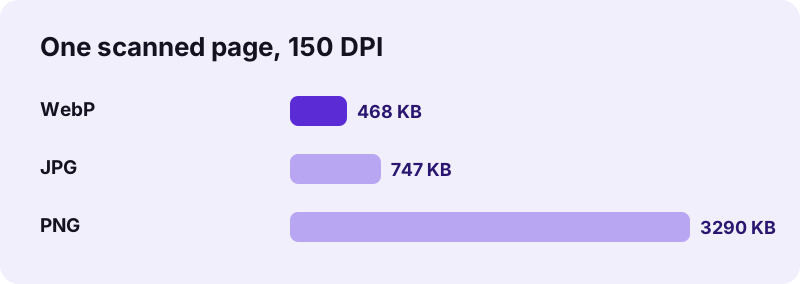
| Scanned A4 page | 468 KB | 747 KB | 3.29 MB |
| Dense text page | not measured | 335 KB | 313 KB |
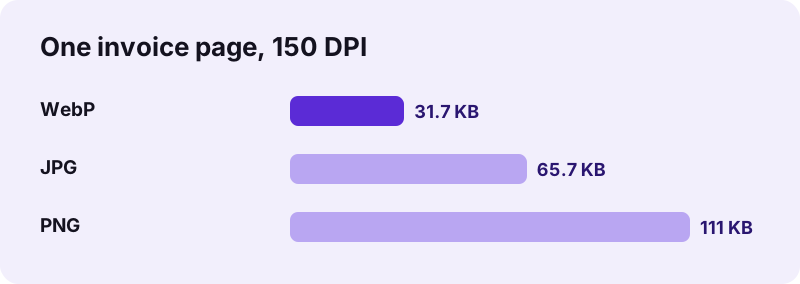
Two patterns stand out. On a mostly white page with some text, WebP was half the size of JPG. On a full-page scan PNG was 4.4 times larger than JPG and 7 times larger than WebP, without a visible gain, because the scan was already a photo. Only on a page packed with text did PNG beat JPG, by about 7 %.
pdf24 PDF to images as WebP
“WebP is a raster graphics file format developed by Google and intended as a replacement for the JPEG, PNG, and GIF file formats on the Web.”
WebP files open in every current browser and in the built-in photo viewers of current Windows, macOS, iOS and Android versions. Older desktop programs and some print shops still expect JPG, so check before you send WebP to a printer or an old office program.
pdf24 PDF to images as JPG
JPG is the safe choice when you do not know what the receiver uses: every phone, computer, website form and photo printer reads it. Pages get a white background and 90 % quality; our 4-page scan at 150 dpi came to about 750 KB per page. More detail on resolutions is on PDF to JPG.
pdf24 PDF to images as PNG
PNG keeps every pixel exactly, which matters for fine print, charts, signatures and anything you will edit again. Pages are saved opaque on white. Avoid PNG for scans and photo pages: our scanned page grew to 3.29 MB. See PDF to PNG for the full PNG measurements.
pdf24 PDF to images tip: test one page first
Unsure which format to send? Type 1 in the Pages field and convert the first page three times, once per format. Each run took under 2 seconds on our laptop, and you can compare size and sharpness before converting the whole PDF.
What does pdf24 PDF to images do with each page?
pdf24 PDF to images draws every page you selected at 72, 150 or 300 DPI on a white canvas, then encodes it as JPG, PNG or WebP. Text, drawings, photos and scans all become part of the picture. Each image is named after the PDF and the page number, such as report-page-4.webp.
An A4 page is 595 × 842 pixels at 72 DPI, 1,240 × 1,754 at 150 DPI and 2,479 × 3,508 at 300 DPI, whatever format you choose. If you convert one page you receive the image itself; two or more pages are packed into one ZIP. Our 5-page contract scan came out as a 1.14 MB ZIP of WebP files, about 227 KB each, in 7.1 seconds.
Is pdf24 PDF to images private?
pdf24 PDF to images never uploads the PDF. Your browser opens it with the File API and renders the pages with JavaScript on your own device; in our tests the page sent 0 upload requests and the result line confirmed 0 bytes uploaded. The images are created locally and carry no watermark.
That makes the tool fit for identity documents, bank statements and medical letters. You can verify it in the Network tab of the browser's developer tools (F12). The File API on MDN describes how a page reads a local file without sending it.
pdf24 PDF to images for common jobs
Different jobs need different formats, so here is what we would pick based on our measurements. The aim is a picture that is sharp enough for its use and no larger than it has to be, which also keeps messages and uploads fast.
| Job | Format | Resolution |
|---|---|---|
| Send a page in WhatsApp or Telegram | WebP or JPG | 150 DPI |
| Put pages on a website | WebP | 72–150 DPI |
| Insert a page in slides | PNG | 150 DPI |
| Print a page | JPG or PNG | 300 DPI |
| Upload a scan to a web form with a size limit | JPG | 72–150 DPI |
| Archive pages in one file | TIFF via PDF to TIFF | 150–300 DPI |
- Need the photos inside the PDF, not whole pages? Use Extract images.
- Want one scrolling picture of all pages? Use PDF to long image.
- Need a smaller PDF instead of images? Try Compress PDF.
pdf24 PDF to images on iPhone, Android and computers
The converter runs in Safari, Chrome, Edge and Firefox on iPhone, iPad, Android, Windows, macOS, Linux and Chromebook, with nothing to install. Images go to your Downloads folder, or Files → Downloads on an iPhone, where Share → Save Image puts them in Photos.
If an older app on a phone refuses a WebP file, convert the page again as JPG. At 300 DPI each page needs several megabytes of memory while it is drawn; on a phone, convert long PDFs in parts with the Pages field.
pdf24 PDF to images problems and fixes
When pdf24 PDF to images stops or the result disappoints, the cause is usually the PDF or the settings: a password, a damaged file, too low a resolution or too large a format for a scan. Each case has a quick fix.
| Symptom | Fix |
|---|---|
| Password error | Unlock PDF with the password you know, then convert |
| File will not open | Repair PDF first |
| Text is blurry | Use 150 or 300 DPI |
| Images too big | Switch PNG to WebP or JPG; use 150 DPI |
| Receiver cannot open WebP | Convert again as JPG |
pdf24 PDF to images: frequently asked questions
Is pdf24 PDF to images free?
Yes, completely. There is no account, no watermark and no limit on files or pages. The work is done by your own browser, so there is no server cost per file. You can convert the same PDF in all three formats to compare them, as often as you like.
Which format is smallest in pdf24 PDF to images?
WebP, in every test we ran. One invoice page at 150 DPI was 31.7 KB as WebP, 65.7 KB as JPG and 111 KB as PNG. One scanned page was 468 KB as WebP, 747 KB as JPG and 3.29 MB as PNG. Pick WebP when the receiver's app supports it.
Does pdf24 PDF to images upload my PDF?
No. The PDF is opened and drawn inside your browser and the images are made on your device. We logged every network request during our tests: 0 uploads, and the result line shows 0 bytes uploaded. Private documents such as IDs and contracts never reach a server.
Can pdf24 PDF to images convert only certain pages?
Yes. Type the pages in the Pages field, for example 4 for one page or 1-3, 7 for four pages. Leave it empty for the whole PDF. A single page downloads as one image; two or more pages come in one ZIP, named by page number.
What resolution does pdf24 PDF to images offer?
Three: 72 DPI for screens and previews, 150 DPI as the default for most uses and 300 DPI for printing. For an A4 page that is 595 × 842, 1,240 × 1,754 or 2,479 × 3,508 pixels. Higher resolution makes sharper but larger files in every format.
Is this pdf24 PDF to images tool from PDF24?
No. pdf24tools is an independent website and is not affiliated with PDF24 or Geek Software GmbH. The converter here is our own code, running in your browser without uploads or sign-up. We use plain tool names so the pages are easy to find, but the site and team are separate.
Does pdf24 PDF to images keep the text selectable?
No. Every format offered here is a picture, so the words can no longer be selected, searched or copied. Keep the PDF for that, or take the text out with PDF to TXT. OCR can read text back from an image later, with some errors on small fonts.
Why did pdf24 PDF to images give me a ZIP?
Because you converted two or more pages. Packing them into one ZIP stops the browser from asking where to save each image. Our 5-page contract scan as WebP was a 1.14 MB ZIP. Double-click it on a computer, or tap it in the Files app on a phone, to get the images.
Can I open WebP files from pdf24 PDF to images on an iPhone?
Yes. Current versions of iOS and iPadOS display WebP in Files, Photos and Safari, and current Android, Windows and macOS versions open them in their built-in viewers. If a receiver has an old program that refuses WebP, convert the page again as JPG.
How long does pdf24 PDF to images take?
A text page takes well under a second: our invoice page took 0.4 to 0.6 seconds in each format. Scans are slower because the big photo must be decoded first; one scanned page took 1.6 to 1.8 seconds and our 5-page contract scan 7.1 seconds as WebP.
Can pdf24 PDF to images handle a scanned PDF?
Yes. Scanned pages are drawn like any other page, at the resolution you choose. For scans pick WebP or JPG: our scanned page was 468 KB as WebP and 747 KB as JPG, against 3.29 MB as PNG. If you want the scan's original picture at full size, use Extract images.
Does pdf24 PDF to images work with a password-protected PDF?
Once the open password is removed, yes. If the PDF asks for a password before it opens, run Unlock PDF with the password you know and convert the unlocked copy. Files that only block printing or copying usually convert without that step.
More pdf24 PDF to images tools and guides
pdf24 PDF to images: sources
- WebP — Wikipedia
- Image file format — Wikipedia
- File API — MDN Web Docs