How to use pdf24 PDF to TIFF in 4 steps
- Choose the PDF. Tap Choose a file or drop one PDF on the box. The browser reads it on your device.
- Set resolution and colour. Pick 100, 150, 200 or 300 DPI and Colour (RGB) or Grayscale (smaller). 300 DPI suits print and fax archives.
- Choose pages if needed. Leave Pages empty for the whole document, or type 1-3, 7 for only those pages.
- Convert and download. Press Convert to TIFF. All selected pages are saved in a single .tiff file, in order.
What kind of TIFF does pdf24 PDF to TIFF create?
pdf24 PDF to TIFF writes a standard baseline TIFF: one file with one image per PDF page, 8 bits per channel, RGB colour or grayscale, compressed with lossless PackBits and tagged with the resolution you chose. Every page keeps its proportions, and the pages follow the order of the PDF.
We opened our results with an image library to check them: the 6-page report gave a TIFF with 6 frames of 1,240 × 1,754 pixels at 150 DPI, and the file reported a resolution of 150 × 150 DPI. Lossless means the TIFF holds exactly the pixels that were drawn, with no JPEG blur around letters. PackBits is a simple run-length scheme that almost every TIFF reader supports.
“TIFF is widely supported by scanning, faxing, word processing, optical character recognition, image manipulation, desktop publishing, and page-layout applications.”
pdf24 PDF to TIFF resolutions
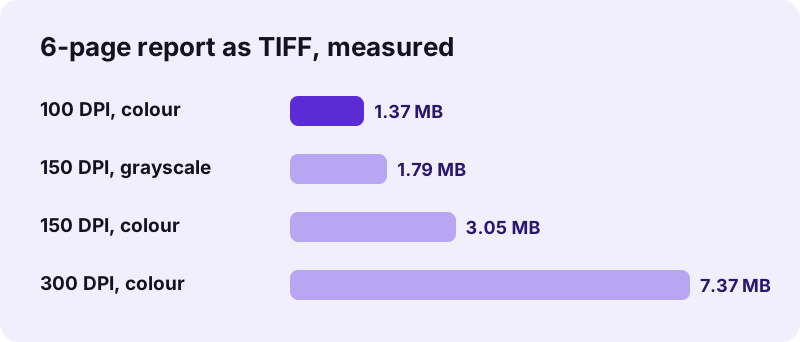
Resolution sets the pixel size of each page. An A4 page measured 826 × 1,169 pixels at 100 DPI, 1,240 × 1,754 at 150 DPI and 2,479 × 3,508 at 300 DPI. Doubling the DPI roughly quadruples the pixels, so file size grows fast: 1.37 MB, 3.05 MB and 7.37 MB for our 6 pages.
pdf24 PDF to TIFF in grayscale
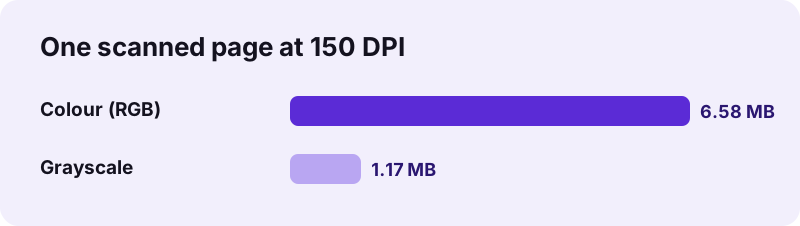
Grayscale stores one value per pixel instead of three. On our text report at 150 DPI it cut the file from 3.05 MB to 1.79 MB; on a scanned page from 6.58 MB to 1.17 MB, 82 % smaller. For black-and-white documents you lose nothing visible.
pdf24 PDF to TIFF and fax services
The output is 8-bit grayscale or colour, not the 1-bit black-and-white CCITT Group 4 format of classic fax machines. Online fax and document systems that accept ordinary TIFF take it as is; if a system insists on 1-bit Group 4, convert the file again in that system's own tool.
pdf24 PDF to TIFF tip: pick only the pages you need
Type a range in Pages, such as 1 or 2-3, to export a cover sheet or a signature page alone. One scanned page at 150 DPI already weighs several megabytes in colour, so fewer pages and grayscale keep uploads to portals fast.
Which DPI and colour should you choose in pdf24 PDF to TIFF?
The right setting depends on where the TIFF goes. In pdf24 PDF to TIFF, 150 DPI grayscale suits most office archives and OCR input, 300 DPI suits print, legal archives and small text, 100 DPI suits screen previews, and colour is only worth its size when the pages contain colour photos, stamps or charts.
| Setting | 6-page report | Time | Use it for |
|---|---|---|---|
| 100 DPI, colour | 1.37 MB | 0.8 s | Screen previews, thumbnails |
| 150 DPI, colour (default) | 3.05 MB | 1.0 s | General use |
| 150 DPI, grayscale | 1.79 MB | 1.0 s | Office archives, document systems |
| 300 DPI, colour | 7.37 MB | 2.2 s | Print, small print, OCR of fine text |
Why use pdf24 PDF to TIFF at all?
pdf24 PDF to TIFF serves archives, scanning workflows, fax gateways, medical and legal record systems, and OCR or image-processing software that reads only image files. TIFF is a plain image container that such systems have accepted for decades, while a PDF can contain fonts, forms and scripts they cannot handle.
- Document management or archive systems that import TIFF only.
- Fax-to-email services and older fax software.
- OCR engines and image-analysis tools that read page images.
- Printers and repro shops that ask for one image per page.
- Records that must look exactly the same in 20 years, with no fonts to go missing.
Need the reverse? TIFF to PDF builds a PDF from a TIFF again, and OCR PDF can add searchable text to it.
pdf24 PDF to TIFF vs PNG and JPG
pdf24 PDF to TIFF keeps all pages in one file, which suits archives; PNG and JPG make one file per page, which suits websites and messages. TIFF and PNG are both lossless, JPG is lossy but smallest for scans, so the choice depends on whether you need one file, perfect pixels or small size.
| Format | Pages per file | Compression | Tool |
|---|---|---|---|
| TIFF | All pages in one | Lossless (PackBits) | This page |
| PNG | One per page (ZIP) | Lossless | PDF to PNG |
| JPG | One per page (ZIP) | Lossy, smallest | PDF to JPG |
| SVG | One per page (ZIP) | Vector, no pixels | PDF to SVG |
For our scanned page at 150 DPI, the colour TIFF was 6.58 MB, the grayscale TIFF 1.17 MB, the PNG 3.29 MB and the JPG 747 KB. Choose TIFF for compatibility and one-file handling, not for the smallest size.
pdf24 PDF to TIFF keeps records private
With pdf24 PDF to TIFF, medical, legal and personnel records stay on your computer. The browser reads the PDF through the File API, draws the pages and encodes the TIFF in JavaScript locally; our network log showed 0 upload requests in every test and the result line confirms 0 bytes uploaded. No account and no watermark.
Check it yourself in the Network tab of the developer tools (F12) while converting. The File API on MDN explains how a page reads a file you pick without uploading it.
pdf24 PDF to TIFF on Windows, Mac, Linux and phones
The converter runs in Chrome, Edge, Firefox and Safari on Windows, macOS, Linux, Android and iOS, with nothing to install. Multi-page TIFF files open in image viewers that support several frames, such as Preview on a Mac, and in document and archive software.
- Windows: the .tiff lands in Downloads; open it in an image viewer that shows multiple pages, or import it into your document system.
- Mac: Preview shows every page in the sidebar.
- Linux: most image viewers and GIMP read multi-page TIFF; GIMP opens pages as layers.
- Phones: the file is saved to Downloads or Files; many phone galleries show only the first page.
Long documents at 300 DPI need a lot of memory; on a phone, convert in parts with the Pages box or Split PDF.
pdf24 PDF to TIFF: frequently asked questions
Is pdf24 PDF to TIFF free?
Yes. It is free with no sign-up, no watermark and no daily limit. The conversion runs on your own device, so there is no server cost per file. Convert as many PDFs as you need; each TIFF is yours to archive, fax or import into any system that accepts image files.
Does pdf24 PDF to TIFF make one file or one per page?
One file. All selected pages are stored as frames of a single multi-page TIFF, in the order of the PDF. Our 6-page report gave one TIFF with 6 pages. If you need a separate image for each page instead, use PDF to PNG or PDF to JPG, which save one file per page.
Is pdf24 PDF to TIFF lossless?
Yes. The pages are compressed with PackBits, a lossless method, so the TIFF contains exactly the pixels that were drawn, with no JPEG artefacts around text. The only choice that affects detail is the resolution: 100, 150, 200 or 300 DPI. Higher DPI gives sharper pages and larger files.
How big is a pdf24 PDF to TIFF file?
It depends on DPI, colour and page count. Our 6-page text report gave 1.37 MB at 100 DPI, 3.05 MB at 150 DPI and 7.37 MB at 300 DPI in colour, and 1.79 MB at 150 DPI in grayscale. One scanned page at 150 DPI was 6.58 MB in colour and 1.17 MB in grayscale.
Is pdf24 PDF to TIFF the PDF24 tool?
No. pdf24tools is an independent site and is not affiliated with PDF24 or Geek Software GmbH. This converter is our own browser code: the PDF is processed on your device, nothing is uploaded and no account is needed. We share only the plain page name so the tool is easy to find.
Which DPI should I use in pdf24 PDF to TIFF for OCR?
Use 300 DPI for OCR when the text is small, and 150 DPI for normal 10–12 point text if file size matters. OCR engines read letters more reliably with more pixels per character. Grayscale is enough for OCR and keeps the file much smaller than colour.
Can pdf24 PDF to TIFF make a black-and-white fax TIFF?
It makes 8-bit grayscale, not 1-bit CCITT Group 4. Many online fax and document services accept ordinary grayscale TIFF directly. If your fax software demands 1-bit Group 4, choose Grayscale here, then let that software convert the file when you load it.
Does pdf24 PDF to TIFF upload my PDF?
No. The PDF is read and the TIFF is built inside your browser. Our network log showed 0 upload requests during every test, and the result line reports 0 bytes uploaded. Nothing is stored on a server, which matters for medical, legal and HR records that must not leave your organisation.
How long does pdf24 PDF to TIFF take?
Seconds for typical documents: our 6-page report took 0.8 s at 100 DPI, 1.0 s at 150 DPI and 2.2 s at 300 DPI in Chrome on a Windows laptop. One page of a large scan took 1.1 s in colour. Long documents at 300 DPI take longer and need more memory.
Can I convert only some pages with pdf24 PDF to TIFF?
Yes. Type the pages in the Pages box, for example 1 for the first page or 2-4, 7 for a selection. Only those pages go into the TIFF, in the order of the PDF. Leave the box empty to convert the whole document.
Can pdf24 PDF to TIFF convert a password-protected PDF?
Only after the open password is removed. A PDF that asks for a password stops with a password message; use Unlock PDF with the password you know, then convert the unlocked copy. Files that only restrict copying or printing usually convert without that step.