How to use pdf24 PDF to long image in 4 steps
- Choose the PDF. Tap Choose a file or drop one PDF on the box. The page preview appears; nothing is uploaded.
- Pick format and width. JPG for small files, PNG for crisp text; 800 px for chats, 1200 px as the default, 1600 px for detail.
- Choose the space between pages. None joins pages edge to edge, Thin adds a fine white line, Wide a clear gap.
- Make and download. Press Make long image and save the single .jpg or .png file.
What is pdf24 PDF to long image for?
pdf24 PDF to long image is for sharing a multi-page PDF where only pictures work well: chat apps, social media stories and posts, image-only web forms and phone screens. The reader scrolls down one picture instead of opening a PDF viewer, and you send one file instead of a ZIP of pages.
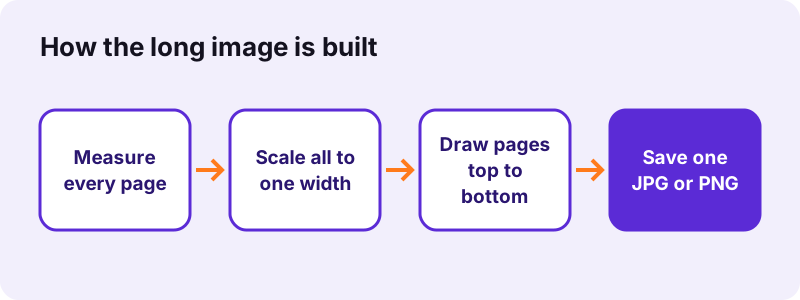
- Menus and price lists for WhatsApp, Telegram or Instagram.
- Receipts and tickets that span two pages.
- Short reports or CV pages to preview on a phone.
- Web comics or slides exported as PDF, read top to bottom.
“Image resolution is the level of detail of an image.”
pdf24 PDF to long image vs one image per page
PDF to JPG saves each page as its own picture, which is better for printing or picking single pages. The long image is better for reading in one go. A 6-page PDF as separate 150 dpi JPGs was a 2.01 MB ZIP; as one 1,200 px long JPG it was 1.75 MB.
pdf24 PDF to long image with mixed page sizes
Every page is scaled to the same width, so a landscape page sits in the stack at full width and becomes shorter, while portrait pages become taller. Nothing is cropped, and each page keeps its proportions.
pdf24 PDF to long image and scanned pages
Scans work like any other page. Our 4-page scan made a 1,200 × 6,817 pixel JPG of 2.37 MB in 6.9 seconds; the extra time is spent decoding the large page photos, each 2,480 × 3,508 pixels in the original.
pdf24 PDF to long image tip for chat apps
Chat apps often shrink large photos. Send the long image as a file or document rather than as a photo, and it keeps its full size; or choose 800 px, which already fits a phone screen and made a 1.00 MB image from our 6 pages.
Which width and format should you choose in pdf24 PDF to long image?
Width sets sharpness and size in pdf24 PDF to long image. 800 px fits a phone screen and keeps files small, 1200 px is the default and reads well on tablets and laptops, and 1600 px keeps small print readable when zoomed. JPG gives smaller files for photos and scans; PNG keeps text edges crisp.
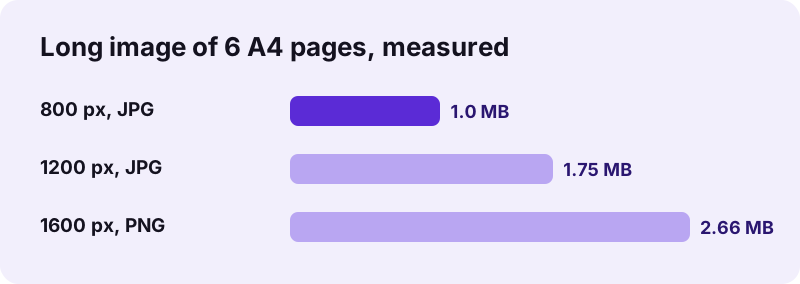
| Settings (6 A4 text pages) | Image size in pixels | File | Time |
|---|---|---|---|
| 800 px, JPG, thin gap | 800 × 6,833 | 1.00 MB | 0.6 s |
| 1200 px, JPG, thin gap | 1,200 × 10,229 | 1.75 MB | 0.6 s |
| 1200 px, JPG, no gap | 1,200 × 10,189 | 1.75 MB | 0.7 s |
| 1600 px, PNG, thin gap | 1,600 × 13,625 | 2.66 MB | 0.8 s |
The gap options are None, Thin (8 px) and Wide (24 px) of white space between pages. Our 6 pages had 5 gaps, so Thin added exactly 40 pixels of height compared with None. JPG pictures are saved at 88 % quality on a white background.
How long can a pdf24 PDF to long image picture be?
A picture from pdf24 PDF to long image can be at most 30,000 pixels tall, because browsers cannot draw larger canvases reliably. iPhones and iPads have a stricter limit of about 16 million pixels. When a PDF is longer, the whole image is narrowed so every page still fits, and a note tells you the new width.
| Device | Limit used by the tool | A4 pages before narrowing at 1200 px |
|---|---|---|
| Windows, Mac, Android, Linux | 30,000 px tall, 120 million pixels | about 17 pages |
| iPhone and iPad | about 16 million pixels | about 7 pages |
For a 40-page document the image would become too narrow to read. Split it first with Split PDF into parts of about 10 pages and make one long image per part, or use PDF to JPG for separate pages.
Is pdf24 PDF to long image private?
pdf24 PDF to long image never sends your PDF anywhere. The browser reads the file with the File API, draws the pages on a canvas and saves the picture locally; our tests logged 0 upload requests, and the result line confirmed 0 bytes uploaded. Nothing is stored once you close the tab.
You can check this in the Network tab of the browser's developer tools (F12). The File API on MDN explains how a page reads a local file without uploading it. The picture has no watermark.
pdf24 PDF to long image on iPhone, Android and computers
The tool runs in Safari, Chrome, Edge and Firefox on iPhone, iPad, Android, Windows, macOS and Linux, with nothing to install. On an iPhone the image lands in Files → Downloads; open it and tap Share → Save Image to add it to Photos, ready to post or send.
Because of the smaller iPhone canvas limit, a long PDF comes out narrower on an iPhone than on a laptop. If the result is too narrow, use 800 px, convert fewer pages at once, or make the image on a computer and send it to the phone.
pdf24 PDF to long image and related tools
A long image is one of several ways to turn PDF pages into pictures on this site. Pick the tool by what the receiver needs: one scrolling picture, separate page images, the photos inside the PDF, or a multi-page image file for archives.
| Need | Tool |
|---|---|
| Each page as its own JPG | PDF to JPG |
| Pages as PNG or WebP | PDF to images |
| The photos inside the PDF | Extract images |
| All pages in one TIFF | PDF to TIFF |
| Fewer pages first | Split PDF |
pdf24 PDF to long image: frequently asked questions
Is pdf24 PDF to long image free?
Yes. There is no account, no watermark and no limit on how many PDFs you turn into long images. The work runs in your own browser, so there is no server cost for each file. Make as many versions as you like, for example one at 800 px for chat and one at 1600 px.
Does pdf24 PDF to long image upload my file?
No. The PDF is opened and drawn inside your browser, and the picture is created on your device. Every network request was logged in our tests: 0 uploads, and the result line said 0 bytes uploaded. Menus, receipts or private letters stay on your phone or computer.
How wide is the picture from pdf24 PDF to long image?
You choose 800, 1200 or 1600 pixels; 1200 is the default. Every page is scaled to that width and the height follows. Six A4 pages gave 800 × 6,833, 1,200 × 10,229 or 1,600 × 13,625 pixels in our tests. Very long PDFs are narrowed to stay within browser limits.
Why is my pdf24 PDF to long image narrower than I chose?
The PDF was too long for one canvas. Browsers cannot draw images taller than about 30,000 pixels, and iPhones and iPads allow about 16 million pixels in total. The tool then narrows the whole image so every page fits, and a note under the download shows the width it used.
JPG or PNG in pdf24 PDF to long image?
JPG gives smaller files and is right for scans, photos and colourful pages; it is saved at 88 % quality. PNG is lossless and keeps small text razor sharp, but files are larger: 6 pages at 1600 px were 2.66 MB as PNG, while 6 pages at 1200 px as JPG were 1.75 MB.
Can pdf24 PDF to long image add space between pages?
Yes. Choose None to join pages edge to edge, Thin for 8 pixels of white space or Wide for 24 pixels. The gap makes page ends easy to see while scrolling. With 6 pages there are 5 gaps, so Thin added 40 pixels to the height in our test.
Is this pdf24 PDF to long image tool made by PDF24?
No. pdf24tools is an independent website and is not affiliated with PDF24 or Geek Software GmbH. The long-image maker is our own code: it runs in your browser, uploads nothing and needs no sign-up. The tool names are similar, but the site, code and team are separate.
Can I use pdf24 PDF to long image on an iPhone?
Yes. Open the page in Safari, tap Choose a file, pick the PDF in Files and tap Make long image. The picture is saved in Files → Downloads; tap Share → Save Image to put it in Photos. Long PDFs come out narrower on an iPhone because of its canvas limit.
How many pages can pdf24 PDF to long image handle?
Any number, but the picture gets narrower once it passes the size limits. At 1200 px that happens after about 17 A4 pages on a computer and about 7 on an iPhone. For long documents, split the PDF into parts and make one long image per part.
Does pdf24 PDF to long image work with scanned PDFs?
Yes. Scanned pages are drawn like any others. Our 4-page scan became a 1,200 × 6,817 pixel JPG of 2.37 MB in 6.9 seconds; scans take longer than text pages because each large page photo has to be decoded first. Choose JPG for scans to keep the file small.
Can I read the text in a pdf24 PDF to long image picture?
You can read it, but not select or search it: the result is a picture made of pixels. Keep the PDF for searching and copying, or take the words out with PDF to TXT. Choose 1600 px if the PDF has small print that people must be able to zoom into.
Does pdf24 PDF to long image open password-protected PDFs?
Only once the open password is removed. If the PDF asks for a password before it opens, use Unlock PDF with the password you know and convert that copy. Files that are only restricted against printing or copying usually work straight away.
More pdf24 PDF to long image tools and guides
pdf24 PDF to long image: sources
- Raster graphics — Wikipedia
- Image resolution — Wikipedia
- File API — MDN Web Docs