How to use pdf24 XLSX to PDF in 4 steps
- Choose the .xlsx. Drop the workbook on the box or tap Choose files.
- Check the options. Auto, Portrait or Landscape; A4 or Letter; gridlines on or off.
- Press Convert to PDF. Every sheet with data is printed in tab order on your device.
- Download the PDF. Save it and check wide sheets, which may print in column bands.
What is inside an .xlsx and what does pdf24 XLSX to PDF read?
An .xlsx is a ZIP package of XML files: xl/workbook.xml lists the sheets, each sheet has its own xl/worksheets/sheetN.xml, and repeated text sits in sharedStrings.xml. pdf24 XLSX to PDF unpacks it in your browser and prints the cell values, widths, heights and merges of every sheet.
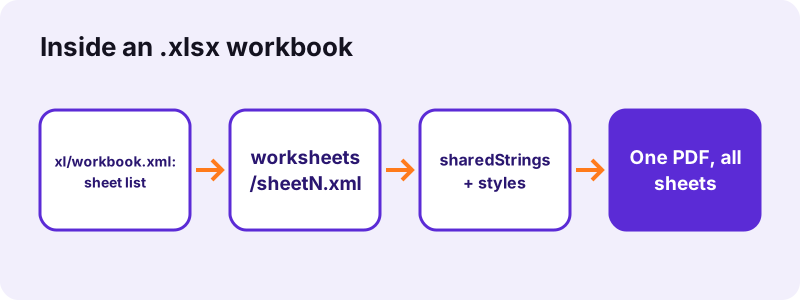
Number formats live in xl/styles.xml. The reader applies them, so a cell formatted as a percentage keeps its % sign, and a date, which Excel stores as a serial number, prints as the date you see on screen. Bold font settings come from the same file.
“Office Open XML (also informally known as OOXML) is a zipped, XML-based file format developed by Microsoft”
Formulas in pdf24 XLSX to PDF
Each formula cell in an .xlsx stores the formula and its last result in a <v> element. The PDF prints that stored result. A file saved by Excel always has it; a file written by some scripts or apps may not, and such cells print empty.
pdf24 XLSX to PDF with exports from scripts
Workbooks generated by reporting tools sometimes skip the cached values. Open such a file in Excel or LibreOffice once, let it recalculate, save it, and the totals appear in the PDF.
pdf24 XLSX to PDF and the row limit
An .xlsx sheet can hold 1,048,576 rows and 16,384 columns. Only the used range, up to the last cell with a value, is printed, so formatting far below your data adds no blank pages.
pdf24 XLSX to PDF tip for very long sheets
A sheet with tens of thousands of rows makes hundreds of pages. Filter or copy the part you need into a new sheet first.
How long does pdf24 XLSX to PDF take? Measured
pdf24 XLSX to PDF printed our 8.2 KB test workbook, one 61 × 5 sheet and one 11 × 25 sheet, as 4 A4 pages in 1.2 seconds in Chrome on Windows 10. The PDF weighs 28,463 bytes and 3,090 characters can be selected and copied from it.
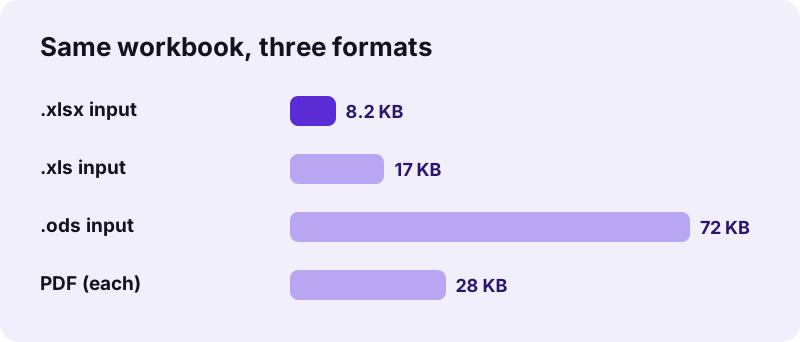
| Input | Pages | PDF size | Time |
|---|---|---|---|
| sales.xlsx (8.2 KB) | 4 | 28,463 B | 1.2 s |
| same, Letter | 3 | 27,451 B | 1.1 s |
| same, landscape | 4 | 28,564 B | 1.1 s |
pdf24 XLSX to PDF for files from Google Sheets, Numbers and LibreOffice
pdf24 XLSX to PDF works with any standard .xlsx, whichever app wrote it. In Google Sheets choose File, Download, Microsoft Excel (.xlsx); in Apple Numbers choose File, Export To, Excel; in LibreOffice Calc save as Excel 2007–365. Then pick the downloaded file here.
- Google Sheets: download first; a sheet link cannot be read from the page.
- LibreOffice Calc: Excel 2007–365 (.xlsx) keeps cached formula results.
- Macro workbooks (.xlsm): save a plain .xlsx copy first.
Is pdf24 XLSX to PDF safe for financial spreadsheets?
pdf24 XLSX to PDF keeps the workbook on your device. The browser reads the .xlsx with the File API and parses it in memory, and the result line confirms 0 bytes uploaded. No account, no stored copy, so bank exports, salary tables and forecasts stay private.
See the File API on MDN for how a page reads a local file without sending it.
What pdf24 XLSX to PDF does not print
The converter prints data, not decoration. Charts, pictures, shapes, comments, cell fill colours and custom borders are left out, and print areas, headers and footers set in Page Layout are not read. The sheet name and a page number are added to every page instead.
| Item | Printed? |
|---|---|
| Values, formats, bold | Yes |
| Merged cells | Yes, centred |
| Hidden rows/columns | No |
| Charts and images | No |
| Cell colours | No |
| Print areas, page setup | Not read |
| Comments and notes | No |
pdf24 XLSX to PDF on phones, tablets and Chromebooks
pdf24 XLSX to PDF runs in Safari on iPhone and iPad, Chrome on Android, and every current browser on Windows, macOS, Linux and ChromeOS, without Excel. Save the .xlsx attachment first, then pick it with Choose files.
- iPhone: Mail → attachment → Save to Files.
- Android: Gmail → attachment → Download.
- Chromebook: Files app or Google Drive.
pdf24 XLSX to PDF with a large workbook on a phone
A workbook with many thousands of rows needs memory. If the phone struggles, convert on a computer or split the workbook into smaller files.
A 2-minute checklist before pdf24 XLSX to PDF
A few edits in the workbook make a much better PDF, because the converter prints exactly the used range of each sheet. Do them in a copy so your working file stays as it is.
- Delete or hide sheets you do not want to send; hidden sheets with data still print.
- Hide helper columns and rows; hidden ones are skipped entirely.
- Widen any column that shows ### on screen.
- Make header rows bold: bold is kept and helps readers on paper.
- Recalculate and save, so every formula has a stored result.
- Decide on gridlines: off for invoices, on for long tables of figures.
- Pick Letter or landscape for very wide sheets to reduce column bands.
Fixing pdf24 XLSX to PDF errors
When a workbook will not convert, the cause is usually encryption, an empty workbook or a file that is not really .xlsx. These checks solve almost every case.
- "Could not open": the file has a password to open; remove it in Excel and save a copy.
- "Nothing to print": every sheet is empty.
- ### in a cell: the number is wider than its column; widen it in Excel.
- Old .xls renamed to .xlsx: it still converts, because the reader detects the real format.
- More options and examples: Excel to PDF, XLS to PDF, ODS to PDF.
pdf24 XLSX to PDF next steps
pdf24 XLSX to PDF: frequently asked questions
Is pdf24 XLSX to PDF free?
Yes. It costs nothing, needs no account and leaves no watermark, because your own device does the work. pdf24tools is an independent site and is not affiliated with PDF24 or Geek Software GmbH; we use the name only because people search for it. There is no limit on the number of workbooks you convert.
Does pdf24 XLSX to PDF upload the workbook?
No. The file is read from your disk by the browser and parsed in memory by JavaScript. The line under the download link shows the bytes read and 0 bytes uploaded. Only the converter code comes from our server; your figures never go to it.
Does pdf24 XLSX to PDF print every sheet?
Yes, every sheet that holds data, in tab order, each starting on a new page with its name at the top. Hidden sheets with data are printed too, because the reader lists all sheets. To print fewer, delete the other sheets in a copy of the workbook first.
Why are some cells empty after pdf24 XLSX to PDF?
The cells probably hold formulas without a stored result. Excel always saves the last result, but files written by scripts or some apps do not. Open the workbook in Excel or LibreOffice, let it recalculate, save it and convert again; the values will then appear.
Can pdf24 XLSX to PDF fit a wide sheet on one page?
It shrinks a wide sheet down to 60 % of its size, and Auto switches to landscape when the columns are wider than a portrait page. Beyond that, columns move to extra pages. Hide unused columns, narrow wide ones or choose Letter landscape to fit more on each page.
Does pdf24 XLSX to PDF keep number formats?
Yes. Values are printed as formatted in the workbook, so currencies, percentages, thousands separators and dates look as they did in Excel. Numbers are right-aligned and text is left-aligned. A number too wide for its column prints as ###, the same as Excel shows on screen.
Does pdf24 XLSX to PDF work with .xlsm files?
The page is built for .xlsx. A macro-enabled .xlsm uses the same XML inside, so save a copy as .xlsx in Excel and convert that. Macros never run in a PDF, and removing them first also keeps the PDF free of anything you did not mean to share.
Is the text in pdf24 XLSX to PDF output searchable?
Yes. Cell values are drawn as real text with an embedded Noto Sans subset, so you can search, select and copy them. From our 4-page test PDF 3,090 characters could be extracted. Cells in Arabic, Hebrew or Asian scripts are drawn as small images instead.
Does pdf24 XLSX to PDF need Microsoft Excel?
No. The workbook is read by an open-source spreadsheet reader inside the page, so the converter works on Chromebooks, Linux laptops, iPhones and Android phones with nothing installed. Only a current browser is needed, such as Chrome, Edge, Firefox or Safari.
Can pdf24 XLSX to PDF hide the gridlines?
Yes. Untick Gridlines before converting and the cells print without the thin grey 0.35-point borders, which looks cleaner for invoices and price lists. Leave them on for wide tables of figures, where the lines help the eye follow each row across the page.
Why does pdf24 XLSX to PDF make so many pages?
Each sheet starts a new page, and a wide sheet is split into column bands printed down then over. A long sheet simply needs many pages at 8.5-point text. Delete sheets you do not need, hide helper columns, or copy just the summary into a new workbook.
More pdf24 XLSX to PDF tools and guides
pdf24 XLSX to PDF: sources
- Office Open XML — Wikipedia
- Microsoft Excel — Wikipedia
- File API — MDN Web Docs