How to use pdf24 ODS to PDF in 4 steps
- Choose the .ods file. Drop the spreadsheet on the box or tap Choose files.
- Pick orientation, paper and gridlines. Auto suits most sheets; A4 or Letter; gridlines on or off.
- Press Convert to PDF. content.xml is parsed and every sheet is printed on your device.
- Download the PDF. One PDF with all sheets, each starting on a new page.
What is an .ods file and how does pdf24 ODS to PDF read it?
An .ods file is an OpenDocument spreadsheet: a ZIP package whose content.xml holds every sheet as a table of rows and cells, with styles.xml for formats. pdf24 ODS to PDF unpacks it in your browser, reads values, widths, merges and bold text, and prints each sheet to PDF.
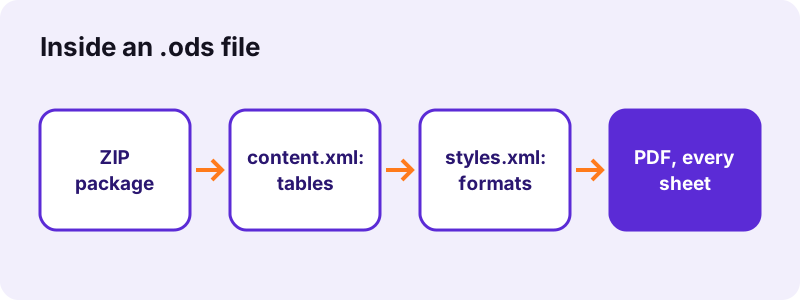
OpenDocument is an open standard, ISO/IEC 26300, maintained by the OASIS consortium. Because the format is documented in full, independent programs can read it reliably; our converter uses an open-source spreadsheet reader running inside the page.
“The OpenDocument format aims to provide an open alternative to proprietary document formats.”
Repeated rows in pdf24 ODS to PDF
ODS saves space by writing one row or cell with a repeat count, for example a blank row repeated 1,000 times. The converter prints only up to the last cell that holds a value, so those blank repeats add no empty pages.
pdf24 ODS to PDF and formulas
Calc stores each formula together with its computed value. The PDF prints that value as formatted, so totals show even though nothing is recalculated in the browser.
pdf24 ODS to PDF with files from Google Sheets
Google Sheets can download as OpenDocument (.ods) too. Those files convert the same way; if a value is missing, download as .xlsx instead and use XLSX to PDF.
pdf24 ODS to PDF tip for large Calc files
Our .ods test file was 72 KB, far larger than the 8.2 KB .xlsx with the same data, because its 69 KB content.xml was stored in the ZIP without compression and ODS cell markup is verbose. The PDF was the same 28 KB from both.
How does pdf24 ODS to PDF compare with the .xlsx and .xls copies? Measured
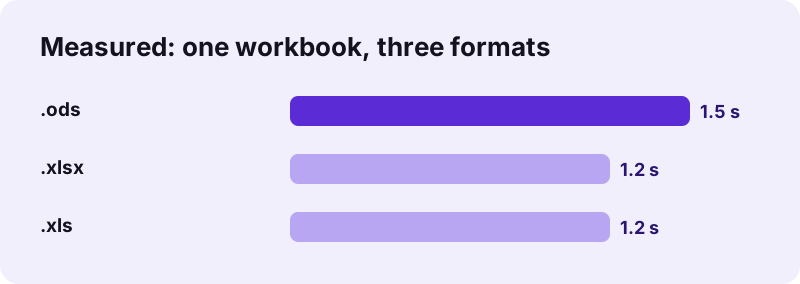
pdf24 ODS to PDF printed our 72 KB test spreadsheet as 4 A4 pages in 1.5 seconds, the same 4 pages, 3,090 characters and 28,463 bytes as the .xlsx and .xls copies of that workbook. The format changes the input size and a fraction of a second, not the printout.
| Copy | Input | PDF pages | PDF size | Time |
|---|---|---|---|---|
| .ods (Calc) | 72 KB | 4 | 28,463 B | 1.5 s |
| .xlsx | 8.2 KB | 4 | 28,463 B | 1.2 s |
| .xls | 17 KB | 4 | 28,464 B | 1.2 s |
What does pdf24 ODS to PDF keep from a Calc spreadsheet?
pdf24 ODS to PDF keeps the data view of each sheet: values as formatted, column widths, row heights, merged cells, bold text and optional gridlines, with the sheet name and a page number on every page. It does not draw charts, images, cell backgrounds, borders or comments.
| In LibreOffice Calc | In the PDF |
|---|---|
| Cell values and formats | Kept |
| Formula results | Kept (stored values) |
| Merged cells | Kept, centred |
| Hidden rows and columns | Skipped |
| Charts, images, shapes | Not drawn |
| Background colours, borders | Not drawn |
| Print ranges, page styles | Not read |
Wide sheets are scaled to no less than 60 % and then split into column bands, down then over, the same way Calc prints by default.
Is pdf24 ODS to PDF private?
pdf24 ODS to PDF keeps the spreadsheet on your device. The browser reads it with the File API, JavaScript parses it in memory, and the result line confirms 0 bytes uploaded. There is no account and no stored copy, which suits public offices and schools that standardised on LibreOffice for data protection reasons.
More on local file access: File API (MDN).
pdf24 ODS to PDF versus Calc's Export as PDF
LibreOffice Calc has its own File → Export as PDF, which uses print ranges, page styles, headers, footers and charts. Use it when you have Calc installed. The browser converter is for when you do not: on a phone, a tablet or a borrowed computer.
| Need | Browser converter | Calc desktop |
|---|---|---|
| No install | Yes | No |
| Charts and colours | No | Yes |
| Print ranges | Not read | Used |
| Every sheet at once | Yes | Option |
| 0 bytes uploaded | Yes | Yes |
pdf24 ODS to PDF on iPhone, Android and Chromebook
OpenDocument files often arrive by e-mail on devices that have no office suite. The converter runs in Safari, Chrome, Edge and Firefox, so an .ods attachment can become a PDF on a phone in a few taps.
- iPhone: save the attachment to Files, then Choose files → Browse.
- Android: download it, then pick it from Download.
- Chromebook: Files app or Google Drive.
pdf24 ODS to PDF problems and fixes
- Password-protected .ods: in Calc use Save As and untick Save with password to make an open copy.
- ### in cells: widen the column in Calc.
- Flat XML spreadsheet (.fods): save it as a normal .ods first.
- Missing chart: export from Calc, or copy the chart into a text document and use ODT to PDF.
Preparing a Calc file for pdf24 ODS to PDF
Calc's print ranges and page styles are ignored, so the sheet itself decides what prints. A few minutes in Calc before converting give a tidier PDF, and they are worth doing in a copy of the file.
- Right-click and hide rows or columns you do not want to share; hidden ones are skipped.
- Delete sheets that hold only notes or helper data, including hidden ones.
- Widen columns that show ### so the full number prints.
- Set header rows in bold; bold is one of the styles the converter keeps.
- Merge title cells across the table width; merged text is printed centred.
- Recalculate (Ctrl+Shift+F9) and save, so stored results are current.
- Choose landscape on the page if a sheet has more than about ten normal-width columns.
Other converters next to pdf24 ODS to PDF
Other OpenDocument and spreadsheet formats have their own pages with format-specific details.
pdf24 ODS to PDF: frequently asked questions
Is pdf24 ODS to PDF free?
Yes. The converter is free, with no sign-up, no watermark and no limit, because your device does the work. pdf24tools is an independent site and is not affiliated with PDF24 or Geek Software GmbH; we use the name because it is what people search for. Every tool here works the same way.
Do I need LibreOffice for pdf24 ODS to PDF?
No. The page reads the OpenDocument spreadsheet format itself, so nothing needs to be installed. That makes it useful on iPhones, Android phones, Chromebooks and work computers where you cannot add software. Only a current browser such as Chrome, Edge, Firefox or Safari is required.
Does pdf24 ODS to PDF upload the spreadsheet?
No. The .ods is read from your disk by the browser and parsed in memory. The result line shows the bytes read and 0 bytes uploaded. Only the converter code is downloaded from our server; the spreadsheet itself never leaves your device.
Does pdf24 ODS to PDF print every sheet?
Yes. Every sheet with data is printed in tab order, each starting a new page with its name at the top and a page number at the bottom. Empty sheets are skipped. Hidden sheets with data are printed as well, so remove them in a copy if needed.
Does pdf24 ODS to PDF keep formula results?
Yes. LibreOffice Calc saves each formula with its computed value, and that value is printed, formatted as in the file. Nothing is recalculated in the browser. If values look outdated, open the file in Calc, press Ctrl+Shift+F9 to recalculate, save and convert again.
Why is my .ods file bigger than the PDF from pdf24 ODS to PDF?
OpenDocument cell markup is verbose, and our test file stored its 69 KB content.xml without ZIP compression, so the .ods was 72 KB. The PDF holds only the printed cells and a font subset, 28 KB in our test, the same as from the .xlsx copy.
Can pdf24 ODS to PDF draw charts from Calc?
No. Charts, images, shapes, cell backgrounds and borders are not drawn; the PDF shows the cell data with optional gridlines. To include a chart, use Export as PDF in Calc, or copy the chart into a Writer document, save it as .odt and convert that file.
Does pdf24 ODS to PDF work with Google Sheets downloads?
Yes. Google Sheets offers File, Download, OpenDocument (.ods), and those files convert like any other. The same sheet downloaded as .xlsx gives the same printout, so pick whichever format you prefer. A sheet link cannot be converted: the file must be on your device.
How does pdf24 ODS to PDF handle wide sheets?
A sheet wider than the page is scaled down, never below 60 %, and Auto switches to landscape when columns exceed a portrait page. Columns that still do not fit are printed on further pages, down then over. Hide unused columns in Calc to keep more on each page.
Is text searchable after pdf24 ODS to PDF?
Yes. Cell values are drawn as real text with an embedded Noto Sans subset, so you can search and copy them; 3,090 characters were extractable from our test PDF. Cells in Arabic, Hebrew or Asian scripts are drawn by the browser as small images and are not searchable.
What page sizes does pdf24 ODS to PDF offer?
A4 and Letter, in portrait or landscape, with 30-point margins and 8.5-point text before scaling. Page styles set in Calc, such as paper size, margins or scale to fit, are not read, so pick the size you need before converting.
More pdf24 ODS to PDF tools and guides
pdf24 ODS to PDF: sources
- OpenDocument — Wikipedia
- OpenDocument technical specification — Wikipedia
- File API — MDN Web Docs