How to use pdf24 PDF to ODS in 4 steps
- Choose the PDF. Tap Choose a file or drop one PDF on the box; it is read on your device only.
- Pick the sheets. One sheet per page gives a tab for every page; Everything on one sheet puts all rows on one tab named PDF.
- Press Convert to ODS. A text PDF takes under a second; the result line shows how many cells were written.
- Open the .ods. Open it in LibreOffice Calc, Collabora, Google Sheets or Excel and check the numbers.
What is an ODS file, and what does pdf24 PDF to ODS write into it?
An ODS file is an OpenDocument Spreadsheet: a ZIP package of XML files defined by the OpenDocument standard, ISO/IEC 26300. pdf24 PDF to ODS fills its content.xml with the rows and cells read from your PDF, marks amounts as float values, adds metadata and packs the result in the order the standard requires.
“It was developed with the aim of providing an open, XML-based file format specification for office applications.”
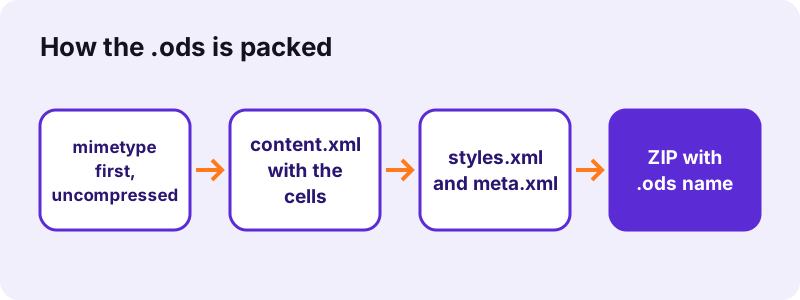
ODF says the first file in the ZIP must be a small entry named mimetype, stored without compression, so that a program can tell an .ods from any other ZIP by reading its first bytes. The spreadsheet library we use writes that entry later, so the converter re-packs the package with mimetype first. Our invoice result contains mimetype, a manifest, meta.xml, styles.xml, content.xml and manifest.rdf.
pdf24 PDF to ODS cell values
Of the 26 cells in our invoice sheet, 13 were written as numbers (office:value-type float): the quantities, unit prices and totals. Item names, the title and the payment sentence stayed text. Percent values such as 15% become 0.15, an amount in brackets becomes negative, and dates like 19.10.2026 are kept as text.
pdf24 PDF to ODS and the decimal comma
LibreOffice shows numbers in the format of your locale, so 25.5 appears as 25,5 on a French or German system. The stored value is the same number either way, which is the point of saving it as a float and not as text.
pdf24 PDF to ODS number formats in Calc
To show 2 decimals, select the price columns, press Ctrl+1 and choose Number with 2 decimal places, or Currency. The trailing zero of 25.50 is then visible again.
pdf24 PDF to ODS tip: check totals with SUM
Type =SUM(D4:D7) under the total column and compare it with the printed total; on our invoice 51 + 119.7 + 60 + 89 gives the printed 319.70. A mismatch points to a split row.
Why choose pdf24 PDF to ODS instead of XLSX?
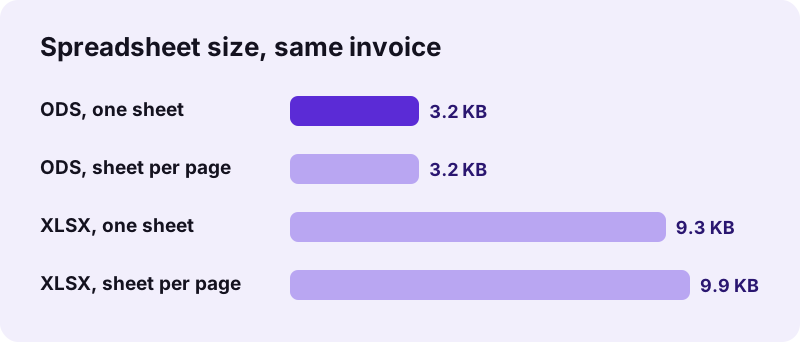
pdf24 PDF to ODS is the better choice when you work in LibreOffice or Collabora, or when a public body or company policy requires open formats. The ODS format is an ISO standard not tied to one vendor, and in our test the same invoice was 3.2 KB as ODS against 9.3–9.9 KB as XLSX.
| Point | ODS | XLSX |
|---|---|---|
| Standard | ISO/IEC 26300 (OpenDocument) | ISO/IEC 29500 (Office Open XML) |
| Native program | LibreOffice Calc | Microsoft Excel |
| Our invoice, one sheet | 3.2 KB | 9.3 KB |
| One-sheet tab name | All pages | |
| Opens in Google Sheets | Yes | Yes |
Most people with Microsoft Excel are better served by PDF to XLSX; recent Excel versions open .ods too, but some formatting can change on the way. The general PDF to Excel page covers fixing shifted columns in detail.
pdf24 PDF to ODS: one sheet per page or one sheet
With One sheet per page, every PDF page gets its own tab, named Page 1, Page 2 and so on, even a page without any text. With Everything on one sheet, all pages are stacked on a single tab named PDF, with an empty row between pages, ready for sorting and filtering in Calc.
| Test file | Mode | Cells | Size | Time |
|---|---|---|---|---|
| Invoice, 2 pages | Sheet per page | 26 | 3.2 KB | 0.6 s |
| Invoice, 2 pages | One sheet | 26 | 3.2 KB | 0.6 s |
| Report, 6 pages | Sheet per page | 156 | 3.3 KB | 0.6 s |
| Scan, 4 pages | Sheet per page | 0 | 2.8 KB | 10.0 s |
Because empty pages still get a tab in this mode, a PDF with blank separator pages gives some empty sheets; right-click the tab and choose Delete Sheet to remove them.
Can pdf24 PDF to ODS read scanned tables?
Scanned tables are pictures, so pdf24 PDF to ODS finds no text to place in cells: our 4-page scan gave an empty 2.8 KB spreadsheet and the message that no selectable text was found. Add a text layer with OCR first, then convert the searchable PDF to ODS.
Run OCR PDF on the scan and convert its result here. Prose pages are a different case: they do have text, but it is not a table, so each printed line lands in column A. Our 6-page report became 26 rows × 1 column per sheet; for prose, PDF to ODT gives a proper text document.
Is pdf24 PDF to ODS private?
pdf24 PDF to ODS keeps your data on your device: the browser reads the PDF through the File API and builds the .ods package in JavaScript. Every test run showed 0 upload requests and 0 bytes uploaded, which matters for council budgets, grade lists and payroll tables that must not leave the organisation.
You can verify it in the Network panel of the developer tools (F12) during a conversion. See the File API on MDN for how a page reads a local file without sending it anywhere.
pdf24 PDF to ODS in LibreOffice, Google Sheets and Excel
The .ods opens in LibreOffice Calc, Collabora Online, OnlyOffice, Google Sheets and recent Excel versions, on Windows, macOS, Linux, Android and iOS. The converter itself runs in any modern browser, so a Linux desktop or a Chromebook can make the file without installing anything.
- LibreOffice Calc: File → Open; the native format, nothing changes.
- Google Sheets: upload to Drive and open with Sheets.
- Excel: File → Open the .ods; check number formats afterwards.
- Android and iPhone: the file lands in Downloads; Collabora Office or Google Sheets open it.
Need a PDF again after editing? Use ODS to PDF on this site or File → Export as PDF in Calc.
pdf24 PDF to ODS: frequently asked questions
Is pdf24 PDF to ODS free?
Yes. It costs nothing, needs no account and adds no watermark. The conversion runs in your own browser, so there is no server time to pay for and no daily limit. Convert as many PDFs to OpenDocument spreadsheets as you need; every .ods is a normal file you keep.
What program opens a pdf24 PDF to ODS file?
LibreOffice Calc is the native program, and Collabora Online, OnlyOffice, Google Sheets and Excel 2010 or later can open .ods too. On phones, Google Sheets and Collabora Office read it. The file follows the OpenDocument standard, so any program that supports ODF spreadsheets will work.
Does pdf24 PDF to ODS keep numbers as numbers?
Yes. Cells that hold a value such as 2, 25.50, 15% or (25) are stored as floats in content.xml, so SUM and charts work straight away. In our invoice, 13 of 26 cells were numeric. Names and dates like 19.10.2026 stay text. Calc then shows numbers in your locale's format.
Why is my pdf24 PDF to ODS file empty?
The PDF has no text layer, which is typical of scans and phone photos saved as PDF. Our 4-page scan gave an empty sheet with the note that no selectable text was found. Run OCR PDF on it first, then convert the searchable result to ODS again.
Does pdf24 PDF to ODS upload my file?
No. The file is read and converted inside your browser; in our tests 0 upload requests left the page and the result line showed 0 bytes uploaded. Nothing is stored after the tab is closed, so confidential tables stay on your computer or phone.
Is pdf24 PDF to ODS made by PDF24?
No. pdf24tools is an independent website and is not affiliated with PDF24 or Geek Software GmbH. This converter is our own code: it runs in the browser, uploads nothing and needs no installation. The page names are kept short and familiar, but the site and its team are separate.
Is pdf24 PDF to ODS output a valid OpenDocument file?
The package follows the ODF packaging rule that the mimetype entry comes first and is stored uncompressed, then the manifest, content, styles and metadata. Our results opened as spreadsheets with sheets and typed cells. We did not run a formal ODF validator, so we do not claim certification.
Can pdf24 PDF to ODS keep cell colours and formulas?
No. A PDF contains no formulas, only printed results, and its colours and borders are drawings, not cell formatting. The .ods holds the cell values and column widths. Add borders with Format → Cells in Calc, and rebuild totals with =SUM() so they update when you edit values.
Why are some pdf24 PDF to ODS sheets empty?
In One sheet per page mode every PDF page gets a tab, including pages without text, such as a blank back page or a scanned cover. Delete those tabs with a right-click on the tab name, or use Everything on one sheet, which puts only real rows on the tab named PDF.
Can I use pdf24 PDF to ODS on Linux?
Yes. It runs in Firefox or Chromium on any Linux distribution, with nothing to install, and the .ods opens directly in LibreOffice Calc, which most distributions ship by default. The same page works on Windows, macOS, ChromeOS, Android and iOS.
How large can a pdf24 PDF to ODS spreadsheet get?
There is no fixed limit; the memory of your device sets it. The files are small because ODS is zipped XML: our results were 2.8 to 3.3 KB. For a long report with only one table you need, cut those pages out with Extract PDF pages first and convert just them.
More pdf24 PDF to ODS tools and guides
pdf24 PDF to ODS: sources
- OpenDocument — Wikipedia
- Spreadsheet — Wikipedia
- File API — MDN Web Docs