How do you pdf24 convert PDF to Excel step by step?
To convert a PDF to Excel, open PDF to Excel, choose the file, pick one sheet per page or all pages on one sheet, and press Convert. The tool reads the text layer, rebuilds rows and columns from the text positions and saves an .xlsx file you can open in any spreadsheet app.
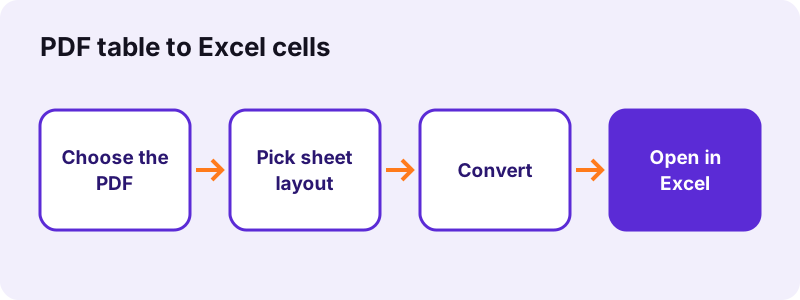
- Open PDF to Excel and choose the PDF.
- Choose One sheet per page to keep pages apart, or Everything on one sheet to stack all rows.
- Press Convert to Excel; a small file takes under a second.
- Download the .xlsx file and open it in Excel, LibreOffice Calc or a mobile spreadsheet app.
- Check totals and dates before you use the numbers.
pdf24 convert PDF to Excel: how rows and columns are found
Each line of text becomes a row. Inside a line, a wide gap starts a new cell, and the columns come from where multi-cell lines put their text. On our invoice that gave the header Item, Qty, Unit price, Total in 4 columns and one row per product, exactly as printed.
pdf24 convert PDF to Excel with numbers that add up
Numbers are written as numbers, not as text, so SUM works at once: 25.50 became 25.5 and 319.70 became 319.7. Both 1,234.50 and 1.234,50 styles are read, while dates such as 19.10.2026 stay text so they are not turned into decimals.
pdf24 convert PDF to Excel: one sheet or many
One sheet per page names the tabs Page 1, Page 2 and so on; our 6-page text file gave 6 sheets. One sheet puts every row under the previous page, which is easier for a long statement you want to filter.
pdf24 convert PDF to Excel: tip for totals
Recalculate totals with a formula instead of trusting the converted total line. If your SUM matches the printed total, every number in the column was read correctly.
What did our pdf24 convert PDF to Excel tests measure?
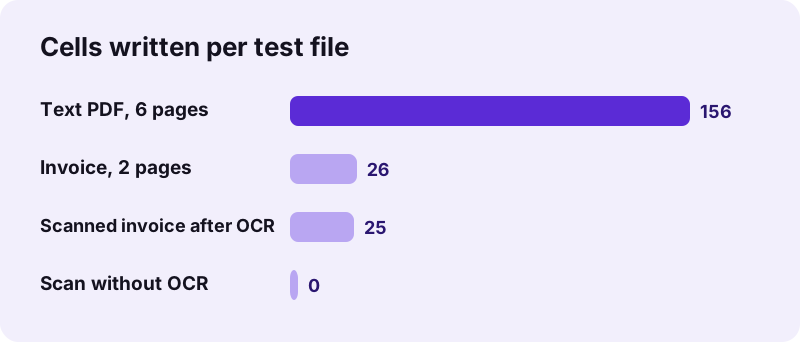
Our PDF to Excel tests used four files. A 2-page invoice gave 26 cells in 0.6 seconds and a 9.7 KB file; a 6-page text PDF gave 156 cells on 6 sheets in 0.5 seconds. A scanned contract gave no text, but a scanned invoice converted cleanly after OCR, with 25 cells.
| Input | Option | Output | Time |
|---|---|---|---|
| invoice-v1.pdf, 2 pages, 2.4 KB | One sheet per page | 9.7 KB, 2 sheets, 26 cells | 0.6 s |
| invoice-v1.pdf | One sheet | 9.1 KB, 26 cells | 0.5 s |
| text-6p.pdf, 6 pages | One sheet per page | 14 KB, 6 sheets, 156 cells | 0.5 s |
| contract-scan-5p.pdf, scan | One sheet per page | No text found: run OCR first | 4.2 s |
| Scanned invoice after OCR, 105 KB | One sheet per page | 9.0 KB, 25 cells, 4 columns | 0.9 s |
The two text-based files show the typical pattern: a real table comes out in several columns, while running text fills column A line by line. If you pdf24 convert PDF to Excel and see only column A, the PDF probably contains paragraphs rather than a table.
Why does pdf24 convert PDF to Excel give an empty sheet for scans?
A scanned PDF is a picture of paper with no text layer, so the Excel converter has nothing to read and says the file is probably a scan. Run OCR PDF first: it recognises the text and adds a searchable layer. Our scanned invoice then converted to 25 cells with the right numbers.
- Open OCR PDF, choose the scan and the document's language.
- Download the -ocr.pdf copy; our scanned invoice took 3.9 seconds.
- Convert that copy with PDF to Excel as usual.
“Optical character recognition (OCR) or optical character reader is the electronic or mechanical conversion of images of typed, handwritten or printed text into machine-encoded text”
OCR can misread a digit on a blurry scan, so compare a few amounts with the paper before you rely on the sheet.
pdf24 convert PDF to Excel: which tables work best
Tables with clear columns of text convert best: invoices, price lists, timetables, bank and card statements exported as PDF. Tables drawn as one picture, cells merged across several columns, or text rotated sideways need more checking, because the converter works from the position of each word on the line.
| Source | Result to expect |
|---|---|
| Invoice or price list from software | Clean rows and columns |
| Bank statement PDF | One row per transaction; check wrapped descriptions |
| Scanned paper table | Works after OCR; check digits |
| Chart or table as an image | No cells; the picture has no text |
| Running text | One row per line in column A |
“A spreadsheet is a computer application for computation, organization, analysis and storage of data in tabular form.”
Is it safe to pdf24 convert PDF to Excel with bank statements?
Converting bank statements here is private because the PDF never leaves your device. The browser opens it with the File API, the rows are built in JavaScript on your computer or phone, and the .xlsx is saved locally. Our request log showed no POST request and the result reported 0 bytes uploaded.
No account is needed and nothing is stored, which suits payroll exports, card statements and tax documents. When you pdf24 convert PDF to Excel on a shared computer, delete the .xlsx from the download folder afterwards. For how browsers read local files, see the File API on MDN.
pdf24 convert PDF to Excel on iPhone, Android and computers
The converter is a web page, so it runs in Safari, Chrome, Edge and Firefox on phones and computers. On a phone, the .xlsx file goes to Downloads and opens in the Excel app, Numbers or Google Sheets. Large statements convert faster on a laptop, but the steps are identical.
- iPhone / iPad: choose the PDF in Files; open the result from Downloads in Numbers or Excel.
- Android: pick the PDF from Files or Downloads; open the .xlsx in a spreadsheet app.
- Windows, Mac, Linux: drag the PDF onto the box; the file lands in your download folder.
What can you do when pdf24 convert PDF to Excel splits columns wrongly?
When columns come out shifted, the text positions in the PDF were uneven, for example long descriptions that wrap onto a second line. Switch to Everything on one sheet to see the whole pattern, then merge or move the few shifted cells in Excel, or delete the header and footer rows you do not need.
- Wrapped text: the second line becomes its own row; join it with the row above.
- Locked file: remove the password with Unlock PDF first.
- Need the text, not a table: use PDF to Word instead.
- Header and footer lines on every page: with one sheet per page, delete them per tab; with everything on one sheet, filter them out once. Each run of pdf24 convert PDF to Excel gives the same layout, so the same cleanup works every month.
pdf24 convert PDF to excel: frequently asked questions
Is pdf24 convert PDF to Excel free?
Yes. You can pdf24 convert PDF to Excel on pdf24tools at no cost: no account, no watermark and no limit on files. The conversion runs inside your browser on your own device, so there is no server cost to charge for, and you can convert as many statements or invoices as you need.
Does pdf24 convert PDF to Excel keep numbers as numbers?
Yes. Amounts are written as numeric cells, so formulas work right away: in our test 25.50 became 25.5 and the total 319.70 became 319.7. Both decimal-point and decimal-comma styles are recognised, while dates such as 19.10.2026 are kept as text.
Can pdf24 convert PDF to Excel handle scanned PDFs?
Not directly. A scan has no text layer, so the converter reports that no text was found. Run OCR PDF first and convert the OCR copy: our scanned invoice then gave 25 cells in 4 columns. Check the digits afterwards, because OCR can misread blurred numbers.
What file does pdf24 convert PDF to Excel create?
It creates an .xlsx workbook, the Office Open XML format that Excel, LibreOffice Calc, Numbers and Google Sheets open. With one sheet per page the tabs are named Page 1, Page 2 and so on; with Everything on one sheet, all rows sit on a single tab.
How long does pdf24 convert PDF to Excel take?
Small files take less than a second: our 2-page invoice needed 0.6 seconds and the 6-page text file 0.5 seconds on a Windows laptop in Chrome. Long statements with many pages take longer, and phones are slower than laptops, but nothing waits on an upload.
Is my file uploaded by pdf24 convert PDF to Excel?
No. The PDF is opened by your browser and the spreadsheet is built in JavaScript on your device. Our request log for every test showed no POST request, and the result line states 0 bytes uploaded, which matters for bank statements, payroll and tax papers.
Why are some rows split in pdf24 convert PDF to Excel?
Each printed line becomes a row, so a description that wraps onto a second line in the PDF becomes a second row in Excel. Join those cells with the row above, or use a formula to combine them. Tables without wrapped text convert one row per entry.
Can pdf24 convert PDF to Excel convert only one page?
The converter reads the whole file. To convert one page, extract it first with Extract PDF pages, or split the file with Split PDF, then convert the smaller PDF. With one sheet per page you can also simply delete the tabs you do not need in Excel.
Does pdf24 convert PDF to Excel keep colours and borders?
No. The converter brings over the text and numbers in their rows and columns, not the cell colours, borders, fonts or logos of the PDF. That keeps the sheet clean for sorting and formulas; add formatting in Excel afterwards if you need it.
Can pdf24 convert PDF to Excel work on iPhone?
Yes. Open PDF to Excel in Safari, choose the PDF from the Files app, convert and save the .xlsx to Downloads. Open it in the Excel app, Numbers or Google Sheets. The conversion runs on the phone itself, so it works the same on mobile data.
Does pdf24 convert PDF to Excel work on password-protected files?
Not while they are locked. Remove the protection first with Unlock PDF, typing the password if the file needs one to open, and convert the unlocked copy. Files that only restrict copying can be unlocked without a password, as our permissions-only test file showed.
Is pdf24 convert PDF to Excel an official tool?
No. pdf24tools is an independent website and is not affiliated with PDF24 or Geek Software GmbH. Our PDF to Excel converter is separate code that runs in your browser. The test results in this guide are our own measurements from 2 November 2026.
Can pdf24 convert PDF to Excel read tables inside images?
No, not without OCR. A table pasted into a PDF as a picture has no text for the converter to read, just like a scan. Run OCR PDF first so the words get a text layer, then convert; charts drawn as images never become cells.
More pdf24 convert PDF to excel tools and guides
pdf24 convert PDF to excel: sources
- Spreadsheet — Wikipedia
- Optical character recognition — Wikipedia
- Office Open XML — Wikipedia
- File API — MDN Web Docs