How to use pdf24 PDF to ODT in 4 steps
- Choose the PDF. Tap Choose a file or drop one PDF on the box; it is read on your device.
- Set page breaks. Mark where each page starts keeps a page break between PDF pages; untick it for one continuous text.
- Press Convert to ODT. Text PDFs finish in under a second; scanned pages take longer because they are drawn as pictures.
- Open it in Writer. Save the .odt and open it in LibreOffice Writer, OpenOffice, Word or Google Docs.
What is an ODT file, and what does pdf24 PDF to ODT write?
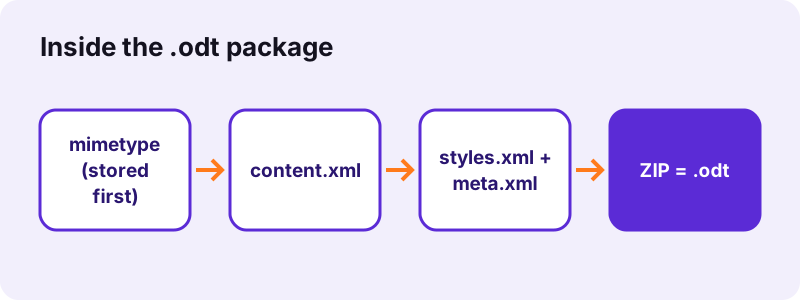
pdf24 PDF to ODT writes OpenDocument Text, the word-processing part of the OpenDocument standard (ISO/IEC 26300). An .odt is a ZIP archive of XML files: content.xml for the text, styles.xml for the look, meta.xml for the title and date. LibreOffice Writer uses it as its native format.
“OpenDocument Format (ODF) for Office Applications, also known as OpenDocument, standardized as ISO 26300, is an open file format for word processing documents, spreadsheets, presentations and graphics using ZIP-compressed XML files.”
We unzipped the .odt made from our 6-page report. The first entry is the 39-byte mimetype file, stored without compression as the standard demands, followed by content.xml (19.3 KB uncompressed, with 6 headings and 6 paragraphs), styles.xml, meta.xml and META-INF/manifest.xml. Scans add a Pictures folder with one JPEG per page.
pdf24 PDF to ODT headings and paragraphs
Lines that are clearly larger than the body text become real OpenDocument headings (text:h), so Writer's Navigator and automatic table of contents pick them up. The other lines are joined into paragraphs (text:p); a hyphen at the end of a line is removed when the word continues on the next line.
pdf24 PDF to ODT tables
Text that sits in shared columns becomes a native table:table element. Our 2-page invoice came out with 1 table holding the Item, Qty, Unit price and Total columns, plus 2 headings, all editable in Writer like any table you insert yourself.
pdf24 PDF to ODT page breaks
With Mark where each page starts ticked (the default), the first paragraph of every PDF page gets a page-break style, so page 3 of the PDF still starts on a new page in Writer. Untick it to get one continuous flowing text; our report was 2.6 KB either way.
pdf24 PDF to ODT tip for long reports
Keep page breaks on when you need to cite page numbers from the PDF; turn them off when you plan to rework the text into a new layout, because forced breaks leave half-empty pages once you delete or add paragraphs.
Why choose pdf24 PDF to ODT instead of Word DOCX?
pdf24 PDF to ODT is the better choice when you work in LibreOffice or OpenOffice, or when an organisation requires open, vendor-neutral formats. Several governments and public bodies prefer OpenDocument for exchange and archiving. If your readers use Microsoft Word, PDF to DOCX is the more natural target.
| Question | ODT | DOCX |
|---|---|---|
| Standard | ISO/IEC 26300 (OASIS) | ISO/IEC 29500 (ECMA-376) |
| Native app | LibreOffice Writer | Microsoft Word |
| Opens in Word | Yes, Word 2010 and later | Yes |
| Opens in Google Docs | Yes | Yes |
| Our report, 6 pages | 2.6 KB in 0.7 s | 2.9 KB in 1.0 s |
The OpenDocument specification is published by OASIS at docs.oasis-open.org; our files follow the ODF 1.3 rule that the mimetype entry comes first, uncompressed.
Can pdf24 PDF to ODT handle scanned PDFs?
A scanned PDF contains page photos and no letters, so pdf24 PDF to ODT places each scanned page in the .odt as a 150 dpi picture and reports how many pages had no selectable text. Our 4-page scan took 14.0 seconds and produced a 2.44 MB file with 4 page JPEGs of about 610 KB each.
To get editable words, add a text layer first with OCR PDF and convert the OCR result. Mixed files are fine: text pages become paragraphs, scanned pages become pictures in the same document.
- Scan at 300 dpi for the cleanest OCR.
- Turn crooked pages with Rotate PDF pages before OCR.
- Check names and numbers after OCR.
pdf24 PDF to ODT measurements
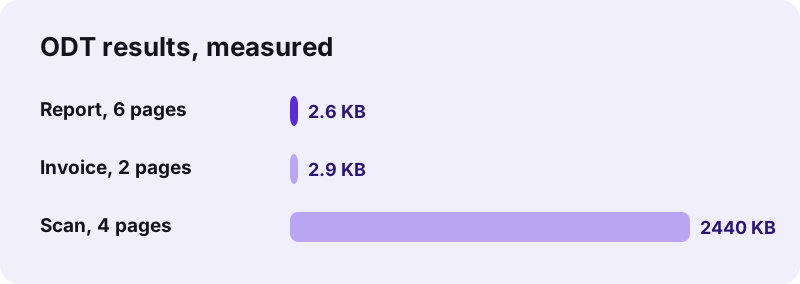
Our four test runs show that text PDFs give tiny OpenDocument files and scans give large ones. Each conversion ran in Chrome on a Windows 10 laptop, and the network log showed 0 uploads in every run, because the converter builds the file inside the browser.
| Test PDF | Option | .odt size | Time | Note |
|---|---|---|---|---|
| Report, 6 pages, 5.1 KB | Page breaks on | 2.6 KB | 0.7 s | 6 headings, 6 paragraphs |
| Report, 6 pages | Page breaks off | 2.6 KB | 0.6 s | one flowing text |
| Invoice, 2 pages, 2.4 KB | Page breaks on | 2.9 KB | 0.6 s | 1 table, 2 headings |
| Scan, 4 pages, 8.07 MB | Page breaks on | 2.44 MB | 14.0 s | 4 page pictures |
What pdf24 PDF to ODT keeps and what it drops
pdf24 PDF to ODT keeps the words, their reading order, headings, bold and italic, font sizes, centred lines, right-to-left paragraphs and column tables. It drops photos and drawings on text pages, form fields, comments, links, bookmarks and the original fonts, because those are not part of the text a PDF stores.
- Need the pictures too? Save them with Extract images and insert them in Writer.
- Need the form? Fill it in the PDF with Fill out PDF.
- Only a few words to change? Edit PDF avoids the round trip.
Is pdf24 PDF to ODT safe for confidential files?
pdf24 PDF to ODT is safe for confidential files because nothing is sent anywhere. The browser reads the PDF with the File API, JavaScript writes the ZIP package in memory and you download it as a local file. Our network logs recorded 0 upload requests, and the result line confirms 0 bytes uploaded.
There is no account, no storage and no copy on a server. See how local file reading works in the File API on MDN.
pdf24 PDF to ODT on Linux, Windows, Mac and phones
pdf24 PDF to ODT works in Chrome, Firefox, Edge and Safari on Linux, Windows, macOS, Android and iOS. Linux users often pick ODT because LibreOffice ships with most distributions; on a phone the Collabora Office or LibreOffice-based viewers, Google Docs and Word open the .odt too.
To go back to PDF after editing, use File → Export as PDF in Writer or ODT to PDF on this site, which also runs in your browser.
pdf24 PDF to ODT: frequently asked questions
Is pdf24 PDF to ODT free?
Yes. It is free, with no sign-up, no watermark and no daily limit. The conversion runs on your own device, so there is no server cost to pass on. Convert as many PDFs as you need, one after another; every .odt is a normal file you can keep, edit and share.
Can Microsoft Word open a pdf24 PDF to ODT file?
Yes. Word 2010 and later open OpenDocument Text files directly through File → Open. Complex formatting may shift slightly between suites, but the text, headings and tables we write are simple, standard elements. If your team uses only Word, PDF to DOCX saves you the extra format step.
Does pdf24 PDF to ODT keep tables?
Yes, when the text in the PDF is aligned in columns. Our invoice became a native OpenDocument table with 4 columns that you can edit, sort and extend in Writer. Tables with merged cells or text drawn as one block can come out as normal lines; use Table → Convert → Text to Table in Writer.
Can pdf24 PDF to ODT make a scan editable?
Not on its own. A scan holds pictures of letters, so each scanned page is placed in the .odt as a picture, and the result line says how many pages had no selectable text. Run OCR PDF first to add a text layer, then convert again for editable paragraphs.
Does pdf24 PDF to ODT upload my PDF?
No. The browser reads the PDF locally and builds the .odt in JavaScript. During our tests the page made 0 upload requests, and the result line shows 0 bytes uploaded. You can verify this yourself in the Network tab of the browser's developer tools while a conversion runs.
What does Mark where each page starts do in pdf24 PDF to ODT?
It adds a page break before the first paragraph of every PDF page after the first, so the Writer document keeps the same page starts as the PDF. Untick it for one continuous text that reflows freely. The file size barely changes: our 6-page report was 2.6 KB both ways.
Is this pdf24 PDF to ODT tool part of PDF24?
No. pdf24tools is an independent website, not affiliated with PDF24 or Geek Software GmbH. The converter is our own code: it runs in your browser, uploads nothing and needs no account. We use simple page names so the tool is easy to find, but the site, the code and the team are separate.
Why does my pdf24 PDF to ODT file look different from the PDF?
A PDF places letters at fixed positions and has no paragraphs, columns or text boxes. The converter rebuilds a flowing document, so multi-column pages become one column, text boxes become paragraphs and fonts are replaced. Headings, bold, italic and sizes are kept, so the clean-up is usually quick.
Can pdf24 PDF to ODT convert Arabic or Hebrew text?
Yes, for PDFs with a real text layer. Paragraphs made mostly of right-to-left characters are written right to left, so Arabic, Hebrew, Persian and Urdu read in the correct direction in Writer. Scanned pages in these scripts still need OCR first, like any scan.
How large can a PDF be for pdf24 PDF to ODT?
There is no fixed limit; your device's memory is the limit, because the whole PDF is read into the browser. Text PDFs are light: our 6-page report was 5.1 KB. Long scans use the most memory and time; split them with Split PDF and convert the parts if a phone struggles.
Does pdf24 PDF to ODT work offline?
The conversion itself needs no internet, because nothing is sent to a server. Load the page online and run one conversion so the converter script is loaded; after that, more files convert without a connection while the tab stays open. Reloading the page needs the internet again.
How do I turn a pdf24 PDF to ODT file back into a PDF?
In LibreOffice Writer choose File → Export as PDF, or use ODT to PDF on this site, which converts in your browser as well. Both keep your edits. If the new PDF is too large to email, run it through Compress PDF; text documents are usually small already.
More pdf24 PDF to ODT tools and guides
pdf24 PDF to ODT: sources
- OpenDocument — Wikipedia
- Open Document Format for Office Applications (OpenDocument) Version 1.3 — OASIS
- File API — MDN Web Docs