Can pdf24 pdf to word without losing formatting really keep the layout?
Converting PDF to Word keeps the formatting that Word can represent as text: headings, paragraphs, bold, italic, font sizes, lists and tables. Free-floating layout such as columns, text boxes and exact line breaks cannot stay editable, so Editable mode turns them into normal paragraphs, while Exact mode keeps the look as pictures.
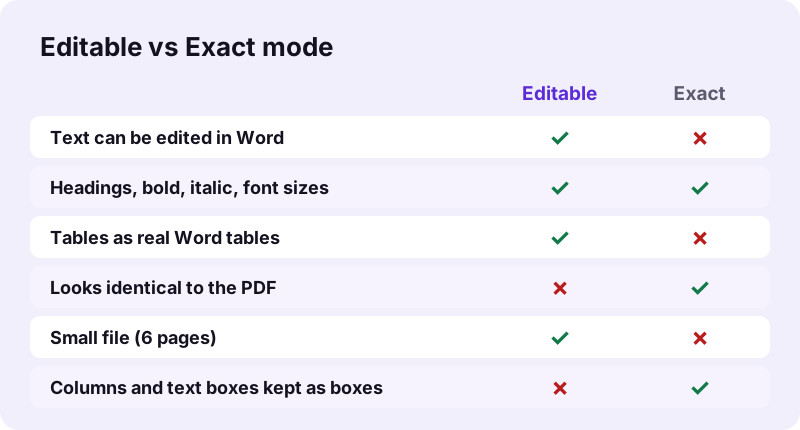
That is why the converter offers two modes instead of one. Pick by what you will do next: edit the words, or show the pages unchanged.
pdf24 pdf to word without losing formatting, step by step
- Open PDF to Word.
- Choose the PDF from your phone or computer.
- Pick Editable to change text, or Exact to keep the look.
- Press Convert and download the .docx file.
- Open it in Word, LibreOffice or Pages and check headings, lists and tables.
pdf24 pdf to word without losing formatting: what Editable rebuilds
Editable mode reads each line's position, size and weight. Larger bold lines become Word headings (Heading 1 to 3), so the navigation pane works; lines are joined into paragraphs and end-of-line hyphens are removed; bullets become indented list lines; centred lines stay centred; right-to-left lines get Word's right-to-left setting.
pdf24 pdf to word without losing formatting: what Editable drops
The font family becomes Word's default (Calibri), although sizes, bold and italic stay. Text colour, pictures placed inside text pages, headers that repeat on every page and multi-column flow are not rebuilt. The result line warns about this after every Editable conversion.
pdf24 pdf to word without losing formatting: tip for two-column papers
For a two-column article, convert in Editable mode, then select the body text in Word and apply Layout, Columns, Two. Word reflows the paragraphs into columns again in a few seconds, which is quicker than fixing a picture-based copy.
What did our pdf24 pdf to word without losing formatting tests show?
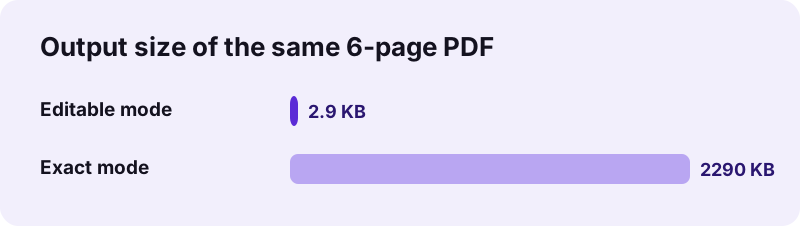
Our Word conversion tests used three files. A 6-page text PDF became a 2.9 KB editable .docx with 12 paragraphs in 0.8 seconds. An invoice became a Word file with one real table of 6 rows. A 5-page scan had no text layer, so its pages arrived as pictures in a 1.48 MB file.
| Test file | Mode | Result | Time |
|---|---|---|---|
| text-6p.pdf, 6 pages, 5.1 KB | Editable | 2.9 KB, 12 paragraphs | 0.8 s |
| text-6p.pdf | Exact | 2.24 MB, 6 page pictures | 2.0 s |
| invoice-v1.pdf, 2 pages | Editable | 3.3 KB, 1 table × 6 rows | 0.8 s |
| contract-scan-5p.pdf, 2.46 MB | Editable | 1.48 MB, 5 pages as pictures | 7.4 s |
| same scan after OCR PDF | Editable | 3.0 KB, 2,575 words of text | 2.1 s |
The figures show the honest trade-off behind pdf24 pdf to word without losing formatting: Editable files are tiny and fully editable but rebuilt, Exact files look perfect but are about 790 times larger and cannot be edited. No setting gives both at once, because Word itself cannot place free text at fixed coordinates the way a PDF does.
pdf24 pdf to word without losing formatting: which mode for which document?
Pick Editable for Word reports, letters, CVs, contracts and invoices whose text or figures you will change. Pick Exact for brochures, certificates, forms with boxes and anything where the look matters more than the words. For scans, run OCR first and then convert in Editable mode.
| Document | Best mode | Why |
|---|---|---|
| CV, letter, report | Editable | Headings and paragraphs come back as styles |
| Invoice or price list | Editable | Tables become real Word tables |
| Brochure, flyer, poster | Exact | Text boxes and pictures stay in place |
| Certificate, signed form | Exact | Nothing moves; the file is a faithful copy |
| Scanned page | OCR, then Editable | A scan has no text to rebuild |
When you are unsure, convert twice. Both runs take seconds, and comparing the two .docx files side by side shows at once whether the document depends on its layout or on its words. Keep the Exact copy for reference and edit the Editable one.
Why do tables and columns change in pdf24 pdf to word without losing formatting?
Tables and columns change in Word because a PDF has no idea of a table or a column: it only places pieces of text at coordinates. The converter treats two or more consecutive lines split into three or more aligned cells as a table, and anything else as flowing text, which is why columns merge into one.
- Tables with clear gaps between cells convert into a real Word table, as our invoice did.
- Tables drawn as one text run without gaps arrive as paragraphs; split them in Word with Convert Text to Table.
- Dates such as 19.10.2026 stay text instead of turning into numbers.
- Columns are read in line order; reapply columns in Word if you need them.
“Office Open XML is a zipped, XML-based file format developed by Microsoft for representing spreadsheets, charts, presentations and word processing documents.”
How does pdf24 pdf to word without losing formatting handle scans?
A scanned PDF holds pictures of pages, so there is no Word formatting to keep until the text is recognised. Run OCR PDF first, then convert the OCR copy in Editable mode. Our 5-page contract scan gave 2,575 editable words this way; headings and spacing then need a quick check by eye.
Without OCR, Editable mode still produces a Word file, but every scanned page is inserted as a picture and the result line says how many pages had no text layer. Use OCR PDF with the document's language set correctly; English, French, German, Spanish and seven more languages are available.
Check three things after OCR and conversion: numbers in tables, names, and words with accents, since these are where recognition errors show first. A sharp scan at 300 dpi gives far fewer errors than a phone photo taken at an angle, so rescan a page rather than correcting dozens of words by hand.
Is pdf24 pdf to word without losing formatting safe for confidential files?
Converting PDF to Word here is safe for confidential files because the document is never uploaded. The browser reads it with the File API and builds the .docx on your device; our request logs showed 0 POST requests and each result line said 0 bytes uploaded. Nothing is stored after you close the tab.
That suits contracts, HR files and medical letters, where a cloud converter would mean handing a copy to a third party. See the File API on MDN for how browsers open local files, and use the tools below for the next step.
pdf24 PDF to word without losing formatting: frequently asked questions
Is pdf24 pdf to word without losing formatting free?
Yes. Both conversion modes are free, with no account, no watermark and no daily limit, so you can try pdf24 pdf to word without losing formatting on as many files as you like. The conversion runs in your browser on your own device, so there is no server cost to charge for.
Does pdf24 pdf to word without losing formatting keep fonts?
Font sizes, bold and italic are kept in Editable mode, but the font family becomes Word's default, Calibri, because a PDF often embeds only parts of a font that Word could not use. Exact mode keeps the original look on screen, as each page is placed as a picture.
Does pdf24 pdf to word without losing formatting keep tables?
Yes, when the table's cells are separated by visible gaps. Our two-page invoice came back with one real Word table of 6 rows, with Item, Qty, Unit price and Total in their own columns. Tables whose cells touch may arrive as paragraphs instead; Word's Convert Text to Table fixes those.
Does pdf24 pdf to word without losing formatting keep images?
In Exact mode every page, images included, is a picture, so nothing is lost visually. In Editable mode, pictures inside text pages are not carried over; only text, headings, lists and tables are rebuilt. Copy important pictures separately with Extract images if you need them in the Word file.
Why does pdf24 pdf to word without losing formatting give a huge file?
You probably used Exact mode. Each page is stored as a picture at 200 dpi, so our 6-page, 5.1 KB text PDF became 2.24 MB, while Editable mode gave only 2.9 KB. Use Editable when you need a small file or want to change the text.
Can pdf24 pdf to word without losing formatting edit a scanned PDF?
Not directly. A scan has no text layer, so its pages are inserted into Word as pictures. Run OCR PDF first: our 5-page scan gave 2,575 recognised words, and converting the OCR copy produced a 3.0 KB Word file with editable text in 2.1 seconds.
Is my file uploaded by pdf24 pdf to word without losing formatting?
No. The browser opens the PDF locally and builds the Word file on your device. Our request logs for every conversion showed no POST request, and the result line states 0 bytes uploaded. That makes the converter suitable for contracts, CVs and HR documents that should not leave your computer.
Does pdf24 pdf to word without losing formatting work on a phone?
Yes. The converter runs in Chrome, Safari, Firefox and Edge on Android and iPhone. The .docx lands in Downloads and opens in Word for mobile or Google Docs. Long documents take longer on a phone because all processing runs on the device itself.
How does pdf24 pdf to word without losing formatting handle headings?
Lines set larger or bolder than the body text are turned into Word headings, from Heading 1 to Heading 3, depending on their size. That means the Word navigation pane and an automatic table of contents work straight away, without restyling every title by hand.
Does pdf24 pdf to word without losing formatting keep Arabic or Hebrew text?
Yes. Right-to-left lines are written with Word's right-to-left paragraph setting, so Arabic and Hebrew read in the correct direction. As with other scripts, the font family changes to the Word default, while font sizes, bold and italic are kept.
Is pdf24 pdf to word without losing formatting an official converter?
No. pdf24tools is an independent website and is not affiliated with PDF24 or Geek Software GmbH. Our converter is separate code that runs in your browser. The results quoted here are our own measurements from 2 November 2026 with our own test files.
Can pdf24 pdf to word without losing formatting open a locked PDF?
A PDF that needs a password to open stops with a message asking you to remove the password first. Use Unlock PDF with the password you know, then convert the unlocked copy. Files with only copy or print limits can be unlocked without a password.
Which program opens the result of pdf24 pdf to word without losing formatting?
The result is a standard .docx file. It opens in Microsoft Word 2007 and later, Word for the web and mobile, LibreOffice Writer, Google Docs and Apple Pages. Headings, tables and lists come through in all of them, though spacing can differ slightly between programs.
More pdf24 PDF to word without losing formatting tools and guides
pdf24 PDF to word without losing formatting: sources
- Office Open XML — Wikipedia
- PDF — Wikipedia
- File API — MDN Web Docs