Is there a pdf24 for mac download?
No separate Mac download exists on pdf24tools, because none is needed. Every tool is a web page that runs in Safari, Chrome, Firefox or Edge on macOS. You open the page, choose a PDF from Finder, and the result is saved to your Downloads folder. Nothing is installed, so nothing needs updating or uninstalling.
That also means pdf24 for mac works the same on an iMac, a MacBook Air or a Mac mini, and on the Windows PC or phone you use elsewhere. Bookmark the tool list in Safari and one click opens any tool.
pdf24 for mac in Safari, step by step
- Open a tool page, for example PDF to Word, in Safari.
- Click Choose PDF files or drag the PDF from Finder onto the box.
- Pick the options, such as Editable or Exact layout.
- Press the green button and wait for the result line.
- Click the download link; Safari saves the file to Downloads.
pdf24 for mac: where the files are saved
Safari and Chrome save results to ~/Downloads unless you changed that in their settings. The original file is never modified: a compressed copy gets the ending -compressed.pdf, a converted file keeps its name with the new extension, such as report.docx.
pdf24 for mac on Apple silicon and Intel models
Because the tools are JavaScript and WebAssembly running in the browser, the processor type does not matter. Apple silicon and Intel Macs run the same code; a faster Mac simply finishes large scans sooner, since all the work happens on your own machine.
pdf24 for mac: tip for very large scans
Close other heavy tabs before compressing or running OCR on a scan of 50 MB or more. The browser keeps every page in memory while it works, and a Mac with 8 GB of RAM has less room when many tabs are open.
Which tasks does pdf24 for mac handle in the browser?
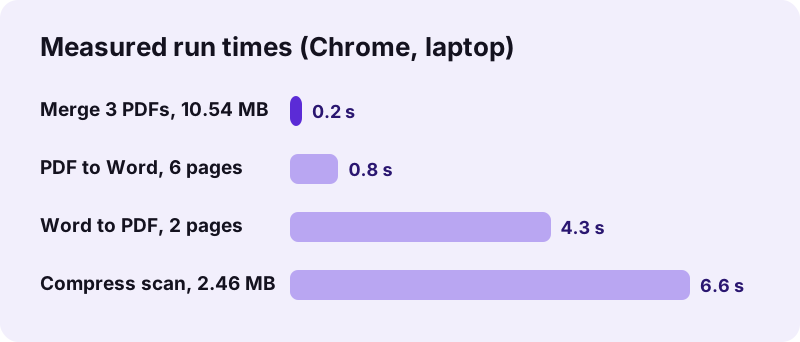
The browser tools on a Mac cover the same jobs as on any computer: convert PDF to Word and Excel, Word to PDF, compress, merge, split, sign, redact, OCR and unlock. Our tests, run in Chrome, show typical times from 0.2 seconds for a merge to about 7 seconds for compressing a 5-page scan.
| Task | Test file | Result | Time |
|---|---|---|---|
| PDF to Word, Editable | 6-page text PDF, 5.1 KB | 2.9 KB .docx | 0.8 s |
| Compress, Recommended | 5-page scan, 2.46 MB | 493 KB (80 % smaller) | 6.6 s |
| Merge | 3 PDFs, 10.54 MB | 15 pages, 10.54 MB | 0.2 s |
| Word to PDF | report.docx, 2.01 MB | 2 pages, 2.05 MB | 4.3 s |
| PDF to Excel | 2-page invoice | 26 cells, 9.7 KB | 0.6 s |
pdf24 for mac compared with the built-in Preview app
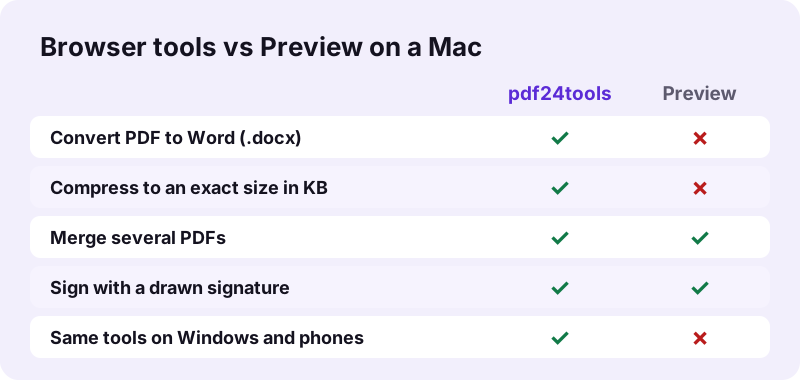
Preview already ships with every Mac and handles viewing, merging pages, signing and annotating well. What Preview cannot do is turn a PDF into an editable Word file, compress to an exact size such as 200 KB, or run OCR into a searchable PDF. Those gaps are where the browser tools help.
“Preview is the built-in image and PDF viewer of the iOS, iPadOS & macOS operating system.”
A sensible split is to keep Preview for reading and quick page edits and use pdf24 for mac tasks that need conversion, a size target or OCR. Neither needs an account.
Is pdf24 for mac safe for private documents?
The Mac tools are safe for private files because nothing is uploaded. Safari reads the PDF with the browser File API and the processing runs locally; in our tests the request log showed 0 POST requests and the result line said 0 bytes uploaded. Contracts, tax forms and IDs stay on your Mac.
With pdf24 for mac there is no account and no cloud folder, so there is nothing to delete afterwards. You can check this yourself in Safari: open Develop, then Web Inspector, then Network, and watch the requests while a tool runs. See the File API on MDN for how browsers open local files.
pdf24 for mac: converting PDF to Word on a MacBook
PDF to Word on a Mac gives a .docx that opens in Word for Mac or in Pages. Editable mode rebuilds headings, paragraphs, bold, italic, lists and tables as real Word text; Exact mode places each page as a picture. Our 6-page text PDF became a 2.9 KB editable file in 0.8 seconds.
- Editable: best for changing the text; columns and text boxes become normal paragraphs.
- Exact: looks identical, but the text cannot be edited (our 6 pages gave 2.24 MB).
- Scans: pages without a text layer arrive as pictures; run OCR PDF first.
Pages imports .docx files directly, so you do not need Microsoft Office to edit the result. With pdf24 for mac the conversion itself stays on the computer, which suits confidential reports.
pdf24 for mac: compressing and merging files
Compressing on a Mac works with fixed levels or an exact size in KB. A 5-page, 2.46 MB scan dropped to 493 KB with Recommended and to 82 KB with an exact 100 KB target. Merging is lossless: three PDFs of 10.54 MB became one 15-page file of the same size in 0.2 seconds.
| Tool | Setting | Measured result |
|---|---|---|
| Compress PDF | Extreme | 2.46 MB → 244 KB |
| Compress PDF | Exact size 200 KB | 2.46 MB → 148 KB |
| Merge PDF | 3 files | 15 pages, 0.2 s |
| Split PDF | Each page | 6 files in a 7.9 KB ZIP |
In pdf24 for mac, compression redraws scanned pages as JPEG pictures, so their text is no longer selectable; typed PDFs that are already small are kept as they are.
What if pdf24 for mac does not work in Safari?
When a tool does not start on a Mac, the cause is usually an old Safari version, a locked PDF or a content blocker. Update macOS or try Chrome, remove the password with Unlock PDF, and allow scripts for the site. A password-protected file stops with a clear message instead of a broken result.
- Update Safari through Software Update; very old versions lack some canvas features.
- Disable content blockers for the site if the Choose button does nothing.
- Use Unlock PDF with the password you know before merging or compressing.
- Try Repair PDF if a damaged file will not open.
pdf24 for mac: frequently asked questions
Is pdf24 for mac free?
Yes. The browser tools cost nothing on a Mac: there is no account, no subscription and no watermark on the output. Because the work runs on your own computer instead of a server, there is no per-file cost to charge for, and there is no daily limit on how many files you process.
Do I need to install pdf24 for mac?
No. pdf24 for mac runs in the browser, so there is no .dmg file, no App Store download and no admin password. Open a tool page in Safari, Chrome or Firefox and use it straight away. When you are done, close the tab; nothing remains on the Mac except the files you downloaded.
Does pdf24 for mac work on macOS Sonoma and newer?
Yes. The tools rely on standard browser features such as the File API, canvas and WebAssembly, which current Safari, Chrome and Firefox versions on recent macOS releases support. If an older Mac can no longer update Safari, install a current Chrome or Firefox and use the tools there.
Can pdf24 for mac convert PDF to Word for Pages?
Yes. The result is a standard .docx file, which Pages opens through File, Open. Editable mode gives real paragraphs, headings and tables that Pages can edit. Exact mode places each page as a picture, which looks identical but cannot be edited in Pages or Word.
Is my file uploaded when I use pdf24 for mac?
No. Safari opens the PDF locally and the conversion runs in JavaScript on the Mac. Our request logs for every test showed no POST request, and each result line states 0 bytes uploaded. That makes the tools suitable for contracts, payslips and medical letters.
Does pdf24 for mac work offline?
Partly. The page and the PDF libraries it loads on first use must come from the internet once. After that, the processing itself runs on the Mac and sends nothing. If the connection drops before a tool has loaded its library, reload the page when you are back online.
Can pdf24 for mac compress a PDF for email?
Yes. Choose Recommended for a good balance or Exact size to hit a limit. In our tests a 10.54 MB file of 15 pages dropped to 1.85 MB with Recommended and to 1.42 MB with a 2,000 KB target, small enough for most email services.
Why is pdf24 for mac slower than a desktop app?
Speed depends on your Mac, because the work is done locally. Small tasks such as merging take well under a second; compressing a 4-page, 8.07 MB scan took 14.2 seconds in our test. Closing other heavy tabs frees memory and makes large scans finish sooner.
Can pdf24 for mac sign a PDF?
Yes. Sign PDF lets you draw a signature with the trackpad, type it or upload a picture, then place it on the page. It is a visible signature placed as an image, not a certificate-based digital signature, which is what most forms and agreements ask for.
Does pdf24 for mac run on iPad as well?
Yes. The same pages work in Safari on iPad and iPhone. Choose the PDF from the Files app, and the result goes to the Downloads folder in Files. Large scans take longer on a tablet, so keep the screen on until the download link appears.
Is pdf24 for mac an official tool?
No. pdf24tools is an independent website and is not affiliated with PDF24 or Geek Software GmbH. Our tools are separate code that runs in your browser on any system, Mac included. The figures in this guide are our own measurements from 2 November 2026.
Can pdf24 for mac open a password-protected PDF?
A PDF that needs a password to open stops with the message that it is password-protected. Use Unlock PDF with the password you know to make an open copy, then run the tool you need. Files with only print or copy limits can be unlocked without any password.
Which browser is best for pdf24 for mac?
Safari, Chrome, Firefox and Edge all run the tools. Safari is already on every Mac and uses little battery; Chrome and Firefox are good choices on older macOS versions that no longer receive Safari updates. Results are the same files whichever browser you use.
More pdf24 for mac tools and guides
pdf24 for mac: sources
- Preview (Apple) — Wikipedia
- macOS — Wikipedia
- File API — MDN Web Docs