How to use pdf24 tools ODT to PDF in 4 steps
- Choose the .odt. Drop one or more .odt or .ott files on the box, or tap Choose files.
- Pick A4 or Letter. The page size applies to every file you convert together.
- Press Convert to PDF. content.xml is read and laid out on your device.
- Download the PDF. Save it, or the ZIP for several files, and check it once.
What is an .odt file and how does pdf24 tools ODT to PDF read it?
An .odt file is an OpenDocument text document, the default format of LibreOffice Writer: a ZIP package whose content.xml holds paragraphs, headings, lists and tables, with styles for bold, italic and alignment. pdf24 tools ODT to PDF unpacks it in your browser and lays those blocks out on PDF pages.
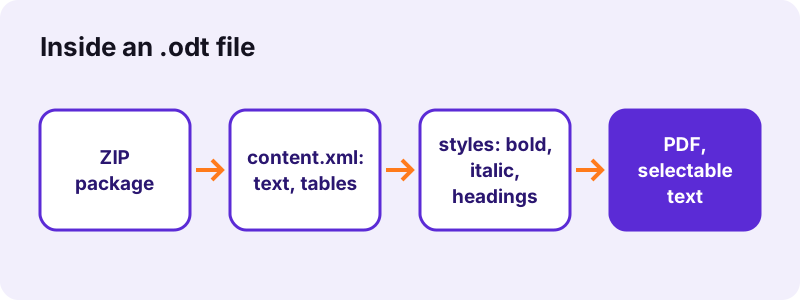
Writer marks headings with an outline level (text:h with text:outline-level), so Heading 1 to Heading 6 come out as six sizes of bold type, from 22 pt down to 11 pt. Automatic styles that Writer creates when you press Ctrl+B or Ctrl+I are followed back to their parent style, so bold and italic survive even when they were applied by hand.
“It was developed with the aim of providing an open, XML-based file format specification for office applications.”
Tables in pdf24 tools ODT to PDF
Table rows and cells are rebuilt as a grid. Rows marked as repeating header rows in Writer are shaded light grey in the PDF, so a long table stays readable.
pdf24 tools ODT to PDF and lists
List items keep their nesting: the first level gets a • bullet, the next a – dash, alternating deeper down. Numbered lists are drawn with bullets too, so add numbers to the text if their order matters.
pdf24 tools ODT to PDF with pictures
Pictures anchored in frames are taken from the package's Pictures folder and placed at the size set in Writer, scaled down only if they are wider than the page.
pdf24 tools ODT to PDF tip for tables of contents
A generated table of contents is printed as plain text lines, without page numbers that match the PDF, because the layout differs. Delete it before converting if those numbers would confuse readers.
What does pdf24 tools ODT to PDF keep and drop?
pdf24 tools ODT to PDF keeps headings, paragraphs, bold, italic, alignment, line breaks, tabs, bullet lists, tables, header rows, pictures and link text. It replaces fonts with Noto Sans and leaves out headers, footers, footnotes, endnotes and comments. Text stays selectable, and links are visible but not clickable.
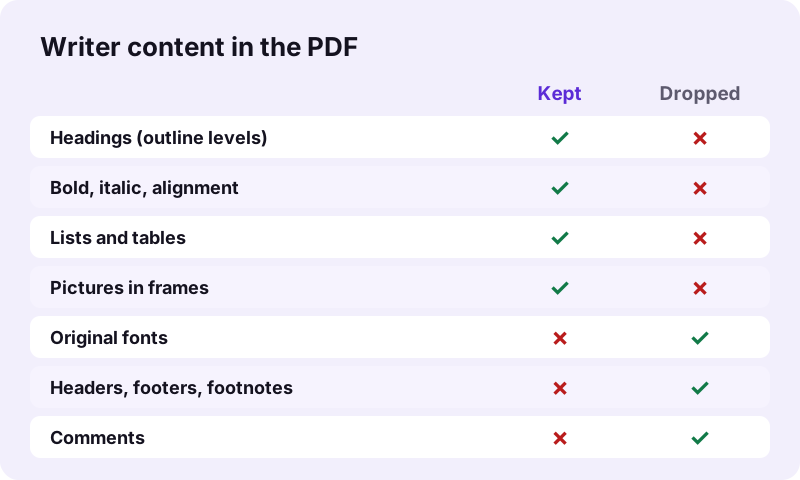
| Writer element | In the PDF |
|---|---|
| Heading 1–6 | Bold, 22 pt to 11 pt |
| Bold, italic, alignment | Kept |
| Bullet and numbered lists | Bullets, nesting kept |
| Tables | Grid, header rows shaded |
| Pictures in frames | Kept |
| Hyperlinks | Blue, underlined, not clickable |
| Fonts | Noto Sans |
| Headers, footers | Not included |
| Footnotes, comments | Not included |
How fast is pdf24 tools ODT to PDF? Measured
pdf24 tools ODT to PDF converted our 1.8 KB test document, with a heading, a bold phrase, a 2-item list, a 3 × 3 table and a Ukrainian sentence, into a 1-page A4 PDF of 14,238 bytes in 0.9 seconds in Chrome on Windows 10. All 177 characters were extractable as real text.
| Measure | Value |
|---|---|
| Input | dc-report.odt, 1.8 KB |
| Output | 1 page, 14,238 B, A4 |
| Time (tool) | 0.9 s |
| Characters extractable | 177 |
| Fonts embedded | Noto Sans Regular and Bold |
| Uploaded | 0 bytes |
The PDF is larger than the .odt because it carries a subset of the font, which guarantees the same look on every device, including the Cyrillic letters of the Ukrainian line. Pictures in a document add their own size to the PDF, because they are embedded rather than redrawn.
Is pdf24 tools ODT to PDF private?
The ODT converter works only in your browser: the .odt is read with the File API, unzipped and laid out in memory, and the result line confirms 0 bytes uploaded. Nothing is stored. That suits schools, universities and public offices that use LibreOffice and must keep documents off third-party servers.
Background: File API (MDN).
pdf24 tools ODT to PDF for files from Google Docs, OpenOffice and other apps
Any program that saves standard OpenDocument text works: LibreOffice Writer, Apache OpenOffice Writer, Collabora, and Google Docs via File, Download, OpenDocument Format (.odt). Writer templates (.ott) are accepted too. The converter reads the shared OpenDocument structure, so the app that wrote the file does not change the result, only the content inside it does.
- Google Docs: download as .odt or as .docx; both convert, the .docx route on DOCX to PDF.
- Flat XML documents (.fodt): save as a normal .odt first.
- Master documents (.odm): export each part as .odt.
- Password-protected .odt: Save As in Writer, untick Save with password.
pdf24 tools ODT to PDF on iPhone, Android and Chromebook
Phones rarely have an app for OpenDocument files, which makes an .odt attachment hard to open. The converter runs in Safari, Chrome, Edge and Firefox, so a Writer document becomes a PDF anyone can read.
- iPhone/iPad: save the .odt to Files, then Choose files → Browse.
- Android: download it, then pick it from Download.
- Chromebook: Files app or Google Drive.
pdf24 tools ODT to PDF versus Writer's Export as PDF
Writer's File → Export as PDF keeps your fonts, headers, footers, footnotes, numbered lists and clickable links, and can create PDF/A. Use it when Writer is installed; use the browser converter on devices where it is not.
Fixing pdf24 tools ODT to PDF problems
Most differences come from parts of the document the converter does not read, or from the change of font. These fixes, made in a copy of the file in Writer before converting, cover the usual cases and take a minute each; the conversion itself then takes about a second.
- Page numbers missing: they live in the footer; add them with Add page numbers.
- Numbered list shows bullets: type the numbers into the text if the order matters.
- Footnotes missing: move key notes into the text or a final section.
- Lines break at other words: Noto Sans has different letter widths from your font.
pdf24 tools ODT to PDF: frequently asked questions
Is pdf24 tools ODT to PDF free?
Yes. It is free, with no sign-up, no watermark and no limit, because your own device does the work. pdf24tools is an independent site and is not affiliated with PDF24 or Geek Software GmbH; the name only reflects what people search for. All our tools work the same private way.
Do I need LibreOffice for pdf24 tools ODT to PDF?
No. The page reads the OpenDocument text format itself, so nothing needs to be installed. It works on iPhones, Android phones, Chromebooks and computers without Writer or OpenOffice. Only a current browser such as Chrome, Edge, Firefox or Safari is required.
Does pdf24 tools ODT to PDF upload my document?
No. The .odt is read from your disk, unzipped and laid out in memory by JavaScript. The result line shows the bytes read and 0 bytes uploaded. Only the converter code comes from our server; your text never leaves your device.
Does pdf24 tools ODT to PDF keep my fonts?
No. Every font is replaced by Noto Sans in regular, bold, italic or bold italic, embedded as a subset. Headings, bold, italic and alignment are kept, so the structure stays clear. For exact fonts, use Export as PDF in LibreOffice Writer on a computer.
Are headers and footers included by pdf24 tools ODT to PDF?
No. Writer stores headers and footers in the page styles of styles.xml, which the converter does not lay out; footnotes, endnotes and comments are skipped as well. Add page numbers afterwards with the Add page numbers tool, and stamp a letterhead with Overlay PDF if needed.
Does pdf24 tools ODT to PDF keep tables?
Yes. Rows and cells are rebuilt as a grid, and rows marked as header rows in Writer are shaded light grey. Bold and italic text inside cells is kept. Merged cells and cell background colours are not reproduced, so check complex tables after converting.
Is the text selectable after pdf24 tools ODT to PDF?
Yes, for Latin, Greek and Cyrillic scripts: words are drawn as real text with an embedded font, so you can search and copy them; all 177 characters of our test file were extractable, including Ukrainian. Arabic, Hebrew, Indic, Thai and CJK lines are placed as images.
Can pdf24 tools ODT to PDF convert several files at once?
Yes. Select or drop several .odt files together; each becomes its own PDF with the same name, and the set downloads as one ZIP. Use Merge PDF afterwards if you want a single file, for example all chapters of a thesis in order.
Does pdf24 tools ODT to PDF keep pictures?
Yes. Pictures placed in frames are read from the package and drawn at the size set in Writer, scaled down only when wider than the page. Charts and drawings made with Writer's own drawing tools are not pictures and are not drawn; insert them as images if needed.
What page size does pdf24 tools ODT to PDF use?
A4 by default, with 56-point margins, or Letter if you select it before converting. Body text is set at 11 points. The page style stored in the .odt, such as size, margins or landscape orientation, is not read, so choose the paper you need.
Why are numbered lists shown with bullets after pdf24 tools ODT to PDF?
The converter keeps every list item and its nesting level but draws all list markers as bullets and dashes. If the numbering carries meaning, such as steps or legal clauses, type the numbers into the text in Writer, or save as .docx and use Word to PDF, which keeps numbers.
More pdf24 tools ODT to PDF tools and guides
pdf24 tools ODT to PDF: sources
- OpenDocument — Wikipedia
- OpenDocument technical specification — Wikipedia
- File API — MDN Web Docs