How to use pdf24 tools DOCX to PDF in 4 steps
- Choose the .docx file. Drop the file on the box or tap Choose files; several .docx files can go in together.
- Set the paper size. A4 is the default; switch to Letter for US printers.
- Press Convert to PDF. Your browser unpacks the .docx and lays out the pages locally.
- Save the PDF. Download the PDF (or a ZIP for several files) and open it once to check.
What is a .docx file and how does pdf24 tools DOCX to PDF read it?
A .docx file is a ZIP archive of XML files in the Office Open XML format. pdf24 tools DOCX to PDF unpacks that archive in your browser, reads the main story in word/document.xml and the pictures in word/media, and sets them on PDF pages with the Noto Sans font.
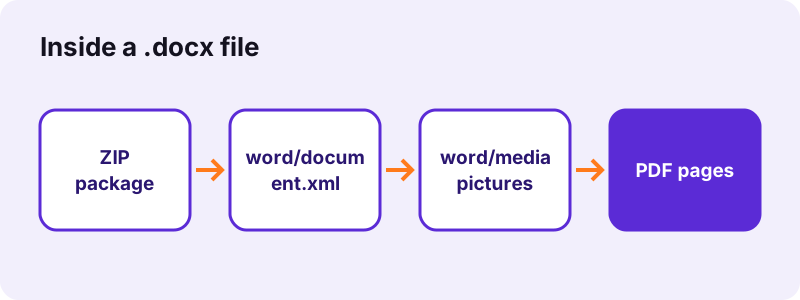
Rename any .docx to .zip and you can open it like a folder: [Content_Types].xml, a _rels folder, and a word folder with document.xml, styles.xml, numbering.xml and usually media. The converter needs only the body, the styles that name headings, the list numbering and the pictures.
“Ecma International standardized the initial version as ECMA-376.”
DOCX parts that pdf24 tools DOCX to PDF uses
| Part of the .docx | Used? | What it gives the PDF |
|---|---|---|
| word/document.xml | Yes | Paragraphs, runs, tables, page breaks |
| word/styles.xml | Yes | Heading and title styles |
| word/numbering.xml | Yes | Bullets and numbers |
| word/media/* | Yes | JPG, PNG and other pictures |
| word/header1.xml, footer1.xml | No | Headers and footers are left out |
| word/footnotes.xml | No | Footnotes are left out |
| word/comments.xml | No | Comments are not printed |
pdf24 tools DOCX to PDF and picture sizes
The size of each picture comes from its wp:extent value in English Metric Units (12,700 per point), so a photo keeps the size you gave it in Word, capped at the text width of the page.
pdf24 tools DOCX to PDF with oversized photos
A photo larger than the page is scaled down to fit both the width and the height of the text area, never cropped.
pdf24 tools DOCX to PDF tip for heavy files
Open the .docx as a ZIP and look at word/media: if one photo is most of the size, the PDF will be large too.
Why is the PDF from pdf24 tools DOCX to PDF almost the size of the .docx?
pdf24 tools DOCX to PDF embeds pictures from word/media as they are, without recompressing them. In our test the .docx was 2,059 KB, its single photo was 2,057 KB, and the PDF came out at 2,094 KB. The text of a two-page report adds only a few kilobytes.
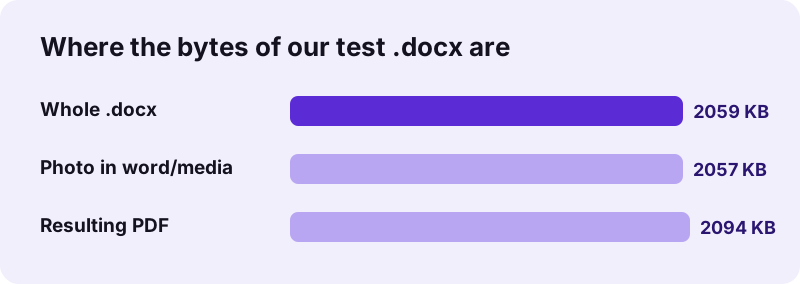
The XML in a .docx is already compressed by ZIP, which is why a long text-only .docx is often under 50 KB. The PDF stores the same text plus a subset of Noto Sans, so text-only documents grow a little; photo-heavy documents stay about the same.
Need it smaller? Run the result through Compress PDF, or compress the pictures in Word before saving the .docx.
pdf24 tools DOCX to PDF for Google Docs, Pages and LibreOffice files
Google Docs (File → Download → Microsoft Word), Apple Pages (File → Export To → Word) and LibreOffice Writer (Save As → Word 2007–365) all write standard .docx files. The converter treats them the same way, because it reads the shared Office Open XML structure, not the app that made it.
- Google Docs: download as .docx first; a Google Docs link itself cannot be converted.
- Apple Pages: choose Word format (.docx) in the export dialog, not the older .doc.
- LibreOffice: keep the default Word 2007–365 option; avoid the Word 97–2003 one.
- WPS Office and OnlyOffice also save .docx by default.
pdf24 tools DOCX to PDF with Strict and Transitional files
Office Open XML has two flavours. Transitional is what Word saves by default; Strict (ISO/IEC 29500 Strict) drops some legacy features and uses different XML namespaces. Almost every .docx you receive is Transitional, which is the flavour our converter is built and tested on.
If a file saved as "Strict Open XML Document" fails to open, save it again from Word as a normal Word Document (.docx). The words and tables stay the same.
“ISO and IEC standardized later versions as ISO/IEC 29500.”
Is pdf24 tools DOCX to PDF safe for confidential files?
pdf24 tools DOCX to PDF never uploads the document. The browser reads the .docx with the File API, JavaScript unzips and converts it in memory, and the result line confirms 0 bytes uploaded. Nothing is stored on a server, so contracts, payslips and CVs stay on your device.
- No account, no e-mail address, no watermark.
- No copy is kept after you close the tab.
- The same holds on phones: the file never leaves the iPhone or Android device.
- Background: how browsers read local files (MDN).
What pdf24 tools DOCX to PDF keeps from a document
The DOCX converter keeps what is written in the body: headings, bold, italic, underline, lists, tables, pictures, alignment, indents and page breaks. It changes fonts to Noto Sans and leaves out headers, footers, footnotes and comments. Link text stays visible but is not clickable.
| Feature | Result |
|---|---|
| Text | Real, selectable text |
| Fonts | Noto Sans (4 styles) |
| Tables | Kept; rows not split across pages |
| Pictures (JPG, PNG) | Embedded unchanged |
| EMF/WMF | Skipped |
| Headers/footers | Not included |
| Links | Visible, not clickable |
More detail, with measured times, is on the Word to PDF page, which uses the same engine.
pdf24 tools DOCX to PDF on phones and computers
The converter is a web page, so it runs in Safari on iPhone and iPad, Chrome on Android, and any modern browser on Windows, macOS, Linux and ChromeOS. Save the .docx attachment to the device first, then pick it with Choose files.
- iPhone: Mail → long-press the attachment → Save to Files → pick it here.
- Android: tap the attachment → Download → pick it from Download.
- Windows/Mac: drag from Explorer or Finder onto the box.
pdf24 tools DOCX to PDF when the attachment will not open
Some mail apps hand over a .docx with a .bin or .dat name. Rename it to .docx; if it then opens in Word, it will convert here too.
Fixing files that pdf24 tools DOCX to PDF cannot convert
A DOCX that fails to convert is usually not a real Office Open XML file. A .doc renamed to .docx, a password-protected document or a damaged ZIP cannot be read. Each has a quick fix in Word or LibreOffice.
- Real .doc behind a .docx name: use DOC to PDF.
- Password-protected .docx: open it in Word, remove the password (File → Info → Protect Document), save, convert.
- Damaged file: Word's Open and Repair, or LibreOffice, usually rescues the text.
- Macro file (.docm) or template (.dotx): save as plain .docx first.
Converters related to pdf24 tools DOCX to PDF
Other formats from the same family have their own pages, because each one stores text differently. Use the one that matches the file extension you have.
pdf24 tools DOCX to PDF: frequently asked questions
Is pdf24 tools DOCX to PDF free?
Yes. The converter is free, with no account, no watermark and no daily limit, because your own device does the work. pdf24tools is an independent website and is not affiliated with PDF24 or Geek Software GmbH; the name only describes what people search for. Every tool on the site runs in the browser the same way.
Does pdf24 tools DOCX to PDF upload the file?
No. The .docx is read from your disk by the browser and unzipped by JavaScript in memory. The line under the download link shows the size that was read and 0 bytes uploaded. Only the converter's own code is fetched from our server when you press the button, never your document.
Can pdf24 tools DOCX to PDF read files from Google Docs?
Yes, once you download them as .docx. In Google Docs choose File, Download, Microsoft Word (.docx), then pick that file here. A sharing link cannot be converted directly, because the page only reads files that are on your device. Comments made in Google Docs are not printed.
Why is my PDF from pdf24 tools DOCX to PDF so large?
Pictures are copied into the PDF without recompression. Our 2.01 MB test file held one 2,057 KB photo, so the PDF was 2,094 KB. Compress the pictures in Word before saving, or run the PDF through Compress PDF afterwards; text-only documents stay small.
Does pdf24 tools DOCX to PDF keep comments and tracked changes?
Comments are not printed: they live in a separate comments part of the .docx that the converter does not lay out. To be sure tracked changes appear the way you want, accept or reject them in Word before converting, so the document body holds only the final text you mean to send.
Can pdf24 tools DOCX to PDF convert a .docm or .dotx file?
The page accepts files ending in .docx only. A macro-enabled .docm or a .dotx template uses the same XML inside, so open it in Word or LibreOffice, save it as an ordinary .docx, and convert that copy. Macros never run in the PDF anyway.
Does pdf24 tools DOCX to PDF keep the fonts of the .docx?
No. The .docx usually names fonts such as Calibri or Times New Roman without containing them, and the converter replaces all of them with Noto Sans. Bold, italic and sizes are kept. If an exact font matters, export from Word, which has the font installed.
Is the text in a PDF from pdf24 tools DOCX to PDF searchable?
Yes for Latin, Greek and Cyrillic scripts: words are drawn as real text with an embedded font, so Ctrl+F, copy and screen readers work. In our test 686 characters were extractable from two pages. Arabic, Hebrew, Indic, Thai and CJK lines are drawn as images instead.
Does pdf24 tools DOCX to PDF work on a Chromebook?
Yes. ChromeOS runs Chrome, and the converter needs nothing else. Pick the .docx from the Files app or from Google Drive's offline folder. The PDF is saved to Downloads. The same goes for Linux machines, which often lack Microsoft Word entirely.
What if pdf24 tools DOCX to PDF says the file cannot be opened?
The file is probably not a real .docx: a renamed .doc, a protected document or a damaged ZIP. Open it in Word or LibreOffice and save it again as Word Document (.docx). If the file is an old .doc, use the DOC to PDF converter instead.
How many files can pdf24 tools DOCX to PDF convert at once?
There is no fixed limit; the practical limit is your device's memory. Each .docx becomes its own PDF, and several PDFs download as one ZIP. Three 2.01 MB test files took 9.3 seconds together on a Windows 10 laptop. Merge PDF can then join them into one file.
More pdf24 tools DOCX to PDF tools and guides
pdf24 tools DOCX to PDF: sources
- Office Open XML — Wikipedia
- File API — MDN Web Docs
- PDF — Wikipedia