Can pdf24 word to pdf without changing font keep my typeface?
Our Word to PDF converter cannot keep your exact typeface: it replaces every font with Noto Sans Regular, Bold and Italic. In our test, report.docx came out with only Noto Sans subsets embedded. To keep a specific font, export the PDF from Word itself on a computer where that font is installed.
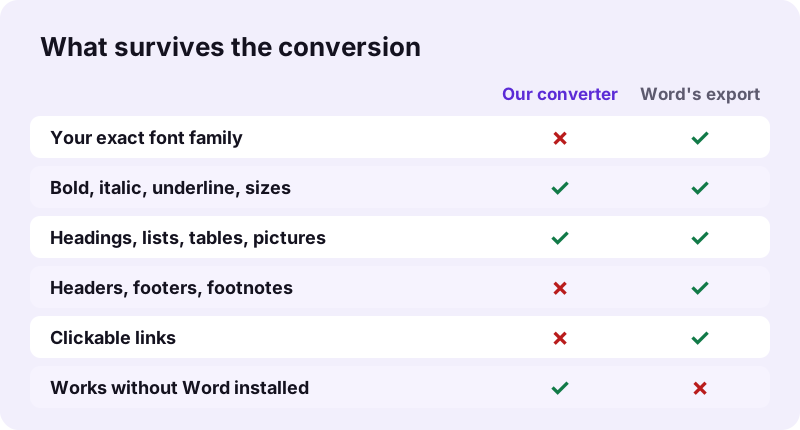
The reason is practical: a browser cannot read the fonts installed on your computer, and Word files usually name fonts without containing them. Rather than guess, the converter uses one well-made font family and embeds the subset it needs, so the PDF looks the same on any phone or computer.
pdf24 word to pdf without changing font in Microsoft Word
- Open the .docx in Word on Windows or Mac.
- Choose File, Save As (or File, Export in newer versions).
- Pick PDF as the format.
- Save. Word writes the PDF with the fonts installed on that computer.
pdf24 word to pdf without changing font: when fonts are missing
Word can only use a font that is installed on the computer doing the export. If a colleague used a font you do not have, Word substitutes another one on your machine too. Install the font, or ask the author to export the PDF on their own computer.
pdf24 word to pdf without changing font and licences
Some commercial fonts forbid embedding in documents. Word then leaves them out or substitutes them, and the PDF looks different on other screens. Check the font's licence, or switch that text to a font that allows embedding.
“Font embedding is the inclusion of font files inside an electronic document for display across different platforms.”
pdf24 word to pdf without changing font: tip for logos
If only a title or logo uses a special font, turn it into a picture in Word before converting with our tool. Pictures are carried over unchanged, so the logo keeps its look while the body text is set in Noto Sans.
What does pdf24 word to pdf without changing font keep and change?
Our Word to PDF converter keeps headings, paragraphs, bold, italic, underline, strikethrough, font sizes, alignment, lists, tables and pictures, and writes real, selectable text. It changes the font family to Noto Sans, colours text black, leaves out headers, footers and footnotes, and draws links blue and underlined but not clickable.
| Element | Kept? | Note |
|---|---|---|
| Font family | No | Set in Noto Sans |
| Bold, italic, underline, strike | Yes | Applied per word |
| Font size | Yes | Headings use set sizes |
| Alignment | Yes | Left, centre and right; justified text is set left-aligned |
| Tables and pictures | Yes | Rows stay together on one page |
| Headers, footers, footnotes | No | Not included |
| Hyperlinks | Partly | Blue and underlined, not clickable |
| Arabic, Hebrew, CJK | Yes | Shaped by the browser and placed as images |
In practice this means the structure of the document survives completely: a reader sees the same headings, the same emphasis, the same tables and the same pictures in the same order. What differs is the shape of the letters and therefore the exact line breaks, so a page can end a few lines earlier or later than in Word.
When is pdf24 word to pdf without changing font not needed?
Exact fonts matter less than people expect for everyday documents: CVs sent by email, letters, reports, homework and forms read well in a clean sans-serif font. When you have no Word installed, for example on a phone, a Linux PC or a shared computer, the browser converter gives a tidy PDF in seconds.
| Situation | Better choice |
|---|---|
| Brand documents with a corporate font | Word's own export |
| Print shop asks for embedded original fonts | Word's own export |
| CV or letter, no Word on this device | Our Word to PDF |
| Confidential file on a shared PC | Our converter: 0 bytes uploaded |
| Quick PDF on a phone | Our converter in the browser |
A good test is to ask who reads the file. If it is a recruiter, a teacher or a customer service desk, a clean Noto Sans PDF is fine. If it is a designer, a print shop or your brand team, export from Word on a computer that has the fonts, and check the font list in the PDF reader's document properties.
What did our pdf24 word to pdf without changing font test show?
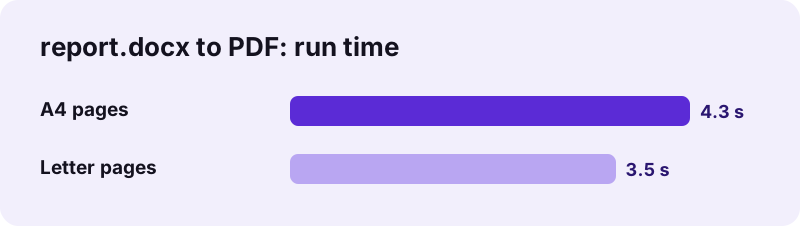
Our test converted report.docx, a 2.01 MB Word file with one picture, into a 2-page PDF of 2.05 MB in 4.3 seconds on A4 pages and 3.5 seconds on Letter pages. Page one held 652 selectable characters. The PDF's font list showed only Noto Sans Regular, Bold and Italic subsets.
- A4 pages measure 595 × 842 points, Letter pages 612 × 792 points.
- The picture made up most of the file size; text-only documents give much smaller PDFs.
- The result line says it plainly: fonts are replaced by Noto Sans; headers, footers and footnotes are not included.
- Nothing was uploaded: the request log showed 0 POST requests.
So the pdf24 word to pdf without changing font question has a clear answer for our tool: layout and styling yes, the font family no.
How do you make pdf24 word to pdf without changing font look closest to the original?
To get a Word to PDF result close to the original, use the built-in Word heading styles, keep text in the body rather than in headers or footers, put logos in as pictures and choose the same page size as the document. Those elements convert faithfully; only the typeface itself changes.
- Move a page header such as a company name into the first line of the body.
- Write footnotes as a short notes section at the end.
- Pick A4 or Letter to match the document, so line breaks stay similar.
- Check the PDF once, then convert again if a table splits badly.
Following these steps does not give pdf24 word to pdf without changing font in the literal sense, but it gives a PDF whose structure, order and emphasis match the original, which is what most readers notice. Use Word's export for the cases where the typeface itself is part of the message.
Is pdf24 word to pdf without changing font safe for private documents?
Our Word to PDF converter is safe for private documents because the file never leaves your device. The browser reads the .docx with the File API, lays out the pages in JavaScript and saves the PDF locally; our request logs showed 0 POST requests and the result line said 0 bytes uploaded.
That makes it a good fit for CVs, contracts and medical letters on a shared or borrowed computer. See the File API on MDN for how browsers open local files, and the related tools below for the next step, such as Compress PDF for email.
pdf24 word to PDF without changing font: frequently asked questions
Does pdf24 word to pdf without changing font exist on this site?
Not in the strict sense. Our Word to PDF converter always sets text in Noto Sans, because a browser cannot read the fonts installed on your computer. It keeps bold, italic, sizes, headings, tables and pictures. For your exact typeface, export the PDF from Word itself.
Why does pdf24 word to pdf without changing font use Noto Sans?
Noto Sans covers a very wide range of scripts and reads well on screen and paper. Since Word files usually name their fonts without containing them, the converter cannot reproduce Calibri, Times or a brand font in the browser, so it uses one reliable family and embeds the needed subset.
How do I get pdf24 word to pdf without changing font in Word?
Open the document in Word, choose File, Save As (or File, Export in newer versions), pick PDF and save. Word writes the PDF with the fonts installed on that computer. If a font is missing there, install it first, otherwise Word substitutes another one.
Does pdf24 word to pdf without changing font keep bold and italic?
Yes. Bold, italic, underline and strikethrough are kept word by word, and font sizes stay as set in the document. Headings follow Word's built-in heading styles, so a Heading 1 stays larger than a Heading 2 in the PDF, even though the typeface changes.
Does pdf24 word to pdf without changing font keep headers and footers?
No. Headers, footers and footnotes are not included in the PDF, and the result line says so after every conversion. Move important header text, such as a company name or a reference number, into the body of the document before converting. Page numbers can then be added afterwards with Add page numbers.
Are links clickable after pdf24 word to pdf without changing font?
Not with our converter. Links appear blue and underlined in the PDF, but no clickable link area is written. If readers must click links, export the PDF from Word, which keeps hyperlinks as active links in the file. The link text and its address stay readable, so readers can still type or copy the address from the page.
Is my file uploaded during pdf24 word to pdf without changing font?
No. The .docx is read by your browser and the PDF is built on your device. Our request logs showed no POST request, and the result line states 0 bytes uploaded. Nothing is stored on a server, so the method suits CVs, contracts and medical letters.
Does pdf24 word to pdf without changing font work on a phone?
Our converter works in Chrome, Safari and Firefox on Android and iPhone, which helps when Word is not installed. The fonts still change to Noto Sans. The Word mobile app can also export a PDF from the same document on many phones. Results are saved to the Downloads folder.
Does pdf24 word to pdf without changing font support Arabic and Chinese?
Yes. Lines in Arabic, Hebrew, Indic scripts, Thai, Chinese, Japanese and Korean are shaped by the browser and placed as images, so they display correctly even where Noto Sans lacks those letters. Latin text around them stays selectable text in Noto Sans. Right-to-left lines keep their direction.
Can pdf24 word to pdf without changing font convert old .doc files?
Word to PDF reads .docx files. For old Word 97-2003 .doc files, use DOC to PDF, which converts the text, paragraphs, breaks and tables but not the full layout. Saving the file as .docx in Word first gives the better result. Fonts change to Noto Sans in both tools.
Is pdf24 word to pdf without changing font an official converter?
No. pdf24tools is an independent website and is not affiliated with PDF24 or Geek Software GmbH. Our converter is separate code that runs in your browser. The test results in this guide are our own measurements from 2 November 2026 with our own file.
How long does pdf24 word to pdf without changing font take?
Our 2-page, 2.01 MB test document took 4.3 seconds with A4 pages and 3.5 seconds with Letter pages on a laptop in Chrome. Long documents with many pictures take longer, and phones are slower because all the work happens on the device. Text-only files finish faster.
Does pdf24 word to pdf without changing font keep tables intact?
Tables are kept with their rows and columns, and each row is measured first so it is drawn on one page rather than cut in half. Very wide tables may wrap text inside cells. Pick Letter or A4 to match the original so the table width stays similar.
More pdf24 word to PDF without changing font tools and guides
pdf24 word to PDF without changing font: sources
- Font embedding — Wikipedia
- Office Open XML — Wikipedia
- File API — MDN Web Docs