How to use pdf24 Excel to PDF in 4 steps
- Choose the workbook. Drop an .xlsx, .xls, .ods or .csv file on the box, or tap Choose files.
- Set orientation, paper and gridlines. Auto picks landscape for wide sheets; A4 or Letter; gridlines on or off.
- Press Convert to PDF. Each sheet is laid out on your device, one after another.
- Download the PDF. Save the PDF and check the column bands of wide sheets.
What does pdf24 Excel to PDF print from a workbook?
pdf24 Excel to PDF prints every sheet that holds data, in the order of the sheet tabs, starting each sheet on a new page. Cells show the value as formatted in the file, so dates, currencies and percentages look as they did in Excel. Empty sheets are skipped.
Each page carries the sheet name in its top-left corner and a page number in the bottom-right corner, so a printed stack stays in order. When a sheet is split into column bands, the name shows the band too, for example Wide (2/3).
| Workbook element | In the PDF |
|---|---|
| Cell values and number formats | Kept, as displayed |
| Formulas | Their last calculated result |
| Column widths and row heights | Kept |
| Hidden rows and columns | Not printed |
| Merged cells | Kept, text centred |
| Bold cells | Kept |
| Cell colours, borders, charts, images | Not drawn |
| Gridlines | Optional thin grey lines |
“In modern spreadsheet applications, several spreadsheets, often known as "worksheets" or simply "sheets", are gathered together to form a "workbook".”
Wide sheets in pdf24 Excel to PDF
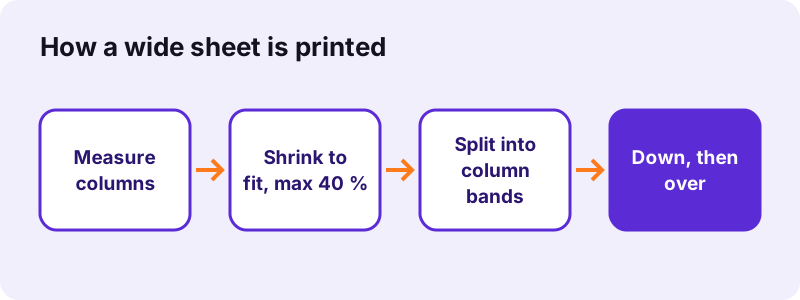
If the columns are wider than the page, the sheet is first scaled down, but never below 60 % of its size so text stays readable. Columns that still do not fit move to further pages, and all rows of the first band print before the next band, Excel's default "down, then over" order.
pdf24 Excel to PDF with Auto orientation
Auto turns a page to landscape when the sheet's total column width is wider than the portrait text area. Portrait and Landscape force one orientation for every sheet.
pdf24 Excel to PDF and long numbers
A number that does not fit its column prints as ###, exactly as Excel shows it on screen. Text that is too long runs into empty cells to its right, and is cut with … only when the next cell is filled.
pdf24 Excel to PDF tip for clean printouts
Widen columns that show ### in Excel before converting, and hide helper columns: hidden columns are left out of the PDF.
How many pages does pdf24 Excel to PDF make? Measured
pdf24 Excel to PDF turned our 8.2 KB test workbook into 4 pages in 1.3 seconds on A4 paper. The workbook has a 61-row, 5-column sheet and an 11-row, 25-column sheet. Forcing landscape still gave 4 pages; Letter paper gave 3 pages in 1.1 seconds.
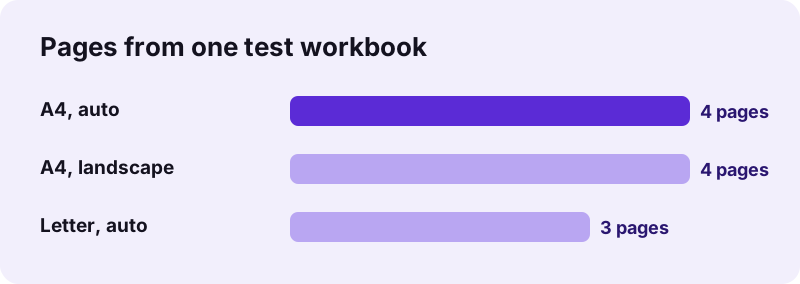
| Setting | Pages | PDF size | Time |
|---|---|---|---|
| A4, Auto | 4 | 28,464 B | 1.3 s |
| A4, Landscape | 4 | 28,564 B | 1.1 s |
| Letter, Auto | 3 | 27,451 B | 1.1 s |
The PDF is bigger than the workbook because it embeds a subset of the Noto Sans font, so that every character prints the same on any device.
Is pdf24 Excel to PDF private enough for payroll and budgets?
pdf24 Excel to PDF never uploads the workbook. The browser reads the file with the File API, the open-source SheetJS reader parses it in memory, and the result line confirms 0 bytes uploaded. Salaries, budgets and customer lists stay on your own device, with no account and no stored copy.
- Free, no sign-up, no watermark.
- Only the converter code is downloaded, never your data.
- Read more: File API (MDN).
pdf24 Excel to PDF for XLSX, XLS, ODS and CSV files
pdf24 Excel to PDF accepts the four common spreadsheet formats and prints them the same way. Our test workbook saved as .xlsx, .xls and .ods gave the same 4 pages and 3,090 characters, so the format you have does not change the result.
| Format | Made by | Page |
|---|---|---|
| .xlsx | Excel 2007 and later, Google Sheets, Numbers | XLSX to PDF |
| .xls | Excel 97–2003 | XLS to PDF |
| .ods | LibreOffice Calc, OpenOffice | ODS to PDF |
| .csv | Exports from databases, banks and apps | this page |
pdf24 Excel to PDF on iPhone, Android, Windows and Mac
pdf24 Excel to PDF is a web page, so it runs in Safari on iPhone and iPad, Chrome on Android, and every current browser on Windows, macOS, Linux and ChromeOS. Save the workbook to the device, then pick it with Choose files; the PDF goes to Downloads.
- iPhone: Files → Downloads → pick the .xlsx.
- Android: Download folder or Google Drive.
- Windows and Mac: drag the file onto the box.
pdf24 Excel to PDF without Excel installed
Nothing from Microsoft Office is needed. A Chromebook or a Linux laptop prints a workbook to PDF with the same result as a Windows PC.
pdf24 Excel to PDF versus Excel's own Export to PDF
Excel's Export or Save as PDF uses your print settings: print areas, headers and footers, fit-to-page scaling, cell colours and charts. The browser converter ignores those and prints the data plainly, but works anywhere, without Office, for every sheet at once.
| Feature | Browser converter | Excel desktop |
|---|---|---|
| Needs Office | No | Yes |
| Print areas and page setup | Not read | Used |
| Charts and cell colours | Not drawn | Drawn |
| All sheets in one PDF | Always | Option in the dialog |
| 0 bytes uploaded | Yes | Yes |
pdf24 Excel to PDF problems and fixes
Most unexpected results come from sheet content that the converter deliberately skips or shrinks. The fixes are made in the workbook before converting, and each takes a minute.
- Empty PDF or error: every sheet is empty or the file is password-protected; remove the password in Excel.
- ### in cells: widen the column in Excel.
- Tiny text: the sheet is very wide; hide unused columns or switch to landscape.
- Missing chart: charts are not drawn; copy the chart into a document and use Word to PDF.
- A sheet you did not expect: hidden sheets that hold data are printed too; delete them in a copy.
After pdf24 Excel to PDF: merge, compress or protect
The converter produces a standard PDF. Join it to a report, shrink it for e-mail, or protect a price list with a password using the other tools on the site.
pdf24 excel to PDF: frequently asked questions
Is pdf24 Excel to PDF free?
Yes. It is free with no sign-up, no watermark and no file count limit, because the conversion runs on your own device. pdf24tools is an independent site and is not affiliated with PDF24 or Geek Software GmbH; the name only reflects what people search for. The same applies to every converter on the site.
Does pdf24 Excel to PDF convert all sheets?
Yes. Every sheet that contains at least one value is printed, in tab order, each starting on a new page with its name at the top. Empty sheets are skipped. To print one sheet only, copy it into a new workbook or delete the other sheets in a copy before converting.
Does pdf24 Excel to PDF upload my spreadsheet?
No. The workbook is read by your browser and parsed in memory by JavaScript. The result line shows the bytes read and 0 bytes uploaded. That makes it suitable for payroll, budgets and customer lists that must not leave your computer or phone.
Does pdf24 Excel to PDF keep formulas?
The PDF shows each formula's result, the value that was stored when the workbook was last saved, formatted as in the file. The formula itself is not printed. If a value looks outdated, open the file in Excel or LibreOffice, let it recalculate, save, and convert again.
Why is my wide sheet split across pages in pdf24 Excel to PDF?
A sheet wider than the page is scaled down to at most 60 % first. Columns that still do not fit go to further pages, printed down then over like Excel. Choose landscape, hide unused columns or narrow them in Excel to keep more columns on one page.
Can pdf24 Excel to PDF print without gridlines?
Yes. Untick Gridlines before converting and cells print without the thin grey borders, which suits invoices and reports. With gridlines on, each cell, including empty ones inside the used range, gets a 0.35-point grey border so rows are easy to follow on paper.
Does pdf24 Excel to PDF keep charts and colours?
No. Charts, pictures, cell fill colours and custom borders are not drawn; the converter prints the cell data, bold text, merged cells and optional gridlines. For a chart, use Excel's own export or copy the chart into a Word document and convert that.
Does pdf24 Excel to PDF work with CSV files?
Yes. A .csv file is read as a one-sheet workbook and printed like any other sheet, with gridlines and automatic landscape for wide exports. Bank statements and database exports often have many columns, so expect column bands or choose Letter or landscape to fit more.
Does pdf24 Excel to PDF work on a phone?
Yes. Open the page in Safari on iPhone or Chrome on Android, tap Choose files and pick the workbook from Files, Downloads or Drive. The PDF is saved to Downloads. Large workbooks with thousands of rows can take longer on older phones.
What paper sizes does pdf24 Excel to PDF support?
A4 (595 × 842 points) and Letter (612 × 792 points), each in portrait or landscape. Margins are 30 points and cell text is set at 8.5 points before any scaling. Page setup stored in the workbook, such as print areas or fit-to-page, is not read.
Can pdf24 Excel to PDF open password-protected workbooks?
No. A workbook encrypted with a password to open cannot be read without it. Open it in Excel, remove the password under File, Info, Protect Workbook, save a copy and convert that. Sheet protection that only blocks editing does not stop the conversion.
More pdf24 excel to PDF tools and guides
pdf24 excel to PDF: sources
- Spreadsheet — Wikipedia
- Microsoft Excel — Wikipedia
- File API — MDN Web Docs