How to use pdf24 convert xml e invoice to pdf in 4 steps
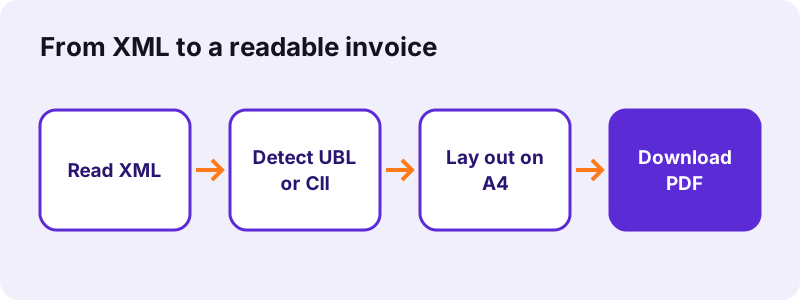
- Choose the XML files. Tap the button or drop one or more .xml invoices on the box. UBL invoices, UBL credit notes and CII invoices are recognised by their root element.
- Press the button. The page parses each file in your browser and lays it out as an invoice on A4.
- Download the result. One file gives one PDF with the same name; two or more files are packed in a ZIP.
- Keep the XML. File the original XML as the legal invoice and use the PDF for reading, printing or approval.
What does pdf24 convert xml e invoice to pdf read from the file?
The pdf24 convert xml e invoice to pdf tool reads the business fields of a UBL 2.1 or CII invoice: number, issue and due date, currency, seller and buyer with address, VAT ID and email, every item line with quantity, unit code, price and amount, the totals, notes, IBAN, payment reference and payment terms.
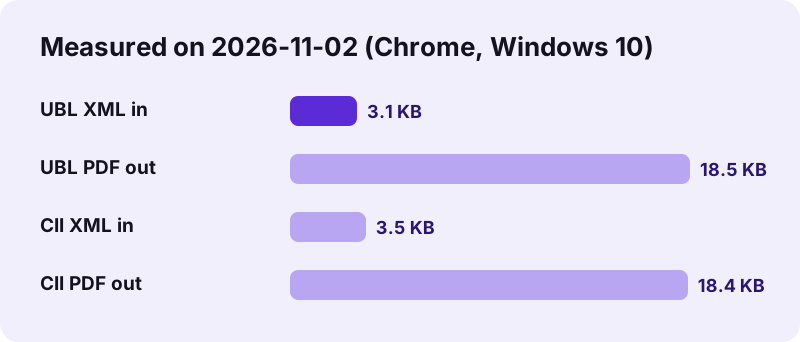
| UBL 2.1 test (XRechnung 3.0 profile) | CII test | |
|---|---|---|
| XML size | 3,225 bytes | 3,601 bytes |
| PDF size | 18,925 bytes, 1 page | 18,885 bytes, 1 page |
| Time | 0.4 s | 0.4 s |
| Item lines | 2 (12 HUR × 100.00; 1 C62 × 300.00) | 1 (5 H87 × 240.00) |
| Totals printed | net 1,500.00, tax 285.00, gross 1,785.00, due 1,785.00 EUR | subtotal 1,200.00 … amount due |
| Extras | IBAN, payment reference, note | dates 20261030 → 2026-10-30 |
Both test files together came back as a 38,024-byte ZIP with the two PDFs in 0.8 seconds. The PDF text is real text, so you can search it for the invoice number or copy the IBAN.
UBL files in pdf24 convert xml e invoice to pdf
UBL is the syntax used by Peppol and by most XRechnung files. The tool accepts the root elements Invoice and CreditNote; a credit note is titled Credit note and its CreditNoteLine items are listed like invoice lines.
“Universal Business Language (UBL), ISO/IEC 19845, is an open library of standard electronic business documents and information models for supply chain, procurement, and transportation”
CII files in pdf24 convert xml e invoice to pdf
UN/CEFACT Cross Industry Invoice (root CrossIndustryInvoice) is the other syntax allowed by the European standard EN 16931 and the one inside ZUGFeRD and Factur-X. Dates written in format 102, such as 20261129, are printed as 2026-11-29.
Other XML in pdf24 convert xml e invoice to pdf
A file that is neither UBL nor CII is not refused: every element that holds a value is printed as path: value, up to 2,000 lines, with a note saying so. That is handy for older or national formats, though the layout is a plain list. A file that is not well-formed XML gives the message This file is not well-formed XML.
pdf24 convert xml e invoice to pdf: unit code tip
Quantities keep the code from the file, for example HUR for hour, C62 for one unit and H87 for piece. These are UN/ECE Recommendation 20 codes; the tool prints them as written instead of guessing a translation.
Does pdf24 convert xml e invoice to pdf also validate the file?
No. The readable PDF shows what the XML says, but it does not check whether the XML follows EN 16931, XRechnung or Peppol rules. Official validation runs Schematron rules in tools that need a server, so we do not offer it. Every page carries a footer saying the PDF is a visualisation, not a validation.
In practice this means: the XML stays the legal invoice and the one you archive. The PDF is for the people around it, for example a manager who approves payment, an assistant who prints it for a paper file, or you when you want to read a supplier's file without accounting software.
Totals are printed from the XML, not recalculated. If a supplier's file has wrong sums, the PDF shows the same wrong sums.
Fields pdf24 convert xml e invoice to pdf does not show
- The tax breakdown per rate: only the total tax amount is printed.
- Document-level allowances and charges as separate lines (the totals still include them).
- Attached documents embedded in the XML, such as a delivery note.
- Buyer reference, order reference and Leitweg-ID fields.
If one of these matters for your approval, open the XML in a text editor and search for the element, or ask the supplier for a PDF copy.
Is pdf24 convert xml e invoice to pdf safe for supplier data?
Yes. Opening supplier invoices here is safe for your data because the browser reads the XML with its built-in parser and draws the PDF on your device; the result line shows 0 bytes uploaded. Supplier names, IBANs and prices are never sent to us, and nothing is stored after you close the tab.
We watched the network log during the UBL test: besides the page itself only the site's web fonts loaded, and no request contained the XML or the PDF. The parser treats the file as data; it does not run scripts or fetch external entities from it.
Who needs pdf24 convert xml e invoice to pdf?
Readable copies help anyone who receives XML invoices without software that displays them: small businesses that get XRechnung or Peppol files from suppliers, freelancers who must check what a client's system sent, and accounts staff who need a printout for approval, a paper archive or a tax adviser who asks for PDFs.
Since 2025 businesses in Germany must be able to receive structured e-invoices, and more EU countries are following, so these files arrive in more inboxes every month. The XML is made for machines; opening it in a browser shows only tags. With pdf24 convert xml e invoice to pdf the readable copy takes one step, for free.
To merge several converted invoices into one file for a monthly folder, use merge PDF. To write your own invoices as PDF, use create invoice or the invoice maker with live preview.
pdf24 convert XML e invoice to PDF: frequently asked questions
Is pdf24 convert xml e invoice to pdf free?
Yes. Converting XML invoices costs nothing, needs no account and adds no watermark. You can convert as many files as you like, one by one or several at once. The work happens in your browser, so there is no server cost per file and no daily limit.
Which formats does pdf24 convert xml e invoice to pdf support?
UBL 2.1 Invoice and CreditNote, and UN/CEFACT Cross Industry Invoice (CII). That covers XRechnung in both syntaxes, Peppol BIS Billing 3.0 and the XML part of ZUGFeRD and Factur-X. Other XML files are listed as path: value lines instead of being refused.
Does pdf24 convert xml e invoice to pdf validate XRechnung?
No. The tool shows the content in a readable layout but does not run the official XRechnung or EN 16931 Schematron rules, which need a server-side validator. Every PDF page has a footer that says it is a visualisation, not a validation. Use a dedicated validator if you must prove compliance.
Can pdf24 convert xml e invoice to pdf read a ZUGFeRD PDF?
Not directly: the tool accepts .xml files. A ZUGFeRD or Factur-X invoice is already a readable PDF with the XML attached inside it, so you can simply open that PDF. If you extracted the factur-x.xml or zugferd-invoice.xml attachment, that XML file converts normally.
Does pdf24 convert xml e invoice to pdf upload my files?
No. The XML is read by your own browser and the PDF is drawn there too; the result line shows 0 bytes uploaded. In our network check only the site's font files were loaded from outside. Nothing is stored, so supplier data does not end up on any server.
Can I convert several invoices with pdf24 convert xml e invoice to pdf?
Yes. Select or drop several .xml files at once. Each becomes its own PDF named after the XML file, and the set downloads as one ZIP. In our test two invoices became a 38,024-byte ZIP in 0.8 seconds. Use merge PDF afterwards if you want one combined file.
Is the PDF from pdf24 convert xml e invoice to pdf a legal invoice?
No. When an invoice was sent as XML, the XML is the original and the one to archive. The PDF is a readable copy for checking, approving or printing. Keep both together, and do not forward the PDF to tax authorities as if it were the e-invoice.
Why does pdf24 convert xml e invoice to pdf show codes like HUR or C62?
These are unit codes from UN/ECE Recommendation 20 that e-invoices must use: HUR means hour, C62 means one (unit), H87 means piece, DAY means day. The tool prints the code exactly as it is in the file, next to the quantity, so nothing is lost or mistranslated.
What if pdf24 convert xml e invoice to pdf says the XML is not well-formed?
The file is broken as XML, for example cut off during download, saved with the wrong encoding, or not XML at all. Download it again from the email or portal and make sure it ends with the closing tag. Files in other formats, such as JSON or EDIFACT, cannot be read.
Does pdf24 convert xml e invoice to pdf recalculate the totals?
No. Amounts are printed as they appear in the XML: line amounts, net total, tax, gross total, prepaid amount and amount due. If the supplier's figures are wrong, the PDF shows them as they are, which is what you want when checking an invoice before paying it.
Does pdf24 convert xml e invoice to pdf work on a phone?
Yes. Open the XML from your mail app's attachment or from the Files app, then pick it on this page in Chrome or Safari. The PDF opens in the phone's viewer and can be shared or printed. Large XML files with hundreds of lines take a little longer on a phone.
Is pdf24 convert xml e invoice to pdf made by PDF24?
No. pdf24tools is an independent site and is not affiliated with PDF24 or Geek Software GmbH. We wrote this XML reader ourselves from the published UBL and CII structures; it runs in your browser, and the figures on this page come from our tests on 2026-11-02.
pdf24 convert XML e invoice to PDF: sources
- Universal Business Language Version 2.1 — OASIS
- eInvoicing — European Commission
- Electronic invoicing — Wikipedia