How to use pdf24 tools PPTX to PDF in 3 steps
- Choose the .pptx. Drop one or more .pptx, .ppsx or .potx files on the box, or tap Choose files.
- Press Convert to PDF. The package is unzipped and every slide is drawn on your device.
- Download. Save the PDF, or the ZIP when you converted several decks.
What is inside a .pptx and how does pdf24 tools PPTX to PDF read it?
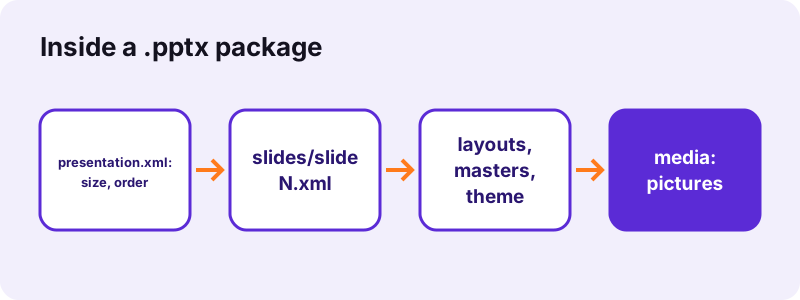
A .pptx is a ZIP package of XML parts in the PresentationML format. pdf24 tools PPTX to PDF reads ppt/presentation.xml for the slide size and order, each ppt/slides/slideN.xml for content, the layouts, masters and theme behind them, and the pictures in ppt/media, then draws every slide as a PDF page.
Positions and sizes in a .pptx are stored in English Metric Units: 12,700 EMU make one point and 914,400 make one inch. The converter divides every coordinate by 12,700, so a picture placed 2 inches from the left edge lands 144 points from the left edge of the PDF page.
“Ecma International standardized the initial version as ECMA-376.”
Slide order in pdf24 tools PPTX to PDF
Pages follow the slide list in presentation.xml, the order you see in PowerPoint's thumbnail pane, not the file names slide1.xml, slide2.xml. A deck whose slides were moved around still prints in the right order.
pdf24 tools PPTX to PDF and hidden slides
Slides marked Hide Slide stay in that list, so they are drawn too. Delete them in a copy of the deck if they must not appear in the PDF.
pdf24 tools PPTX to PDF with masters and layouts
Logos, footers and coloured bars placed on the slide master or layout are drawn behind the slide's own content, unless the slide is set to hide background graphics. Empty placeholders, the "Click to add title" prompts, are never drawn.
pdf24 tools PPTX to PDF tip for templates
A .potx template converts like a deck, which is a quick way to send a client a PDF preview of a template's layouts.
What page size does pdf24 tools PPTX to PDF use?
The PPTX converter gives every PDF page the slide size stored in presentation.xml, so the PDF looks like the slide show. Our 4:3 test deck gave 720 × 540-point pages; PowerPoint's default 16:9 widescreen size gives 960 × 540 points. Nothing is fitted to A4 or cropped.
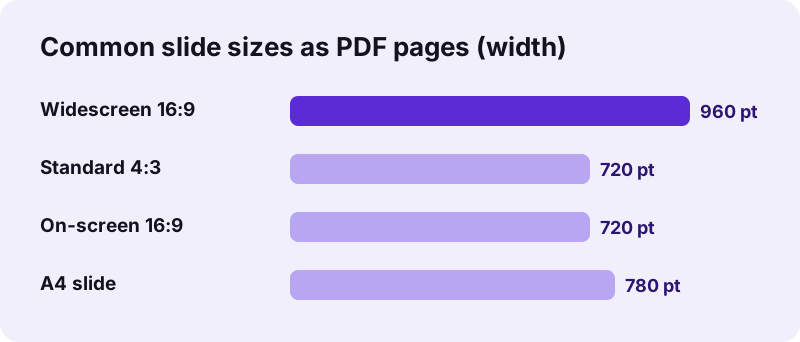
| PowerPoint slide size | Inches | PDF page (points) |
|---|---|---|
| Widescreen (16:9), default | 13.333 × 7.5 | 960 × 540 |
| Standard (4:3) | 10 × 7.5 | 720 × 540 |
| On-screen Show (16:9) | 10 × 5.625 | 720 × 405 |
| A4 paper slide | 10.83 × 7.5 | 780 × 540 |
To print slides on A4 or Letter paper with margins, convert first and then use Pages per sheet or Change PDF page size.
How long does pdf24 tools PPTX to PDF take? Measured
pdf24 tools PPTX to PDF turned our 31 KB test file, 3 slides with one PNG picture, into a 3-page PDF of 14,541 bytes in 1.0 seconds in Chrome on Windows 10. 124 characters of slide text could be selected and copied from the result, and 0 bytes were uploaded.
| Measure | Value |
|---|---|
| Input | dc-deck.pptx, 31 KB, 3 slides |
| Output | 3 pages, 14,541 B |
| Page size | 720 × 540 pt |
| Time (tool) | 1.0 s |
| Pictures in PDF | 1 |
| Characters extractable | 124 |
Pictures are taken from ppt/media and embedded, so a deck full of photos makes a PDF of roughly the size of those photos. Use Compress PDF if it must fit an e-mail.
What pdf24 tools PPTX to PDF draws and skips
The converter draws text boxes, titles and bullets with theme colours, pictures, slide backgrounds, rectangles, ellipses, lines, tables and grouped shapes. It skips charts, SmartArt, gradients, rotation, animations, transitions, video, audio and speaker notes.
| PresentationML element | Result |
|---|---|
| p:sp with text | Drawn, selectable text |
| p:pic | Picture drawn |
| p:grpSp (group) | Children drawn |
| Table in p:graphicFrame | Drawn |
| Chart or SmartArt in p:graphicFrame | Not drawn |
| Gradient fill | Not drawn |
| Animation timing | Ignored |
| Notes slides | Not included |
Fonts are replaced by Noto Sans. Lines in Arabic, Hebrew, Indic, Thai and CJK scripts are shaped by the browser and placed as images.
Is pdf24 tools PPTX to PDF private?
pdf24 tools PPTX to PDF keeps the presentation on your device. The browser reads the .pptx with the File API, JavaScript unzips and draws it in memory, and the result line confirms 0 bytes uploaded. No account, no stored copy, so confidential decks never reach a server.
How it works: File API on MDN.
pdf24 tools PPTX to PDF for decks from Google Slides, Keynote and Impress
Google Slides (File → Download → Microsoft PowerPoint), Keynote (File → Export To → PowerPoint) and LibreOffice Impress (Save As → PowerPoint 2007–365) all write .pptx files that convert here. Impress users can also convert their .odp files directly on the ODP page.
- Google Slides: download first; a sharing link cannot be read.
- Keynote: export to PowerPoint, not to the old .ppt.
- Impress: keep .odp and use ODP to PDF, or save as .pptx.
- Old .ppt files: see PPT to PDF.
pdf24 tools PPTX to PDF on iPhone and Android
Save the attachment to Files or Download, then pick it with Choose files in Safari or Chrome. The PDF is saved to Downloads; PowerPoint does not need to be installed.
Fixing pdf24 tools PPTX to PDF errors
When a .pptx fails, the file is usually not a real PresentationML package, or it is protected. Each case has a quick fix.
- "Old binary .ppt": the file is PowerPoint 97–2003 with a .pptx name; open it in PowerPoint and save as .pptx.
- "No slides were found": the package has no slide list; open and resave it in PowerPoint or Impress.
- Password-protected deck: an encrypted .pptx looks like a legacy file and is refused; remove the password in PowerPoint (File → Info → Protect Presentation).
- Empty area: a chart or SmartArt; save it as a picture and place that instead.
- More detail: PowerPoint to PDF.
pdf24 tools PPTX to PDF next steps
pdf24 tools PPTX to PDF: frequently asked questions
Is pdf24 tools PPTX to PDF free?
Yes. It is free, with no sign-up and no watermark, and there is no limit on decks because your own device does the work. pdf24tools is independent and is not affiliated with PDF24 or Geek Software GmbH; the name just reflects what people type into search engines. Every converter on the site works this way.
Does pdf24 tools PPTX to PDF upload the file?
No. The .pptx is read by your browser and unzipped and drawn in memory by JavaScript. The result line shows the bytes read and 0 bytes uploaded. Only the converter code is downloaded from our server, never your slides, so confidential decks stay on the device.
Can pdf24 tools PPTX to PDF open .ppsx and .potx files?
Yes. A .ppsx slide show and a .potx template use the same PresentationML parts as a .pptx, so both are accepted and drawn the same way, one page per slide at the slide's own size. Macro-enabled .pptm files should be saved as .pptx first.
Does pdf24 tools PPTX to PDF keep the slide order?
Yes. Pages follow the slide list in presentation.xml, which is the order shown in PowerPoint's thumbnail pane, even if the slides were rearranged many times. Hidden slides are part of that list and are drawn as well, so delete them in a copy if needed.
Why does pdf24 tools PPTX to PDF make wide pages?
Each page takes the slide size of the deck. PowerPoint's default widescreen slide is 13.333 × 7.5 inches, so the PDF page is 960 × 540 points. That keeps the PDF looking like the presentation; use Pages per sheet afterwards to print handouts on A4 or Letter.
Does pdf24 tools PPTX to PDF keep fonts?
No. Fonts named in the deck are replaced by Noto Sans in regular, bold or italic, embedded as a subset. Sizes, colours and bold are kept. A deck built on a brand typeface will look plainer, so for client-facing PDFs export from PowerPoint, which has the fonts installed.
Why is a chart missing after pdf24 tools PPTX to PDF?
Charts and SmartArt live in separate chart and diagram parts of the package that need their own drawing engine, which the converter does not have. The rest of the slide is drawn. Save the chart as a picture in PowerPoint and place the picture on the slide instead.
Does pdf24 tools PPTX to PDF include speaker notes?
No. Notes are stored in separate notesSlide parts and are not drawn; the PDF holds one page per slide. To share notes, export Notes Pages from PowerPoint or copy them into a document and convert it with Word to PDF.
Can pdf24 tools PPTX to PDF convert a .ppt renamed to .pptx?
No. The converter checks the first bytes of the file: an old binary PowerPoint file starts with a different signature from a ZIP package, and the tool reports that it is a legacy .ppt. Open it in PowerPoint, Keynote or Impress and save it as a real .pptx.
Is the text in pdf24 tools PPTX to PDF output searchable?
Yes. Titles, bullets and text boxes are drawn as real text with an embedded font, so Ctrl+F and copy work; 124 characters were extractable from our 3-slide test. Arabic, Hebrew, Indic, Thai and CJK lines are shaped by the browser and placed as images.
Can pdf24 tools PPTX to PDF convert several decks at once?
Yes. Select or drop several .pptx files together and press Convert once. Each deck becomes its own PDF with the same name, and the set downloads as one ZIP. To combine them into a single PDF, open Merge PDF afterwards and drop the converted files in the order you want.
More pdf24 tools PPTX to PDF tools and guides
pdf24 tools PPTX to PDF: sources
- Office Open XML — Wikipedia
- Microsoft PowerPoint — Wikipedia
- File API — MDN Web Docs