How to save a file with pdf24 PDF to PPTX in 4 steps
- Open the PDF. Tap Choose a file and select one PDF, or drop it on the box. It is read on your device.
- Set the slide resolution. Keep 200 dpi for screens and projectors, or choose 150 dpi for a lighter file and 300 dpi for print.
- Convert. Press Convert to PowerPoint. Every page becomes a slide picture and its text a notes page.
- Save the .pptx. Download the file and open it in PowerPoint, Keynote, Google Slides or Impress.
What is a PPTX file, and what does pdf24 PDF to PPTX put in it?
A PPTX file is a PowerPoint presentation in the Office Open XML format: a ZIP package of XML parts and media. pdf24 PDF to PPTX fills that package with one slide per PDF page, a JPEG picture of the page on each slide, and a notes page holding the text found on that page.
Because the format is an open standard, the file is not tied to one program. It is also why a .pptx can be inspected: rename it to .zip and you can see every slide and picture inside.
“Office Open XML is a zipped, XML-based file format developed by Microsoft for representing spreadsheets, charts, presentations and word processing documents.”
pdf24 PDF to PPTX: inside the ZIP package
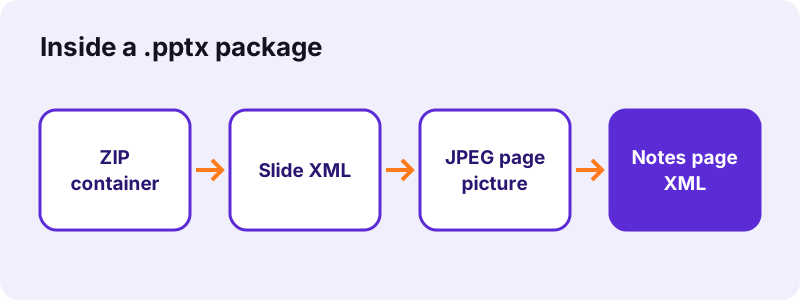
We unzipped the .pptx made from our 2-page invoice. It held 45 parts: the presentation and theme files, two slide files of 1,018 bytes each, two notes pages and two pictures. The slide XML is tiny because it only points to the picture; nearly all the weight is in the images.
pdf24 PDF to PPTX picture parts
Each page is stored as a JPEG in the ppt/media folder. In our invoice file the busy first page took 89.6 KB and the mostly empty second page 37.6 KB. JPEG keeps photos and charts compact, which is why a deck of pictures stays small enough to email.
pdf24 PDF to PPTX notes pages
Every slide gets a notes page in ppt/notesSlides. It holds the page text as plain lines: 297 characters for the invoice's first page. PowerPoint shows it under the slide in Normal view and in Presenter View, and Keynote and Google Slides show it as presenter notes.
pdf24 PDF to PPTX tip: set your own title
The file properties name pdf24tools as author and carry a generic title. Before you share the deck, set the title and author in File → Info → Properties in PowerPoint, so search and document lists show the right name.
Which apps open a pdf24 PDF to PPTX file?
Any program that reads the PowerPoint 2007+ format can open a pdf24 PDF to PPTX file: PowerPoint for Windows and Mac, PowerPoint on the web and on phones, Apple Keynote, Google Slides and LibreOffice Impress. Picture slides are the easiest content for every one of them, so slides look the same everywhere.
| App | How to open the .pptx | Notes shown? |
|---|---|---|
| PowerPoint 2007 and later | Double-click the file | Yes, notes pane |
| PowerPoint on the web | Upload to OneDrive, open | Yes |
| Keynote (Mac, iPhone, iPad) | File → Open, or tap it in Files | Yes, presenter notes |
| Google Slides | Drive → New → File upload, then Open with Google Slides | Yes, speaker notes |
| LibreOffice Impress | File → Open | Yes, Notes view |
Working only in LibreOffice? PDF to ODP writes the OpenDocument format natively instead.
PPTX or PPT: why does pdf24 PDF to PPTX not make .ppt files?
The .ppt extension belongs to the binary format of PowerPoint 97–2003, which was replaced by .pptx in PowerPoint 2007. pdf24 PDF to PPTX writes only the newer format, because it is an open standard, it is smaller thanks to ZIP compression, and every current presentation program reads it.
If an old system really requires .ppt, open the converted file in PowerPoint and use File → Save As → PowerPoint 97-2003 Presentation. LibreOffice Impress can do the same with File → Save As and the Microsoft PowerPoint 97–2003 type.
- .pptx = Office Open XML, ZIP + XML, PowerPoint 2007 and later.
- .ppt = legacy binary format, PowerPoint 97–2003.
- .ppsx = .pptx that starts as a slide show; rename or Save As if you need it.
- .odp = OpenDocument presentation, native to LibreOffice.
pdf24 PDF to PPTX results on our test files
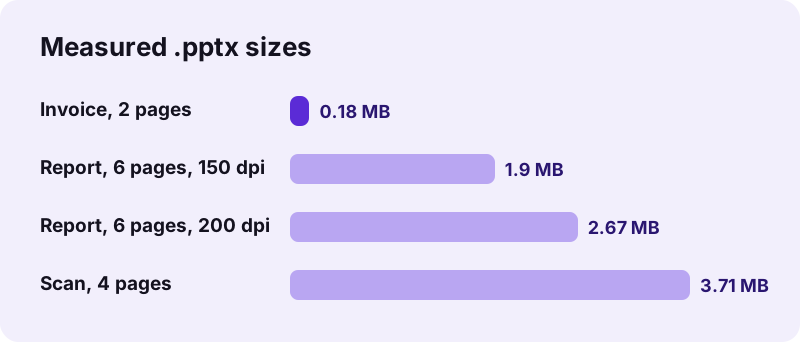
We ran pdf24 PDF to PPTX on a typed invoice and a scanned document to see what a real .pptx looks like. Typed pages give light files and filled notes; scanned pages give heavier files and empty notes, because a scan has pictures of letters and no text layer to copy.
| Test file | Slides | .pptx size | Time | Notes |
|---|---|---|---|---|
| Invoice, 2 pages, 2.4 KB | 2 | 177 KB | 1.3 s | Filled, 297 characters on slide 1 |
| Scan, 4 pages, 8.07 MB | 4 | 3.71 MB | 22.2 s | Empty (no text layer) |
| Report, 6 pages, 200 dpi | 6 | 2.67 MB | 3.9 s | Filled, 2,300 characters on slide 1 |
The slide size matched the A4 pages: 8.27 × 11.69 inches, portrait. To fill the notes of a scan, run OCR PDF before converting.
pdf24 PDF to PPTX keeps the file on your device
Nothing you convert with pdf24 PDF to PPTX is uploaded. The browser reads the PDF through the File API, draws the pages and zips the .pptx in JavaScript on your own phone or computer; our network log showed 0 upload requests for every test, and the result line reports 0 bytes uploaded.
That matters for pitch decks, sales figures and unpublished research. The MDN File API guide explains how a page can read a chosen file locally. There is no account, and the slides carry no watermark.
pdf24 PDF to PPTX for Google Slides and Keynote users
Google Slides and Keynote both import .pptx files directly, so the converted deck works without PowerPoint. Upload the file to Google Drive and open it with Google Slides, or open it in Keynote on a Mac, iPhone or iPad; the page pictures appear as slides and the notes as speaker notes.
- Convert the PDF and download the .pptx.
- Google Slides: in Drive choose New → File upload, then right-click the file → Open with → Google Slides.
- Keynote: tap the file in Files, or use File → Open on a Mac.
- Check one slide's notes to confirm the text came through.
Google Slides keeps the original .pptx in Drive and makes a copy in its own format when you edit, so you still have the untouched file.
What a pdf24 PDF to PPTX file cannot do
A converted PPTX shows each page as a single picture, so some PowerPoint features have nothing to work with. The slide text cannot be retyped, links in the PDF are not clickable, slide masters are empty, and charts are images rather than editable PowerPoint charts with data behind them.
- Retype text: use the notes, or PDF to Word for editable paragraphs.
- Edit chart data: rebuild the chart from the numbers; PDF to Excel can pull table figures out.
- Keep PDF links: add them back with Insert → Link.
- Re-use the pictures elsewhere: PDF to PNG gives one image file per page.
For the full overview of slide conversion, resolutions and fixes, see PDF to PowerPoint.
pdf24 PDF to PPTX: frequently asked questions
Which PowerPoint versions open a pdf24 PDF to PPTX file?
PowerPoint 2007 and every later version open it, on Windows and Mac, as do PowerPoint on the web and the mobile apps. The .pptx format was introduced with Office 2007. PowerPoint 2003 and older need Microsoft's compatibility pack, or you can save the file as .ppt from a newer program.
Can Google Slides open a pdf24 PDF to PPTX file?
Yes. Upload the .pptx to Google Drive, then choose Open with → Google Slides. Each PDF page appears as a picture slide and the page text appears in the speaker notes. Google Slides saves an editable copy in its own format and leaves your original .pptx untouched in Drive.
Is the text editable in a pdf24 PDF to PPTX file?
Only in the notes. Each slide is a JPEG picture of the PDF page, so the words on the slide cannot be retyped. The text of every page is copied into its notes page as real text, so you can copy it into new text boxes or a new slide when a page needs rewording.
Why is my pdf24 PDF to PPTX file so large?
Scanned pages and high resolutions make big files. Our 4-page scan gave 3.71 MB, while a typed 2-page invoice gave 177 KB. Choose 150 dpi for a lighter deck, compress the PDF before converting, or use File → Compress Pictures in PowerPoint after converting.
Does pdf24 PDF to PPTX make .ppt files?
No, it writes only .pptx, the format of PowerPoint 2007 and later. It is an open standard, smaller and read by every current presentation app. If an old system insists on .ppt, open the converted file in PowerPoint or LibreOffice and save it as a PowerPoint 97–2003 presentation.
Is pdf24 PDF to PPTX connected to PDF24?
No. pdf24tools is an independent site and is not affiliated with PDF24 or Geek Software GmbH. The converter is our own browser code: your PDF is processed on your device, nothing is uploaded, and no account is needed. Only the familiar page name is shared, to make the tool easy to find.
Does pdf24 PDF to PPTX work in Keynote on a Mac?
Yes. Keynote opens .pptx files with File → Open, or by double-clicking when Keynote is your default app. The page pictures become slides and the notes become presenter notes. If you prefer to keep working in Keynote, export to the Keynote format from File → Save once it is open.
How long does pdf24 PDF to PPTX take on a scanned file?
Longer than on a typed file, because every page is a large image to redraw. Our 4-page, 8.07 MB scan took 22.2 seconds, while the 2-page invoice took 1.3 seconds in Chrome on a Windows laptop. Very long scans are best split into parts first.
Can pdf24 PDF to PPTX convert several PDFs at once?
It converts one PDF per run. To make a single deck from several PDFs, join them first with Merge PDF and convert the merged file; you get one slide per page in the merged order. Or convert each PDF separately and use Reuse Slides in PowerPoint to combine the decks.
Does pdf24 PDF to PPTX change the slide size?
No. The slide size is taken from the first PDF page: our A4 invoice produced 8.27 × 11.69-inch portrait slides. If your template needs widescreen 16:9, change it under Design → Slide Size in PowerPoint and choose Ensure Fit so the page pictures are not cropped.
Where is the pdf24 PDF to PPTX file saved on Android?
Chrome on Android saves it to the Downloads folder. Open it from the download notification or the Files app; Google Slides or the PowerPoint app will open it. The PDF itself stays where it was, untouched, because the conversion only reads it and creates a new file.
More pdf24 PDF to PPTX tools and guides
pdf24 PDF to PPTX: sources
- Office Open XML — Wikipedia
- File API — MDN Web Docs
- JPEG — Wikipedia