How to use pdf24 PDF to ODP in 4 steps
- Choose the PDF. Tap Choose a file or drop one PDF on the box. The browser reads it on your device.
- Set Slide image quality. 150 DPI gives the smallest file, 200 DPI is recommended, 300 DPI is the sharpest.
- Press Convert to ODP. Each page is drawn as a JPEG picture on its own slide, and its text is copied into the slide notes.
- Open it in Impress. Download the .odp and open it in LibreOffice Impress, Collabora or another OpenDocument app.
What is an ODP file and what does pdf24 PDF to ODP produce?
An ODP file is a presentation in the OpenDocument Format, the ISO 26300 standard used natively by LibreOffice Impress. pdf24 PDF to ODP writes a valid .odp package with one slide per PDF page, a JPEG picture of that page on the slide and the text of the page in the slide's notes.
OpenDocument is chosen by many public bodies and schools because it is an open, vendor-neutral format. A deck saved as .odp opens in Impress on Windows, macOS and Linux without any conversion step, and it keeps working in future versions because the specification is public. Read more in the OpenDocument article on Wikipedia.
“It was developed with the aim of providing an open, XML-based file format specification for office applications.”
pdf24 PDF to ODP: the package inside
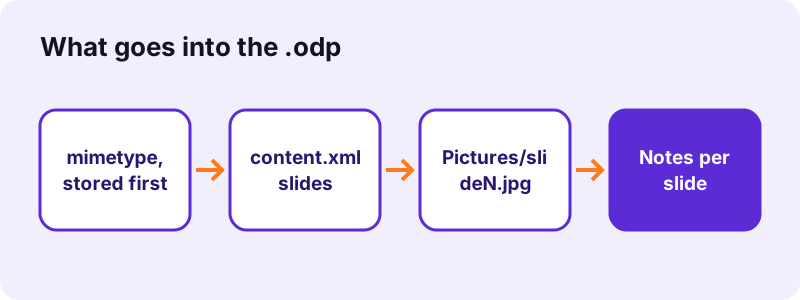
Our converted 6-page report contained a mimetype entry saying application/vnd.oasis.opendocument.presentation, stored first and uncompressed as the ODF rules require, then content.xml with 6 slides, styles.xml, meta.xml, a manifest and six pictures named slide1.jpg to slide6.jpg.
pdf24 PDF to ODP slide size
The slide takes the size of the PDF page. Our A4 test file gave slides of 20.99 × 29.70 cm in portrait, the same as the paper, so nothing is cropped. A landscape PDF gives landscape slides; pages of another size are centred and scaled to fit.
pdf24 PDF to ODP notes
Each of the 6 slides got its own notes with the page text, one paragraph per line of the PDF. In Impress choose View → Notes to read or edit them, or use the Presenter Console during a slide show to see them on your own screen only.
pdf24 PDF to ODP tip for scanned handouts
A scan has no text layer, so its notes stay empty. Run OCR PDF first if you want the words of a scanned handout in the notes; the slides themselves look the same either way.
Which Slide image quality should you pick in pdf24 PDF to ODP?
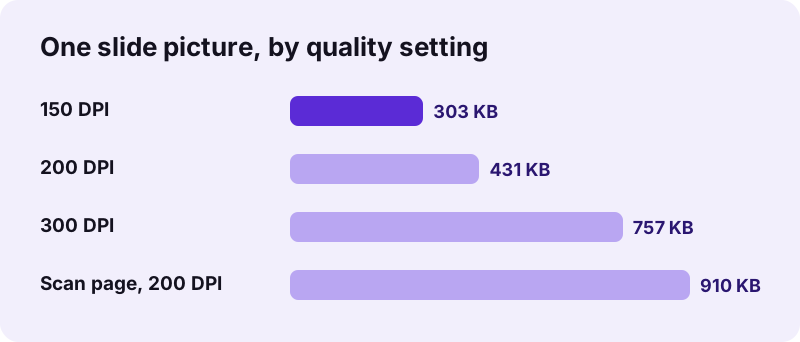
The quality setting in pdf24 PDF to ODP decides how sharp each slide picture is and how large the file becomes. 200 DPI is recommended for projectors and laptop screens, 150 DPI gives a smaller file for email or cloud sharing, and 300 DPI is the sharpest, for large screens or printing handouts.
| Setting | 6-page report | Time | Per slide picture |
|---|---|---|---|
| 150 DPI (smaller file) | 1.71 MB | 1.4 s | about 303 KB |
| 200 DPI (recommended) | 2.41 MB | 2.1 s | about 431 KB |
| 300 DPI (sharpest) | 4.10 MB | 3.5 s | about 757 KB |
Scanned pages weigh more because they contain photo-like detail: our 4-page scan made a 3.63 MB file at 200 DPI in 15.7 seconds, about 910 KB per slide picture.
Can you edit the slides from pdf24 PDF to ODP in Impress?
Slides from pdf24 PDF to ODP can be reordered, deleted, cropped, annotated and given transitions in Impress, but the words on a slide cannot be retyped, because each slide shows the PDF page as one picture. The notes hold the page text as editable text you can copy into new text boxes.
- Draw shapes, arrows and new text boxes on top of a page picture.
- Use Slide → Duplicate Slide and crop each copy to zoom into parts of a page.
- Add transitions in the Slide Transition panel.
- Paste notes text into a new slide when a page needs new wording.
Need editable paragraphs instead? PDF to ODT rebuilds the text as an OpenDocument text file for LibreOffice Writer.
pdf24 PDF to ODP or PDF to PPTX?
Both formats hold the same slide pictures and notes. Pick ODP when you present with LibreOffice Impress or must deliver an open ISO format; pick PPTX when the audience uses Microsoft PowerPoint, Keynote or Google Slides, which read .pptx without any conversion.
| .odp | .pptx | |
|---|---|---|
| Standard | OpenDocument, ISO 26300 | Office Open XML, ISO/IEC 29500 |
| Native app | LibreOffice Impress | Microsoft PowerPoint |
| Our 6-page report, 200 DPI | 2.41 MB | 2.67 MB |
| Notes with page text | Yes | Yes |
| Tool | This page | PDF to PPTX |
Impress can also save an .odp as .pptx later (File → Save As), so you are not locked in. To turn slides back into a PDF, use ODP to PDF.
pdf24 PDF to ODP keeps your files private
pdf24 PDF to ODP converts entirely in your browser: the PDF is read through the File API, the pages are drawn and zipped into the .odp on your device, and nothing is sent to a server. Our network log showed 0 upload requests in every test, and the result line says 0 bytes uploaded.
That suits schools, councils and companies whose rules forbid uploading documents to outside services. The File API documentation on MDN shows how a page reads a local file without uploading it. No account is needed and no watermark is added.
pdf24 PDF to ODP on Linux, Windows, macOS and phones
pdf24 PDF to ODP works in Firefox, Chrome, Edge and Safari on Linux, Windows, macOS, Android and iOS. Nothing needs to be installed to convert; opening the .odp needs an OpenDocument program such as LibreOffice Impress on a computer or Collabora Office on a phone or tablet.
- Linux: drop the PDF in Firefox or Chromium, open the result with Impress.
- Windows and macOS: the .odp lands in Downloads; LibreOffice opens it with a double-click.
- Android and iPhone: the file goes to Downloads or Files; a mobile ODF app opens it.
- Chromebook: convert in Chrome and open the file with an Android office app.
For very long scans on a phone, split the PDF first with Split PDF to keep memory use low.
pdf24 PDF to ODP: frequently asked questions
Is pdf24 PDF to ODP free?
Yes. It is free with no sign-up, no watermark and no daily limit. The work happens in your own browser, so there is no server cost per file to charge for. Convert as many PDFs as you need, one after another; every .odp file is yours to keep, edit and share.
Which programs open a pdf24 PDF to ODP file?
Any OpenDocument presentation program: LibreOffice Impress on Windows, macOS and Linux, Collabora Office, and other ODF-compatible suites. Microsoft PowerPoint can also open .odp files, though for PowerPoint users the .pptx output of PDF to PPTX is the safer choice because it is that program's own format.
Can I edit text on slides from pdf24 PDF to ODP?
Not on the slide itself, because every slide is a picture of the PDF page. The page text is copied into the notes as real, editable text. Copy it into a new text box when you need to reword a slide, or convert the PDF with PDF to ODT to get editable paragraphs.
How big is a pdf24 PDF to ODP file?
It depends on the quality setting and the pages. Our 6-page typed report gave 1.71 MB at 150 DPI, 2.41 MB at 200 DPI and 4.10 MB at 300 DPI. A 4-page scan gave 3.63 MB at 200 DPI, because scanned pages hold much more detail than typed ones.
Is pdf24 PDF to ODP part of PDF24?
No. pdf24tools is an independent website and is not affiliated with PDF24 or Geek Software GmbH. This converter is our own code: it runs in your browser, uploads nothing and needs no account. We only share the plain page name so people looking for the tool can find it.
Does pdf24 PDF to ODP keep the page size?
Yes. The slide takes the size of the PDF page; our A4 test file gave 20.99 × 29.70 cm portrait slides. A landscape PDF gives landscape slides. If you need a 16:9 screen format, change it in Impress under Slide → Slide Properties and scale the picture to fit.
Why are the notes empty after pdf24 PDF to ODP?
Notes are filled from the text layer of each page. A scanned PDF has only pictures and no text layer, so its notes stay empty. Run OCR PDF on the scan to add real text, then convert again. The slides look the same, and the recognised words appear in each slide's notes.
How long does pdf24 PDF to ODP take?
Typed PDFs take a couple of seconds: our 6-page report took 1.4 s at 150 DPI, 2.1 s at 200 DPI and 3.5 s at 300 DPI. Scans are slower because each page is a large image; our 4-page, 8.07 MB scan took 15.7 s in Chrome on a Windows laptop.
Does pdf24 PDF to ODP upload my presentation?
No. The PDF is read and converted inside your browser, and the .odp is created on your device. We logged the network during every test and saw 0 upload requests; the result line confirms 0 bytes uploaded. Nothing is stored on a server, so there is nothing to delete afterwards.
Can pdf24 PDF to ODP convert a password-protected PDF?
Only after the open password is removed. A PDF that asks for a password to open stops with a password message; use Unlock PDF with the password you know and convert the unlocked copy. Files restricted only against copying or printing usually convert without that step.
Can I turn a pdf24 PDF to ODP file back into a PDF?
Yes. In Impress use File → Export as PDF, or use ODP to PDF on this site, which also runs in your browser. Because the slides are pictures of the original pages, the new PDF looks the same as before, plus any shapes, text boxes or slides you added.
More pdf24 PDF to ODP tools and guides
pdf24 PDF to ODP: sources
- OpenDocument — Wikipedia
- File API — MDN Web Docs
- JPEG — Wikipedia