How to use pdf24 tools PDF to PowerPoint in 4 steps
- Choose the PDF. Tap Choose a file or drop one PDF on the box. Your browser reads it; nothing is sent to a server.
- Pick a resolution. 200 dpi is the default and suits projectors and screens. 150 dpi gives a smaller file, 300 dpi the sharpest slides for large displays or print.
- Press Convert to PowerPoint. Each page is drawn as a picture and placed on its own slide; the page text is copied into that slide's notes.
- Download the .pptx. Open it in PowerPoint, Keynote, Google Slides or LibreOffice Impress and present it, add titles or reorder slides.
What does pdf24 tools PDF to PowerPoint make from a PDF?
pdf24 tools PDF to PowerPoint creates a .pptx presentation with exactly one slide per PDF page. Every slide holds a picture of its page at the resolution you choose, the slide has the same proportions as the page, and the text found on the page is written into the speaker notes so you can read it while presenting.
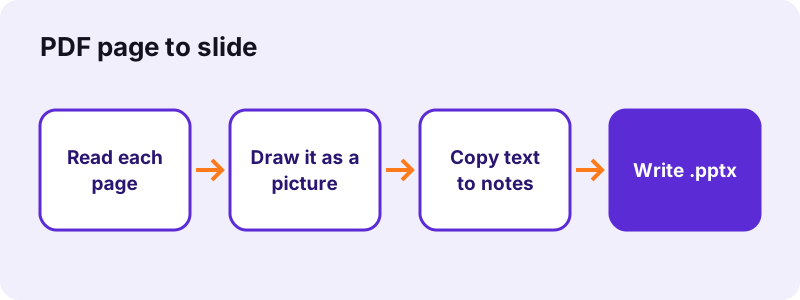
This approach keeps the look perfect: fonts, logos, charts and photos appear exactly as in the PDF, on any computer, because nothing is re-typeset. The price is that the slide itself is one picture, not text boxes you can retype. Our 2-page invoice gave 2 slides of 177 KB in total in 1.3 seconds, with 297 characters of text in the notes of slide 1.
“JPEG is a commonly used method of lossy compression for digital images, particularly for those images produced by digital photography.”
pdf24 tools PDF to PowerPoint: slide size and layout
The slide size is taken from the first PDF page. An A4 portrait PDF gives 8.26 × 11.69-inch portrait slides, so nothing is cropped or stretched; a landscape PDF gives landscape slides. Pages of another size are centred on the slide and scaled to fit, keeping their proportions.
pdf24 tools PDF to PowerPoint speaker notes
The notes are real, editable text. On our 6-page report the first slide's notes held 2,300 characters, the whole text of that page, line by line. Open View → Notes in PowerPoint to see them, or Presenter View while you present. You can also copy them out to build new text slides.
pdf24 tools PDF to PowerPoint with a scanned PDF
A scan converts fine, but its notes stay empty because a scan has no text layer. Our 4-page scan (8.07 MB) became 4 slides and a 3.71 MB file in 22.2 seconds, with nothing in the notes. Scans take longer than text PDFs because each page is a large image.
pdf24 tools PDF to PowerPoint tip: run OCR first
If you want the notes filled for a scanned handout, add a text layer with OCR PDF first and convert the OCR result. The slides look the same, and the recognised words land in the notes, ready to copy.
Can you edit slides made with pdf24 tools PDF to PowerPoint?
Slides from pdf24 tools PDF to PowerPoint can be rearranged, deleted, annotated and animated, but the words on the slide cannot be retyped, because each slide is one picture of the PDF page. To change the wording, edit the PDF first or rebuild that slide from the text in the speaker notes.
What works well in PowerPoint after the conversion:
- Add a title, arrows, shapes or new text boxes on top of the page picture.
- Delete, duplicate or reorder slides, and add transitions between them.
- Crop the picture to zoom into one chart or paragraph.
- Insert your own slides between the converted ones.
- Copy the notes text into a new slide when a page needs rewriting.
If you need editable text instead of a picture, PDF to Word rebuilds paragraphs and tables, and you can paste them into slides. To fix one word before converting, use Edit PDF.
Which resolution should you choose in pdf24 tools PDF to PowerPoint?
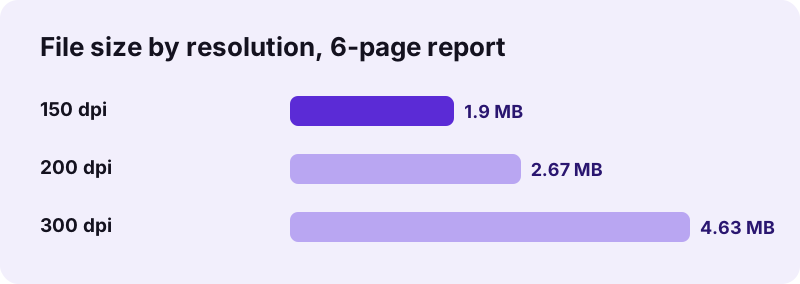
The resolution sets how sharp each slide picture is and how big the file gets. In pdf24 tools PDF to PowerPoint, 200 dpi is the default and looks crisp on projectors and laptop screens; 150 dpi cuts the size for email, and 300 dpi suits large 4K displays, zooming in and printing handouts.
| Resolution | 6-page report | Time | Good for |
|---|---|---|---|
| 150 dpi | 1.90 MB | 4.8 s | Email, small screens |
| 200 dpi (default) | 2.67 MB | 3.9 s | Projectors, laptops |
| 300 dpi | 4.63 MB | 6.1 s | 4K screens, printed handouts |
Going from 200 to 300 dpi made the file 73 % larger. Conversion time stayed between 3.9 and 6.1 seconds for all three settings, so pick by file size and sharpness, not by speed.
Is pdf24 tools PDF to PowerPoint safe for confidential slides?
pdf24 tools PDF to PowerPoint is safe for board papers, client decks and internal reports because the PDF never leaves your device. The browser reads it with the File API and builds the presentation in JavaScript; during our tests the page made 0 upload requests and the result line showed 0 bytes uploaded.
You can verify it in the Network tab of the browser developer tools (F12) while converting. The File API on MDN describes how a web page reads a file you pick without sending it anywhere. There is no account, no queue and no watermark on the slides.
pdf24 tools PDF to PowerPoint on phones, tablets and computers
The converter runs in Chrome, Edge, Firefox and Safari on Windows, macOS, Linux, Android, iPhone and iPad. No PowerPoint licence is needed to convert; the free PowerPoint mobile app, Keynote, Google Slides and LibreOffice Impress all open the resulting .pptx file.
- iPhone and iPad: pick the PDF from Files; the .pptx is saved to Files → Downloads and opens in Keynote or PowerPoint.
- Android: pick the PDF from Downloads or Drive; open the result in Google Slides or PowerPoint.
- Windows and Mac: drop the PDF on the box; the file lands in Downloads.
- Chromebook: upload the .pptx to Google Drive yourself and open it with Google Slides.
Long scanned PDFs need the most memory. On a phone, split a big scan with Split PDF and convert the parts.
pdf24 tools PDF to PowerPoint, PPTX, ODP or images?
The right output depends on the program you present with. PowerPoint, Keynote and Google Slides take .pptx; LibreOffice Impress prefers .odp; and if you only need pictures of the pages to drop into an existing deck, separate JPG or PNG files are simpler.
| You want | Use | Result |
|---|---|---|
| A deck for PowerPoint or Google Slides | PDF to PPTX | .pptx, notes included |
| A deck for LibreOffice Impress | PDF to ODP | .odp, notes included |
| Page pictures for your own deck | PDF to JPG | one image per page |
| Editable text to retype slides | PDF to Word | .docx paragraphs |
| Back from slides to a PDF | PowerPoint to PDF |
pdf24 tools PDF to PowerPoint not working? Causes and fixes
Most failures come from the PDF, not from PowerPoint: a password that blocks opening, a damaged download, or a scan so large that a phone runs out of memory. The message under the button names the problem, and each case has a quick fix.
| Symptom | Cause | Fix |
|---|---|---|
| Password error | PDF needs a password to open | Unlock PDF with your password |
| Notes are empty | Scan without text layer | OCR PDF, then convert |
| File too big to email | 300 dpi or many scanned pages | Use 150 dpi, or compress first |
| Slides look blurry when zoomed | 150 dpi chosen | Convert again at 300 dpi |
| Nothing happens on a phone | Very large scan | Split the PDF and convert parts |
pdf24 tools PDF to powerpoint: frequently asked questions
Is pdf24 tools PDF to PowerPoint free?
Yes. The converter is free with no sign-up, no watermark and no daily limit. It can be free because all the work happens in your own browser, so there is no server cost per file. Convert as many PDFs as you like; every presentation is yours to keep, edit and share.
Can I edit the text after pdf24 tools PDF to PowerPoint?
Not on the slide itself. Each slide is a picture of the PDF page, so the words cannot be retyped there. The page text is copied into the speaker notes as real text, which you can copy into new text boxes. For fully editable text, use PDF to Word and paste paragraphs into your slides.
How long does pdf24 tools PDF to PowerPoint take?
Text PDFs take a few seconds: our 2-page invoice took 1.3 s and our 6-page report 3.9 s at 200 dpi in Chrome on a Windows laptop. Scans take longer because every page is a big image; a 4-page, 8.07 MB scan took 22.2 s. Large scans need more memory, which phones have less of.
Does pdf24 tools PDF to PowerPoint upload my PDF?
No. The browser reads your PDF and builds the presentation locally with JavaScript. We logged the network traffic during every test run: 0 upload requests were made and the result line confirmed 0 bytes uploaded. That keeps board papers, client decks and unpublished results on your own device.
Is pdf24 tools PDF to PowerPoint made by PDF24?
No. pdf24tools is an independent website and is not affiliated with PDF24 or Geek Software GmbH. The converter is our own code that runs in your browser, uploads nothing and needs no account. We use plain, familiar page names so the tool is easy to find, but the site and the team are separate.
What slide size does pdf24 tools PDF to PowerPoint use?
The slide size follows the first page of your PDF, so an A4 portrait PDF gives 8.26 × 11.69-inch portrait slides and a landscape PDF gives landscape slides. Pages are never stretched; a page of a different size is centred and scaled to fit. Change the size later in Design → Slide Size if you need 16:9.
Why are the speaker notes empty after pdf24 tools PDF to PowerPoint?
The notes are filled from the text layer of each page. A scanned PDF has no text layer, only pictures, so its notes stay empty, as on our 4-page scan. Run OCR PDF on the scan first to add real text, then convert the OCR result again; the slides look the same and the notes get filled.
Can I use pdf24 tools PDF to PowerPoint on an iPhone?
Yes. Open the page in Safari or Chrome, tap Choose a file, pick the PDF from Files and tap Convert to PowerPoint. The .pptx file is saved in Files → Downloads, and Keynote or the free PowerPoint app opens it. Nothing is installed and the PDF stays on the iPhone.
Does pdf24 tools PDF to PowerPoint keep links and animations?
No. A PDF page is drawn as a picture, so web links inside the page are not clickable on the slide and PDF has no slide animations to copy. Add links again with Insert → Link on a shape or text box, and add transitions or animations in PowerPoint as you would for any deck.
How do I make the pdf24 tools PDF to PowerPoint file smaller?
Choose 150 dpi instead of 200: our 6-page report dropped from 2.67 MB to 1.90 MB. Scans are the heaviest input, so compress the PDF first or convert fewer pages by splitting it. In PowerPoint, File → Compress Pictures can shrink the slide images further.
Can pdf24 tools PDF to PowerPoint open a password-protected PDF?
Only once the open password is removed. A PDF that asks for a password stops with a password message. Use Unlock PDF with the password you know, then convert the unlocked copy. A PDF restricted only against copying or printing usually converts without that step.
More pdf24 tools PDF to powerpoint tools and guides
pdf24 tools PDF to powerpoint: sources
- JPEG — Wikipedia
- Office Open XML — Wikipedia
- File API — MDN Web Docs