How to use pdf24 ODP to PDF in 3 steps
- Choose the .odp. Drop one or more .odp or .otp files on the box, or tap Choose files.
- Press Convert to PDF. content.xml is read and every slide is drawn on your device.
- Download. Save the PDF, or the ZIP when you converted several presentations.
What is an .odp file and how does pdf24 ODP to PDF read it?
An .odp file is an OpenDocument presentation: a ZIP package whose content.xml holds every slide as a draw:page element, while styles.xml holds the page size and styles. pdf24 ODP to PDF unpacks it in your browser and draws each page's frames, text and shapes onto one PDF page.
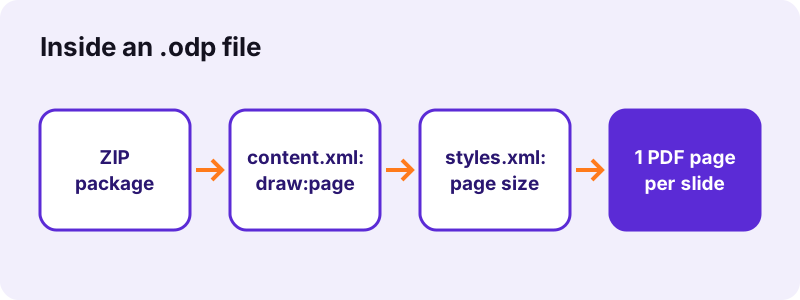
OpenDocument measures positions in real units such as cm, mm or in. The converter turns them into points (1 cm = 28.35 pt), so the default 16:9 Impress slide of 28 × 15.75 cm becomes a 793.7 × 446.5-point PDF page, exactly what our test produced.
“The standard is developed and maintained by a technical committee in the Organization for the Advancement of Structured Information Standards (OASIS) consortium.”
Text sizes in pdf24 ODP to PDF
When a text box has no size of its own, the converter uses Impress's defaults by placeholder class: 40 pt for titles, 28 pt for subtitles and outline text, 18 pt for other text. Titles and subtitles are centred unless the style says otherwise.
pdf24 ODP to PDF and shapes
Rectangles, ellipses, circles and lines are drawn with their fill and outline colours; unstyled shapes get Impress's default blue. Polygons, freeform paths and custom shapes other than ellipses are drawn as their bounding rectangle.
pdf24 ODP to PDF with right-to-left text
Arabic and Hebrew lines are shaped by the browser and placed as images, so they display correctly but cannot be selected. Latin, Greek and Cyrillic text stays real text.
pdf24 ODP to PDF tip for templates
Impress templates (.otp) are accepted too, which gives a quick PDF preview of a template's slides.
What does pdf24 ODP to PDF draw and what does it skip?
pdf24 ODP to PDF draws text boxes, titles, outline text, pictures in frames, rectangles, ellipses, lines and solid page background colours. It skips objects placed on the master page, gradient or bitmap backgrounds, rotation, animations, sounds and speaker notes. Fonts are replaced by Noto Sans.
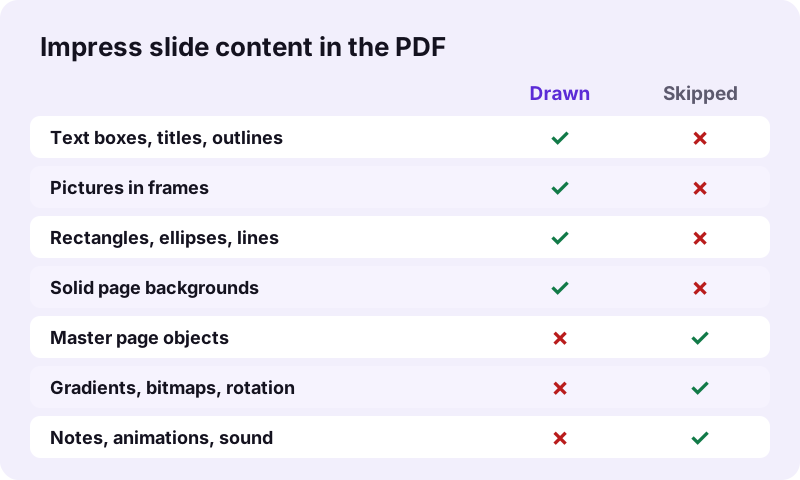
| Impress element | In the PDF |
|---|---|
| draw:frame with text-box | Text drawn, selectable |
| draw:frame with image | Picture drawn |
| Rectangles, ellipses, lines, connectors | Drawn |
| Custom shapes, polygons | Bounding rectangle |
| Solid slide background | Drawn |
| Master page logos and footers | Not drawn |
| Gradient or bitmap background | Not drawn |
| Notes, animations, sound | Not included |
If your template puts a logo on the master slide, it will be missing from the PDF. Copy the logo onto the slides, or save the deck as .pptx and use PPTX to PDF, which does draw master graphics.
How fast is pdf24 ODP to PDF? Measured
pdf24 ODP to PDF converted our 2-slide, 2.0 KB test presentation into a 2-page PDF of 9,759 bytes in 0.8 seconds in Chrome on Windows 10. The pages kept the 16:9 slide size of 793.7 × 446.5 points, and the slide text was extractable as real text.
| Measure | Value |
|---|---|
| Input | dc-slides.odp, 2.0 KB, 2 slides |
| Output | 2 pages, 9,759 B |
| Page size | 793.7 × 446.5 pt (28 × 15.75 cm) |
| Time (tool) | 0.8 s |
| Characters extractable | 46 |
| Uploaded | 0 bytes |
The PDF is larger than the tiny .odp because it embeds a Noto Sans font subset, the same on every device; the .odp only names fonts it expects your system to have.
pdf24 ODP to PDF for lesson slides and handouts
Teachers and trainers often need slides as a PDF for a learning platform or for printing. The converter gives one page per slide; two more free steps turn that into a printable handout or a smaller upload.
- Convert the .odp here: one PDF page per slide, text selectable.
- Open Pages per sheet and choose 2, 4 or 6 slides per A4 sheet for printing.
- If the platform limits upload size, run the PDF through Compress PDF.
Because the slide text stays real text, students can search the PDF for a term and copy definitions into their notes, which is not possible when slides are exported as pictures.
Is pdf24 ODP to PDF private?
pdf24 ODP to PDF keeps the presentation on your device: the browser reads it with the File API, JavaScript unzips and draws it in memory, and the result line confirms 0 bytes uploaded. That fits schools and public offices that use LibreOffice and must keep lesson plans or internal slides off third-party servers.
How local file reading works: File API on MDN.
pdf24 ODP to PDF without LibreOffice: phones and Chromebooks
An .odp attachment often lands on a device with no office suite. The converter runs in Safari on iPhone and iPad, Chrome on Android and Chromebooks, and any current browser on Windows, macOS and Linux, so nothing has to be installed.
- iPhone/iPad: save the attachment to Files, then Choose files → Browse.
- Android: download it, then pick it from Download.
- Chromebook: Files app or Google Drive.
pdf24 ODP to PDF versus Impress Export as PDF
Impress's own File → Export as PDF draws master pages, gradients, charts and notes pages, and keeps your fonts. Use it when Impress is installed; use the browser converter when it is not.
Fixing pdf24 ODP to PDF problems
Most problems come from content the converter skips, or from a file that is not a regular .odp.
- Logo or footer missing: it sits on the master page; copy it onto the slides.
- Plain white background: the slide uses a gradient or bitmap; switch to a solid colour.
- Shape looks square: polygons and freeforms are drawn as their bounding box.
- Flat XML presentation (.fodp): save it as a normal .odp first.
- Password-protected .odp: in Impress use Save As and untick Save with password.
pdf24 ODP to PDF next steps
pdf24 ODP to PDF: frequently asked questions
Is pdf24 ODP to PDF free?
Yes. It is free, with no sign-up, no watermark and no limit, because your own device does the work. pdf24tools is an independent website and is not affiliated with PDF24 or Geek Software GmbH; we use the name because people search for it. Every tool on the site runs locally in the same way.
Do I need LibreOffice for pdf24 ODP to PDF?
No. The page reads the OpenDocument presentation format itself, so nothing needs to be installed. It works on iPhones, Android phones, Chromebooks and work computers without LibreOffice or OpenOffice. Only a current browser such as Chrome, Edge, Firefox or Safari is needed.
Does pdf24 ODP to PDF upload my slides?
No. The .odp is read from your disk by the browser, unzipped and drawn in memory. The result line shows the bytes read and 0 bytes uploaded. Only the converter code is downloaded from our server; your presentation never leaves the device.
What page size does pdf24 ODP to PDF use?
Each page takes the slide size from the presentation's page layout. The default 16:9 Impress slide, 28 × 15.75 cm, gives 793.7 × 446.5-point pages, as in our test; a 4:3 deck gives 4:3 pages. Nothing is fitted to A4, so the PDF looks like the slide show.
Why is my logo missing after pdf24 ODP to PDF?
Objects placed on the master slide, such as logos, footers and decorative bars, are not drawn; only the content of each slide is. Copy the logo onto the slides themselves, or save the deck as .pptx in Impress and use PPTX to PDF, which draws master graphics.
Does pdf24 ODP to PDF keep speaker notes?
No. Notes are stored as a separate notes page for each slide and are not drawn. The PDF has one page per slide. To share notes, use Export as PDF in Impress with notes pages, or copy the notes into a Writer document and convert it with ODT to PDF.
Does pdf24 ODP to PDF keep animations and transitions?
No. A PDF is static, so every object on a slide appears at once, in its final position. Custom animations, slide transitions and sounds are left out. If a slide builds up items one by one, all of them are visible together on its PDF page.
Is the text selectable after pdf24 ODP to PDF?
Yes, for Latin, Greek and Cyrillic scripts: titles and text boxes are drawn as real text with an embedded Noto Sans subset, so they can be searched and copied. Arabic, Hebrew, Indic, Thai and CJK lines are shaped by the browser and placed as images.
Can pdf24 ODP to PDF convert several presentations at once?
Yes. Select or drop several .odp files together; each becomes its own PDF with the same name, and the set downloads as one ZIP. Merge PDF can then join them into one file, in whatever order you put them, for example a whole course or a conference day.
Does pdf24 ODP to PDF work with Google Slides?
Google Slides can download a presentation as OpenDocument (.odp), and those files convert here. Slides can also download .pptx, which goes through PPTX to PDF and draws master graphics as well; try that format if your theme has a logo on every slide.
Why do some shapes look square after pdf24 ODP to PDF?
Rectangles, ellipses, circles and lines are drawn as they are, but polygons, freeform paths and most custom shapes, such as stars or arrows, are drawn as their bounding rectangle with the same fill. The text inside them is still drawn centred.
More pdf24 ODP to PDF tools and guides
pdf24 ODP to PDF: sources
- OpenDocument — Wikipedia
- Presentation program — Wikipedia
- File API — MDN Web Docs